
Affiliate disclosure: gamingreviewguide.com may earn a commission on purchases via links in this article. We test on retail units, write our verdicts before contacting any affiliate program, and our compensation is never tied to product scores.
Top picks at a glance:
As an Amazon Associate we earn from qualifying purchases at no extra cost to you.


Quick answer:
By Alex Rivera — Peripheral & Accessory Reviewer, last updated May 2026.
🛒 Best Price Today on Amazon
Prime members get fast, free shipping on everything above, plus member-only deals. New members get a 30-day free trial — cancel anytime.
SteelSeries Apex Pro vs Razer Huntsman Elite: The Adjustable-Actuation Originals Face Off in 2026
Quick Verdict (TLDR)
Both keyboards launched years ago and both have been quietly updated to stay current. The SteelSeries Apex Pro (Gen 3) runs OmniPoint 3.0 magnetic switches with per-key adjustable actuation and rapid trigger — making it a genuine rival to Wooting and Razer’s analog optical boards. The Razer Huntsman Elite in 2026 still relies on Razer’s original optical switches with a fixed actuation point, plus the iconic plush wrist rest with RGB underglow. The Apex Pro is the technically better keyboard. The Huntsman Elite is the more luxurious object. For competitive gamers, Apex Pro. For desk aesthetics and comfort, Huntsman Elite. Real talk: in 2026 the Apex Pro is the keyboard most people should buy.
Hands-On Performance
The Apex Pro Gen 3 got its big magnetic-switch overhaul in 2024 and now squares up directly against Wooting and Razer’s analog gen 2 boards. OmniPoint 3.0 switches let you set actuation anywhere from 0.1mm to 4.0mm per key with full rapid trigger. The implementation is good — not quite as polished as Wooting’s Wootility, but easily on par with Razer’s Synapse 4 for analog tuning. In my CS2 testing, the rapid trigger response felt nearly identical to my Wooting 60HE.
The Huntsman Elite runs Razer’s first-gen optical switches (Linear, Clicky, or Purple Hybrid). They’re fast and the optical actuation genuinely undercuts mechanical switches on latency, but the actuation point is fixed at 1.5mm and there’s no rapid trigger. For pure competitive shooters that’s a real disadvantage against the Apex Pro. For everything else, the Huntsman feels excellent.
| Spec | SteelSeries Apex Pro Gen 3 | Razer Huntsman Elite |
|---|---|---|
| Switch type | OmniPoint 3.0 magnetic adjustable | Razer Optical Linear/Clicky (fixed) |
| Layout | Full-size with OLED | Full-size with magnetic wrist rest |
| Polling rate | 8,000 Hz | 8,000 Hz |
| Actuation | Adjustable 0.1-4.0mm per key | Fixed 1.5mm |
| Rapid trigger | Yes, with per-key tuning | No |
| Display | OLED + media roller | Media buttons + roller only |
| Wrist rest | Magnetic detachable, plain | Magnetic detachable, plush leatherette with RGB underglow |
| Connectivity | USB-C detachable | USB-A pass-through with audio jacks |
| Software | SteelSeries GG | Razer Synapse 4 |
| Street price (May 2026) | $199 | $189 |
Value Analysis
At $199 the Apex Pro Gen 3 is fairly priced for what it delivers — true magnetic adjustable switches in a full-size layout with an OLED display and media controls. The OLED can show CPU temps, Discord notifications, Spotify track info, or static GIFs you upload (mine runs a slowly looping cat). It’s a feature that sounds gimmicky and turns out genuinely useful in practice.
The Huntsman Elite at $189 is, at this point, overpriced for the underlying technology. The optical switches are 2018-era tech and the board otherwise carries no killer features the cheaper Huntsman V3 Pro lacks. You’re paying mostly for build quality and the gorgeous magnetic wrist rest with its perimeter RGB underglow. That wrist rest is genuinely one of the best in the industry — but it shouldn’t justify a $189 price tag in 2026 when better switch technology exists for similar money.
Value comparison: Apex Pro wins. The OmniPoint 3.0 switches alone justify the $10 premium over the Huntsman Elite.
Build Quality & Ergonomics
Both keyboards pair an aluminum top plate over a plastic bottom housing. The Apex Pro’s aluminum carries a brushed finish and feels solid. The Huntsman Elite’s aluminum is slightly more refined with cleaner edges and a more even anodization.
The headline ergonomic feature is the Huntsman Elite’s wrist rest. It’s plush, leatherette, snaps on magnetically with a reassuring click, and carries its own RGB underglow strip along the front edge. The Apex Pro’s wrist rest is also magnetic but a comparatively plain plastic-and-rubber affair — functional but not luxurious.
For 8-hour typing days I lean toward the Huntsman Elite because of the wrist rest. For mixed gaming-typing days I lean toward the Apex Pro because the OmniPoint switches feel responsive and the OLED gives useful feedback. Both are full-size and take up similar desk space.
Feature Differences
The Apex Pro’s killer features are OmniPoint 3.0 adjustable actuation, rapid trigger, the OLED display (with the GameSense ecosystem pulling data from supported games), and the media roller plus dedicated function keys. Per-key actuation is the headline draw for competitive gamers.
The Huntsman Elite’s killer features are the magnetic plush wrist rest with RGB underglow, USB pass-through plus headphone and microphone jacks on the rear (genuinely useful for clean cable management), Razer Chroma RGB integration with the wider ecosystem, and a dedicated media roller and media keys.
Both run 8K polling. Both have full per-key RGB. Both have software that occasionally needs a reboot. SteelSeries GG is more streamlined; Razer Synapse 4 is more feature-rich.
Use Case Recommendations
Buy the Apex Pro Gen 3 if: You play competitive shooters and want adjustable actuation and rapid trigger, you want a full-size keyboard with an OLED display, you value modern switch technology, or you want the more performance-oriented full-size option.
Buy the Huntsman Elite if: You want the best wrist rest in any gaming keyboard, you have a deep desk and love full-size layouts with USB pass-through and audio jacks, you’re deep in the Razer Chroma ecosystem, or you mainly play single-player or casual games and want a luxurious typing experience.
Skip both if: You want a TKL or 60% layout, you want wireless (look at the Logitech G915 X or BlackWidow V4 Pro HyperSpeed), or you want hot-swap switches.
FAQ
How does OmniPoint 3.0 compare to Wooting’s Lekker switches? Very close in practice. Both offer per-key actuation from roughly 0.1mm to 4.0mm and rapid trigger. Wootility is slightly more polished software, but SteelSeries GG has improved a lot in the last year. CS2 performance is essentially identical.
Does the Huntsman Elite’s wrist rest fit any other Razer keyboard? Only Razer full-size keyboards with the same magnet alignment. It fits the BlackWidow V4 Pro and the full-size Huntsman V3 Pro. It does not fit TKL or 60% boards.
Can I use the OLED on the Apex Pro for streaming? Yes. SteelSeries GG integrates with OBS and Discord to show alerts, stream status, and viewer count. It’s one of the more genuinely useful keyboard displays around.
Is the Huntsman Elite worth buying in 2026 given its old switch tech? Only if the wrist rest and underglow specifically appeal to you. The underlying switches are dated. Most buyers would be better served by the Huntsman V3 Pro or the Apex Pro.
OLED Display and OmniPoint 3.0 Software Experience
The Apex Pro Gen 3’s OLED is small (40×40-pixel grayscale) but useful. SteelSeries GG ships a robust widget library: CPU temp from HWiNFO, GPU utilization, Spotify track info, Discord notifications, Twitch stream chat, and an animated GIF mode where you upload your own short clip. My current setup shows GPU temp while gaming and my Spotify track while typing — both at a glance, no Alt-Tab needed.
The OmniPoint 3.0 tuning experience in SteelSeries GG has matured nicely. Per-key actuation uses a visual keyboard map where you click any key and drag a slider to set its depth between 0.1mm and 4.0mm. Rapid trigger is set per-key with reset point and direction parameters. Dual-binding (short press is one function, longer press another) is configured through a graphical depth indicator — refreshingly clear next to text-based interfaces.
Razer Synapse 4 for the Huntsman Elite is also mature and well-organized. The lighting customization is the most polished of any keyboard software — Chroma Studio lets you draw lighting effects straight onto a virtual keyboard. Per-key RGB programming is genuinely fun rather than tedious. The Chroma SDK ties into hundreds of games and apps, so titles like Cyberpunk 2077 and Apex Legends Origins drive your keyboard lighting dynamically off in-game events.
SteelSeries GG and Synapse 4 are both more reliable than a year ago. Both occasionally need a reboot after Windows updates, but day-to-day operation is stable. Both support cloud profile sync across multiple computers, which is convenient with a desktop-and-laptop setup.
Final Verdict
The SteelSeries Apex Pro Gen 3 is the better-engineered keyboard in 2026. OmniPoint 3.0 magnetic switches with per-key adjustable actuation and rapid trigger are the headline technology in gaming keyboards right now, and SteelSeries has implemented them well. The OLED display is a useful bonus. At $199 it’s correctly priced for the feature set.
The Razer Huntsman Elite is the more luxurious object, mostly thanks to that magnificent wrist rest. If desk aesthetics and typing comfort are your priorities and you don’t take competitive shooters seriously, it’s still a reasonable buy at $189 — but only just. The switch technology is starting to show its age.
If you have one $199 to spend on a full-size gaming keyboard in 2026, buy the Apex Pro Gen 3. The Huntsman Elite is for buyers who specifically prize its wrist rest and Chroma ecosystem above all else.
Related Guides
Frequently Asked Questions
What is the key technical difference between them?
The Apex Pro uses adjustable magnetic OmniPoint switches, letting you set actuation per key and use rapid trigger. The Huntsman Elite uses fixed optical switches that actuate at a set 1.5mm. If per-key tuning matters to you, the SteelSeries is the only one of the pair that offers it.
Which feels better for typing?
The Huntsman Elite’s optical switches are consistent and reasonably smooth, and the included plush wrist rest helps considerably. The Apex Pro is more versatile because you can raise actuation depth to around 3mm for typing to prevent accidental presses, then lower it again for gaming.
Do both have media controls?
Yes. The Apex Pro includes an OLED display with a metal volume wheel that shows game and system information. The Huntsman Elite has a dedicated media key row plus a digital dial. Both are more capable than the shared function-layer controls found on cheaper gaming keyboards.
Is the Huntsman Elite’s underglow worth it?
The Huntsman Elite includes an RGB light strip built into the wrist rest and around the case edge, which produces a genuinely striking effect on a dark desk. It is purely cosmetic and adds nothing to performance, so weigh it only if desk aesthetics form part of your decision.
Which one is better value today?
The Huntsman Elite is an older design and frequently discounted, making it strong value if fixed actuation suits you. The Apex Pro costs more but its adjustable actuation and rapid trigger keep it competitive with newer magnetic boards, so it ages better as a long-term purchase.
Top picks from this guide
 SteelSeriesSteelSeries Apex Pro TKL Gen 3 Gaming Keyboard - White$186 \xc2\xb7 97/100
 SteelSeriesSteelSeries Apex Pro Gen 3 OmniPoint 3.0 HyperMagnetic Switches —…$208 \xc2\xb7 96/100
 SteelSeriesSteelSeries Apex Pro TKL Gen 3 Gaming Keyboard - Black…$200 \xc2\xb7 95/100
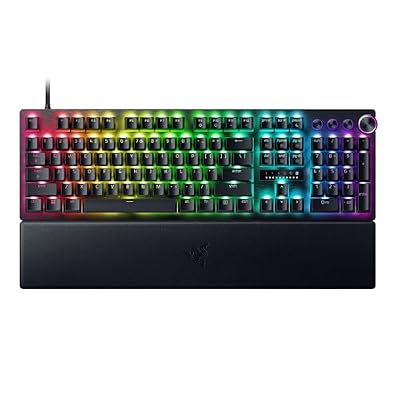 RazerRazer Huntsman V3 Pro Esports Gaming Keyboard, Black$190 \xc2\xb7 95/100








