
Affiliate disclosure: gamingreviewguide.com may earn a commission on qualifying purchases made through links in this article. We pay full retail for our test hardware. Our recommendations are based on extended hands-on use and not influenced by any payments.
Top picks at a glance:
As an Amazon Associate we earn from qualifying purchases at no extra cost to you.



Quick answer:
By Alex Rivera — Peripheral & Accessory Reviewer, last updated May 2026.
🛒 Best Price Today on Amazon
Prime members get fast, free shipping on everything above, plus member-only deals. New members get a 30-day free trial — cancel anytime.
Logitech MX Keys S vs Keychron K8 Pro: Productivity Pro Meets the Mechanical Crossover
Quick Verdict (TLDR)
These two keyboards aim at different jobs, but plenty of people cross-shop them when they want one keyboard for both work and casual gaming. The Logitech MX Keys S is the most refined productivity keyboard money can buy — scissor-switch typing, multi-device pairing, smart functions tied to Logi Flow, and a slim profile that slides into any office bag. The Keychron K8 Pro is a tenkeyless mechanical with a hot-swap PCB, QMK/VIA, and genuine custom-keyboard features at a mainstream price. If you primarily work and only occasionally game, MX Keys S. If you split work and serious gaming, Keychron K8 Pro. Choosing wrong is the mistake people regret most.
Hands-On Performance
I used the MX Keys S for two weeks of pure productivity work — emails, spreadsheets, writing this article. It’s the most comfortable keyboard I’ve used for typing-heavy days. The scissor switches have just enough travel (1.8mm) to feel deliberate without exhausting your fingers. Multi-device pairing across three devices works seamlessly; I had it bound to my work laptop, my Mac mini, and my iPad and switched between them with one key press.
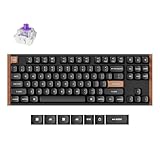
I used the K8 Pro for a week of mixed gaming and work. Out of the box it has Gateron G Pro switches (I chose Reds) and PBT keycaps. The TKL layout is about as space-efficient as the MX Keys S minus the numpad. Typing is more deliberate and louder, with the mechanical feedback some people love and others find tiring after eight hours.
| Spec | Logitech MX Keys S | Keychron K8 Pro |
|---|---|---|
| Switch type | Perfect-Stroke scissor (1.8mm travel) | Gateron G Pro mechanical (hot-swap) |
| Layout | Full-size low-profile | Tenkeyless (87 keys) |
| Backlight | White, hand-proximity sensor | RGB south-facing |
| Connectivity | Bluetooth + Logi Bolt receiver + USB-C | 2.4GHz + Bluetooth + USB-C |
| Multi-device | 3 devices via Easy Switch + Logi Flow | 3 devices via Bluetooth |
| Battery life | ~10 days backlight on / 5 months off | ~240 hrs RGB off |
| Software | Logi Options+ + Smart Actions | QMK/VIA + Keychron Launcher |
| Hot-swap | No | Yes (3- and 5-pin) |
| Weight | 810 g | 980 g |
| Street price (May 2026) | $129 | $109 |
Value Analysis
Both are priced fairly. The MX Keys S at $129 is a polished, mature productivity tool with smart software features (the AI-assisted Smart Actions that arrived in late 2025 are surprisingly useful — one keystroke can summarize a Slack thread or draft a response in Outlook). You’re paying for refinement and software, not radical hardware.
The K8 Pro at $109 is one of the best value mechanical keyboards in 2026. CNC aluminum frame (the Pro variant), hot-swap, QMK/VIA, multi-device wireless, and per-key RGB. You’re getting features that cost $200+ from boutique brands. Keychron’s quality control has also improved noticeably over the last two years — recent units I’ve bought have been well-built and consistent.
If I had to name a winner on raw value, I’d give it to the K8 Pro for its hot-swap and QMK. The MX Keys S takes it on software polish and Mac integration. Both are honest products at honest prices.
Build Quality & Ergonomics
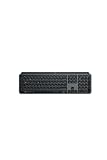
The MX Keys S is built with a magnesium-and-aluminum frame and a slightly soft-touch plastic key surface. The keys are concave and lightly textured, which feels excellent under your fingers. The hand-proximity backlight is genuinely useful — the keys light as your hand approaches and go dark when it doesn’t. Battery management is best-in-class.
The K8 Pro Pro variant has a CNC aluminum frame that weighs nearly a kilogram. It sits planted on the desk. The included PBT keycaps have a slight texture and are dye-sublimated, so the legends won’t wear off. The K8 Pro has a flip-foot for typing-angle adjustment, which the MX Keys S lacks (the MX Keys S has fixed legs).
Ergonomically, the MX Keys S wins for long typing days. Lower profile, more neutral wrist position, lighter key travel. The K8 Pro wins for typing satisfaction — it’s much more enjoyable to actually push a key, with definite tactile feedback. For 10-hour writing days I’d pick the MX Keys S. For 4-hour mixed sessions I’d pick the K8 Pro.
Feature Differences
The MX Keys S’s killer features are Logi Flow (cursor and clipboard flow between paired computers — copy on Windows, paste on Mac with one keystroke), Smart Actions (programmable macros that integrate with Office, Slack, Adobe), and the hand-proximity backlight. None of these exist on the K8 Pro.
The K8 Pro’s killer features are hot-swap (change switches without soldering), QMK/VIA firmware (program every key down to the firmware level, including layers and macros), and the 2.4GHz wireless dongle for lower-latency gaming. None of these exist on the MX Keys S.
Multi-device pairing is on both, with three slots. The MX Keys S adds Logi Flow as the differentiator — actual cursor flow between computers is genuinely magic the first time you use it across two monitors on two different PCs.
Use Case Recommendations
Buy the MX Keys S if: You spend most of your day in productivity apps (Office, Slack, Adobe, Notion), you switch between Mac and PC constantly, you want the most comfortable typing experience for 8+ hour days, you value smart software features, or you have multiple computers on one desk.
Buy the K8 Pro if: You want a mechanical keyboard that genuinely doubles as a gaming keyboard, you want to swap switches over time, you want the satisfaction of mechanical typing, you value QMK customization, or you need a keyboard with a flip-foot adjustable typing angle.
Skip both if: You want a 60% layout, you want analog rapid-trigger switches for competitive shooters, or you want a full-size mechanical (look at the K10 Pro for the bigger Keychron).
FAQ
Can I use the K8 Pro for serious competitive gaming? Yes for everything except high-level competitive shooters where rapid trigger matters. The 1,000Hz polling and Gateron switches are fine for Valorant up to Diamond rank. Above that, consider a Wooting or Huntsman V3 Pro.
Is the MX Keys S good for any gaming? Casual gaming yes, competitive no. The 1.8mm scissor travel and Bluetooth latency are fine for Civilization, Stardew Valley, or even Diablo IV. It’s not appropriate for CS2 or Apex.
Does the MX Keys S work with Logi Flow on the new M5 Macs in 2026? Yes. Logi Flow has been updated for macOS Sequoia 26.x and works reliably with M3, M4, and the new M5 Macs. Windows 11 and 12 are also supported.
How loud is the K8 Pro compared to a typical office keyboard? Noticeably louder. With Gateron Red linears it’s moderate; with Browns or Blues it’s loud enough to bother coworkers. The MX Keys S is whisper-quiet by comparison.
Software, AI Features, and Daily Workflow Integration
The MX Keys S’s late-2025 Smart Actions update changed how I use the keyboard. Smart Actions are essentially AI-assisted macros — press a key combination and Logitech’s Logi AI Edge can summarize highlighted text, draft an email response, transcribe a meeting recording, or translate selected content. The feature is genuinely useful, not gimmicky. My most-used Smart Action: Caps Lock + Q summarizes any highlighted text into bullet points, which I use constantly for processing long emails.
On privacy, Logi Options+ now has an explicit “process locally” toggle that keeps text on your machine using a small distilled model. Cloud processing is more capable but optional. As of May 2026 the local model is good enough for summarization and translation; cloud handles drafting and longer transformations. I keep mine local because I work with sensitive client material.
The K8 Pro has no AI integration. What it does have is QMK/VIA, which lets you customize the keyboard at a depth no other mainstream board matches. My K8 Pro is programmed with three layers: standard (normal keyboard), gaming (Caps Lock becomes left Ctrl, Tab becomes left Shift for easier crouch in shooters), and coding (Caps Lock becomes Escape for vim users, F-keys map to debug commands). All of it is stored in firmware, so it works on any computer without software.
Different philosophies of customization. Logitech’s MX Keys S is software-deep, hardware-fixed. Keychron’s K8 Pro is hardware-deep (via QMK), software-light. Pick the one that matches how you want to invest your customization energy.
Final Verdict
This comparison really hinges on who you are. For pure productivity use, the Logitech MX Keys S is the better keyboard in 2026. The combination of comfortable scissor switches, intelligent software, Logi Flow, and battery life makes it the right tool for desk warriors. I’ve used MX Keys variants as my work keyboard for years and the S generation is the best yet.
For a true crossover keyboard that handles both work and serious gaming, the Keychron K8 Pro is one of the best buys at $109. Hot-swap, QMK, multi-device wireless, and build quality that punches well above its price. If you want one keyboard for everything you do at a computer, this is my pick.
I have both on my desk right now. The MX Keys S is on the laptop dock for work. The K8 Pro is on the gaming PC. Different jobs, different tools.
Related Guides
Frequently Asked Questions
Are these really gaming keyboards?
Neither is designed primarily for gaming. The MX Keys S is a low-profile scissor-switch productivity board, and the K8 Pro is a mechanical board aimed at typists and Mac users. The K8 Pro is the more capable of the two for gaming thanks to real mechanical switches and N-key rollover.
Which is better for long typing sessions?
The MX Keys S has spherically dished keycaps and very short travel, so it is fast and quiet and causes little finger fatigue for touch typists. The K8 Pro gives you switch choice, more travel and a satisfying sound, which many people find more pleasant across a whole working day.
Can both connect to multiple devices?
Yes. The MX Keys S pairs with three devices over Bluetooth or the Logi Bolt receiver and supports Flow for cursor handoff between machines. The K8 Pro also stores three Bluetooth profiles plus wired mode, and includes both Mac and Windows keycaps so the modifier legends stay correct.
Is the Keychron K8 Pro customisable?
Considerably. It is hot-swappable on most versions and supports QMK and VIA, so you can remap every key, build layers and record macros without proprietary software. The MX Keys S is limited to Logi Options+ remapping of a handful of keys, with no switch or keycap replacement possible.
Which should I buy for a hybrid work and play desk?
Choose the K8 Pro if you want one board that types well and handles evening gaming acceptably. Choose the MX Keys S if your priority is quiet, low-profile typing alongside a laptop, and you keep a separate dedicated gaming keyboard for competitive sessions.











