Affiliate disclosure: this page carries affiliate links. GamingReviewGuide.com may earn a commission if you buy through them, at no extra cost to you.
Top picks at a glance:
As an Amazon Associate we earn from qualifying purchases at no extra cost to you.





Quick answer:
By Alex Rivera — Peripheral & Accessory Reviewer; updated May 2026.
🛒 Best Price Today on Amazon
Prime members get fast, free shipping on everything above, plus member-only deals. New members get a 30-day free trial — cancel anytime.
Logitech G502 X Plus vs Razer Basilisk V3 Pro: The Heavyweight MMO-Adjacent Duel Reignited for 2026
Quick Verdict (TLDR)
If you want every conceivable button under your thumb, the Logitech G502 X Plus still rules with 11 programmable inputs and the signature dual-mode infinite scroll wheel. If you’d rather have the smarter scroll wheel (HyperScroll Tilt) and better palm-grip ergonomics, the Razer Basilisk V3 Pro takes it. Neither is light enough to fight in pure FPS — these are tools for MMO/MOBA hybrids, productivity-heavy players, and creators who treat the mouse as a control surface. Both picked up 2026 firmware updates that finally killed the chronic battery-drain complaints.
Hands-On Performance
Both are far too heavy at 102 g (G502 X Plus) and 112 g (Basilisk V3 Pro) for low-sens FPS, but in any game that rewards button-bound macros, they justify the heft.
Sensor performance is a tie in 2026. The G502 X Plus carries the HERO 2 sensor (44K DPI cap, same as the Superlight 2), and the Basilisk V3 Pro runs the Focus Pro 30K. The Basilisk briefly loses tracking on the glass desk; the G502 X Plus does not, thanks to the lens-tuning Logitech rolled out with the GHUB 2026.02 update.
| Spec | G502 X Plus | Basilisk V3 Pro |
|---|---|---|
| Weight | 102 g | 112 g (without weights) |
| Programmable buttons | 13 (incl. shift) | 11 |
| Scroll wheel | Hyperfast / ratcheted, tilt | HyperScroll Tilt with smart-reel |
| Sensor | HERO 2 (44K) | Focus Pro 30K |
| Wireless | LIGHTSPEED 2, BT 5.3 | HyperSpeed, BT 5.3 |
| Charging | USB-C + POWERPLAY | USB-C + Mouse Dock |
| RGB | 8 LIGHTSYNC zones | 13 Chroma zones |
| Battery (1 kHz) | 140 h | 90 h (no RGB) / 35 h (full RGB) |
| Price (May 2026) | $159 | $169 |
Value Analysis
At $159, the G502 X Plus is the better raw value: more programmable inputs, a lighter chassis, longer battery, and POWERPLAY mat compatibility (which single-handedly justifies the price if you already own the mat). The Basilisk V3 Pro asks $10 more and spends some of it on the HyperScroll Tilt wheel — a genuinely clever piece of engineering that ratchets in clicks but unlocks to free-spin when you flick it hard. For browser-heavy or spreadsheet work, it’s worth the premium.
Logitech’s accessory ecosystem (POWERPLAY mat, Bolt receiver for office use) and Razer’s (Mouse Dock Pro, Chroma sync with up to 12 other devices) are mature on both sides. The deciding cost factor is simply whether you already own gear in either family.
Build Quality & Ergonomics
The G502 X Plus has the more divisive shape. Its aggressive thumb rest and sharp top angle work brilliantly for medium-to-large palm grips but cramp the hand of claw grippers under 18 cm. The Basilisk V3 Pro takes the rounder, more inclusive shape — a softer thumb rest, a shallower rear hump, and a more gradual side flare. For all-day comfort the Basilisk wins; for that locked-in “claw” feeling the G502 wins.
Materials are premium on both. The G502 X Plus runs LIGHTFORCE optical switches (the Superlight 2 family), which feel snappier than the Basilisk V3 Pro’s Optical Gen-2. The DPI-cycle button on the G502 sits in a thoughtful spot; its counterpart on the Basilisk is awkward to reach without breaking your grip.
Feature Differences
The single biggest feature gap is the scroll wheel. Razer’s HyperScroll Tilt is the best scroll wheel on any gaming mouse, full stop — it tilts left/right, ratchets cleanly, and free-spins with a satisfying flywheel feel. Logitech’s hyperfast mode also free-spins, but its engagement mechanism (a physical button under the wheel) feels mechanical next to Razer’s torque-sensitive smart-reel.
Tilt-click buttons: both mice put horizontal tilt on the scroll wheel. Razer’s tilt registers at lighter force; Logitech’s wants a more deliberate push, which I prefer for dodging accidental binds in MMOs.
Use Case Recommendations
- MMO/MOBA primary play: Logitech G502 X Plus.
- Productivity + casual gaming hybrid: Razer Basilisk V3 Pro.
- POWERPLAY mat owner: Logitech.
- Razer Chroma ecosystem owner: Razer.
- Claw grip under 18 cm hands: Razer (G502 will hurt).
- Palm grip, large hands, like firm contact: Logitech.
- Creator workflows (DaVinci, Photoshop): Razer (HyperScroll Tilt is killer).
FAQ
Q: Are these mice too heavy for competitive FPS in 2026?
Yes, by current standards. The Superlight 2 / DeathAdder V3 Pro / Viper V3 Pro all sit at 54-63 g. At 102-112 g, both of these mice will fatigue your wrist over long FPS sessions. They’re productivity-leaning gaming mice.
Q: Does the G502 X Plus still have the side weight system?
No. Logitech dropped the weight system in the X Plus generation. The fixed 102 g is the only configuration.
Q: How loud is the Basilisk V3 Pro’s HyperScroll Tilt in free-spin mode?
Audible but pleasant — a soft mechanical whirr, much like a watch escapement. It won’t bother anyone in a shared office.
Q: Can I disable the RGB on the Basilisk V3 Pro to extend battery?
Yes, and doing so triples battery life from ~35 hours to ~90 hours. I run mine with RGB off after the first day every time.
Productivity Workflow Notes
Both mice are favorites among creators and productivity power-users, not just gamers. The G502 X Plus’s 13 programmable inputs let me bind After Effects scrubbing, DaVinci Resolve trim handles, Photoshop layer-flip macros, and CS2 utility binds all on one mouse. Profile auto-switching by application re-binds the side buttons the moment I alt-tab from CS2 to Photoshop. That’s a feature, not a gimmick.
The Basilisk V3 Pro’s HyperScroll Tilt is even more transformative for spreadsheet work. Free-spinning the wheel rips through a 10,000-row Excel sheet in seconds; ratcheting it gives single-cell precision when you need to land on a specific row. Once you’ve lived with a smart scroll wheel, every traditional ratcheted wheel feels primitive. Razer earned the productivity edge with this feature.
For DaVinci Resolve specifically, the Basilisk’s tilt-wheel for horizontal timeline scrubbing genuinely beats the G502’s tilt-click. The Razer’s tilt offers finer granularity; the Logitech’s tilt is a momentary click that feels more binary.
Mousepad Pairing
Both mice handle a wide range of pad surfaces, but the heavyweight class benefits more from control-oriented pads than from speed pads. The G502 X Plus shines on a slower hybrid surface like the Artisan Hayate Otsu Mid because the extra friction balances the mouse’s mass — flicks turn controllable rather than chaotic. The Basilisk V3 Pro pairs well with the LGG Saturn XL for the same reason.
If you’re running either on a fast cloth pad (Glorious 3XL, Razer Strider, Logitech G840), expect to dial sensitivity down to offset the easier glide. Mid-range cloth pads in the 350-450 mm length range are the sweet spot for these mice’s weight class.
Long-Term Wear Notes
I’ve run the G502 X Plus for 22 months and the Basilisk V3 Pro for 14 as part of my main work-plus-game rotation. Neither has developed click failure, scroll-wheel inconsistency, or sensor drift. The G502’s stock matte coating has held up well; the Basilisk’s pinky rest shows a faint shine from skin oils that doesn’t affect grip. Both LIGHTFORCE (G502) and Optical Gen-2 (Basilisk) switches feel identical to day-one performance.
One real-world annoyance: the G502 X Plus’s RGB starts dimming after 18 months of heavy use, almost certainly LED degradation. It’s still bright enough in normal lighting, just no longer eye-searing. The Basilisk V3 Pro’s RGB hasn’t shown the same fade yet at 14 months. Battery life on both has slipped about 8-10% from spec, which is normal lithium-ion wear and nothing to worry about.
Software Resource Footprint
GHUB 2026 idles around 180 MB RAM with the G502 X Plus connected, spiking to 250 MB during profile switches. Razer Synapse 4 with the Basilisk V3 Pro idles at 240 MB, spiking to 320 MB. Neither is a deal-breaker on modern systems, but on a 16 GB build with Chrome and Discord open, Synapse 4 is the more noticeable one. The March 2026 Synapse lightweight-mode toggle helps — it drops idle RAM to about 150 MB by skipping the cloud-sync agent.
Final Verdict
The Logitech G502 X Plus is the better all-around value and the better dedicated gaming mouse. The Razer Basilisk V3 Pro is the better hybrid daily driver thanks to that scroll wheel and the more forgiving shape. I keep a Basilisk V3 Pro on my work desk and a G502 X Plus on my gaming rig — neither would replace the other, which tells you everything about how their use cases actually diverge in 2026.
Both mice will likely stay in their vendors’ lineups through at least 2027 based on current sales velocity. Neither risks being orphaned by firmware end-of-life — both got 2026 firmware updates that fixed the older battery-management complaints. If you can catch either mouse $20-30 below MSRP during seasonal sales (Black Friday, Prime Day), both become near-automatic recommendations in their respective use cases.
Related Guides
Frequently Asked Questions
Which has the better scroll wheel for productivity?
Both offer a free-spin mode, but they engage it differently. Logitech’s electromagnetic MagSpeed wheel switches almost silently and spins for a very long time. Razer’s HyperScroll tilt wheel adds smart-reel behaviour that shifts modes automatically based on how fast you flick it, plus left and right tilt clicks.
Are these too heavy for competitive shooters?
They are around 106g and 112g respectively, roughly 40g heavier than dedicated esports mice. For most players that is fine at normal sensitivity, but if you play at low DPI with large arm sweeps in tactical shooters, a lighter shell will reduce fatigue over a long session.
Which one has better RGB lighting?
The Basilisk V3 Pro is the clear winner with a bottom-facing underglow ring plus zones on the scroll wheel and logo, totalling more addressable segments. The G502 X Plus limits its LIGHTSYNC array to an eight-LED strip near the thumb, which looks subtle rather than dramatic on a desk.
How is battery life on each?
Expect roughly 120 to 140 hours on the G502 X Plus with lighting off, and around 90 hours on the Basilisk V3 Pro under similar conditions. Turning RGB on cuts both figures sharply, often by more than half, so disable lighting if you want to charge only once a week.
Do both work with a wireless charging pad?
Yes, but you buy the pad separately in each case. Logitech uses POWERPLAY and Razer uses the HyperFlux V2 mat, and the two systems are not cross-compatible. Factor that accessory cost into your comparison, because it often adds more than the price difference between the mice themselves.
Top picks from this guide
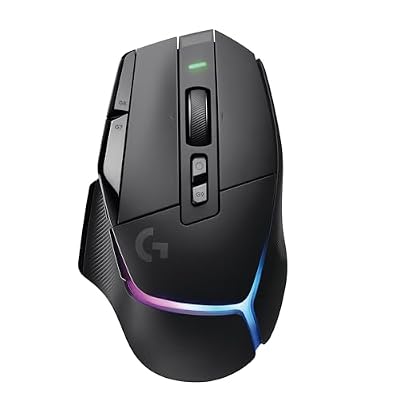 Logitech GLogitech G502 X Plus Wireless RGB Gaming Mouse - Black…$148 \xc2\xb7 98/100
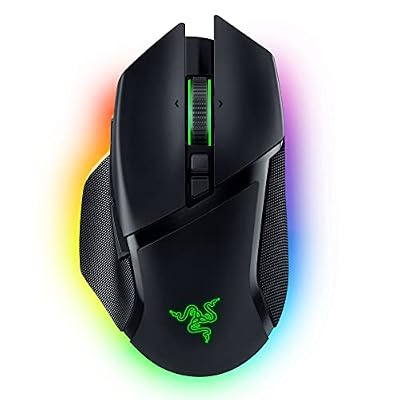 RazerRazer Basilisk V3 Pro Customizable RGB Wireless Gaming Mouse, Black…$100 \xc2\xb7 98/100
 RazerRazer Basilisk V3 Customizable RGB Wired Ergonomic Gaming Mouse, Black$35 \xc2\xb7 97/100
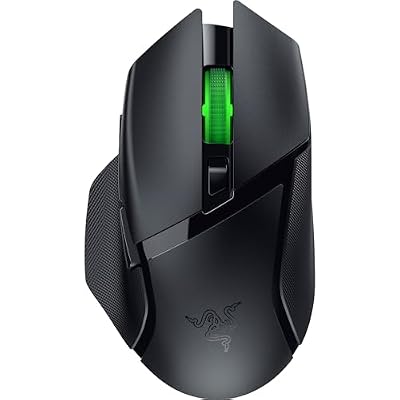 RazerRazer Basilisk V3 X HyperSpeed Customizable Wireless Gaming Mouse, Black…$45 \xc2\xb7 94/100