🛒 Best Price Today on Amazon
Prime members get fast, free shipping on everything above, plus member-only deals. New members get a 30-day free trial — cancel anytime.
The best hot-swappable mechanical keyboard in this group for most people is the AULA F75, a 75% wireless board with pre-lubed linear switches, 2.4GHz, Bluetooth 5.0 and USB-C connections, and RGB backlighting. “Hot-swappable” means each switch sits in a socket on the circuit board, so you can pull a switch out and push a different one in without soldering. If you want a full-size wired board with extra shortcut keys, the Redragon K668 is the practical choice, and the FANTECH Maxfit61 is the smallest and simplest way to start experimenting with switches.
Quick List
- Redragon Wired Hot-Swap Keyboard (Red Switch) – best for a wired board with 11 backlight modes and PBT double-shot keycaps
- Redragon K580 Wired RGB – best for MMO and MOBA players who want macro keys and a media wheel
- AULA F99 Wireless – best for a compact full-featured layout with tri-mode wireless and linear switches
- FANTECH Maxfit61 60% – best for a small, simple board with blue switches that is easy to modify
- AULA F75 75% Wireless – best all-round compact board for desk and travel use
- Redragon K668 108-Key – best for full-size typists who want dedicated mute, calculator and desktop keys
Which One Is Right for You?
| If you… | Choose |
|---|---|
| want a compact board you can use over 2.4GHz, Bluetooth or USB-C | AULA F75 75% Wireless |
| need a number pad and wireless in a smaller footprint than full size | AULA F99 Wireless |
| want to learn switch swapping on a tiny, simple layout | FANTECH Maxfit61 60% |
| type all day and use shortcut keys for volume, calculator and desktop | Redragon K668 108-Key |
| play MMOs and want extra macro keys plus a media wheel | Redragon K580 Wired RGB |
| want a straightforward wired keyboard with red switches and PBT keycaps | Redragon Wired Hot-Swap Keyboard (Red Switch) |
Layout and connectivity decide most of the choice, so settle those first. A 60% board has no arrow keys or function row. A 75% keeps arrows and a compact function row. A 96% or full-size layout keeps a number pad. Wireless boards add convenience but need charging, while wired boards never run out of battery. After that, hot-swap is the shared feature, so the main question is whether you will actually swap switches or just want the option.
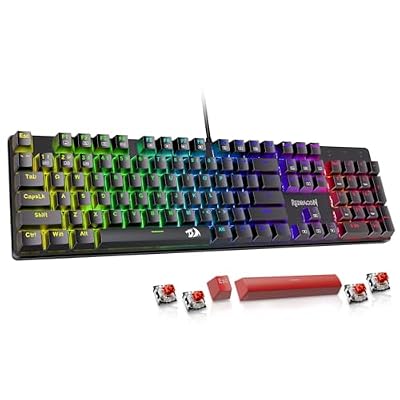
Redragon Mechanical Gaming Keyboard Wired, 11 Programmable Backlit Modes, Hot-Swappable Red Switch, Anti-Ghosting, Double-Shot PBT Keycaps, Light Up Keyboard for PC Mac
Included for '6 Best Mechanical Keyboards with Hot Swappable Switches (October 2026) Honest Reviews' because the listing specifies 11 Programmable Backlit Modes and Hot-Swappable Red Switch, details this guide uses to compare options.
View on Amazon
Redragon K580 Wired RGB Mechanical Gaming Keyboard, Macro Key & Media Wheel | 5 On-Board Keybinding Buttons for MMO MOBA Games, Dedicated Media Controls, Classic Tactile Blue Switch for Hype Typing Feel
Included for '6 Best Mechanical Keyboards with Hot Swappable Switches (October 2026) Honest Reviews' because the listing specifies Macro Key & Media Wheel and 5 On-Board Keybinding Buttons for MMO MOBA Games, details this guide uses to compare options.
View on Amazon
AULA F99 Wireless Mechanical Keyboard,Tri-Mode BT5.0/2.4GHz/USB-C Hot Swappable Custom Keyboard,Pre-lubed Linear Switches,RGB Backlit Computer Gaming Keyboards for PC/Tablet/PS/Xbox
Included for '6 Best Mechanical Keyboards with Hot Swappable Switches (October 2026) Honest Reviews' because the listing specifies Tri-Mode BT5.0/2.4GHz/USB-C Hot Swappable Custom Keyboard and Pre-lubed Linear Switches, details this guide uses to compare options.
View on Amazon
FANTECH Maxfit61 60% Mechanical Keyboard - Hot Swappable Blue Switch, White
Included for '6 Best Mechanical Keyboards with Hot Swappable Switches (October 2026) Honest Reviews' because the listing specifies Hot Swappable Blue Switch and White, details this guide uses to compare options.
View on Amazon
AULA F75 75% Wireless Mechanical Keyboard, Hot Swappable Creamy Keyboard, Pre-lubed Linear Switches, 2.4GHz/Type-C/BT5.0, RGB Backlit Gaming Keyboards(White&Brown)
Included for '6 Best Mechanical Keyboards with Hot Swappable Switches (October 2026) Honest Reviews' because the listing specifies Hot Swappable Creamy Keyboard and Pre-lubed Linear Switches, details this guide uses to compare options.
View on Amazon
Redragon K668 108-Key Hot-Swap Wired RGB Gaming Keyboard, Extra 4 Hotkeys | Dedicated Shortcut Keys for Mute, Calc & Desktop, Cushioned Noise Dampening for Creamy Thocky Sound, Swap-Ready, PRO Software
Included for '6 Best Mechanical Keyboards with Hot Swappable Switches (October 2026) Honest Reviews' because the listing specifies Extra 4 Hotkeys and Dedicated Shortcut Keys for Mute, details this guide uses to compare options.
View on AmazonAll 6 Picks in Detail
1. Redragon Wired Hot-Swap Keyboard (Red Switch) – Best for Wired Linear Typing with PBT Keycaps
As an Amazon Associate we earn from qualifying purchases at no extra cost to you.

This Redragon listing describes a wired mechanical gaming keyboard with 11 programmable backlight modes, hot-swappable red switches, anti-ghosting and double-shot PBT keycaps. Red switches are linear, meaning they press smoothly without a tactile bump or click, which suits fast gaming inputs and quiet-ish typing. PBT keycaps resist the shiny wear that cheaper ABS caps develop over time, and double-shot means the legends are molded through the keycap rather than printed on it. The visible title does not state the layout, so confirm the key count and size on the product page before you buy.
- Connection: wired, per the listing
- Switches: hot-swappable red (linear), per the listing
- Keycaps: double-shot PBT, per the listing
- Lighting: 11 programmable backlight modes
- Layout and key count: confirm on listing
Pros:
- Hot-swap sockets allow switch experiments
- Durable PBT keycaps
- No battery to charge
Cons:
- Layout is not stated in the visible title
- Wired only, so desk clutter and no Bluetooth
Compared with the Redragon K668, it is the pick when you want the hot-swap and PBT combination without the full-size footprint, assuming the layout on the listing is smaller. Because the sockets and the PBT caps are both listed, it is a sensible first hot-swap board for someone who wants to learn on a wired keyboard before moving to wireless. Plan on buying a switch puller and a small set of spare switches so you can see how linear, tactile and clicky feels compare on the same board.
2. Redragon K580 Wired RGB – Best for Macro Keys and a Media Wheel

The Redragon K580 listing describes a wired RGB mechanical gaming keyboard with a macro key, a media wheel and five onboard keybinding buttons aimed at MMO and MOBA games. That is a different personality from the compact boards in this guide: it is a full-size board built around extra inputs. The visible title does not state hot-swappable switches, so confirm on the product page that the version you are buying has swappable sockets; Redragon and some retailers describe this line as hot-swappable, but listings and revisions differ. If the version you receive is not hot-swappable, it would not belong in this category, so treat it as a runner-up until you confirm.
- Connection: wired, per the listing
- Extras: macro key, media wheel and five onboard keybinding buttons
- Target use: MMO and MOBA gaming, per the listing
- Hot-swap support: not stated in the visible title, confirm on listing
- Switch type and layout: confirm on listing
Pros:
- Dedicated macro and media controls
- Onboard keybinding for game profiles
- Wired reliability
Cons:
- Hot-swap status needs verifying on the product page
- Full-size body takes up desk space
Next to the K668, it trades dedicated shortcut keys for macro and media controls, so choose by whether you game or work more. Gamers who bind many actions to a handful of keys tend to appreciate hardware macro buttons, because the bindings travel with the keyboard instead of living in an app. Check the listing for the exact key count and switch type before you commit.
3. AULA F99 Wireless – Best for a Compact Layout with Three Connection Modes

The AULA F99 listing describes a tri-mode wireless mechanical keyboard that connects over Bluetooth 5.0, 2.4GHz or USB-C, with hot-swappable sockets, pre-lubed linear switches and RGB backlighting for PC, tablet, PlayStation and Xbox. Other F99 listings and the maker describe a 96% layout with 99 keys, which keeps the number pad in a smaller body, but the visible title here does not state the layout, so confirm it on the product page. Pre-lubed switches have lubricant applied at the factory, which reduces scratchiness out of the box. Tri-mode connectivity lets you use the low-latency 2.4GHz dongle for games and Bluetooth for a tablet.
- Connection: Bluetooth 5.0, 2.4GHz and USB-C, per the listing
- Switches: pre-lubed linear, hot-swappable, per the listing
- Lighting: RGB backlight
- Layout: 96% with 99 keys on related F99 listings; confirm on this listing
- Battery capacity: confirm on listing
Pros:
- Three connection options
- Pre-lubed linear switches feel smooth from the start
- Number pad retained in a compact layout
Cons:
- Larger than 75% boards
- Wireless boards need regular charging
Compared with the AULA F75, it keeps the number pad, which is the reason to pick it over the more compact sibling. Wireless boards add a few things to keep in mind: charge the battery before a long session, keep the dongle in a front-panel port for a clear signal, and switch to the cable for tournaments or any moment when a dropped input would matter.
4. FANTECH Maxfit61 60% – Best for a Small Board with Blue Switches

The FANTECH Maxfit61 is a 60% mechanical keyboard in white with hot-swappable blue switches, per the listing. A 60% layout has 61 keys and drops the function row, number pad and dedicated arrow cluster, which makes it small enough to leave plenty of mouse room. Blue switches are clicky and tactile, giving an audible click and a bump at actuation, which many typists enjoy and many roommates do not. Because it is hot-swappable, you can replace the blue switches with quieter linear or tactile ones if the click becomes tiresome.
- Layout: 60%, per the listing
- Switches: blue (clicky), hot-swappable, per the listing
- Color: white
- Connection: confirm on listing
- Lighting and keycap material: confirm on listing
Pros:
- Compact size frees up desk space
- Hot-swap lets you change away from clicky switches
- Simple, easy-to-understand listing
Cons:
- Blue switches are loud in shared spaces
- Missing arrow and function keys require layer shortcuts
Compared with the AULA F75, it is smaller and simpler but gives up wireless and arrow keys, so it suits learners more than travelers. Many first-time buyers pair a 60% board with a keycap set and a lube kit, since the small size makes it quick to work on. Look up the layout map before ordering so you know where the arrow and function layers sit.
5. AULA F75 75% Wireless – Best All-Round Compact Hot-Swap Board

The AULA F75 listing describes a 75% wireless mechanical keyboard with hot-swappable sockets, pre-lubed linear switches, 2.4GHz, Type-C and Bluetooth 5.0 connections, and RGB backlighting for gaming. A 75% layout squeezes in arrow keys and a function row with only a small gap, which many people find the best balance between size and usability. The listing uses the word “creamy,” which refers to the soft, muted sound profile that some boards aim for, though the exact build is not described in the visible title. For most people who want a hot-swappable board that is easy to carry and easy to use, this is the one to start with.
- Layout: 75%, per the listing
- Connection: 2.4GHz, Type-C and Bluetooth 5.0, per the listing
- Switches: pre-lubed linear, hot-swappable, per the listing
- Lighting: RGB backlight
- Battery capacity and keycap material: confirm on listing
Pros:
- Keeps arrow keys and function row in a compact body
- Three wireless and wired options
- Pre-lubed linear switches reduce initial scratchiness
Cons:
- No number pad
- Wireless operation means charging
It is the more compact sibling of the F99, so choose it if you do not need a number pad. The balance of size and features is why 75% boards are so common among enthusiasts: a small body, a full set of arrows and room for a mouse. If you carry the keyboard in a bag, the wireless modes make it easy to move between a desktop, a laptop and a tablet.
6. Redragon K668 108-Key – Best for Full-Size Typists with Shortcut Keys

The Redragon K668 is a 108-key wired RGB gaming keyboard with hot-swap sockets, four extra hotkeys, dedicated shortcut keys for mute, calculator and desktop, and a cushioned design aimed at reducing noise. Full-size layouts suit spreadsheet users and anyone who relies on the number pad, and the dedicated keys save you from function-layer combinations. Since it is wired, there is no charging and no wireless lag, and the hot-swap sockets mean you can change switches later. It is the most office-friendly board in this guide.
- Layout: 108 keys, per the listing
- Connection: wired, per the listing
- Extras: four extra hotkeys, including mute, calculator and desktop
- Switches: hot-swap sockets; switch type installed: confirm on listing
- Noise dampening: cushioned design, per the listing
Pros:
- Dedicated shortcut keys for common tasks
- Full-size layout with number pad
- Wired reliability
Cons:
- Large body on a small desk
- No wireless option
Compared with the K580, it favors office shortcuts over MMO macros, so pick it for productivity. Because the footprint is large, measure your desk and keyboard tray first, and look at the cable length if your PC sits far away. A cushioned build can reduce bottom-out noise, which helps in a shared office or a home with sleeping family members.
Specs Compared
| Keyboard | Layout | Connection | Switch (listing) | Hot-swap | Extras |
|---|---|---|---|---|---|
| Redragon Wired Hot-Swap (Red) | Confirm on listing | Wired | Red linear | Yes | 11 backlight modes, PBT double-shot keycaps |
| Redragon K580 Wired RGB | Confirm on listing | Wired | Confirm on listing | Confirm on listing | Macro key, media wheel, 5 onboard keybinding buttons |
| AULA F99 Wireless | Confirm on listing (96% on related listings) | Bluetooth 5.0, 2.4GHz, USB-C | Pre-lubed linear | Yes | RGB backlight |
| FANTECH Maxfit61 | 60% | Confirm on listing | Blue (clicky) | Yes | White finish |
| AULA F75 | 75% | 2.4GHz, Type-C, Bluetooth 5.0 | Pre-lubed linear | Yes | RGB backlight |
| Redragon K668 | 108 keys | Wired | Confirm on listing | Yes | 4 extra hotkeys, mute, calculator, desktop keys |
How We Chose These
This guide is built from research into listing details and maker documentation. We began with the six keyboards in the current catalog set and read each listing title and specification field for layout, connection type, switch type, hot-swap support and extras. We looked at maker pages and retailer descriptions for the Redragon and AULA lines to understand what the headline features mean in practice. Where a title was silent, we flag it and tell you to confirm it on the product page, and we note when hot-swap status is unclear. We favored clear hot-swap support, a sensible range of layouts and connections, and features that matter to typing and gaming.
What to Look For
What hot-swap sockets actually allow
On a standard keyboard, switches are soldered to the circuit board and replacing one means desoldering. On a hot-swappable board, each position has a socket, commonly made by Kailh or a similar maker, that grips the metal pins of a switch. You use a switch puller to lift the old switch straight out and press the new one in. This lets you change a switch that has failed, try tactile versus linear feel, or change the sound of the whole board. Hot-swap is a convenience feature, not a performance feature, so buy it if you expect to experiment or repair.
3-pin versus 5-pin switches
Most mechanical switches use a Cherry MX-style cross stem, but they come in two pin layouts. Three-pin switches have two metal contact pins and one plastic locating pin. Five-pin switches add two extra plastic pins for stability. Many hot-swap boards accept both, because the plastic pins fit in holes on the plate or board, but some PCB designs do not have holes for the extra pins. If you want to buy aftermarket switches, check that the keyboard accepts both types, and trim the extra plastic pins only if the manufacturer says it is safe. Insert switches straight and gently; bent metal pins are the main way people damage a socket.
Layout size and what you give up
Layouts are named by approximate percentages of a full-size board. A 60% board has about 61 keys and no arrows or function row. A 75% has around 80 to 84 keys, with arrows and function keys in a compact block. A 96% layout has about 99 keys and keeps the number pad. A full-size board has 104 to 108 keys, depending on extras. Smaller boards leave more room for the mouse, which matters for low-sensitivity gamers, but they rely on function layers. Pick the smallest layout whose missing keys you will not miss.
Switch type, lubrication and sound
Linear switches press smoothly; tactile switches have a bump; clicky switches add an audible click. Red switches are typically linear and blue switches are typically clicky. Pre-lubed linear switches, as on the AULA boards, have factory lubricant that reduces scratchy feel and some rattle. Sound also depends on the case, the plate and the keycaps: PBT keycaps tend to sound deeper than thin ABS, and a foam-filled or gasket-mounted case sounds softer. If you share a room, avoid clicky switches or plan to swap them.
Wireless, battery and latency
Tri-mode boards offer a 2.4GHz dongle, Bluetooth and a USB cable. The dongle usually gives the lowest latency for games, Bluetooth suits tablets and laptops, and the cable provides power and a fallback. Battery life depends on capacity and backlighting; RGB lighting is the largest drain. Rule of thumb: if you game on the board, use 2.4GHz or wired, and turn off the backlight when you travel.
Keycaps, stabilizers and typing feel
Keycaps change the sound and feel as much as the switches do. Double-shot PBT caps, as named on the Redragon listings, are thicker and sound deeper than thin printed ABS caps. Profile also matters: Cherry-profile and OEM-style caps sit lower and are comfortable for long typing sessions. Stabilizers are the small wire-and-housing assemblies under the spacebar, Enter and Shift keys. Rattly stabilizers are a common complaint on budget boards, and the fix is usually a dab of lubricant on the wire ends. Because hot-swap boards are meant for tinkering, minor tuning like this is part of the appeal.
Software, macros and onboard memory
Programmable boards store lighting modes and key assignments either in a desktop app or directly on the keyboard. The Redragon K580 listing mentions five onboard keybinding buttons, which suggests profiles can be saved on the board itself. That matters for MMO players who move between computers and want the same macros everywhere. Check whether the software needs Windows, because some budget boards ship with a Windows-only app. If you use macOS or Linux, look for a board that stores settings on the device or supports open firmware, and confirm it before you buy.
Worked example
Suppose you type mostly in documents and play a few shooters. You want arrow keys, a desk with room for a mouse and a quiet sound. A 75% wireless board with pre-lubed linear switches, like the AULA F75, covers that. If you later find the sound too thin, a set of tactile switches and a switch puller let you change the feel in an evening without soldering.
Questions
Do I need to solder to change switches on these keyboards?
No. Hot-swap boards use sockets, so you pull a switch out and press a new one in. You only need a switch puller and, ideally, a steady hand to avoid bending pins.
Can I use any switch on a hot-swap keyboard?
Most accept Cherry MX-style switches, but fit varies. Some boards take both 3-pin and 5-pin switches, while others accept only 3-pin versions or specific brands, so confirm compatibility before buying.
Is a 60% keyboard good for gaming?
Yes, many players like the extra mouse space. The tradeoff is that arrows, function keys and the number row use layers, which can be awkward in games that need many keybinds.
Is 2.4GHz better than Bluetooth for gaming?
Generally yes, because the dedicated dongle connection tends to have lower latency than Bluetooth. Bluetooth is convenient for tablets and laptops, but wired or 2.4GHz is the better choice for fast games.
What does pre-lubed mean?
It means the manufacturer applied lubricant to the switch stems and housings at the factory. This reduces friction and scratchy feel, though quality varies and some enthusiasts re-lube switches themselves.
Why do PBT keycaps matter?
PBT is a harder, more textured plastic that resists shine and wear better than ABS. Double-shot legends are molded in rather than printed, so they do not rub off, which keeps a keyboard looking good for years.
Update History
- October 20, 2026 – Initial publication; product set drawn from current catalog listings.
- Check the product page for current specifications and availability before buying.
Sources
- Manufacturer and retailer product pages for Redragon and AULA keyboards
- Retailer listing titles and specification fields for each keyboard