🛒 Best Price Today on Amazon
Prime members get fast, free shipping on everything above, plus member-only deals. New members get a 30-day free trial — cancel anytime.
The real decision is how many thumb commands you actually use. A full 12-button grid can hold an entire MMO hotbar, while a shooter player may only ever press two side buttons for melee and push-to-talk. Every wireless grid mouse also trades something for its buttons: runtime, weight, or a replaceable AA cell instead of a rechargeable battery. Buying more buttons than your thumb can find by feel just adds cost and bulk.
This guide serves four groups: MMO raiders moving a full rotation onto the thumb, MOBA and FPS players who want two reliable side buttons, multi-genre players who swap between shooters and MMOs, and budget buyers trying a wireless grid for the first time. The picks were chosen from the names and specifications published on the Amazon product pages.
Quick Picks
As an Amazon Associate we earn from qualifying purchases
| Product | Best for | Key spec from title |
|---|---|---|
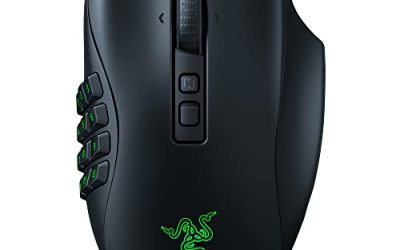
| Razer Naga V2 HyperSpeed | MMO players who want a fixed 12-button grid and very long AA runtime | 19 programmable buttons with a 12-button thumb grid, Focus Pro 30K |
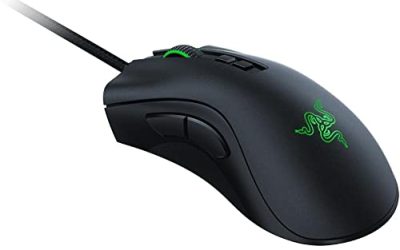
| Razer Basilisk V3 X HyperSpeed | Shooter and MOBA players who only need two thumb buttons | 9 programmable controls in an ergonomic shell, dual wireless |
| Razer Naga V2 Pro | Multi-genre players who swap between shooters and MMOs | Swappable magnetic side plates (2, 6 or 12 buttons), HyperSpeed + Bluetooth |
| Redragon M913 Impact Elite Wireless MMO Mouse | Grid buyers who want a rechargeable battery and full remapping software | 16 programmable buttons with 12 side buttons, rechargeable |
| Redragon Wireless MMO Gaming Mouse (M901P-KS class) | First-time grid buyers on a tight budget | 16 programmable buttons, up to 70 hours per charge |
How to Choose
Grid vs cluster: count the abilities you bind today
Start by counting the commands you already move off the keyboard. An MMO raider with a dozen cooldowns, mounts and potions genuinely uses a 12-button grid, and a MOBA player with two actives uses a two-button cluster. The trap is buying the grid for a game you might play later: twelve small buttons packed under one thumb take weeks to learn by feel, and a grid you cannot find without looking is worse than two large buttons you hit every time. Match the layout to the bindings you use this week, not the ones you imagine.
Battery system: rechargeable cell or replaceable AA
Wireless mice split into two camps. Built-in rechargeable models plug in over USB-C and double as wired mice while they charge, but the cell ages with the mouse. AA models like the Naga V2 HyperSpeed swap a fresh battery in seconds and post very long runtimes, at the cost of carrying spares. Either way, read the runtime figure carefully: the headline number is usually measured with lighting off or in an eco mode, and the same mouse can run far fewer hours with RGB on and the performance dongle connected.
Wireless system and fallback modes
For play, a 2.4 GHz dongle connection is the one that matters, because it keeps polling fast and latency low. Bluetooth is the useful second mode: it sips power for office work and pairs with a laptop or tablet without moving the dongle. The third mode worth checking is a wired fallback, which lets a rechargeable mouse keep working mid-session while it charges. A mouse that offers all three, like the Naga V2 Pro, suits a desk shared between a gaming PC and a work laptop; a dongle-only budget mouse is fine for a single dedicated rig.
Shell size and weight with a grid fitted
Side buttons change the shell. A 12-button grid needs width for the thumb panel, so MMO mice run wide and comparatively heavy, roughly 95 to 134 g across this set, with tall ergonomic humps shaped for palm and claw grips. Fingertip players, who steer with small wrist and finger movements, usually find that bulk tiring and the grid hard to reach without shifting grip. Check the stated length and width against your current mouse, and be honest about your grip: the best grid mouse for a palm-grip raider is the wrong mouse for a fingertip aimer.
The 5 Best Options
Razer Naga V2 HyperSpeed

This is the fixed-grid option for players who know they want twelve thumb buttons every session. The wide right-handed shell puts a full 12-button grid under the thumb and adds a HyperScroll wheel, while the Focus Pro 30K sensor and HyperSpeed connection keep it responsive enough for faster games between raids. Because it runs on a single AA, runtime stretches to hundreds of hours, so it suits raiders who hate charging cables and do not mind keeping a spare battery in the desk drawer.
Specs
- 19 programmable buttons with a 12-button thumb grid
- Focus Pro 30K optical sensor, up to 30,000 DPI
- HyperSpeed 2.4 GHz and Bluetooth, 1,000 Hz polling
- Single AA battery: up to 250 hours on 2.4 GHz, up to 400 hours on Bluetooth
- Dimensions 119.5 x 75 x 43.5 mm; 95 g without the AA battery
- HyperScroll wheel; wide right-handed ergonomic shell
Best for: MMO players who want the full grid plus the longest runtime in this set.
Watch out for: it runs on a replaceable AA rather than a built-in rechargeable cell, and the fixed 12-button grid cannot be swapped for a smaller plate; the wide shell can feel short for large palms.
ASIN: B0BGJT87N2
Razer Basilisk V3 X HyperSpeed
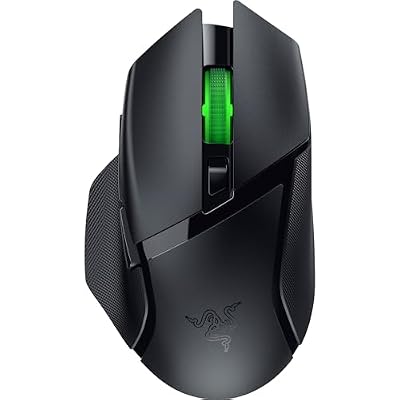
Not every side-button buyer needs a grid. The Basilisk V3 X keeps the classic two-button thumb cluster, adds a thumb rest and top buttons for nine programmable controls in total, and pairs that with dual wireless and very long AA runtime. It fits MOBA and FPS players who bind melee, ping and push-to-talk to the thumb and want the mouse to disappear the rest of the time, plus anyone who prefers an ergonomic shell that stays comfortable through long non-gaming hours at the same desk.
Specs
- 9 programmable controls with a two-button thumb cluster
- Sensor up to 18,000 DPI
- HyperSpeed 2.4 GHz and Bluetooth
- One AA battery: up to 285 hours on HyperSpeed, up to 535 hours on Bluetooth
- Thumb rest; Gen-2 mechanical switches
- Ergonomic right-handed shell
Best for: Shooter and MOBA players who want two reliable side buttons and weeks of battery.
Watch out for: only a two-button thumb cluster plus top buttons — not an MMO grid; AA battery instead of USB-C recharging.
ASIN: B0BXBC26X8
Razer Naga V2 Pro

The Naga V2 Pro answers the grid-versus-cluster question by refusing to pick one. Three magnetic side plates swap between 2, 6 and 12 thumb buttons, so the same mouse covers a shooter night and a raid night without a second purchase. It adds a HyperScroll Pro wheel, Gen-3 optical switches and a Focus Pro 30K sensor that the listing says tracks even on glass. Runtime is long in Bluetooth-style use and shorter on the 2.4 GHz dongle, so heavy dongle users should expect to charge more often than the AA models need fresh cells.
Specs
- Three magnetic side plates for up to 19+1 programmable inputs
- Focus Pro 30K optical sensor; tracks on glass per listing copy
- HyperSpeed 2.4 GHz, Bluetooth and USB-C wired modes
- HyperScroll Pro wheel
- Gen-3 optical switches rated at 90 million clicks
- Weight about 131-134 g
Best for: Multi-genre players who swap between shooters and MMOs and want one mouse for both.
Watch out for: it is the premium tier of this set and the swappable-plate system only pays off if you actually change genres; confirm which plates are in the box for the exact listing variant.
ASIN: B0BGJTLFN5
Redragon M913 Impact Elite Wireless MMO Mouse

The M913 Impact Elite brings the full MMO layout — sixteen programmable buttons, twelve of them on the side — to a rechargeable design at the accessible end of this category. Its PixArt 3335 sensor offers five onboard DPI steps up to 16,000, and every button can be remapped in the maker’s software, so a raider can build proper hotbar layers rather than accepting defaults. It connects over 2.4 GHz for play and over USB-C wired while charging, which makes it a sensible first serious grid mouse for Windows players.
Specs
- 16 programmable buttons, 12 on the side
- PixArt 3335 sensor, up to 16,000 DPI across five onboard steps
- 2.4 GHz wireless and USB-C wired modes
- Rechargeable battery: about 45 hours with backlight on, about 80 hours in eco mode
- All buttons remappable in the maker’s Windows software
Best for: MMO players who want a rechargeable full grid without the premium tier.
Watch out for: side-button mapping software is Windows-only, and the battery figures are eco-mode dependent — check the runtime with lighting on before relying on it for long sessions.
ASIN: B088B3ZM76
Redragon Wireless MMO Gaming Mouse (M901P-KS class)

This Redragon is the low-commitment way to find out whether a 12-button grid suits your thumb. It still offers sixteen programmable buttons, a 1000 mAh rechargeable battery, five memory profiles and adjustable polling, so the experiment covers real raid use rather than a cut-down demo. The stated runtime of over 70 hours applies with RGB off, which is a fair trade for a first grid mouse. If the layout clicks, you will know exactly what to look for in an upgrade; if not, the lesson cost little.
Specs
- 16 programmable buttons with a 12-button side grid
- DPI adjustable from 100 to 16,000
- Polling rate adjustable from 125 to 1,000 Hz
- 2.4 GHz wireless and wired modes
- 1000 mAh battery: over 70 hours with RGB off
- Five memory profiles; four lighting modes; right-handed ergonomic shape
Best for: Budget buyers trying a wireless grid for the first time.
Watch out for: the 70-hour figure is with RGB off — lighting shortens it; Redragon model naming in this family is confusing (M901P-KS and M913 overlap), so verify the exact model name on the product page before ordering.
ASIN: B0CKN2NSYL
Which One Fits Your Situation
An MMO raider moving a full rotation onto the thumb
Start with the Razer Naga V2 HyperSpeed if you want the grid to simply always be there, backed by AA runtime measured in hundreds of hours. The Redragon M913 Impact Elite is the alternative when you would rather recharge over USB-C and lean on Windows software to remap every button into hotbar layers.
A MOBA or FPS player who wants two side buttons and weeks of battery
The Razer Basilisk V3 X HyperSpeed is the natural fit: two thumb buttons you can find instantly, a thumb rest for long sessions, and AA runtime that stretches to 535 hours on Bluetooth. It skips the grid entirely, which is exactly the point for ability-light games where speed and simplicity beat extra inputs every single time.
A multi-genre player who swaps between shooters and MMOs
The Razer Naga V2 Pro was built for exactly this pattern. Fit the 12-button plate for raid night, swap to the 2-button plate for a shooter, and keep one mouse paired to everything on your desk. It is the heaviest and most premium pick here, but it replaces two specialised mice with one flexible tool.
A budget buyer trying a wireless grid for the first time
Take the Redragon Wireless MMO Gaming Mouse (M901P-KS class). Sixteen programmable buttons and a real 12-button grid let you learn grid play properly, and the rechargeable battery and five memory profiles cover everyday use across several games. Just confirm the exact model name on the listing before ordering, since this Redragon family reuses similar names across its range.
Common Mistakes
- Buying a 12-button grid for a game you rarely play, then fighting the layout in the games you actually play every day.
- Comparing battery figures without checking the test mode: eco and lighting-off numbers can be double the runtime you get with RGB on.
- Assuming every wireless mouse recharges: two picks here run on replaceable AA batteries, which some buyers love and others hate.
- Ignoring shell width and weight, then blaming aim when a wide 130 g MMO shell simply does not suit a fingertip grip.
- Ordering a Redragon grid mouse without verifying the exact model name, because the M901 and M913 families overlap in naming.
Frequently Asked Questions
How many side buttons do I actually need?
Count the commands you would move off the keyboard today. Most FPS and MOBA players use two to four thumb commands, so a cluster is enough. MMO players with a full hotbar of cooldowns, mounts and consumables are the ones who genuinely benefit from a 12-button grid under the thumb.
Is a 2.4 GHz dongle better than Bluetooth for gaming?
Yes for play. A 2.4 GHz dongle connection keeps polling high and latency low, which matters in fast games. Bluetooth is the better second mode for office work, travel and battery saving, and several mice here offer both, so you can game on the dongle and work over Bluetooth without re-pairing.
How long do wireless MMO mice really last per charge?
It depends on the mode and lighting. AA models in this set run for hundreds of hours, while rechargeable grid mice run for tens of hours with lighting on and longer in eco modes. Treat every headline figure as the best case and check the with-lighting number before a long session.
Can I use a grid mouse for shooters too?
You can, but the wide shell and extra weight suit palm and claw grips better than fingertip aiming, and unused grid buttons sit under your thumb. Players who split time between genres often prefer a swappable-plate mouse like the Naga V2 Pro, or keep a lighter two-button mouse for shooters.