🛒 Best Price Today on Amazon
Prime members get fast, free shipping on everything above, plus member-only deals. New members get a 30-day free trial — cancel anytime.
Most MMO mice are built like bricks. A 12-button thumb grid needs room, so manufacturers stretch the shell past 125 mm, and a player with a hand under 18 cm ends up reaching for the front buttons with a stretched thumb while the back of the mouse pushes into the palm. The real decision here is not sensor speed — it is whether your thumb can cover all twelve grid buttons without shifting your grip every time a cooldown comes up.
This guide is for small-handed MMO players who still want a full thumb grid rather than a two-button side cluster. Every pick below measures under 120 mm in length according to its Amazon listing or manufacturer specifications, carries a 12-button side grid or the equivalent, and is still sold on Amazon US. Dimensions are stated for every model, because on this shortlist the millimetres matter more than the DPI headline.
Quick Picks
As an Amazon Associate we earn from qualifying purchases
| Product | Best for | Key spec from title |
|---|---|---|
| UtechSmart Venus | Smallest overall footprint | 16400 DPI high precision laser sensor |
| Logitech G600 | Learning a thumb grid without misclicks | 20 MMO-tuned programmable buttons |
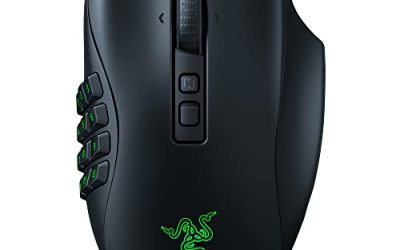
| Razer Naga X | Light weight for fingertip and claw grips | 85g with 16 programmable buttons |
| Corsair Scimitar RGB Elite | Short thumbs that need the grid moved closer | 18,000 DPI optical sensor, Key Slider side panel |
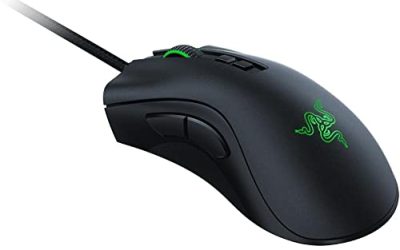
| Razer Naga V2 HyperSpeed | Wireless play on a compact shell | Focus Pro 30K optical sensor, up to 400 hr battery life |
How to Choose
Start With Length and Height, Not the Button Count
For a hand under roughly 18 cm, shell length decides whether a palm grip works at all. Once a mouse passes about 122 mm, your fingertips float past the main clicks or your palm heel hangs off the back, and both problems get worse during long raid sessions. Height matters almost as much: a shell around 38 to 41 mm tall lets smaller hands wrap over the top instead of climbing it. Every mouse in this guide sits between 117 and 119.5 mm long for exactly that reason, while popular grid mice at 128 mm and beyond were left out, however good their sensors are.
Check Where the Thumb Grid Sits, Not Just How Many Buttons It Has
Twelve buttons are useless if the back row sits where your thumb joint cannot bend. On a small hand, the thumb rests further forward on the shell, so grid placement and button shaping decide how many of the twelve keys are genuinely reachable. Sculpted panels that split the grid into two angled groups, like the G600’s dual-dish layout, give your thumb a landmark it can find without looking. Adjustable panels go further still. If you regularly hit only eight or nine buttons on a borrowed MMO mouse, treat grid position as the deciding feature rather than a bonus.
Match Weight to Your Grip Style
Small hands fatigue faster under a heavy shell because the same mass is controlled by shorter fingers with less leverage. A wired grid mouse around 85 g, such as the Naga X, suits fingertip and claw players who lift and reset the mouse often. Heavier models in the 120 to 133 g range feel planted and suit palm grips, where the whole hand steers and the grid thumb does the fast work. Adjustable weight systems sound flexible, yet the added grams rarely help a smaller hand; if a mouse ships with tuning weights, start with all of them removed.
Decide on Wired or Wireless, Then Check the Software
A cable removes battery weight and charging from the equation, which is why four of these five picks are wired, and modern flexible cords drag far less than the stiff braided cables older MMO mice shipped with. The one wireless model here keeps the same compact Naga shell and runs for hundreds of hours on a single AA battery. Whichever connection you pick, confirm the configuration software supports your system before ordering: some grid mice only program their buttons on Windows and merely carry the saved profiles over to other platforms afterwards.
The 5 Best Options
UtechSmart Venus

The Venus is the smallest full-grid mouse on this list, and for the very smallest hands that is the whole argument. Its shell measures about 117 mm long and only 38 mm tall, the lowest profile here, so a short palm can settle over it without the back edge digging in. The twelve side buttons are tilted at alternating angles, which gives a small thumb distinct surfaces to separate by feel. An 8-piece weight tuning set is included, although most small-handed players will run it empty. Five onboard profiles store separate bindings for different games or characters.
Specs
- Dimensions: 4.6 x 3 x 1.5 inches (approx. 117 x 76 x 38 mm)
- Sensor: Laser, adjustable 200 to 16,400 DPI
- Buttons: 19 total, including 12 programmable side buttons
- Polling rate: 1000 Hz
- Profiles: 5 storable memory profiles
- Weight system: 8-piece weight tuning set
- Connection: Wired USB
Best for: The smallest hands that need the shortest, lowest shell with a full grid.
Watch out for: Button programming is done through Windows software; the laser sensor also behaves differently from the optical sensors in the other picks.
ASIN: B00FNKMVUO
Logitech G600

Logitech’s long-running G600 attacks the small-hand problem from the grid side rather than the shell side. At 118 mm long it is genuinely compact, and its dual-dish thumb panel splits the twelve buttons into two sculpted groups of six with a notched landmark button, so a shorter thumb can anchor on the dish instead of hunting across a flat keypad. A third main button under the ring finger works as a G-Shift key, doubling the grid’s assignments when held. The trade-off is mass: at 133 g without its cable, this is the heaviest pick here, which suits a relaxed palm grip better than quick lifting.
Specs
- Dimensions: 118 x 75 x 41 mm
- Weight: 133 g (without cable)
- Sensor: Laser, 200 to 8,200 DPI
- Buttons: 20 MMO-tuned, including 12 thumb buttons and a G-Shift ring-finger button
- Report rate: Up to 1000 reports per second
- Cable length: 6.5 feet (2 m)
- Scroll wheel: Clickable, with tilt
Best for: Palm-grip players who misclick flat thumb grids and want a sculpted panel instead.
Watch out for: It is wired only and heavy for its size, so fingertip players who lift the mouse constantly may tire quickly.
ASIN: B0086UK7IQ
Razer Naga X

The Naga X keeps Razer’s familiar grid shell at 119 mm long but trims it to 85 g, the lightest mouse in this guide by a wide margin. That combination is what makes it the natural pick for small hands using a claw or fingertip grip: the shell stays short enough to control, and the low mass means repositioning it does not strain short fingers during long sessions. Its 12-button thumb grid is fixed rather than swappable, the main clicks use second-generation optical switches rated for fast, debounce-free actuation, and the flexible Speedflex cable keeps drag low for a wired mouse.
Specs
- Dimensions: 119 x 74 x 43 mm
- Weight: 85 g (excluding cable)
- Sensor: Razer 5G Advanced Optical, up to 18,000 DPI
- Buttons: 16 programmable, including a 12-button thumb grid
- Switches: 2nd-gen Razer Optical Mouse Switches
- Cable: Razer Speedflex
- Feet: 100% PTFE
Best for: Claw and fingertip players with small hands who want a grid mouse that feels quick to move.
Watch out for: The side panel is fixed, so there is no alternative grid layout, and there is no wireless option at this size and weight.
ASIN: B08QVNG4BM
Corsair Scimitar RGB Elite
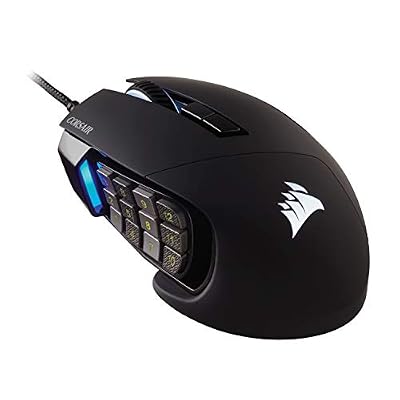
Corsair’s answer to a short thumb is mechanical rather than electronic: the patented Key Slider system lets the entire 12-button side panel slide forward or backward and lock where your thumb actually lands. On a 119.4 mm shell that adjustment can move the back row of the grid from unreachable to comfortable, which no other mouse here offers. The panel’s buttons are mechanical and textured in alternating rows for identification by touch. A custom PixArt PMW3391 sensor adjustable in single-DPI steps covers precision, and onboard storage keeps profiles on the mouse itself. At 122 g it is a palm-grip mouse, not a lifter’s mouse.
Specs
- Dimensions: 119.4 x 77 x 42.4 mm
- Weight: 122 g
- Sensor: PixArt PMW3391 optical, native 18,000 DPI, adjustable in 1 DPI steps
- Buttons: 17 programmable, including 12 mechanical side buttons
- Side panel: Patented Key Slider, repositionable and lockable
- Main switches: Omron, rated for 50 million clicks
- Connection: Wired, braided cable
- Software: Corsair iCUE, with onboard profile storage
Best for: Players whose thumb falls short of the grid’s back row on fixed-panel mice.
Watch out for: It is the widest and one of the heaviest picks here, and full configuration depends on the iCUE software.
ASIN: B082LRMY53
Razer Naga V2 HyperSpeed

This is the wireless route into a compact grid mouse. The V2 HyperSpeed uses the same short Naga footprint at roughly 119.5 mm long and keeps the weight to 95 g despite carrying a battery, so it stays manageable for smaller hands that found older wireless MMO mice bulky. Nineteen programmable buttons include the 12-button grid and a dual-mode HyperScroll wheel that tilts and switches between free-spin and tactile scrolling. Battery life is the headline convenience: up to 250 hours over the 2.4 GHz HyperSpeed connection, or up to 400 hours on Bluetooth for a second machine.
Specs
- Dimensions: Approx. 119.5 x 75 x 43.5 mm
- Weight: 95 g
- Sensor: Razer Focus Pro 30K Optical
- Buttons: 19 programmable, including a 12-button thumb grid
- Connection: Razer HyperSpeed Wireless (2.4 GHz) and Bluetooth
- Battery: 1 AA battery; up to 250 hours on HyperSpeed Wireless, up to 400 hours on Bluetooth
- Switches: Mechanical Mouse Switches Gen-2
- Scroll wheel: HyperScroll, dual-mode with tilt
Best for: Small-handed players who want to drop the cable without moving up to a full-size shell.
Watch out for: It runs on a replaceable AA battery rather than a rechargeable cell, and it is the tallest shell in this guide at 43.5 mm.
ASIN: B0BGJT87N2
Which One Fits Your Situation
Your Thumb Cannot Reach the Back Row of a Normal Grid
Start with the Corsair Scimitar RGB Elite. Its sliding side panel exists precisely for this problem, letting you shift all twelve buttons toward your thumb and lock them there. If the Scimitar’s 122 g weight puts you off, the Logitech G600 is the fallback: its dual-dish panel groups the buttons under a shorter thumb’s natural arc instead of spreading them across a flat plate.
You Play With a Fingertip or Claw Grip and Lift the Mouse Often
Take the Razer Naga X. At 85 g it asks far less of short fingers than the 120 g-plus wired alternatives, and its 119 mm shell is short enough to steer with fingertips rather than your whole hand. The wired connection keeps that weight consistent, with no battery shifting the balance mid-session.
You Want Wireless for a Clean Desk or a Laptop Setup
The Razer Naga V2 HyperSpeed is the only cable-free option that stays under 120 mm long. Use the 2.4 GHz connection for gaming and Bluetooth for a work laptop, and expect to swap its AA battery only a few times a year at the rated endurance. Small-handed players should note its taller 43.5 mm hump suits a relaxed claw more than a flat fingertip grip.
This Is Your First MMO Mouse and Your Hands Are Petite
The UtechSmart Venus gives you the smallest shell and the lowest height in the guide, which makes the learning curve about the grid rather than about wrestling an oversized mouse. Bind only the six easiest buttons at first, add the rest over a week or two, and leave the tuning weights in the box until your grip settles.
Common Mistakes
- Judging fit by hand length alone, when thumb length and grid position decide how many side buttons you can actually press.
- Assuming every MMO mouse is large and skipping the dimension check; shells in this category range from about 117 mm to well over 130 mm.
- Binding all twelve grid buttons on day one, then misfiring abilities in group content instead of learning six buttons at a time.
- Adding every tuning weight a mouse ships with, which makes a compact shell feel sluggish under a small hand.
- Choosing a tall, heavy wireless model for a fingertip grip, a mismatch that shows up as wrist and finger fatigue within a week.
Frequently Asked Questions
What mouse length suits a hand under 18 cm for MMO play?
Look at shells between roughly 115 and 120 mm long. That range lets a smaller hand keep a relaxed palm or claw grip while the thumb stays over the grid instead of stretching forward. Every pick in this guide falls inside it, while most mainstream MMO mice at 125 mm and longer were excluded for exactly this reason.
Can a small thumb really use all 12 grid buttons?
Usually, yes, but layout matters more than the count. Sculpted panels like the G600’s dual-dish design and Corsair’s sliding Key Slider panel exist to bring the far rows within a shorter thumb’s reach. Expect the four buttons under your thumb’s resting arc to become automatic first, and treat the remaining rows as secondary bindings while you learn.
Is a laser sensor a problem on the older models here?
For MMO play, not in practice. The G600 and Venus use laser sensors with more than enough tracking range for ability-driven games, where grid access matters far more than pixel-level aim. Players who also compete in fast shooters may prefer the optical sensors in the Naga X, Scimitar RGB Elite or Naga V2 HyperSpeed, but nothing about an MMO rotation exposes a laser sensor’s limits.
Should small-handed players avoid heavier MMO mice entirely?
Not necessarily. Weight only becomes a problem when your grip style fights it. A palm-grip player steers with the whole hand and often prefers the planted feel of the 122 g Scimitar or 133 g G600, while a fingertip player lifting the mouse hundreds of times an hour should stay near the Naga X’s 85 g or the wireless Naga V2 HyperSpeed at 95 g.