🛒 Best Price Today on Amazon
Prime members get fast, free shipping on everything above, plus member-only deals. New members get a 30-day free trial — cancel anytime.
The real decision with a raid mouse is how much of your rotation you can move off the keyboard without fumbling mid-pull. A wireless MMO mouse puts a numbered thumb grid where your other hand used to stretch across the number row, but models differ sharply in grid layout, battery strategy and weight. Picking wrong means a grid your thumb cannot read by touch, or a battery that fades on progression night.
This guide is for MMO players who raid, run dungeons or grind dailies on PC and want to cut the cable without giving up a full side panel. Every pick below is a true wireless MMO mouse with a multi-button thumb grid, chosen from the names and specifications published on its Amazon product page, with the listing’s own figures used for buttons, sensors and battery life.
Quick Picks
As an Amazon Associate we earn from qualifying purchases
| Product | Best for | Key spec from title |
|---|---|---|
| Razer Naga V2 Pro | Players who swap roles and games often | 19+1 programmable buttons with swappable side plates |
| Corsair Scimitar Elite Wireless SE | Players who want the thumb grid positioned to their reach | 33,000 DPI Marksman S sensor, 16 programmable buttons |
| Razer Naga V2 HyperSpeed | Long raid weeks with minimal charging fuss | 19 programmable buttons, up to 400-hour battery rating |
| SteelSeries Aerox 9 Wireless | Hybrid MMO and FPS players who dislike heavy mice | 18 programmable buttons, 18K DPI TrueMove Air sensor |
How to Choose
Side-Panel Layout Decides Your Rotation
Count the abilities you actually press every pull, not the ones bound somewhere in a menu. Most raiders need eight to twelve thumb keys for a core rotation, cooldowns and a potion or mount. A fixed twelve-button grid suits players whose layout never changes, while swappable or sliding panels help if your thumb lands between rows. Also check how the grid is sculpted: raised, angled keys are easier to identify by touch than flat ones, and a panel you cannot read blind will slow you down more than a missing button ever will.
Battery Strategy: Rechargeable Cell or AA
Wireless MMO mice split into two camps. Rechargeable models plug in over USB-C and double as wired mice while they charge, which suits a fixed desk. AA-powered models swap a fresh cell in seconds and often post much longer rated runtimes, which suits players who hate cables entirely. Compare the rated hours for the mode you will actually use, because Bluetooth figures are usually far higher than the 2.4 GHz gaming mode. Lighting left on full shortens every rating, so treat headline numbers as best-case values with illumination off.
Wireless Modes, Polling and Latency
For raiding, a 2.4 GHz dongle connection is the mode that matters: it carries the full polling rate and the lowest latency, and every pick here offers one. Bluetooth is a useful second mode for a laptop or a living-room PC, but it polls slower and suits dailies rather than progression pulls. All four mice below report at up to 1,000 Hz over their gaming connection, which is ample for MMO ability queues. Keep the dongle close to the mouse with a clear path, since a receiver buried behind a tower can stutter regardless of the spec sheet.
Shape, Weight and Thumb Reach
A twelve-button grid only works if your thumb rests on it naturally. Palm-grip players with medium or large hands usually settle onto full-size MMO shells, while smaller hands can end up stretching for the front row of the grid. Weight varies widely in this category, from under 90 grams to well over 110, and heavier mice feel stable during long grinds but tiring in mixed-genre play. Right-handed ergonomic shells dominate the segment, so left-handed players should confirm orientation on the listing before ordering anything.
The 4 Best Options
Razer Naga V2 Pro

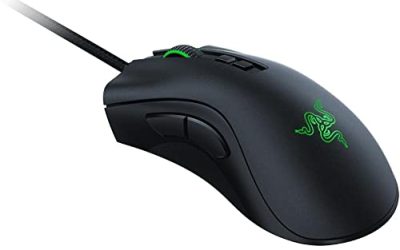
The Naga V2 Pro is built for players whose button needs change with their role. Its three magnetic side plates swap between twelve-button, six-button and two-button layouts, so the same mouse covers a raid main, a MOBA alt and a shooter evening without new hardware. The HyperScroll Pro wheel adds tilt inputs and switchable free-spin, and the Focus Pro 30K sensor is far beyond what MMO play demands. It is the heaviest pick here and the most feature-dense, which suits committed raiders more than casual dungeon runners.
Specs
- Programmable buttons: 19+1
- Side plates: three interchangeable plates (12-button, 6-button and 2-button)
- Sensor: Razer Focus Pro 30K optical
- Switches: Razer Optical Mouse Switches Gen-3
- Scroll wheel: HyperScroll Pro with tilt inputs
- Connectivity: HyperSpeed Wireless (2.4 GHz), Bluetooth, wired USB-C
- Battery life: up to 150 hours on HyperSpeed, up to 300 hours on Bluetooth
- Weight: 134 g
Best for: Raiders who rotate between tank, healer and DPS roles and want one mouse that reconfigures for each.
Watch out for: The wireless charging puck and dock are separate purchases, and at 134 g this is a poor match for anyone who also plays fast shooters.
ASIN: B0BGJTLFN5
Corsair Scimitar Elite Wireless SE

Corsair’s Scimitar line is the long-running alternative to the Naga formula, and the SE updates it with the Marksman S sensor and a much longer battery rating. Its signature Key Slider lets the twelve-button side panel slide forward or back and lock where your thumb actually rests, a fix for the reach problem that fixed grids ignore. Sixteen programmable buttons, three onboard profiles and Elgato Virtual Stream Deck support also make it the strongest pick here for streamers who fire scenes and clips from the mouse during a run.
Specs
- Sensor: Corsair Marksman S optical, 33,000 DPI, 750 IPS tracking, 50G acceleration
- Programmable buttons: 16, including an adjustable 12-button Key Slider panel
- Connectivity: SLIPSTREAM Wireless (2.4 GHz), Bluetooth, wired USB-C
- Polling rate: up to 1,000 Hz
- Battery life: up to 150 hours on 2.4 GHz and up to 500 hours on Bluetooth, lighting off
- Onboard profiles: 3
- Weight: 114 g
- Extras: Elgato Virtual Stream Deck support, iCUE software
Best for: Players whose thumb never quite lands right on fixed grids, and streamers who want stream controls on the side panel.
Watch out for: At 114 g it is a heavy mouse for mixed-genre desks, and full macro and Stream Deck features require Corsair’s iCUE software to be running.
ASIN: B0F6NGCDFN
Razer Naga V2 HyperSpeed

The Naga V2 HyperSpeed keeps the classic fixed twelve-button grid and the Focus Pro 30K sensor, then trades the Pro model’s swappable plates and optical switches for a far simpler power story: a single AA battery rated for up to 400 hours over Bluetooth and up to 250 hours over HyperSpeed wireless. There is nothing to plug in and no charge level to babysit during a raid tier, just a spare cell in the drawer. Mechanical switches and a lighter 95 g shell round out a mouse aimed at players who want the grid without the flagship complexity.
Specs
- Programmable buttons: 19
- Sensor: Razer Focus Pro 30K optical
- Switches: Razer Mechanical Mouse Switches Gen-2
- Scroll wheel: HyperScroll with free-spin and tactile modes
- Connectivity: HyperSpeed Wireless (2.4 GHz), Bluetooth
- Battery: 1 AA battery (included); up to 400 hours on Bluetooth, up to 250 hours on HyperSpeed
- Hand orientation: right-handed
- Weight: 95 g
Best for: Progression raiders who want a full thumb grid and months between battery changes instead of a charging routine.
Watch out for: The AA cell is replaceable rather than rechargeable, and the listing’s battery figures differ by mode, so the 400-hour headline applies to Bluetooth, not the gaming connection.
ASIN: B0BGJT87N2
SteelSeries Aerox 9 Wireless
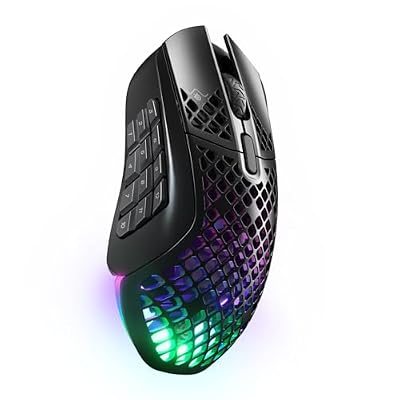
The Aerox 9 Wireless takes the opposite approach to the heavyweight flagships: a perforated shell brings an eighteen-button MMO mouse down to 89 grams, light enough to flick in shooters between raid nights. Twelve of its buttons sit on the side panel, and the TrueMove Air sensor tracks at up to 18,000 CPI. The open shell is protected by an IP54-rated AquaBarrier coating against splashes and dust. The trade-off is feel: the side buttons sit flatter than a Naga grid, so locating them by touch takes more practice.
Specs
- Programmable buttons: 18, including 12 side buttons
- Sensor: TrueMove Air optical, up to 18,000 CPI
- Connectivity: 2.4 GHz wireless, Bluetooth
- Battery life: up to 180 hours on 2.4 GHz
- Weight: 89 g
- Shell: perforated ultra-lightweight design with AquaBarrier IP54 protection
- Lighting: RGB
Best for: Players who split time between an MMO main and aim-heavy games and refuse to keep two mice on the desk.
Watch out for: The honeycomb shell lets in dust and crumbs over time despite the IP54 coating, and the flush side buttons are harder to tell apart by feel than sculpted grids.
ASIN: B09VNPB6Q1
Which One Fits Your Situation
You Raid Several Roles on One Character Roster
Choose the Razer Naga V2 Pro. Swapping the twelve-button plate for the six- or two-button plate when you move from a raid main to a MOBA or shooter alt keeps your muscle memory on one shell, one sensor and one software profile set, instead of retraining your hand on a second mouse.
You Play Long Weeks and Hate Charging Cables
Choose the Razer Naga V2 HyperSpeed. A single AA cell and a rated 250 hours on the gaming connection mean battery management becomes a twice-a-tier chore rather than a nightly one, and a dead cell mid-raid is a ten-second swap instead of a cable hunt, a forced break, or playing tethered for the rest of the night.
Your Thumb Never Lands Right on Fixed Grids
Choose the Corsair Scimitar Elite Wireless SE. The sliding Key Slider panel exists precisely for hands that fall between standard layouts: loosen it, slide the twelve buttons to where your thumb rests naturally, lock it down, and the front row stops being a stretch on every pull, even deep into a long session when your grip starts to wander.
You Split Evenings Between Raids and Shooters
Choose the SteelSeries Aerox 9 Wireless. At 89 grams it moves like an FPS mouse during aim-heavy sessions, with none of the wrist drag a heavyweight MMO shell brings to fast flicks, yet the twelve-button side panel still carries a full MMO rotation when raid time comes, so one desk setup honestly covers both habits without compromise on either side.
Common Mistakes
- Buying a wired MMO mouse by accident, because wired and wireless versions often share near-identical names and box art.
- Mapping all twelve side buttons on day one instead of adding two or three binds per week until the grid feels automatic.
- Judging a mouse by sensor DPI headlines when grid layout and thumb reach matter far more for MMO play.
- Leaving RGB lighting at full brightness and then blaming the mouse when real battery life falls short of the rated figure.
- Ignoring onboard profiles, then losing every keybind when switching between a desktop and a laptop.
Frequently Asked Questions
How many side buttons do I actually need for raiding?
Most raiders use eight to twelve thumb keys: a core rotation, two or three cooldowns, an interrupt, a potion and a mount. A twelve-button grid covers that with room to grow, while players with simple rotations may find six buttons easier to learn. Start with the abilities you press most, not the full spellbook.
Is 2.4 GHz wireless responsive enough for progression raiding?
Yes. Modern 2.4 GHz gaming connections poll at up to 1,000 Hz, the same rate as wired mice, and MMO combat runs on a global cooldown that is far more forgiving than shooter aiming. Keep the receiver near the mouse with a clear line of sight, and connection quality will not be what wipes the group.
Can I use one of these mice over Bluetooth on a laptop?
Every pick in this guide offers Bluetooth alongside its 2.4 GHz mode, and Bluetooth is fine for dailies, crafting and travel play. It polls slower than the dongle connection, though, so switch back to 2.4 GHz for raids. Bluetooth is also where the longest battery ratings apply, which makes it the sensible mode away from your main desk.
Do these mice remember keybinds without the software running?
The Corsair Scimitar Elite Wireless SE stores three onboard profiles, and the Razer and SteelSeries models also save settings to onboard memory through their software. That means your grid layout travels between PCs once configured. Complex macros and app-specific actions may still need the companion software installed, so check what your binds rely on before relying on a borrowed machine.