🛒 Best Price Today on Amazon
Prime members get fast, free shipping on everything above, plus member-only deals. New members get a 30-day free trial — cancel anytime.
Destiny 2 asks more from a mouse than most shooters. Your aim has to track a jumping Hunter in the Crucible one minute, then your thumb has to fire off a grenade, a charged melee, a class ability, and a finisher without leaving WASD the next. Pick the wrong mouse and you either run out of buttons or end a six-hour raid night with an aching wrist and a heavy, dragging aim.
This guide is for PC Guardians who play a mix of PvE and PvP and want one mouse that covers both. The five picks below were chosen from their Amazon listings and specifications, balancing three things Destiny 2 rewards: enough programmable buttons for ability keybinds, a weight and shape that keep aim steady, and switches and battery life that hold up through long sessions.
Quick Picks
As an Amazon Associate we earn from qualifying purchases
| Product | Best for | Key spec from title |
|---|---|---|
| Logitech G502 X Plus | Most ability keybinds | 13 programmable controls |
| Razer Basilisk V3 Pro | Keybinds plus tilt-wheel weapon swaps | 11 programmable buttons |
| SteelSeries Rival 5 | Extra side buttons on a lighter wired mouse | 9 programmable buttons |
| Logitech G Pro X Superlight 2 | Pure aim and Crucible flicks | 60 g with 44K DPI sensor |
| Razer DeathAdder V3 Pro | Comfort through long raid nights | 63 g with 90-hour battery |
How to Choose
Count Buttons Against Your Ability Loadout
Start by listing what you actually press in a fight. A typical Destiny 2 build wants grenade, powered melee, class ability, finisher, interact, and often an Icarus dash or weapon swap within thumb reach. A five-button mouse forces most of that back onto the keyboard, which breaks your movement. Mice with nine or more programmable controls, like the G502 X Plus or Rival 5, let your thumb own abilities while your keyboard hand owns strafing. Map one button you can hit by feel alone to your panic option, usually your class ability or finisher, and keep it identical across every subclass so muscle memory survives a build change.
Match Weight to How You Aim
Destiny 2 mixes slow tracking on bosses with sudden flicks onto snipers and Shriekers, so weight shapes both. Lighter mice around 60 to 85 grams, such as the Superlight 2, DeathAdder V3 Pro, and Rival 5, start and stop faster and tire your forearm less during repeated clears. Heavier mice above 100 grams feel steadier for low-sensitivity tracking and give big button layouts room to exist, which suits palm-grip players who plant the mouse rather than lift it. Neither end is automatically better. Decide by your sensitivity: low-sensitivity arm aimers usually gain more from a light shell, while high-sensitivity wrist aimers often prefer the control of extra mass.
Prioritize Switch Feel and Durability for Raid Length
A raid night can mean thousands of clicks on the same two switches, plus constant scroll-wheel swaps between kinetic, energy, and heavy weapons. Optical switches, like the LIGHTFORCE units in the G502 X Plus and the Gen-3 switches in both Razer picks, actuate with light rather than metal contacts, which removes the debounce delay behind double-click failures. The Rival 5 takes a different route with IP54-rated mechanical switches built to resist dust. Whichever design you choose, look for a stated click lifespan in the tens of millions and a wheel with firm, distinct steps, because a mushy wheel causes accidental heavy-weapon swaps mid-encounter.
Check Battery, Connectivity, and Shape Together
Wireless freedom matters in Destiny 2 because cable drag shows up most during wide sweeps across a large pad, but a dead battery mid-raid is worse than any cable. Compare rated wireless hours against your weekly play time: a 90-hour mouse needs charging roughly every two weeks of heavy play, while shorter ratings demand a weekly habit. Shape is the final filter. Right-handed ergonomic shells like the DeathAdder V3 Pro support a relaxed palm through long PvE sessions, while flatter symmetrical shapes like the Superlight 2 suit fingertip and claw grips in PvP. If your hand cramps now, fix shape before chasing sensor numbers.
The 5 Best Options
Logitech G502 X Plus

If your Destiny 2 keybind problem is simply that you have more abilities than buttons, this is the most direct answer in the guide. Thirteen programmable controls cover grenade, melee, class ability, finisher, interact, and a DPI-shift sniper button, with the dual-mode wheel adding tilt inputs for weapon swaps. The sculpted right-handed shape and thumb rest keep that busy layout reachable under a settled palm grip, and LIGHTFORCE optical-mechanical switches keep the main clicks crisp through long raid weeks. At 106 grams it favors control over flick speed, so it suits Guardians who track steadily and let their thumb do the multitasking.
Specs
- Sensor: HERO 25K optical, up to 25,600 DPI
- Programmable controls: 13
- Switches: LIGHTFORCE hybrid optical-mechanical
- Connectivity: LIGHTSPEED wireless, USB-C wired
- Battery life: Up to 130 hours with lighting off
- Weight: 106 g
- Extras: LIGHTSYNC RGB, POWERPLAY charging compatible, dual-mode scroll wheel
Best for: Players who want every Destiny 2 ability on the mouse.
Watch out for: The 106 g weight feels sluggish if you prefer a fingertip grip.
ASIN: B092CB69Q4
Razer Basilisk V3 Pro
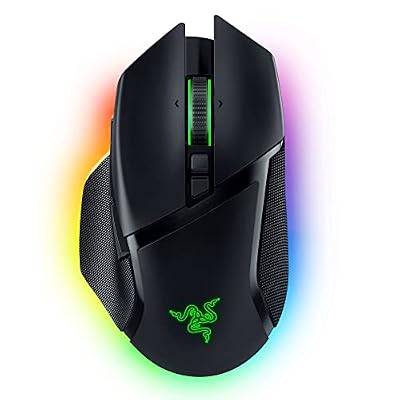
The Basilisk V3 Pro is built for players who want nearly G502-level button depth but prefer Razer’s take on the layout. Eleven programmable buttons include a removable sniper clutch that temporarily drops sensitivity for lining up a linear fusion rifle shot, then returns you to normal aim on release. Its HyperScroll wheel tilts left and right, which maps naturally to kinetic and energy weapon swaps, and it can switch between tactile steps and free spin for menus. Gen-3 optical switches and three connection modes round out a mouse that works as hard in build-crafting screens as it does in encounters.
Specs
- Sensor: Focus Pro 30K optical, up to 30,000 DPI
- Programmable buttons: 11
- Switches: Razer Optical Gen-3
- Connectivity: HyperSpeed wireless, Bluetooth, USB wired
- Battery life: Up to 90 hours on HyperSpeed
- Weight: 112 g
- Extras: HyperScroll tilt wheel, 13-zone Chroma RGB
Best for: Guardians who want a sniper clutch and tilt-wheel weapon swaps.
Watch out for: It is the heaviest pick here, so small hands may find it bulky.
ASIN: B0B6Y3XYFG
SteelSeries Rival 5

The Rival 5 approaches Destiny 2 from the opposite direction: keep the mouse wired and light, but give the thumb a proper five-button side panel anyway. Nine programmable buttons include a distinctive up-down toggle that works well for swapping weapons or triggering two related actions, like grenade and finisher, without moving your thumb far. At 85 grams it moves noticeably quicker than the two heavy wireless picks, and the Golden Micro IP54 switches are rated for 80 million clicks with dust and water resistance. It is a strong fit if you play at a desk where a cable is no hardship and you value side-button quantity per gram.
Specs
- Sensor: TrueMove Air optical, up to 18,000 CPI
- Programmable buttons: 9, including 5 side buttons
- Switches: Golden Micro IP54, rated for 80 million clicks
- Connectivity: Wired, Super Mesh cable
- Polling rate: 1,000 Hz
- Weight: 85 g
- Extras: 10-zone PrismSync RGB
Best for: Wired players who want many side buttons without heavy weight.
Watch out for: There is no wireless option, so cable management is on you.
ASIN: B093LSMKL3
Logitech G Pro X Superlight 2

Choose this one when aim is the whole argument. At 60 grams, the Superlight 2 is the lightest mouse in this guide, and that shows up in Destiny 2 as faster target corrections in Trials, easier vertical tracking on flying opponents, and less forearm fatigue across a long Iron Banner session. The HERO 2 sensor reaches 44,000 DPI with 8 kHz polling over LIGHTSPEED, so the tracking hardware will not be the limit on your flicks. The trade is buttons: only five programmable controls means your abilities mostly stay on the keyboard. It rewards players whose build relies on gunplay first and who already have keyboard binds they trust.
Specs
- Sensor: HERO 2 optical, up to 44,000 DPI
- Programmable buttons: 5
- Switches: LIGHTFORCE hybrid optical-mechanical
- Connectivity: LIGHTSPEED wireless, USB-C wired
- Polling rate: Up to 8 kHz
- Weight: 60 g
- Charging: USB-C
Best for: Crucible-focused players who aim with a claw or fingertip grip.
Watch out for: Five buttons leave little room for ability keybinds.
ASIN: B09NBWL8J5
Razer DeathAdder V3 Pro

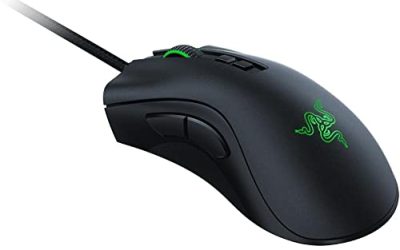
The DeathAdder V3 Pro is the comfort pick for players whose sessions run long. Its refined ergonomic shape fills the right hand without sharp edges, and at 63 grams it avoids the wrist load heavier ergonomic mice bring to an evening of dungeon and raid clears. The Focus Pro 30K sensor and Gen-3 optical switches deliver the same tier of tracking and click response as the Basilisk, while the 90-hour battery covers a week of play between charges. Like the Superlight 2, it keeps only five programmable buttons, so it fits Guardians who bind abilities to the keyboard and want their mouse hand focused purely on aim.
Specs
- Sensor: Focus Pro 30K optical, up to 30,000 DPI
- Programmable buttons: 5
- Switches: Razer Optical Gen-3
- Connectivity: HyperSpeed wireless, USB wired
- Battery life: Up to 90 hours
- Weight: 63 g
- Charging: USB-C
Best for: Palm-grip players who raid for hours and prioritize comfort.
Watch out for: The large shell can feel oversized in smaller hands.
ASIN: B0B6XZLNHQ
Which One Fits Your Situation
You Run Ability-Heavy Builds in Endgame PvE
If your Strand or Prismatic build throws grenades, melees, and class abilities on a constant rotation, pick the Logitech G502 X Plus. Its thirteen controls give every ability a dedicated thumb input, which keeps your movement keys free during mechanics. The Basilisk V3 Pro is the close alternative if you also want a sniper clutch for boss damage phases. Either way, spend ten minutes in orbit finalizing binds before your first raid, not mid-encounter.
You Mostly Play Trials and Competitive Crucible
Pick the Logitech G Pro X Superlight 2. PvP punishes slow aim corrections more than it rewards extra buttons, and the 60-gram shell with 8 kHz polling is built exactly for fast, repeated flicks between lanes. Your abilities can stay on familiar keyboard keys, where most competitive players already have them. If you use a palm grip and find flat mice uncomfortable, the DeathAdder V3 Pro gives you nearly the same lightness in an ergonomic shape instead.
You Play Long Sessions and Your Hand Aches Now
Choose the Razer DeathAdder V3 Pro. The combination of a supportive right-handed shape, 63-gram weight, and 90-hour battery directly addresses the three usual causes of session fatigue: poor palm support, excess mass, and mid-night charging interruptions. Set a moderate sensitivity so your shoulder, not just your wrist, shares the aiming work. If your ache comes mainly from a dragging cable rather than shape, the wireless Basilisk V3 Pro is worth considering despite its extra weight.
You Want Plenty of Buttons but Play at One Desk
The SteelSeries Rival 5 was made for your setup. It keeps nine programmable buttons, including that useful five-button side panel, in an 85-gram wired body that never needs charging and never drops a connection. The cable is the only compromise, and a simple bungee or a clear desk edge mostly erases it. This is also the sensible pick if you rotate between Destiny 2 and other genres, since the side panel layout adapts well to MOBA and MMO hotkeys too.
Common Mistakes
- Buying by maximum DPI alone, when Destiny 2 aim depends far more on shape, weight, and a sensitivity you can control than on a five-figure sensor rating.
- Putting every ability on the mouse but leaving interact on a distant key, so revives and mechanic pickups still force your hand off movement.
- Copying a streamer’s very low sensitivity with a heavy mouse, a pairing that makes turning on flankers painfully slow.
- Leaving RGB and maximum polling enabled without a charging routine, then having the battery die during the final raid encounter.
- Judging a new mouse in one session, before your thumb has learned a new side-button layout, and returning it too early.
Frequently Asked Questions
How many mouse buttons do you actually need for Destiny 2?
Most players are well served by two side buttons plus a wheel click, which covers grenade and melee while class ability stays on the keyboard. Players running ability-heavy Prismatic or Strand builds benefit from nine or more programmable controls, like the G502 X Plus offers, because finisher, interact, and class ability can all move to the thumb without crowding.
Is a lighter mouse always better for Destiny 2 aim?
Not always. Lighter mice help with fast flicks and reduce fatigue, which is why the 60-gram Superlight 2 suits Crucible play. But Destiny 2 also involves long tracking on bosses and Champions, where a slightly heavier, well-shaped mouse can feel steadier. Your grip and sensitivity matter more than chasing the lowest number on the spec sheet.
What sensitivity should you use with these mice?
A common starting range is 800 DPI with an in-game sensitivity between 4 and 8, adjusted so one comfortable swipe turns your Guardian roughly 180 degrees. Change one variable at a time and give each setting a full activity to settle. All five mice here store DPI settings through their software, so you can keep a PvP and PvE stage ready.
Can you use these mice for Destiny 2 on console?
Destiny 2 on PlayStation and Xbox does not support mouse and keyboard input for gameplay, so these picks are for the PC version on Steam or the Epic Games Store. The wireless models can still serve double duty as your everyday PC mouse, and the Rival 5 works with any computer, but none of them will control your Guardian on a console.