🛒 Best Price Today on Amazon
Prime members get fast, free shipping on everything above, plus member-only deals. New members get a 30-day free trial — cancel anytime.
A mouse changes mobile gaming more than most players expect. Shooters, strategy titles, cloud gaming services and remote desktop play all feel different the moment a real pointer replaces a fingertip, and Android phones and tablets, iPads and Chromebooks all accept a Bluetooth mouse without adapters or fuss. The catch is that a desk gaming mouse is usually the wrong tool for the job: too big for a bag, tied to a USB receiver, and hungry for charging.
The best mouse for mobile gaming is therefore a travel mouse that never forgot how to game. It connects over Bluetooth so it pairs with a phone or tablet directly, it is compact and light enough to live in a bag, its battery lasts long enough to forget about, and underneath it still carries a genuine gaming sensor and switches. The five picks below all meet that brief, from a sub-60 gram featherweight to a compact ergonomic model with a full set of programmable controls.
As an Amazon Associate, we earn from qualifying purchases.
Quick Picks
| Product | Best for | Key point |
|---|---|---|
| Razer Orochi V2 (Black) | The lightest travel gaming mouse | Under 60 g with Bluetooth and up to 950 hours of battery |
| Razer Basilisk Mobile | Compact ergonomic comfort with many controls | 10 programmable controls and tri-mode connection |
| SteelSeries Rival 3 Wireless Gen 2 (Black) | Simple, durable and battery powered | Bluetooth 5 and 2.4 GHz with 60 million click switches |
| ASUS ROG Keris Wireless AimPoint (Black) | A full gaming sensor in a travel size | 36,000 DPI AimPoint sensor and tri-mode connection at 75 g |
| Keychron M3 Mini | One mouse for phone, tablet and PC | Bluetooth 5.1, 2.4 GHz and wired modes in a mini shell |
How to Choose
Bluetooth is the entry requirement. Phones and tablets have no spare USB ports for a receiver, so a mobile gaming mouse must pair over Bluetooth directly. Every pick here does. Models that also include a 2.4 GHz receiver are worth more, because the same mouse can then serve your PC at a desk with lower latency, but Bluetooth is the mode that makes the mobile part of the brief work at all.
Check the platform, not just the mouse. Android and ChromeOS give a mouse full pointer control in games and apps. iPadOS supports a pointer across the system, though individual games decide how much mouse control they allow. Cloud gaming and remote play services generally pass mouse input through well. Before buying any mouse for one specific title, confirm that title accepts mouse input on your platform.
Size and weight decide whether it travels. A mobile mouse earns its place by living in a bag, which means compact dimensions and a weight that does not announce itself. The picks here range from under 60 g to a still-portable 75 g class, all in shells smaller than a full-size desk mouse. If a mouse feels like a burden to pack, it will be left at home, and a left-behind mouse has no specifications at all.
Battery style matters on the road. Replaceable AA or AAA batteries, used by the Orochi V2 and the Rival 3 Wireless Gen 2, can be swapped anywhere in the world in seconds. Rechargeable models remove battery buying but need a cable and a power source at the right moment. For travel, think about which failure mode you would rather manage in an airport or a hotel room.
Do not accept an office sensor in a gaming shell. Travel mice often hide weak sensors behind gaming branding. The picks here use real gaming optical sensors rated from 18,000 DPI upward, with tracking speeds that hold up in fast games. That headroom is what separates a mouse you can genuinely game on from a pointer that merely connects.
Best Options
Razer Orochi V2 (Black)

The Orochi V2 is the reference design for this category: a compact symmetrical shell that weighs under 60 g with a lithium battery fitted, yet still carries a proper 18,000 DPI gaming sensor and Razer’s second-generation mechanical switches. It connects over Bluetooth for phones and tablets, and over HyperSpeed 2.4 GHz wireless for a PC, switching between the two with a toggle underneath.
Battery life is the headline. Razer quotes up to 950 hours in Bluetooth mode and up to 425 hours over the 2.4 GHz connection, powered by a single AA or AAA battery, your choice depending on whether you prefer runtime or the lowest possible weight. Weeks of travel between battery swaps is normal. The shell suits small and medium hands in claw or fingertip grips, and the whole package disappears into a bag pocket in a way no desk mouse can.
Specs
- Bluetooth and HyperSpeed 2.4 GHz wireless; optical sensor up to 18,000 DPI; weight under 60 g depending on battery fitted; battery life up to 950 hours in Bluetooth mode and up to 425 hours in 2.4 GHz mode; runs on one AA or AAA battery; compact symmetrical shell
Best for: The lightest travel gaming mouse
Watch out for: Too small for large hands and relaxed palm grips, and there is no wired mode if the battery dies mid-session
Razer Basilisk Mobile

The Basilisk Mobile shrinks Razer’s ergonomic Basilisk line into a travel format without giving up its identity. The right-handed sculpted shell supports the palm in a way flat travel mice cannot, and the control count is remarkable for the size: 10 programmable controls, including the signature HyperScroll wheel that switches between notched and free-spinning movement, plus optical switches rated for fast, consistent clicks.
Connectivity is tri-mode, covering 2.4 GHz wireless, Bluetooth and wired USB-C, so one mouse genuinely covers phone, tablet and PC. The Focus X 18K optical sensor keeps tracking honest in real games, and battery life runs up to 105 hours depending on mode. It is the pick for players who found the Orochi V2 a little too minimal and want their travel mouse to feel like their desk mouse, only smaller.
Specs
- Tri-mode connection with 2.4 GHz wireless, Bluetooth and wired USB-C; Focus X 18K optical sensor; 10 programmable controls; HyperScroll tilt wheel; Razer Optical Mouse Switches Gen-3; battery life up to 105 hours; compact right-handed ergonomic shell
Best for: Compact ergonomic comfort with many controls
Watch out for: The ergonomic shape is right-handed only, and it is the bulkiest shell here for very small bags
SteelSeries Rival 3 Wireless Gen 2 (Black)

The second generation of the Rival 3 Wireless keeps the formula that made the original a travel staple: dual wireless connection, replaceable batteries and a sensor that belongs in a gaming mouse. Bluetooth 5 handles phones and tablets, the 2.4 GHz Quantum 2.0 connection handles PC play, and the TrueMove Air optical sensor delivers up to 18,000 CPI of accurate tracking.
SteelSeries fits mechanical switches rated for 60 million clicks, which addresses the durability question that hangs over travel gear that gets knocked around in bags. Power comes from AAA batteries, keeping the swap-anywhere advantage, and the shell is a straightforward symmetrical design that most hand sizes can use comfortably. It lacks the exotic numbers of the ROG pick below, but as a dependable, affordable-feeling all-rounder for gaming on the move, it is hard to fault.
Specs
- Bluetooth 5 and 2.4 GHz wireless; TrueMove Air optical sensor up to 18,000 CPI; mechanical switches rated for 60 million clicks; powered by AAA batteries; symmetrical shell; durable polymer construction
Best for: Simple, durable and battery powered
Watch out for: No wired fallback mode, and the design is plain compared with the Razer and ROG picks
ASUS ROG Keris Wireless AimPoint (Black)

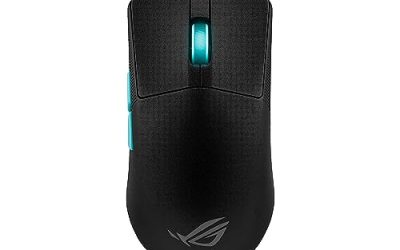
The Keris Wireless AimPoint is the pick for players who refuse to compromise on the sensor just because the mouse travels. Its ROG AimPoint optical sensor reaches 36,000 DPI with tracking that matches full-size esports mice, inside a 75 g shell that remains genuinely portable. Tri-mode connectivity covers 2.4 GHz, Bluetooth and wired USB-C, with Bluetooth pairing for the phone or tablet in your bag.
Battery life runs up to 119 hours in its efficient modes, and ROG fits optical micro switches for crisp clicks plus socketed switch design heritage that tinkerers appreciate. The shape is a compact right-handed ergonomic form developed with esports input, so longer cloud gaming sessions on a tablet stay comfortable. Among these five, this is the mouse that most completely erases the line between travel mouse and desk mouse.
Specs
- Tri-mode connection with 2.4 GHz wireless, Bluetooth and wired USB-C; ROG AimPoint optical sensor up to 36,000 DPI; weight 75 g; battery life up to 119 hours; ROG optical micro switches; compact right-handed ergonomic shell; PTFE feet
Best for: A full gaming sensor in a travel size
Watch out for: The most desk-like size and weight here, so ultralight packers may prefer the Orochi V2
Keychron M3 Mini

The M3 Mini is the multi-device organiser’s pick. Its tri-mode connection spans Bluetooth 5.1 for phones and tablets, a 2.4 GHz receiver for PC gaming and a wired USB-C mode, and the mini shell packs flat into a bag or even a large pocket. Keychron lists the sensor at up to 26,000 DPI, which is proper gaming territory, far beyond what travel mice usually offer.
The appeal is consolidation: one small mouse that pairs with the tablet on the train, the phone for cloud gaming at the hotel, and the PC when you get home. Keychron’s configuration tools cover DPI and button settings without bloat. Players with large hands should treat the mini name as a warning, but for everyone else it is the most flexible single purchase in this guide.
Specs
- Bluetooth 5.1, 2.4 GHz wireless and wired USB-C modes; optical sensor up to 26,000 DPI; mini symmetrical shell; rechargeable battery; USB-C charging; multi-device pairing across phone, tablet and PC
Best for: One mouse for phone, tablet and PC
Watch out for: The mini shell is too small for large hands or full palm grips, and mobile players who never touch a PC may not need its third mode
Which One Fits
- Choose the Razer Orochi V2 if you want the lightest, longest-lasting travel mouse and your hands suit a compact symmetrical shell.
- Choose the Razer Basilisk Mobile if you want ergonomic support and a full control set, including the dual-mode scroll wheel, in your travel mouse.
- Choose the SteelSeries Rival 3 Wireless Gen 2 if you want a durable, simple dual-wireless mouse with batteries you can replace anywhere.
- Choose the ASUS ROG Keris Wireless AimPoint if sensor performance is non-negotiable and you accept a little more size to get it.
- Choose the Keychron M3 Mini if one mouse must serve your phone, your tablet and your PC across the whole week.
Common Mistakes
Buying a receiver-only mouse for a phone. A 2.4 GHz dongle has nowhere to plug into most phones and tablets. If Bluetooth is not on the specification, the mouse will not pair, no matter how good its gaming credentials are.
Assuming every mobile game accepts a mouse. Platform support and game support are separate questions. Confirm your main titles handle mouse input on your device before building a setup around them, especially on iPad where support varies most by game.
Packing a full-size desk mouse instead. Weight and bulk are why travel mice exist. A mouse that stays home helps nobody; the compact picks here exist so the mouse is actually in the bag when the gaming moment arrives.
Forgetting a surface. Hotel desks, train tables and glass surfaces challenge any sensor. A thin travel mouse pad or even a notebook cover under the mouse keeps tracking consistent away from home.
FAQ
Can you really game with a mouse on a phone?
Yes, within what each platform and game allows. Android offers the broadest mouse support, cloud gaming services pass mouse input through well, and many strategy, simulation and shooter titles play noticeably better with a real pointer than with touch alone.
Is Bluetooth responsive enough for gaming?
For mobile and cloud gaming, yes. Bluetooth adds a little latency compared with a 2.4 GHz receiver, which is why every pick here also offers 2.4 GHz or wired modes for PC play. In the mobile context, network and display delays in cloud gaming are far larger than the Bluetooth link.
How long do batteries last in a travel gaming mouse?
It varies by design. The Orochi V2 stretches a single battery to up to 950 hours in Bluetooth mode, while rechargeable models like the Keris Wireless AimPoint quote up to 119 hours per charge. Either way, running out mid-trip is unlikely if you leave with a fresh battery or a full charge.
Will these mice also work as my main PC mouse?
Several of them can. The Basilisk Mobile, Keris Wireless AimPoint and M3 Mini all include 2.4 GHz and wired modes with full gaming sensors, so they can serve as a single-mouse setup. The Orochi V2 and Rival 3 Wireless Gen 2 also game well on PC over 2.4 GHz.
Final Verdict
The Razer Orochi V2 remains the purest answer to this brief: the lightest shell, the longest battery life and a real gaming sensor in a mouse that vanishes into a bag. The Basilisk Mobile adds comfort and controls, the Rival 3 Wireless Gen 2 adds durability and simplicity, the ROG Keris AimPoint adds flagship tracking, and the Keychron M3 Mini adds the most flexible pairing. Pick by the trips you actually take, and mobile gaming stops feeling like a compromise.