🛒 Best Price Today on Amazon
Prime members get fast, free shipping on everything above, plus member-only deals. New members get a 30-day free trial — cancel anytime.
Buy the K65 Plus Wireless if you like its stock MLX Red switches and already use iCUE. Choose the V1 Max if you want gasket mounting, more stock switch choices, or QMK-based remapping. In Corsair K65 Plus Wireless vs Keychron V1 Max, those differences matter more than polling rate. Both offer 1,000 Hz over USB or 2.4 GHz.
Which 75% wireless keyboard should you buy?
Choose the K65 Plus for its ready-to-use linear build
The standard K65 Plus Wireless gives you pre-lubed MLX Red switches, dampened acoustics, and a multifunction dial in a familiar 75% format. It suits a buyer who wants to plug in the receiver, keep the stock feel, and configure lighting or shortcuts through iCUE. If a Corsair mouse or headset already uses the same application, combining those settings can be convenient.
Corsair also advertises up to 266 hours with LEDs off. That is a reason to compare it when you usually keep the board unlit.
Decide separately whether you need the larger rating and whether you like typing on a linear switch. A high runtime cannot give a switch a tactile bump.
If you want a ready-to-use layout and may change a few switches down the line, this is a sensible first choice. If you already plan to replace the entire stock switch set and keycaps, compare the total cost with a barebones Keychron, if one is available for the layout you want.
Choose the V1 Max for firmware, a softer build, or a different switch
The V1 Max uses a gasket mount and polycarbonate plate. It is a strong fit if you like a softer typing platform or want to change its behavior. Keychron sells assembled variants with Gateron Jupiter switches including Red, Brown, and Banana where available, and it has offered a barebones option for people bringing their own caps and switches.
QMK-based configuration is the main software reason to pick it. Use Keychron’s supported configuration workflow for layers, remaps, and the dial. This suits a buyer who wants to keep important keyboard behavior in the board rather than expecting a background application to run on every machine.
Verify that the box says V1 Max. The original V1 and the newer V1 8K and V1 Ultra 8K use different designs or feature sets.
Compare both at the same regional layout and with the exact switch or barebones package selected. A lower barebones price is only meaningful if you already have the parts or include them in the comparison.
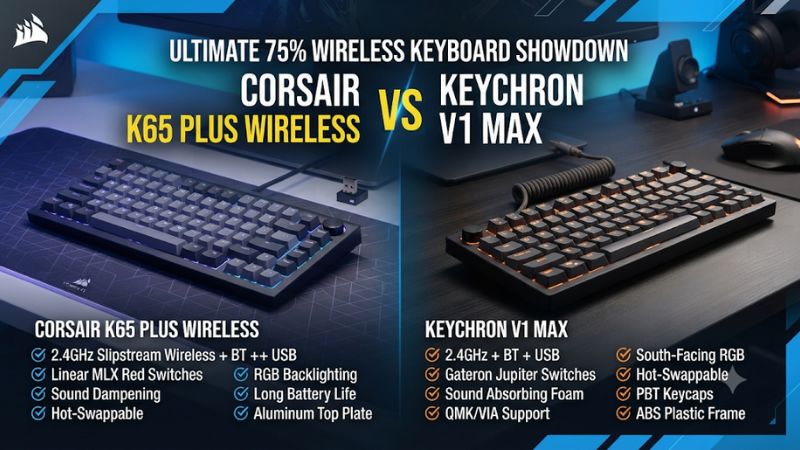
| Feature | Corsair K65 Plus Wireless | Keychron V1 Max |
|---|---|---|
| Layout | 75% with arrows, function row, and multifunction dial | 75% with arrows, function row, and knob |
| Standard stock switches | Pre-lubed Corsair MLX Red linears on the common black unit | Assembled choices include Gateron Jupiter Red, Brown, and Banana |
| Build | Plastic case, internal steel plate, two dampening layers | Plastic case, gasket mount, and polycarbonate plate |
| Stock caps, common assembled version | Dye-sublimated PBT; non-shine-through | Double-shot PBT, OSA; non-shine-through |
| Mechanical switch replacement | Hot-swap; Corsair documents Cherry MX RGB and possible third-party fits | Hot-swap sockets rated for most 3-pin and 5-pin MX mechanical switches |
| Gaming paths | USB and 2.4 GHz; 1,000 Hz | USB and 2.4 GHz; 1,000 Hz |
| Extra wireless path | Bluetooth | Bluetooth |
| Published lights-off maximum | Up to 266 hours | Up to 190 hours |
| Main configuration | iCUE and hardware profiles | QMK-based remapping with Keychron Launcher, with supported settings stored on the keyboard |
What changes under your fingers in typing and games?
Compare linear with linear before comparing the mounts
The K65 Plus’s stock reds are linear. The V1 Max with Jupiter Red gives you a comparable starting point if you want to isolate other differences.
A Jupiter Brown or Banana changes the feel by adding a tactile bump. If you compare a linear Corsair against a tactile Keychron, the switch is already a large part of what you feel.
Type a short ordinary task, then run a movement drill with frequent stops and reversals. Notice whether you accidentally press a key while resting on it and whether you like how the feedback tells you it actuated. A slightly different spring or bump can matter more to you than how much the mount flexes under a deliberately heavy press.
If you mostly play and type lightly, the board may feel different from the result of a dramatic demonstration that pushes down hard on the center. Use your normal force. Compare the same few keys and include the space bar because its weight and stabilizer can change the overall impression.
Use the gasket mount as a feel preference
Keychron documents a gasket mount and polycarbonate plate for the V1 Max. That construction aims for a softer keystroke and less resonance.
Corsair instead makes much of its dampening layers and smooth stock switches, and Tom’s Hardware describes an internal steel plate. These are different approaches to building a 75% board.
The Keychron is the more natural choice if you specifically want the gasket build and its associated feel, all else being equal. The Corsair can appeal if you like a firmer feel and the supplied sound.
Neither design guarantees how loud it will seem on your desk. The pad, surface, caps, and your typing technique contribute.
If you have a chance to test the keyboards, check for an annoying sound on an ordinary word or a repeated movement rather than judging a sound clip alone. Microphone distance and gain can change impressions in online recordings. An acceptable sound in your own room is enough if acoustic tuning is not your main concern.
Check cap profile, sizes, and legend visibility
The assembled V1 Max commonly uses OSA double-shot PBT caps. The K65 Plus standard black model uses dye-sublimated PBT.
Both stock setups have opaque legends, so RGB mainly shows around the caps. If you game in a dark room and need illuminated characters, plan a compatible replacement set or budget a small desk light.
Profile changes can affect how easily you find the next key when moving quickly. Test several ordinary shortcuts or number keys and decide whether one shape helps guide your fingers.
A heavier cap can also change the perceived sound. Use the stock position before trying to choose a new profile from a photo.
Check special cap widths and the precise regional layout before a swap. A set with the right switch mount can still lack a compact Shift, navigation key, or a needed language legend. The small keys around the arrow cluster deserve a quick inventory before you order.
Which remapping and wireless setup works better?
Choose iCUE for familiar device profiles and RGB
Corsair’s hardware mode can keep supported basic settings available when iCUE is closed. Configure one shortcut and one lighting setting in the software, then verify whether they remain in the active onboard profile. A convenient software command on one desktop may depend on the app, while a hardware-stored key assignment can be available on more hosts.
The Corsair dial is useful if it does the job you reach for while playing, such as volume. Test it with a call and game running.
If you want another action, find the supported choices and confirm whether it works outside iCUE. This can reveal whether the Corsair controls suit your actual daily configuration.
If you already synchronize Corsair devices, confirm that the keyboard participates in the parts of your setup you care about. A unified app can be more convenient than maintaining separate utilities. If you mostly keep the keyboard unlit and use one map, that advantage is smaller.
Choose Keychron for QMK and keyboard-side layers
The V1 Max uses a QMK-based configuration. Keychron’s Launcher instructions ask for a supported browser such as Chrome, Edge, or Opera and a wired connection while you configure it. Check that your computer can access that setup path, especially on a work device with restricted USB access.
Create a small layer for frequently used commands and leave a way to return to the base layout. Save a plain set of settings first so you can recognize a problem if the keyboard starts doing something unexpected. Test your remaps after disconnecting the setup cable and using the receiver.
The V1 Max makes more sense for someone who has specific layer or remapping needs. If your only customization is changing the brightness or assigning the dial to volume, both workflows can do the basics. Choose based on how often you will actually enter the configuration tool.
Use wired or 2.4 GHz for the main gaming comparison
Keychron publishes 1,000 Hz in receiver and wired modes. RTINGS reports 1,000 Hz for those modes on the K65 Plus too.
This places the two boards in the same broad report-rate class, and does not establish identical latency. The game and the complete keyboard input path determine how quickly an action registers.
RTINGS flagged a multi-key release behavior on the K65 Plus that might matter to rhythm players. Its Keychron series review tested a V5 Max, a different layout in the same family.
Avoid borrowing those exact measurements as a direct K65 Plus against V1 Max score. If your games rely on tightly timed chords, verify the exact boards and intended modes.
Bluetooth is useful for switching to another machine, where available shortcuts and response can differ. Start on the intended receiver for the main game, then try USB as a second path. If the board only fails at a particular distance or through a dock, resolve that connection before evaluating the layout or switch.
Which design is easier to keep across different setups?
Compare a work and game profile without relying on shortcuts you rarely use
For a shared work and gaming desk, choose the most common actions on the keyboard and try them first. In a game, a simple volume control and a reliable modifier may be enough.
At work, you might want one remapped navigation key and a layer you can access with the thumb. Confirm which workflow makes those few settings easier to save and restore.
On the Corsair, create a supported hardware assignment and close iCUE to check it. Then try an application-specific assignment and see when it becomes available.
This shows which features depend on the app. The distinction matters if the keyboard travels to a computer on which you cannot install it.
On Keychron, plug in for Launcher configuration and make a reversible change to an unused key or layer. Disconnect, return to the receiver, and confirm the device still reports the intended action. If the remap does not apply, check the current layer and operating system selection instead of creating a second copy of the keymap.
This test gives both boards a fair role. If your needs are simple and you already use iCUE, managing another configuration interface may add little. If you need the same basic custom layout on several hosts, the keyboard-side approach may fit your routine better.
Check the device switch and layout in normal use
Both keyboards offer wireless options for a secondary device. That makes them reasonable when a laptop shares the desk with the gaming system.
Decide which device gets the receiver and try moving to a secondary Bluetooth connection while an ordinary application is open. Switch back and confirm that the board and game both follow the intended path.
Keychron’s V1 Max specifications list Bluetooth polling separately from its receiver and wired modes. The receiver is the relevant 1,000 Hz wireless route if that is why you are choosing it.
Do the equivalent check on the Corsair. A shortcut that changes devices can also change the perceived input delay when it moves you to another connection.
If one computer has a compact selection of ports or uses a dock, connect the receiver there before deciding which board is easier to live with. Try both game and ordinary typing with the rest of your equipment active. If it only works reliably at a direct port, account for that placement before you decide which board conveniently fits both hosts.
Decide whether you are buying an assembled board or a project
A fully assembled K65 Plus is the obvious comparison with an assembled V1 Max. Pick the closest switch feel you would genuinely buy.
If a tactile V1 Max saves you the cost of swapping the Corsair’s stock linears, include the savings. If you already own a full compatible set, a barebones V1 Max can make more sense than paying for parts you plan to remove.
Think about the amount of installation you want. Swapping two keys is a small change.
Installing a complete match of switches and caps takes more time, especially if you need to verify each socket, the right Shift width, and any spare parts you expect to use. A lower purchase price can be offset by parts and handling.
Check the exact switches on the selected listing. Colors and regional kits may have different configurations.
If two stores sell the same full name with different included parts, compare what arrives in the box rather than treating both as equivalent. That is especially important when you want a particular switch feel rather than a specific case color.
Compare replacement needs over the way you use the board
Decide whether your first likely change is replacing a single failed switch, adding a different feel, or improving visibility. A supported hot-swap socket helps with the first two.
Cap size and light direction matter for the third. A single stock board does not need to be the best platform for all types of modification to work for your needs.
Use a few common commands and check whether the large keys feel predictable before replacing parts. If a large key feels inconsistent, another cap or a stabilizer check may be more relevant than swapping the switch. If the repeated presses are too light or too heavy, compare a switch sample in the right position.
Even when you plan to modify the board, keep some stock switches or caps available for troubleshooting. Test a changed key on its original mapping and then in the normal game. A reversible change makes it easier to decide whether the replacement solved the problem.
How should you compare battery, parts, and price?
Compare runtime after deciding how you use the lights
Corsair rates the K65 Plus for up to 266 hours with LEDs off. Keychron lists up to 190 hours with backlighting off and up to 100 hours at the lowest RGB brightness.
Both ratings depend on manufacturer test conditions and actual settings. The published lights-off figures favor the Corsair on paper without establishing its margin in your routine.
Check the lighting you want before making runtime decisive. Some people rarely turn it on because the stock legends do not shine through.
Others use it to orient their hands at night. Brightness, sleep habits, and connection mode can shift how often the keyboard actually needs charging.
If you keep the board on a desk with a ready data cable, a battery difference may matter less than the stock switches or mapping. If you share it between systems away from an outlet or do not want spare cables on the desktop, test the charging routine early.
Calculate the cost of the build you actually want
The assembled Corsair is a complete board with switches and caps. The V1 Max assembled options give you more stock switch choices.
A barebones version shifts the cost of switches and caps to you. Price the case, materials, and any extra caps for your exact layout before calling one a better deal.
Both boards support conventional swap options, but their published compatibility differs. Corsair explicitly documents Cherry MX RGB mechanical switches and notes that other three- or five-pin designs may fit.
Keychron says the V1 Max accepts most compatible three- and five-pin MX mechanical designs. Check the switch housing and try a small batch first.
If a change is mainly for feel, test a few switches in the positions you use most. If it is for legibility, test keycaps.
Those are separate reasons to spend money and may lead you to keep the original switches. An upgrade plan is more useful when it solves a specific problem and fits the total price.
Run a short comparison in your normal setup
- Place both boards at the same spot. Use the same chair, mousepad, and hand position. Verify that the arrows and dial are where you expect.
- Use the same connection. Compare them on each model’s receiver or check both by USB. Observe ordinary key presses, holds, and releases in the same scene.
- Test one important remap. Verify it in the game, then close the configuration software or reconnect to confirm the saved behavior.
- Compare a normal typing task. Try the large keys, number row, and navigation group. Record any repeated mistakes before changing switches.
- Price the exact option. Include replacement caps, accessories, and switches in the amount you would pay. Confirm that the receiver and any needed configuration cable are included.
Give both boards time in your usual games and a few desktop tasks. If the difference in how they register movement is difficult to notice, the dock behavior, stock switches, and how easily you can restore a profile become more important. Choose the one you can set up and leave alone between matches.
Conclusion
Choose the Corsair K65 Plus Wireless if you want smooth stock linears, iCUE, and the stronger published lights-off battery figure. Choose the Keychron V1 Max for a gasket build, more assembled switch options, or QMK-based keymaps. Both have a useful 75% layout and 1,000 Hz gaming connections, so compare the precise build and settings you will keep.