🛒 Best Price Today on Amazon
Prime members get fast, free shipping on everything above, plus member-only deals. New members get a 30-day free trial — cancel anytime.
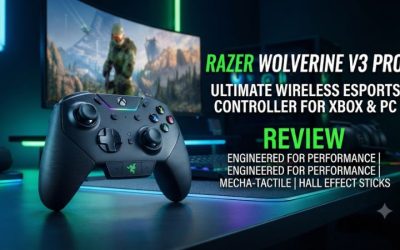
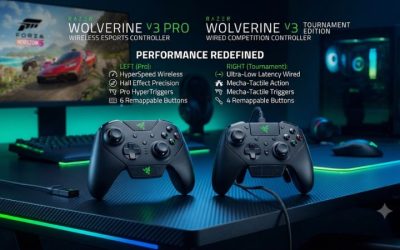
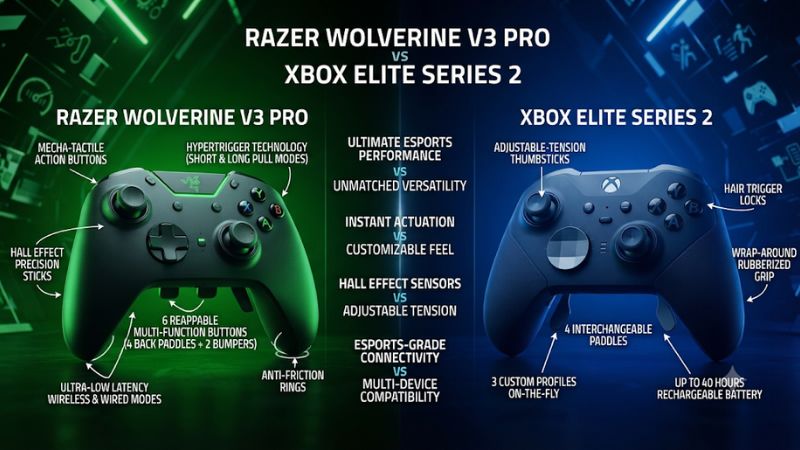
In Razer Wolverine V3 Pro vs Xbox Elite Series 2, choose the Razer for clicky trigger stops, Hall-effect sticks, and six extra buttons. Pick the Elite for native Xbox Wireless, removable paddles, and adjustable stick tension. The better fit depends on which controls you can reach and how often you swap devices.
The differences that should decide your purchase
The Wolverine V3 Pro makes the most sense for a shooter-focused player who wants a tactile short pull and extra buttons around the rear and shoulders. The Elite Series 2 makes the most sense for a player who wants to vary stick resistance, choose among three trigger depths, or remove some of the rear paddles. On Xbox, the Elite pairs directly with the console. The Razer uses its included receiver for wireless play.
| Feature | Razer Wolverine V3 Pro for Xbox | Xbox Elite Wireless Controller Series 2 |
|---|---|---|
| Wireless on Xbox | Included HyperSpeed USB receiver | Native Xbox Wireless |
| PC connection | Included USB receiver or USB cable | USB, Bluetooth, or compatible Xbox Wireless hardware |
| Trigger feel options | Full-range analog pull or short mouse-click stop | Three physical trigger depths |
| Stick hardware | Hall-effect sensors with interchangeable caps | Adjustable mechanical tension with interchangeable caps |
| Additional controls | Four fixed back buttons and two extra bumpers | Up to four removable rear paddles |
| Configuration | Razer Controller Setup for Xbox and supported Windows software | Xbox Accessories |
| Power and included accessories | Internal battery, detachable cable, receiver, spare caps, and case | Internal battery, cable, and full bundle with paddles, charging base, case, and interchangeable parts |
| Best fit | Shooters and players who want extra shoulder inputs | Mixed genres and players who want more physical fit options |
This comparison covers the Xbox-compatible Wolverine V3 Pro and the full Elite Series 2 package. The Series 2 Core uses the same general controller platform with a reduced accessory kit, including no bundled paddles or charging base. Razer also sells a similarly named V3 Pro 8K PC model, so check Xbox compatibility against the selected store variant.
Choose the Razer if you already know you want a trigger click
A short tactile click is the most direct reason to pick the Razer. The mechanism has a distinct endpoint, and returning from a short press takes less finger travel than making another full squeeze. It feels natural when the trigger mainly performs a digital action like firing, aiming, or activating an ability.
The effect is easy to evaluate. Choose a semiautomatic weapon and fire deliberate single shots, then repeat with quick taps. Try changing the left and right switches independently. Some players like the click on the firing side and prefer the longer pull on the aiming side so their resting finger is less likely to press it.
Give the shoulder buttons and rear controls the same test. Map only one or two actions at first and see whether you can press them while continuing to aim. If the extra bumpers are easy to reach and you use them in play, they give the Razer a genuine layout advantage for you.
Choose the Elite if you want more physical adjustments
The Elite gives you three trigger depths and adjustable stick resistance. Its removable paddles let you change the amount of hardware under your fingers. Use two, four, or none depending on how comfortably you grip the controller and how many actions you routinely move off the face buttons.
The middle trigger stop is particularly useful if you find the shortest setting too sensitive or abrupt. It gives you another travel option before returning to full pull. A player who alternates between a shooter and a driving game might use a shorter stop for firing and the full pull for analog braking, while another player uses the middle setting as a more relaxed everyday choice.
On Xbox, native wireless pairing keeps the controller from taking up a console USB port. That can be decisive if your ports are already assigned or if you move between setups that have room for the controller but no convenient place to leave a receiver. On Windows, the usability of each connection type depends on the PC, the game, and the features you want to use.
Triggers, sticks, and extra controls in real games
Short click versus three trigger depths
The Razer offers two distinct trigger modes. With full analog travel, you can feed incremental values into a compatible game. In the short mode, the physical feel approaches a mouse click. The Elite uses three physical trigger depths, with a middle position between the shortest and longest settings. Microsoft’s controller supports changing the physical position without requiring you to reconfigure Xbox Accessories for every switch movement.
For shooters, test the shortest setting against the weapon you use. A player who taps a pistol will notice reset travel more often than a player who holds the trigger for sustained automatic fire. You may also need to adjust the game’s threshold if a trigger reacts sooner than you expect or a custom setting prevents it from reaching the intended action reliably.
For racing, compare both with full travel. Try holding a partial brake input and then releasing it gradually as you turn into a corner. A constant full-throttle test misses the reason you want analog travel. Consider how your hands react after a full session. A click that is appealing in a brief demo may feel abrupt over long play, while a comfortable middle stop may end up being the setting you use every day.
Hall-effect sensing and stick tension solve different problems
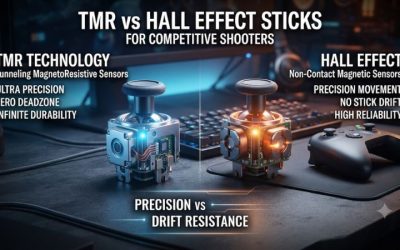
The Razer uses Hall-effect sensing for the sticks. That avoids the contact-based position sensing used by conventional potentiometers. It still has a mechanical centering assembly, and a usable deadzone may be appropriate if the stick settles slightly off-center. Evaluate its return to center and its small-movement response in your actual game.
The Elite lets you alter the mechanical resistance with its adjustment tool. That can be useful if you tend to push the stick too far and want a stiffer physical feel, or if you prefer a lighter movement for quick turns. Changing tension changes what your thumb feels. The controller and game also offer separate ways to adjust deadzones or response characteristics.
Both controllers support interchangeable caps. To compare cap height, leave sensitivity and deadzone stable until you have experienced the new leverage. For a closer comparison between pads, choose roughly similar cap heights first, and then customize each after trying the standard options. That helps you distinguish a sensor or tuning preference from a difference in how far your thumb moves.
If you are choosing a used device, test each stick rather than relying on the technology listed in the ad. Watch the input at rest and after repeated releases. Confirm the stick reaches the expected range and that the stick click works without unusual pressure. This matters for either controller.
Fixed back buttons and removable paddles suit different grips
The Razer’s four rear buttons and two extra bumpers create six available inputs. The Elite’s four removable paddles give you more control over which parts are physically present. The important comparison is how many controls you can use while maintaining normal access to both triggers and both sticks.
Try a practical action sequence. Aim at a fixed object, use a rear jump or crouch control, and return your index fingers to their normal trigger position. Next, grip the pad firmly while keeping the camera still. If you activate another rear command accidentally while tightening your grip, move the mapping or remove the offending Elite paddle during the test.
On the Razer, check reach to the two extra shoulder controls while aiming and firing. On the Elite, try two paddles before installing all four. If you play varied games, a low-clutter layout may make it easier to hand the controller to another person or switch to a genre where rear inputs give you less benefit.
Face buttons and the D-pad are personal fit checks
The Razer’s tactile face buttons and floating eight-way D-pad are part of its controller feel. The Elite comes with interchangeable D-pad options in the full kit. Try rapid face-button sequences, slow directional menu input, and any diagonals your preferred games use frequently. A difference that matters in a fighting game may carry little weight for a player who uses the D-pad mainly for inventory shortcuts.
Use the controller in your actual posture. Sitting upright at a desk changes wrist and finger position compared with reclining at a couch. A paddle that feels easy to hit in a store can sit differently once you hold the controller for an hour. If you will alternate between both positions, try it in both before making a decision based solely on first impressions.
If you share a room or use a sensitive chat microphone, test trigger and button clicks at normal volume. The tactile noise may have no practical effect in your room, or it may influence where you prefer to use a headset or which trigger mode you pick.
Wireless, PC setup, and battery routine
On Xbox, decide how you want the controller to connect
The Elite pairs directly to Xbox using Xbox Wireless. The Razer uses its HyperSpeed receiver for a wireless Xbox connection and can also play over a USB cable. If you keep the controller at one console, you can leave the receiver installed. If you frequently bring the controller elsewhere, the receiver becomes another accessory to carry and account for.
Think about where the console sits. A front port may give easier access, while a rear port can keep the receiver out of the way. Use a consistent placement if you are comparing connection behavior and observe whether the controller stays connected at your normal seating distance. A proper test should include a normal play session and at least one reconnect after the console or controller sleeps.
If you regularly move between a console and a Bluetooth-capable device, the Elite offers a Bluetooth route for supported devices. Feature availability can vary by device, app, and connection. For the Razer, plan on the receiver or the cable. For either controller, test any headset plugged into the pad on the connection where you need chat.
On PC, compare the mode you actually use
The Wolverine V3 Pro supports Razer’s 1,000 Hz Tournament Mode over wired USB on a compatible PC. Razer lists a lower polling rate for the Pro’s wireless and Xbox use. The higher wired mode can be useful if your setup is already a desk with a direct USB cable and you specifically want more frequent controller reports.
Polling rate refers to the nominal frequency with which reports are sent. It does not capture controller-side processing time or the rest of the chain from game input to a visible frame. Wired, receiver, Xbox Wireless, and Bluetooth results should be compared only when the measurement and connection match what you plan to use. Button measurements and stick measurements can also differ.
For a practical comparison, use the same game, scene, frame-rate setup, and controller layout. Test a quick single press, repeated taps, and a slow aim movement. If you notice stuttering or disconnections on one connection, repeat the run on a wired baseline. That comparison is more useful than trying to infer a universal latency winner from a polling figure or a player’s different home setup.
Compare charging routines alongside advertised battery life
Both controllers have internal rechargeable batteries. Microsoft rates the Elite for up to 40 hours under its specified conditions, and the full package comes with a charging base. For someone who already docks their controller between sessions, the base can make charging almost automatic. The Core bundle changes that comparison because it omits the base.
The Razer includes a USB cable and a carry case. The cable is useful both for charging and for a wired play session. If you use the receiver every evening, plan where you will plug the controller in so you can keep playing when it needs power. Lighting and other settings can affect battery life, and a used unit may have less capacity than the same model when new.
If you buy secondhand, ask for a wireless session off the cable and confirm the controller charges normally. For an Elite with a charging base, test the base separately from the direct USB connection. For the Razer, verify that the receiver pairs and reconnects. The ability to complete a normal session on the connection you need matters more than the original battery claim.
Software, profiles, and what to check before buying
Use the app that matches your configuration habits
The Elite uses Xbox Accessories for supported remapping and customization. It can save up to three custom profiles and a default profile on the controller. That works well if you use a shooter layout, a racing layout, and a simple general-purpose layout. After saving, switch profiles during a game menu or test screen and confirm the active mapping with a single recognizable input.
The Razer uses Razer Controller Setup for Xbox and, where supported, Windows software such as Synapse for additional settings. Use the compatible app to adjust the available controller settings and confirm that your bindings apply to the desired profile. Check both your usual platform and connection if you plan to play on Xbox and PC. A profile that works in one setup deserves a brief verification when you switch to another.
A profile can change how both pads feel. Begin with simple mappings and the default game calibration for a direct comparison, then tune each pad individually once you know which physical controls work for you. A comfortable trigger can seem unreliable when a software threshold is mismatched. Resetting to a known profile helps you see whether the hardware feels right before refining the software.
Price the full kit you need, especially with the Elite Core
Compare the Wolverine V3 Pro with the full Elite Series 2 if you want to use four rear controls as soon as you open the box. The Core can be a better buy when you want the Elite’s adjustable tension and trigger stops and already have the accessories you need, or when you intend to use the pad without paddles. Include the price of any paddle set or charging base you actually plan to add.
On a used Elite, check the paddles, charging base, adjustment tool, case, and swappable parts against the listing. On a used Razer, check the receiver, USB cable, spare caps, and case. Test the connection and inputs before counting an accessory-dependent feature in your buying decision.
Give equal attention to controls that are hard to judge from photos. Press both bumpers from the grip you normally use. Pull the triggers through every setting. Try small right-stick movements and check for drift after release. Make sure the USB plug stays seated during ordinary movement. These checks catch the failures that would most quickly make a premium controller a poor buy.
Choose by your most frequent session
| If this describes you | Start with | Reason |
|---|---|---|
| You play shooters and want a tactile trigger click | Wolverine V3 Pro | Short click stops and six reachable mapping positions if the layout fits |
| You switch between shooters, action games, and racing | Elite Series 2 | Three trigger depths and adaptable rear hardware |
| Your console has no convenient spare USB port | Elite Series 2 | Native Xbox Wireless pairing |
| You want a wired 1,000 Hz mode on a compatible PC | Wolverine V3 Pro | Razer provides the mode over wired USB |
| Rear controls get in the way of your normal grip | Elite Series 2 | You can physically remove individual paddles |
| You rely on extra shoulder controls while aiming | Wolverine V3 Pro | Two extra bumpers complement the four rear buttons |
If you still have no clear winner, try each controller with two rear mappings and your preferred trigger mode for ten minutes. Test the inputs you use while under pressure. Choose the grip and control arrangement that gives you the fewest missed or accidental presses. Then check whether the connection fits where you normally sit.
Final verdict
Buy the Wolverine V3 Pro for tactile click triggers, Hall-effect sticks, extra shoulder controls, and the option to play wirelessly through its receiver or wired on PC. It is the more direct upgrade for a player who wants those physical features for shooters and can reach the rear buttons comfortably.
Buy the Elite Series 2 for native wireless on Xbox, three trigger depths, adjustable stick tension, and paddles you can remove. Choose the full kit if you want its rear controls and charger from the start. Choose the Core if you want the controller’s physical adjustments and can supply or skip the missing accessories.