🛒 Best Price Today on Amazon
Prime members get fast, free shipping on everything above, plus member-only deals. New members get a 30-day free trial — cancel anytime.
Shopping for an HDR gaming monitor under 400 dollars means accepting a compromise before you open a single listing. True high dynamic range needs bright highlights and deep blacks on the same screen, and at this budget a panel usually delivers one of those or neither. The practical question is not “which monitor has HDR” because almost every listing prints the word. It is “which one gives me a brighter, more colorful image than the standard mode without ruining motion clarity.”
This guide is for PC and console players who want a single display for fast shooters and for cinematic single-player games, and who can live with a label like “HDR Ready” if the rest of the spec sheet earns its place. Nine monitors are compared below using only the specs in their listings: curved VA panels, one ultrawide, a Fast IPS model and an OLED. Expect honest trade-offs rather than promises, and expect to read a few numbers before you buy in 2026.
Quick Picks

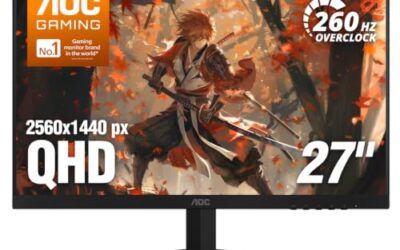
AOC 27" Gaming Monitor QHD 260Hz Overclocked IPS NVIDIA G-SYNC Q27G41ZE | 2560×1440 Computer Monitor, 240Hz Native / 260Hz OC, NVIDA G-SYNC Compatible, 0.3ms, HDR, VESA, Audio Out, 3-Yr Warranty


As an Amazon Associate we earn from qualifying purchases. Product prices and availability are accurate as of the date/time indicated.

SANSUI 24 Inch Curved 160Hz Gaming Monitor,1500R Curved Gaming Monitor | FHD 1080P Computer Monitor,MPRT 1ms Fast VA, Freesync,HDR,3000:1, HDMI2.0,DP1.4, VESA Supp.(ES-G24C1L HDMI Cable Incl.)





As an Amazon Associate we earn from qualifying purchases. Product prices and availability are accurate as of the date/time indicated.

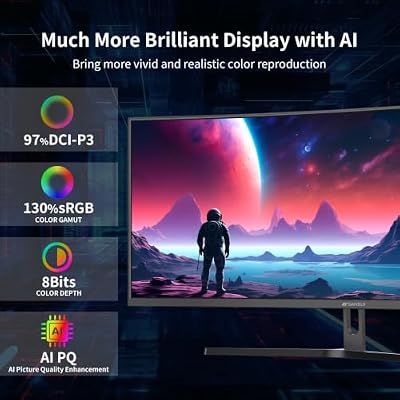
SANSUI 34-Inch Curved Gaming Monitor UWQHD 3440 x 1440P 200Hz Ultrawide | 34” Ultra Wide Gaming Computer Monitor-PBP, OD 1ms, HDR, 300nits, 130%sRGB, DCI-P3 97%,AI Crosshair,HDMI2.1x2,DP1.4




As an Amazon Associate we earn from qualifying purchases. Product prices and availability are accurate as of the date/time indicated.

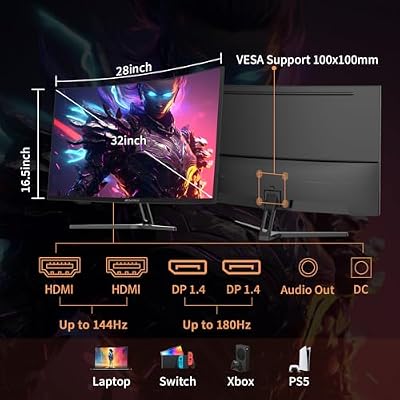
SANSUI 32-Inch Curved Gaming Monitor WQHD 2560 x 1440 180Hz Curved 1500R | Fast VA,1ms(OD), HDR, 300nits, sRGB 125%, DCI-P3 95%, FreeSync, DP1.4x2, HDMI x2(DP Cable Included)




As an Amazon Associate we earn from qualifying purchases. Product prices and availability are accurate as of the date/time indicated.

msi MAG 274CF X24 27-inch 1920 x 1080 (FHD) Gaming Monitor, 240Hz, AMD FreeSync Premium, HDR Ready, HDMI, VGA Port, VESA, Tilt, 0.5ms, Black


As an Amazon Associate we earn from qualifying purchases. Product prices and availability are accurate as of the date/time indicated.

msi PRO MP243L E14 24-inch IPS 1920 x 1080 (FHD) Gaming Office Monitor, 144Hz, Free-Synch, HDR Ready, HDMI, VGA Port,VESA Mountable, Tilt, 4-Side Slim Bezel,1ms, Black


As an Amazon Associate we earn from qualifying purchases. Product prices and availability are accurate as of the date/time indicated.
| Product | Best for | Key spec from the listing |
|---|---|---|
| SANSUI 24-inch curved | Small desks, budget HDR | 160Hz, FHD, Fast VA, 3000:1 |
| SANSUI 34-inch ultrawide | Immersive single-player games | 3440 x 1440, 200Hz, 300nits |
| SANSUI 32-inch 240Hz | Competitive play on a big screen | 240Hz, FHD, 1500R curve |
| SANSUI 32-inch WQHD | Color-focused 1440p | 2560 x 1440, 180Hz, DCI-P3 95% |
| ASUS ROG XG27ACMES | Fast 1440p with USB-C | 255Hz, 0.03ms, USB-C 90W |
| LG 27GX704A-B | Best black levels | OLED, 240Hz, 0.03ms |
| msi MAG 274CF X24 | Console and PC mix | 240Hz, FHD, 0.5ms |
| msi PRO MP243L E14 | Gaming plus office use | 24-inch IPS, 144Hz |
| SANSUI 27-inch curved | Contrast-heavy dark games | 240Hz, 4000:1 contrast |
How to Choose
Read the HDR claim, not the HDR word
A bare “HDR” in a title usually means the monitor accepts an HDR signal. It does not mean the picture looks different. Look for a stated peak brightness: 300nits, as one listing here shows, is barely above ordinary SDR, while a true entry-level HDR effect starts around 400nits. “HDR Ready” is a looser label still. The exception is OLED, where each pixel can switch fully off, so highlights pop even at modest brightness.
Match resolution to refresh rate
Full HD at 240Hz is easy for midrange graphics cards, while 1440p at 180Hz to 255Hz asks for more power. Ultrawide 3440 x 1440 at 200Hz is the heaviest load here. Pick the pixel count your GPU can hold above 100 frames per second in the games you play, because HDR processing costs a little performance on some systems.
Check the ports
HDMI 2.0 handles 1080p at high refresh rates but caps 1440p, so DisplayPort 1.4 is the safer connection for the 180Hz-plus models. Consoles need HDMI, and a listing that names only one HDMI port limits you if you also run a second device. USB-C with 90W power delivery, as on the ASUS, can charge a laptop while carrying video.
Know where budget models cut corners
Curved VA panels bring strong contrast ratios, quoted here at 3000:1 and 4000:1, but they can smear dark motion compared with Fast IPS. Look at the response claim: MPRT 1ms is a motion-blur reduction figure, not a gray-to-gray speed, so it is not directly comparable to 0.03ms on the OLED. Stands are another cut; tilt-only designs and VESA mounts are common, height adjustment is not.
The 9 Best Options
SANSUI 24-Inch Curved 160Hz
This is the smallest and cheapest route into a curved HDR display. The listing shows a 1500R curve, FHD 1080P, 160Hz, MPRT 1ms, FreeSync and a 3000:1 contrast ratio, plus HDMI 2.0. It suits a compact desk where a 27-inch panel would crowd the keyboard, and it makes the most sense for someone upgrading from an old 60Hz office display who wants the jump to be obvious without spending much.
- Strength: the 3000:1 contrast on a Fast VA panel gives dark scenes more depth than a typical IPS.
- Strength: 160Hz is a real step up from 60Hz without demanding a powerful GPU.
- Trade-off: the listing gives no peak brightness, so treat the HDR label as a signal-compatibility feature.
Skip it if you want 1440p sharpness or plan to play at arm’s length on a larger screen.
SANSUI 34-Inch Curved Ultrawide
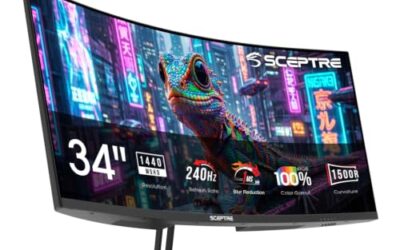
The 3440 x 1440 resolution and 200Hz refresh rate make this the widest canvas in the group. The listing adds PBP (picture-by-picture), OD 1ms, 300nits, 130% sRGB and HDR, which points to a screen built for racing, open-world and flight games. The sRGB figure suggests a vivid default look, and the ultrawide shape also gives spreadsheet and editing windows plenty of room when the console is switched off.
- Strength: ultrawide 21:9 framing fills peripheral vision in supported games.
- Strength: PBP lets two sources share the screen, useful for a PC and console.
- Trade-off: 300nits is modest, so HDR highlights will be gentle.
Skip it if your desk is shallow or your favorite shooters crop or stretch at ultrawide ratios.
SANSUI 32-Inch Curved 240Hz
Here is a large 32-inch panel tuned for speed: 240Hz, FHD, a 1500R curvature, 1ms MPRT, HDMI and DP1.4, a metal stand and VESA support. It fits players who sit a little farther back and want a big, fast display without paying for 1440p. Because FHD content is light on the graphics card, it is also a sensible way to push frame rates high in shooters while still enjoying a cinematic curve in slower games.
- Strength: DP1.4 and 240Hz together suit esports-style play.
- Strength: the metal stand and VESA pattern make arm mounting simple.
- Trade-off: 1080P stretched across 32 inches looks softer up close.
Skip it if you read small text all day or sit close to the screen.
SANSUI 32-Inch WQHD 180Hz
The most color-rich Sansui in the list, with 2560 x 1440, 180Hz, a Fast VA panel, 1ms (OD), 300nits, sRGB 125%, DCI-P3 95%, FreeSync and two DP1.4 inputs. It is the sensible pick for someone who games and edits photos on the same desk. A 180Hz ceiling is high enough for smooth competitive play, and 1440p at 32 inches keeps text readable at a normal sitting distance.
- Strength: DCI-P3 95% coverage helps HDR content look saturated.
- Strength: dual DisplayPort 1.4 inputs let two PCs share the screen.
- Trade-off: 300nits caps how dramatic HDR highlights can get.
Skip it if you only need 1080p speed and would rather spend less.
ASUS ROG XG27ACMES
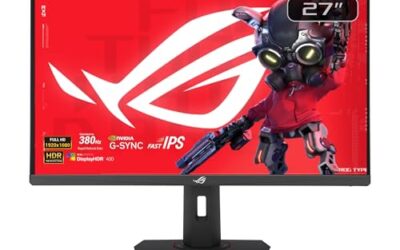
This 27-inch model lists 1440p, 255Hz, Fast IPS, G-SYNC Compatible, HDR, 0.03ms, USB-C 90W and DisplayWidget Center. The wording also mentions OLED Care Pro, so confirm the exact panel type on the spec sheet before ordering. It is for players who want one cable to run video and charge a laptop, and who care more about motion speed at 1440p than about a curved panel. The DisplayWidget Center software name also hints at on-screen control from the desktop.
- Strength: 255Hz at 1440p is the fastest refresh rate in this comparison.
- Strength: USB-C with 90W delivery cuts desk clutter.
- Trade-off: the mixed panel wording in the listing makes the HDR expectation unclear.
Skip it if you want a curved screen or a guaranteed black-level upgrade.
LG 27GX704A-B UltraGear OLED
The only OLED here, listed as 27-inch QHD at 240Hz with 0.03ms response, NVIDIA G-Sync Compatible, AMD FreeSync Premium Pro and a VESA display HDR claim. For dark games, per-pixel lighting is the single biggest HDR improvement a buyer can get. It is the choice for someone who plays mostly at night in a dim room and values contrast over screen size or a curve.
- Strength: OLED black levels give HDR scenes real depth.
- Strength: FreeSync Premium Pro and G-Sync Compatible cover both GPU brands.
- Trade-off: OLED panels raise burn-in questions for static desktop use, so vary your wallpaper and taskbar.
Skip it if the screen will mostly show spreadsheets or a fixed HUD for hours.
msi MAG 274CF X24
A 27-inch FHD monitor at 240Hz with 0.5ms, AMD FreeSync Premium, HDR Ready, HDMI, a VGA port, VESA and tilt. It is aimed at competitive players on midrange hardware who want speed first and HDR as a bonus. The VGA port in the listing is a nod to older hardware, so it also works as a secondary display on a mixed desk.
- Strength: 240Hz at FHD is easy for most graphics cards to drive.
- Strength: FreeSync Premium adds low-framerate compensation.
- Trade-off: “HDR Ready” is not a brightness promise.
Skip it if you want 1440p detail on a 27-inch screen.
msi PRO MP243L E14
The only 24-inch IPS here, described as a gaming-office hybrid with 144Hz, Free-Sync, HDR Ready, HDMI, VGA, VESA support, tilt and slim bezels on four sides. It fits a student desk that handles homework by day and games by night. Because it is a smaller panel, it also leaves room beside it for a second display or a laptop stand.
- Strength: IPS panels keep colors consistent at wide viewing angles.
- Strength: slim four-side bezels suit side-by-side setups.
- Trade-off: 144Hz and HDR Ready make it the least HDR-focused model here.
Skip it if HDR is a priority rather than a checkbox.
SANSUI 27-Inch Curved 240Hz
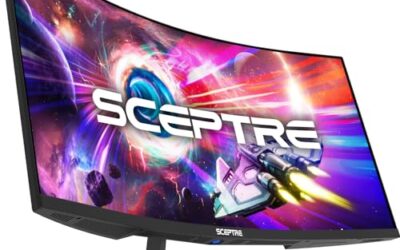
This one pairs 240Hz and 1ms with FHD, a 1500R curve, FreeSync, 130% sRGB, HDR, low blue light and a 4000:1 contrast ratio. The crosshair feature in the listing speaks to shooter fans who want an aiming aid, while the 27-inch size keeps the curve gentle and the image sharp enough for a normal desk distance.
- Strength: 4000:1 contrast is the highest figure listed, helping dark scenes.
- Strength: low-blue-light mode eases long evening sessions.
- Trade-off: no peak brightness is stated, so HDR strength is unknown.
Skip it if you want a flat panel or higher resolution.
Which One Fits Your Situation
You play dark horror and story games
The LG 27GX704A-B OLED is the logical choice because its black levels transform dim scenes. If a lower-cost curved option is the target, the SANSUI 27-inch with 4000:1 contrast is the nearest alternative.
You run a PC and a console together
Choose the SANSUI 34-inch ultrawide for its PBP mode, or the SANSUI 32-inch WQHD with two DisplayPort inputs. Both let two sources coexist without cable swapping.
You need one cable for a work laptop
The ASUS ROG XG27ACMES, with USB-C at 90W, handles video and charging in one connection. That makes it the tidy answer for hybrid work and play.
You have a small desk and a modest GPU
The msi PRO MP243L E14 or the SANSUI 24-inch keep size and power demands low. Pick the SANSUI for a curve and higher refresh, the msi for IPS color.
Common Mistakes
- Trusting the word HDR without a stated peak brightness or certification.
- Pairing a 1440p 180Hz-plus monitor with an HDMI 2.0 cable and wondering why the refresh rate drops.
- Choosing 1080p at 32 inches and then complaining about softness.
- Comparing MPRT 1ms with gray-to-gray 1ms as if they were the same measurement.
- Ignoring OLED static-image habits when the screen will double as an office display.
Related guides
- Logitech G Pro X 2 Vs Steelseries Arctis Nova Pro Wireless
- Travel Controller Case For 8Bitdo Ultimate Series
- Gaming Pc Under 600 For Roblox And Minecraft
Frequently Asked Questions
Is HDR worth it on a monitor at this price?
It depends on peak brightness and local dimming. Panels around 300nits show only a mild change, while OLED shows a clear one. Treat HDR as a bonus unless the listing backs it with numbers.
Should I pick 1080p or 1440p?
Pick 1080p when frame rate matters most or your graphics card is modest. Pick 1440p when you sit close to a 27-inch or larger screen and want sharper text.
Are curved monitors better for gaming?
A 1500R curve wraps the image around your view, which many players find immersive on 32-inch and ultrawide panels. On a 24-inch screen the effect is subtle.
What cable do I need for HDR?
Use DisplayPort 1.4 for high refresh rates at 1440p. HDMI 2.0 works for 1080p at high refresh and for console HDR, but check the port version on both ends.