
🛒 Best Price Today on Amazon
Prime members get fast, free shipping on everything above, plus member-only deals. New members get a 30-day free trial — cancel anytime.

BenQ Zowie XL2546X+ 24.1 DyAc 2 280Hz Fast TN Gaming Monitor for Esports | 280Hz, Fast TN Panel, DyAc 2 Technology, XL Setting to Share, Black eQualizer, Color Vibrance, S Switch, Shielding Hood
Included for 'BenQ ZOWIE XL2546K 24.5-Inch 240Hz Gaming Monitor Review' because the listing specifies 280Hz and Fast TN Panel, details this guide uses to compare options.
View on Amazon
BenQ Zowie XL2540X+ 24.1 280Hz Fast TN Gaming Monitor for Esports | 280Hz, Fast TN Panel, XL Setting to Share, Black eQualizer, Color Vibrance, S Switch, Shielding Hood
Included for 'BenQ ZOWIE XL2546K 24.5-Inch 240Hz Gaming Monitor Review' because the listing specifies 280Hz and Fast TN Panel, details this guide uses to compare options.
View on Amazon
BenQ Zowie XL2546 24.5 Inch 240Hz Gaming Monitor | 1080P 1ms | Dynamic Accuracy & Black Equalizer for Competitive Edge | S-Switch for Custom Display Profiles | Shield
Included for 'BenQ ZOWIE XL2546K 24.5-Inch 240Hz Gaming Monitor Review' because the listing specifies 1080P 1ms and Dynamic Accuracy & Black Equalizer for Competitive Edge, details this guide uses to compare options.
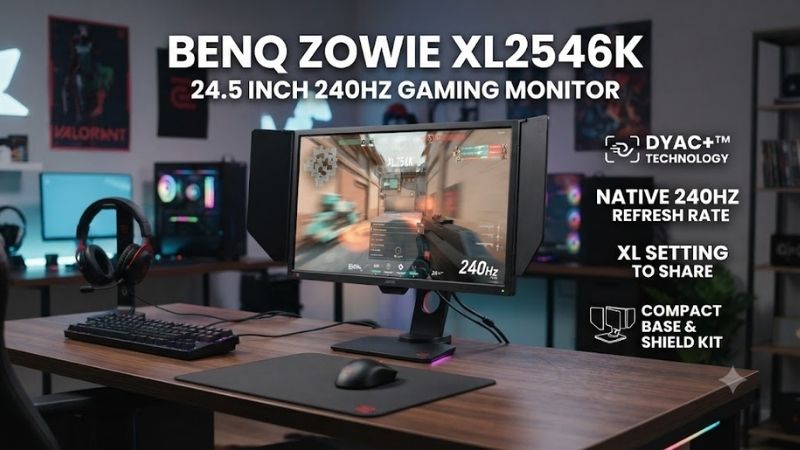
View on AmazonThe BenQ ZOWIE XL2546K 24.5-inch 240Hz gaming monitor is built for competitive FPS players who value motion clarity, fast response, and repeatable settings over cinematic image quality. Its TN panel, DyAc+ technology, 240Hz refresh rate, S Switch, and esports-focused stand make its purpose very clear from the start.
Specifications
| Specification | BenQ ZOWIE XL2546K |
|---|---|
| Screen Size | 24.5 inches |
| Resolution | 1920 x 1080 |
| Refresh Rate | 240Hz |
| Panel Type | TN |
| Typical Brightness | 320 nits |
| Native Contrast | 1000:1 |
| Motion Technology | DyAc+ |
| HDMI | 3 x HDMI 2.0 |
| DisplayPort | 1 x DisplayPort 1.2 |
| Headphone Jack | Yes |
| Height Adjustment | 155 mm |
| Tilt | -5° to 23° |
| Swivel | 45° left/right |
| Pivot | 90° |
| VESA | 100 x 100 mm |
| Net Weight | 6.2 kg |
| Included Accessories | S Switch, Shields, Dust Cover, DP Cable |
BenQ officially lists the XL2546K with a 24.5-inch TN panel, 1920 x 1080 maximum PC resolution at 240Hz, 320-nit typical brightness, and 1000:1 native contrast. Connectivity includes three HDMI 2.0 inputs, DisplayPort 1.2, and a headphone jack.
Performance
The XL2546K is best for Counter-Strike 2, Valorant, Rainbow Six Siege, Overwatch 2, Apex Legends, and similar titles where tracking moving targets matters more than deep blacks or wide color. It can also work for general gaming, but buyers focused on RPGs, editing, or HDR should understand the trade-offs before choosing it.
BenQ uses a 24.5-inch TN panel with a native 1920 x 1080 resolution and 240Hz refresh rate. The official specification lists typical brightness at 320 nits and native contrast at 1000:1. This combination is tuned for competitive play, where high refresh and fast pixel behavior matter more than high resolution.
At 24.5 inches, 1080p remains practical for esports because it keeps GPU requirements lower than 1440p while preserving a compact viewing area. Competitive players can keep the entire screen within their field of view more easily, and high-end GPUs have a better chance of sustaining frame rates close to the panel’s 240Hz ceiling.
The headline feature is DyAc+, BenQ ZOWIE’s motion-clarity technology. It is designed to make fast in-game movement appear clearer by reducing perceived blur during actions such as tracking, spraying, and rapid camera movement. In FPS games, that can make outlines easier to read while the player or target is moving quickly.
DyAc+ is especially useful when the game can produce very high and stable frame rates. A 240Hz monitor already refreshes every 4.17 milliseconds, but motion blur can still make moving targets harder to read. DyAc+ addresses that specific weakness, although the effect is most valuable for players sensitive to motion clarity.
BenQ also supports variable refresh rate operation when DyAc+ is disabled. That means users can choose between motion-clarity processing and VRR depending on the game and frame-rate behavior. For competitive titles with very high FPS, DyAc+ is the more obvious fit, while VRR can help when frame delivery fluctuates more heavily.
The TN panel is one of the reasons the XL2546K performs so well for competitive motion, but it is also the monitor’s main image-quality compromise. TN technology generally gives up some viewing-angle consistency and color richness compared with IPS or OLED alternatives, making the XL2546K more specialized than an all-purpose display.
For esports, those limitations may be acceptable because the player normally sits centered in front of the screen. The panel is not designed to impress with cinematic contrast or creator-grade color. Instead, it prioritizes quick transitions, visibility, and consistent behavior at high refresh rates, which aligns with its competitive FPS focus.
Gaming Features
The XL2546K includes Black eQualizer, which allows users to brighten darker areas without simply raising the entire image in the same way. In competitive games, that can help reveal opponents hiding in shadowed corners. Used aggressively, it can flatten the image, so players should tune it around visibility rather than appearance.
Color Vibrance provides another gaming-oriented adjustment by increasing or reducing color intensity. Players often use it to make enemies, outlines, maps, and environmental elements easier to separate visually. The best setting depends on the title, room lighting, and personal preference, so there is little reason to copy one universal value.
XL Setting to Share adds practical value because monitor profiles can be exported, imported, and shared. Instead of manually copying every value from a teammate or professional player, users can apply compatible settings more quickly. It is useful when different games benefit from different image profiles.
The included S Switch is one of the XL2546K’s most useful physical accessories. It connects to the monitor and provides quick access to settings without repeatedly navigating the rear controls. BenQ states that users can customize and save up to three profiles, making it easy to jump between FPS, general gaming, and desktop presets.
The included side shields are designed to reduce visual distractions around the edges of the display. They do not improve panel performance, but they reinforce the product’s tournament focus. Some players will appreciate the enclosed view, while others may remove them for a cleaner or more open desktop setup.
Ergonomics and Stand
Ergonomics are strong for a competitive monitor. The stand provides 155 mm of height adjustment, tilt from -5 to 23 degrees, swivel of 45 degrees in either direction, and 90-degree pivot support. This range makes it easier to align the display with eye level and maintain a consistent position during long practice sessions.
The redesigned stand also uses a relatively compact base compared with many gaming monitors. That matters for low-sensitivity FPS players who use large mouse movements and need more desk area near the keyboard. Freeing space under the monitor can be more useful in practice than decorative RGB lighting or an oversized stand footprint.
VESA 100 x 100 mounting is supported for users who prefer a monitor arm. An arm can free even more desk space and make depth adjustment easier, especially on shallow desks. Competitive players should still position the display securely because even small movements or vibrations can become distracting during rapid mouse and keyboard input.
Connectivity
Connectivity is straightforward but adequate for the target audience. BenQ provides three HDMI 2.0 ports, one DisplayPort 1.2 input, and a headphone jack. PC users can run 1920 x 1080 at 240Hz through HDMI 2.0 or DisplayPort, while current consoles are officially listed at up to 1080p 120Hz over HDMI 2.0.
For a desktop gaming PC, DisplayPort is usually the simplest connection because it leaves the HDMI inputs available for consoles or other systems. The monitor does not include USB-C, a USB hub, or modern docking features. That omission is understandable for esports use, but it reduces flexibility for laptop-heavy workspaces.
Console compatibility is useful but not the XL2546K’s main reason to exist. PlayStation 5 and Xbox Series X are officially supported at 1920 x 1080 and 120Hz, so console players can benefit from high refresh rates. However, the monitor’s 240Hz ceiling and DyAc+ focus make far more sense for a capable gaming PC.
Image Quality
The 320-nit typical brightness specification is sufficient for ordinary indoor gaming, but the XL2546K is not an HDR-focused display. Buyers who want bright HDR highlights, local dimming, OLED blacks, or wide-gamut cinematic presentation should look elsewhere. Its image system is designed around esports visibility rather than visual spectacle.
Audio is similarly minimal because the monitor includes a headphone jack but no emphasis on integrated speakers. Competitive players commonly use gaming headsets, IEMs, or external speakers anyway, so this is not a major weakness for the target audience. Users building a simple console setup may prefer a monitor with built-in audio.
During fast FPS play, the XL2546K’s strengths become easier to appreciate. Camera pans, strafing, recoil corrections, and rapid target movement remain easier to follow than on slower 60Hz or 144Hz displays. The jump from 144Hz to 240Hz is smaller than the jump from 60Hz to 144Hz, but competitive players can still notice it.
To benefit fully from 240Hz, the gaming PC needs to produce high frame rates consistently. Esports titles are well suited to that requirement because they can often run at several hundred frames per second on modern hardware with competitive settings. Heavy AAA games may not reach 240 fps, reducing the value of the panel’s headline refresh rate.
Input feel is another reason the monitor suits esports. Higher refresh rates reduce the time between displayed frames, so mouse movement and camera response can feel more immediate when the PC is delivering enough frames. The monitor cannot compensate for network latency or slow game engines, but it reduces one display-side delay.
That said, the XL2546K is less compelling for single-player games where visual richness matters more than reaction time. A 1440p IPS, mini-LED, or OLED monitor can deliver sharper detail, better contrast, wider viewing angles, and stronger colors. Choose the ZOWIE when competitive performance is the priority.
Everyday Use
Text and desktop work are acceptable at 24.5 inches and 1080p, but productivity is not a standout strength. The pixel density is modest compared with 27-inch 1440p or 4K displays, and the TN panel offers less visual consistency for color-sensitive work. It works for browsing and office tasks, but creators should use a more suitable display.
Build quality is practical rather than flashy. The dark chassis, shields, S Switch, carry-oriented stand design, and integrated power supply all support tournament or LAN use. Net weight is listed at 6.2 kg, while maximum power consumption is below 40W, keeping the monitor manageable for users who regularly move their setup.
Flicker-free and Low Blue Light features are included for general comfort. BenQ notes that flicker-free operation applies with DyAc+ disabled, which matters for users sensitive to flicker. Competitive players should test DyAc+ during longer sessions rather than assuming one motion setting suits everyone.
Pros and Cons
Pros
- 240Hz refresh rate
- Excellent competitive motion focus
- DyAc+ motion-clarity technology
- Black eQualizer
- Color Vibrance
- S Switch included
- Three savable profiles
- XL Setting to Share
- Excellent stand adjustment
- Compact esports-oriented stand base
- Side shields included
- Three HDMI 2.0 ports
- VESA 100 x 100 support
Cons
- Only 1920 x 1080 resolution
- TN image quality is less versatile than IPS or OLED
- No HDR-focused hardware
- No USB-C
- No USB hub
- No emphasis on integrated speakers
- 240Hz requires high PC frame rates to justify
- Specialized for competitive gaming rather than mixed use
Who Is the XL2546K For?
Who should buy it? Players who spend most of their gaming time in CS2, Valorant, Rainbow Six Siege, Overwatch 2, or other competitive shooters are the clearest audience. It also suits players who value 240Hz motion, compact screen size, rapid profile switching, and proven esports-oriented controls more than resolution or cinematic image quality.
Who should skip it? Gamers who mainly play story-driven AAA titles, edit photos or video, want HDR, or prefer 1440p and 4K detail will get more value from a different panel. Casual players using hardware that cannot approach high frame rates may also struggle to justify the compromises made specifically for 240Hz esports performance.
FAQ
Is the BenQ ZOWIE XL2546K Good for Competitive Gaming?
Yes. The XL2546K is specifically designed around competitive FPS gaming with a 240Hz TN panel, DyAc+, Black eQualizer, Color Vibrance, S Switch, and profile-sharing tools. These features focus on motion visibility and repeatable settings rather than high resolution, HDR, or cinematic picture quality.
Is 240Hz Worth It Over 144Hz?
The improvement from 144Hz to 240Hz is less dramatic than moving from 60Hz to 144Hz, but competitive players can still benefit from smoother motion and shorter intervals between frames. The upgrade makes the most sense when your PC can consistently generate well above 144 fps in the games you play most often.
Does the XL2546K Support PS5 and Xbox Series X?
Yes. BenQ officially specifies support for 1920 x 1080 at up to 120Hz on PlayStation 5 and Xbox Series X through HDMI 2.0. Console players cannot use the full 240Hz refresh ceiling, so the XL2546K offers its strongest value when paired with a PC capable of much higher esports frame rates.
Should I Use DyAc+ or Variable Refresh Rate?
DyAc+ makes the most sense when motion clarity is the priority and your game maintains consistently high frame rates. Variable refresh rate can be preferable when performance fluctuates and you want smoother synchronization. BenQ specifies that VRR operates with DyAc+ disabled, so users need to choose between the two modes.
Is the XL2546K Good for AAA Games?
It can run AAA games perfectly well, but its strengths are not optimized for them. Players who prioritize cinematic graphics may prefer 1440p, 4K, IPS, mini-LED, or OLED displays with stronger contrast and color. The XL2546K makes more sense when fast competitive titles represent the majority of your gaming time.
Conclusion
The XL2546K remains a focused product rather than an all-rounder, and that is why it still makes sense. Its combination of 240Hz, TN response behavior, DyAc+, Black eQualizer, Color Vibrance, S Switch, shields, and flexible stand gives competitive players tools that are directly related to visibility, consistency, and speed.









