🛒 Best Price Today on Amazon
Prime members get fast, free shipping on everything above, plus member-only deals. New members get a 30-day free trial — cancel anytime.
- Best Magnetic Charging Dock Mice at a Glance
- Razer Basilisk V3 Pro 35K — Best for Mixed Gaming
- Razer Cobra Pro — Best Compact Premium Option
- Razer Cobra HyperSpeed — Best Streamlined Dock Option
- Razer Naga V3 Pro — Best for MMO and Multi-Genre Gaming
- Razer Naga V2 Pro — Best for Established Naga Controls
- How to Choose the Best Mouse With Magnetic Charging Dock
- Magnetic Charging Dock vs Standard Cable Charging
- Which Model Fits Each Type of Gamer?
- FAQ
- Conclusion
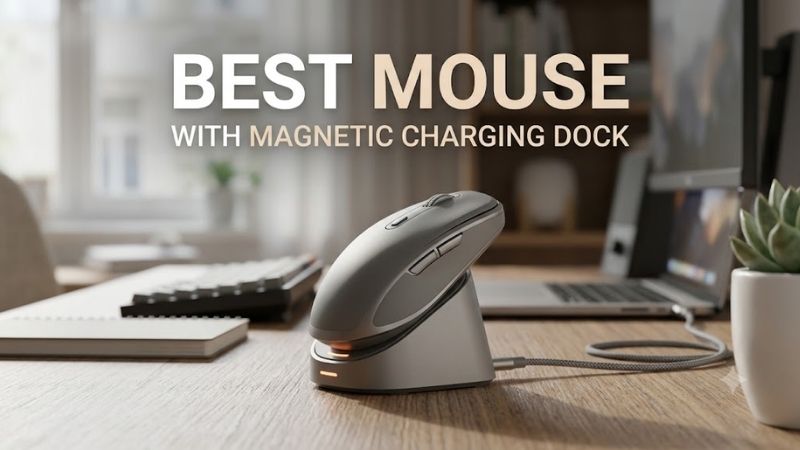
The best mouse with magnetic charging dock support is not just about avoiding a cable. The dock must align easily, keep the mouse ready between sessions, and fit the way you play. This roundup compares current Razer models that work with the Mouse Dock Pro, from compact FPS-friendly shapes to MMO-focused designs.
Quick answer: For most people in 2026, the best mouse with magnetic charging dock is the Mouse — our #1 rated choice. See the full ranked comparison, alternatives and buying advice below.
Best Magnetic Charging Dock Mice at a Glance
| Mouse | Best For | Connectivity | Dock Support |
|---|---|---|---|
| Razer Basilisk V3 Pro 35K | Mixed gaming and productivity | HyperSpeed, Bluetooth, wired | Mouse Dock Pro |
| Razer Cobra Pro | Compact gaming and RGB setups | HyperSpeed, Bluetooth, wired | Mouse Dock Pro |
| Razer Cobra HyperSpeed | Lightweight everyday gaming | HyperSpeed, Bluetooth, wired | Mouse Dock Pro |
| Razer Naga V3 Pro | MMO and multi-genre gaming | HyperSpeed, Bluetooth, wired | Mouse Dock Pro |
| Razer Naga V2 Pro | MMO controls and customizable layouts | HyperSpeed, Bluetooth, wired | Mouse Dock Pro |
Razer’s Mouse Dock Pro uses a magnetic wireless charging system with an interchangeable Wireless Charging Puck. The dock also includes an 8,000 Hz HyperPolling transceiver, so supported mice can charge on the stand and use the dock as their high-rate wireless receiver instead of occupying another USB port.
Razer Basilisk V3 Pro 35K — Best for Mixed Gaming
Best For: Gaming, productivity, strategy games, RPGs, and users who want extra controls.
Key Features:
- Focus Pro 35K Optical Sensor Gen-2
- 11 programmable buttons
- HyperScroll Tilt Wheel
- HyperSpeed wireless, Bluetooth, and wired connectivity
- Five onboard profiles
- Mouse Dock Pro compatibility
- 112 g approximate weight
The Basilisk V3 Pro 35K is the most versatile option here for players who want a large ergonomic shape, extensive controls, and a premium scroll wheel. Its 11 programmable buttons, tri-mode connectivity, and Focus Pro 35K sensor suit mixed gaming, productivity, and browsing better than a minimalist competitive mouse.
What Makes It Different
What separates the Basilisk is its control-heavy layout. The HyperScroll Tilt Wheel can switch between tactile and free-spinning behavior, while the thumb trigger and extra buttons reduce keyboard reaches in games or desktop work. At 112 g, however, it favors stability and features over ultra-light flicking.
Pros
- Extensive programmable controls
- Ergonomic right-handed design
- Flexible scroll-wheel modes
- Supports magnetic dock charging
- Strong fit for gaming and desktop work
Cons
- Heavier than compact FPS mice
- Mouse Dock Pro is a separate accessory
Use Case: RPGs, strategy games, general gaming, editing, office work, and setups where one mouse must handle several roles.
Who It’s For: Users who want magnetic charging without sacrificing extra buttons, scrolling features, or ergonomic palm support.
Razer Cobra Pro — Best Compact Premium Option
Best For: Claw and fingertip users who want compact dimensions, customizable controls, and extensive RGB lighting.
Key Features:
- 77 g approximate weight
- Ten customizable controls
- Five onboard profiles
- HyperSpeed, Bluetooth, and wired modes
- 11-zone Chroma RGB
- Wireless charging support
The Cobra Pro is the stronger fit for gamers who want magnetic dock charging in a smaller, lighter chassis. It weighs 77 g, offers ten customizable controls, and supports HyperSpeed, Bluetooth, and wired use. Its 11-zone Chroma lighting also makes the charging setup more visually integrated than simpler wireless mice.
What Makes It Different
Its compact body works especially well for claw and fingertip users who dislike bulky ergonomic shells, yet it still keeps onboard profiles and substantial customization. The trade-off is that players with larger hands or a strong palm grip may prefer the broader support of the Basilisk or Naga rather than the Cobra’s tighter shape.
Pros
- Compact 77 g design
- Rich Chroma RGB implementation
- Multiple onboard profiles
- Three connectivity modes
- Magnetic dock charging compatibility
Cons
- Compact dimensions may not suit large palm grips
- More elaborate than necessary for RGB-free setups
Use Case: Competitive games, mixed gaming, portable desktop setups, and RGB-focused builds.
Who It’s For: Players wanting a smaller mouse without giving up wireless charging, onboard customization, or multiple connection options.
Razer Cobra HyperSpeed — Best Streamlined Dock Option
Best For: Players who want a compact dock-compatible mouse without emphasizing elaborate RGB lighting.
Key Features:
- HyperSpeed wireless
- Bluetooth
- USB-C wired operation
- Mouse Dock Pro support
- Upgradeable 8,000 Hz wireless polling
- Wireless charging compatibility
The Cobra HyperSpeed is the leaner alternative for buyers who want the same dock ecosystem without paying for the Cobra Pro’s extensive RGB treatment. It supports HyperSpeed wireless, Bluetooth, wired operation, and wireless charging through the Mouse Dock Pro, while also allowing an upgrade to 8,000 Hz polling through the dock.
What Makes It Different
This model is best for players who care more about a compact right-handed symmetrical shape and long wireless runtime than decorative lighting. Razer rates it for up to 110 hours on HyperSpeed and 170 hours on Bluetooth. Like the other current dock-compatible models, the charging dock itself is sold separately.
Pros
- Compact gaming-focused shape
- Tri-mode connectivity
- Supports magnetic dock charging
- Dock can enable higher wireless polling
- Long rated wireless battery life
Cons
- Dock is an additional purchase
- Fewer visual features than the Cobra Pro
Use Case: FPS games, everyday gaming, laptop setups, and users who want simple dock-based charging.
Who It’s For: Gamers who prefer the Cobra form factor but do not need the Cobra Pro’s full RGB and customization package.
Razer Naga V3 Pro — Best for MMO and Multi-Genre Gaming
Best For: MMO, MOBA, battle royale, and players who frequently switch between game genres.
Key Features:
- Three swappable side plates
- 12-, 6-, and 2-button side layouts
- Up to 23 programmable buttons
- Focus Pro 50K Optical Sensor Gen-3
- HyperScroll Tilt Wheel Gen-2
- Mouse Dock Pro compatibility
- Up to 8,000 Hz polling with supported accessory
The Naga V3 Pro targets MMO, MOBA, and multi-genre players who need far more commands under the thumb. Three magnetic side plates provide 12-, 6-, or 2-button layouts, and the mouse supports up to 23 programmable buttons with the 12-button plate. It also works with the Mouse Dock Pro for charging and up to 8,000 Hz polling.
What Makes It Different
Its advantage is adaptability rather than low weight. You can move from a dense MMO grid to a simpler two-button side panel without changing mice, then place it on the magnetic dock after play. At 117 g before the side plate is counted, it is much heavier than the Cobra line and better suited to control-rich play than fast FPS swipes.
Pros
- Up to 23 programmable buttons
- Three interchangeable control layouts
- Current-generation Naga features
- Dock charging and 8,000 Hz support
- Useful across several game genres
Cons
- Significantly heavier than compact gaming mice
- Excessive button count for minimalist FPS users
Use Case: MMO raids, MOBAs, battle royale, productivity macros, and gamers maintaining several control profiles.
Who It’s For: Players who want one dock-compatible mouse to transform between command-heavy and simpler layouts.
Razer Naga V2 Pro — Best for Established Naga Controls
Best For: MMO players who want interchangeable side plates and the HyperScroll Pro Wheel.
Key Features:
- Three interchangeable side plates
- HyperScroll Pro Wheel
- HyperSpeed wireless
- Bluetooth
- USB-C wired mode
- Replaceable bottom puck
- Mouse Dock Pro support
The Naga V2 Pro remains relevant for users who want the established Naga layout with three interchangeable side plates and the HyperScroll Pro Wheel. It supports HyperSpeed wireless, Bluetooth, and USB-C wired use, and its bottom cover puck can be replaced by the Razer Wireless Charging Puck for Mouse Dock Pro charging.
What Makes It Different
Choose the Naga V2 Pro when you value the older HyperScroll Pro Wheel system and its familiar MMO-focused control scheme more than the newer V3 Pro upgrades. The important caveat is weight: the mouse body is about 134 g before a side plate, so it prioritizes command density, palm support, and customization over quick low-inertia movement.
Pros
- Flexible interchangeable side panels
- Extensive MMO-oriented controls
- Multiple wireless connection modes
- Compatible with the magnetic dock system
- Dedicated advanced scroll-wheel design
Cons
- Heavy compared with FPS-oriented mice
- Older than the Naga V3 Pro
- Dock and charging puck setup adds cost
Use Case: MMOs, RPGs, productivity macros, and games where numerous commands need immediate thumb access.
Who It’s For: Existing Naga users or MMO players who specifically prefer the V2 Pro control and scroll-wheel implementation.
How to Choose the Best Mouse With Magnetic Charging Dock
Check Dock Compatibility First
Start with dock compatibility, because “wireless charging” does not automatically mean magnetic dock charging. Razer lists the Mouse Dock Pro for specific models only, and the Wireless Charging Puck replaces the compatible cover puck under the mouse. Buying a different Razer wireless mouse does not guarantee that it will work with this dock.
Match the Shape to Your Grip
Next, match the shape to your grip rather than choosing on charging alone. Compact Cobra models favor faster repositioning and smaller hands, the Basilisk gives more right-hand support and extra controls, and the Naga family uses a fuller ergonomic body for long sessions with many thumb commands. Dock convenience cannot fix a poor shape match.
Decide Whether 8,000 Hz Polling Matters
Polling rate matters mainly for competitive play and high-refresh displays. The Mouse Dock Pro includes an 8,000 Hz HyperPolling transceiver for compatible models, reducing the need for a separate receiver. Higher polling can increase system and battery demands, so casual players do not need to run the maximum rate constantly.
Think About Your Charging Routine
Consider the charging routine itself. A magnetic dock is most useful when you naturally return the mouse to one spot after every session, because short top-ups reduce the chance of starting with a low battery. If you travel often or move between computers, USB-C charging remains important, since the dock is less convenient to carry than a cable.
Magnetic Charging Dock vs Standard Cable Charging
A magnetic dock prioritizes convenience rather than faster gameplay by itself. Instead of locating a USB-C cable when the battery runs low, you return the mouse to a fixed charging point after playing. The drawback is desk space and accessory cost, while wired charging remains easier for travel and lets you continue using the mouse during charging.
The Mouse Dock Pro has another advantage because charging is only part of its job. Its integrated HyperPolling receiver can replace the separate wireless dongle after pairing a compatible mouse, helping reduce receiver clutter. That combination makes the dock more useful for a permanent gaming desk than a charging stand that performs no connectivity function.
Which Model Fits Each Type of Gamer?
For mixed gaming and productivity, the Basilisk V3 Pro 35K offers the broadest balance of extra controls, scrolling options, and ergonomic support. The Cobra models move in the opposite direction with smaller bodies that are easier to reposition, while the Naga family dedicates considerably more space and weight to side buttons and command access.
MMO players should concentrate on the Naga V3 Pro and Naga V2 Pro because their interchangeable panels provide far more thumb inputs than the Basilisk or Cobra designs. Competitive players who rarely use extra buttons are more likely to appreciate a Cobra model, while users switching constantly between games and desktop tasks may benefit from the Basilisk.
FAQ
Does the Razer Mouse Dock Pro Really Use Magnetic Charging?
Yes. The Razer Mouse Dock Pro charges supported mice wirelessly through the Razer Wireless Charging Puck, and magnets hold the mouse in place on the charging surface. The puck is included with the dock, but the mouse must be one of the officially supported models with a compatible removable bottom cover.
Is the Mouse Dock Pro Included With Compatible Razer Mice?
No. The Mouse Dock Pro is an accessory, not a universal feature included with every compatible mouse. Retail bundles can vary, so check the exact listing before purchase. For the current dock system, the important parts are the Mouse Dock Pro itself and the Wireless Charging Puck that fits into the mouse’s removable puck bay.
Can the Dock Replace the Mouse’s Wireless Dongle?
The dock can also function as the wireless HyperPolling receiver for supported Razer mice. After pairing through Razer Synapse, the original mouse dongle is not required for that connection. This keeps the setup cleaner and gives compatible models access to higher wireless polling without adding another receiver beside the charging stand.
Which Magnetic Dock Mouse Is Better for FPS Games?
For FPS-focused players, the Cobra Pro or Cobra HyperSpeed makes the most sense because both use a compact body that is easier to reposition than the heavier Basilisk and Naga models. The better choice between the two depends on whether you value the Cobra Pro’s extra RGB and controls or prefer the simpler HyperSpeed design.
Can I Use the Mouse While It Is Charging on the Dock?
The dock is intended to hold the mouse on its charging surface, so it is not designed for normal gameplay while docked. Compatible models also provide USB-C wired operation, allowing continued use when direct cable charging is preferable. That makes the dock ideal for charging between sessions rather than replacing wired charging in every situation.
Is a Magnetic Charging Dock Worth Buying?
A dock makes the most sense for a permanent gaming desk where the mouse can be returned to the same place after every session. It reduces cable handling and encourages frequent top-ups, but it adds cost and occupies desk space. Travelers and users who charge only occasionally may find a USB-C cable simpler and easier to carry.
Conclusion
The best mouse with magnetic charging dock support depends on what you play. Basilisk V3 Pro 35K offers broad control, Cobra Pro and Cobra HyperSpeed suit compact setups, while Naga V3 Pro and Naga V2 Pro serve command-heavy games. All pair with Razer’s Mouse Dock Pro, so shape and controls should decide the final pick.
Ready to decide? Our #1 pick for 2026 is the Mouse.
Live price & availability on Amazon.