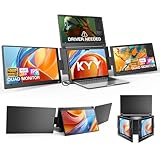
- Top Pick: KYY Triple Screen Laptop Monitor Extender 15.6" Quad Laptop Screen Extender
- Best Value: 15.6" Laptop Screen Extender, 1080P FHD Triple Portable Monitor for Laptops, Ultra-Slim Travel Dual Monitor Fit for 12"-17.3" Laptops, USB-C Plug&Play Extended Screen Compatible with Win/Mac/Android
- Premium Choice: Vixtan 14" Triple Laptop Screen Extender, 3.0 lbs Lightweight FHD IPS Portable Monitor for Laptop, USB-C Plug & Play Multi Screen Attachment for 13-17.3" laptops with Windows/Mac/Chrome
A portable three-monitor setup used to mean lugging around a car full of gear. Now it means clipping a folding panel array onto your laptop lid and unfolding two extra FHD screens in under a minute. For traders, developers, analysts, and anyone whose productivity lives and dies by screen space, these portable triple setups transform a single laptop into a mobile command center you can carry anywhere.
This review compares leading portable triple-monitor solutions, from KYY and Vixtan foldable extenders to the well-regarded Xebec Tri-Screen. Here is how to build the right portable three-screen rig for your work.
As an Amazon Associate we earn from qualifying purchases at no extra cost to you.




🎮 Get More From Your Setup — Free
Prime Gaming gives you free PC games every month, in-game loot, and a free Twitch channel sub — plus fast free shipping on all the gear above. New members get a 30-day free trial.
Watch: Portable 3 Monitor Setup — Video Review
Design & Build
Portable triple setups mount to the back of your laptop and unfold two panels to flank the built-in screen. Most target 15.6-inch class panels for 12 to 17.3-inch laptops, though the Vixtan uses lighter 14-inch panels for weight-conscious users. Build quality varies significantly: sturdier aluminum-alloy models like the KYY hold their angle reliably, while the Xebec Tri-Screen is known for a polished, purpose-built design. Weight is the central trade-off, since three panels add real heft to your laptop’s hinge, so a secure clamp and rigid construction are essential to avoid sag and strain during use.
Performance
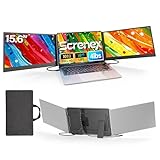
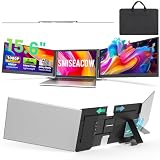
Image quality is consistently good, with 1080P FHD IPS panels the standard across these extenders, delivering sharp text and wide viewing angles for spreadsheets and code. Connectivity is the make-or-break factor. Single-cable USB-C models like the KYY and Screnex are the most convenient, carrying video and power over one wire, provided your laptop’s USB-C port supports video output. Some setups, including certain KYY and SMISEACOW configurations, need a driver or additional cable. The Xebec Tri-Screen is designed for straightforward PC use. Auto-rotation on some models adds handy portrait viewing for documents.
Pros & Cons
- Triple the workspace: three screens from one laptop, anywhere you go.
- Folds for travel: panels collapse flat against the lid.
- Single-cable options: USB-C models simplify setup to one wire.
- Productivity boost: ideal for trading, coding, and data work on the move.
- Added weight: triple panels stress the hinge and add bag bulk.
- Port and driver needs: some models require video-capable USB-C or a driver.
Alternatives to Consider
For a polished, purpose-built experience, the Xebec Tri-Screen is a strong pick with a reputation for quality. Value-focused buyers get excellent results from the KYY quad-screen extender or the Screnex ultra-thin triple, both leaning on single-cable USB-C. Weight-conscious travelers should consider the lighter Vixtan 14-inch triple or the ultra-slim SMISEACOW. If a full triple feels like too much weight for your hinge, a dual-panel setup delivers most of the benefit with less strain. Always confirm your laptop’s USB-C port outputs video before committing to a single-cable model.
Related Guides
- Best Gaming Monitor OLED (2026)
- Best ASUS Monitor Best Gaming Settings (2026)
- Triple Portable Monitor (2026)
- Monitor Deals Black Friday (2026)
Frequently Asked Questions
Will a portable triple monitor work with my laptop?
Single-cable USB-C models require a USB-C port that supports video output. If yours does not, choose a model with HDMI and separate power, and check the size range fits your laptop.
How heavy is a triple-screen setup?
Triple extenders add noticeable weight to your laptop and bag. Lighter 14-inch models like the Vixtan reduce the load, while 15.6-inch aluminum units are sturdier but heavier.
Do I need to install a driver?
Many USB-C models are plug-and-play on Windows and Mac, but some configurations, including certain KYY and SMISEACOW units, require a driver. Check the product listing to be sure.
Is a triple setup worth it over dual?
If your work benefits from monitoring multiple data streams at once, like trading or development, a triple setup is a clear win. If you value lighter weight, a dual setup may suffice.
Verdict
A portable three-monitor setup is a genuine productivity multiplier for mobile professionals. The Xebec Tri-Screen is the polished premium pick, the KYY and Screnex extenders offer strong single-cable value, and the lighter Vixtan suits travelers minimizing weight. Confirm your USB-C port outputs video, and you can carry a full triple-screen workstation in your bag.