🛒 Best Price Today on Amazon
Prime members get fast, free shipping on everything above, plus member-only deals. New members get a 30-day free trial — cancel anytime.
For Ryzen 7 5800X vs Ryzen 7 5700X for a drop-in AM4 upgrade, start with the 5700X if you want eight cores and a lower stock power class. Choose the 5800X when it costs less to install or saves time in sustained CPU work. Check your exact motherboard and BIOS version before buying either chip for an older PC.
Use the 5700X for a simple upgrade and price the 5800X around your workload
The 5700X is the easier choice when you want eight Zen 3 cores without changing the rest of a modest AM4 build. The 5800X can make sense if a good deal includes adequate cooling or if your regular all-core work benefits from its higher stock power class. Gaming alone rarely gives you a strong reason to pay much more for the 5800X.
| Current use or hardware | Better starting point |
|---|---|
| Gaming, voice chat, and ordinary desktop use | Ryzen 7 5700X |
| Repeated CPU rendering, encoding, or compilation | Compare the task time, cooling, and total cost of the 5800X |
| Compact case or older cooler you want to keep | Evaluate the 5700X first |
| Tested 5800X bundle with a cooler you need | Compare its installed cost with a CPU-only 5700X |
| Already own a Ryzen 5 5600 and mostly game | Measure the existing bottleneck before buying either |
| CPU-limited gaming is the sole reason for upgrading | Compare a compatible AM4 X3D option where pricing makes sense |
| Current system relies on an APU for video output | Include a working graphics card in the upgrade plan |
Check what the two processors share
| Specification | Ryzen 7 5800X | Ryzen 7 5700X |
|---|---|---|
| Architecture and codename | Zen 3, Vermeer | Zen 3, Vermeer |
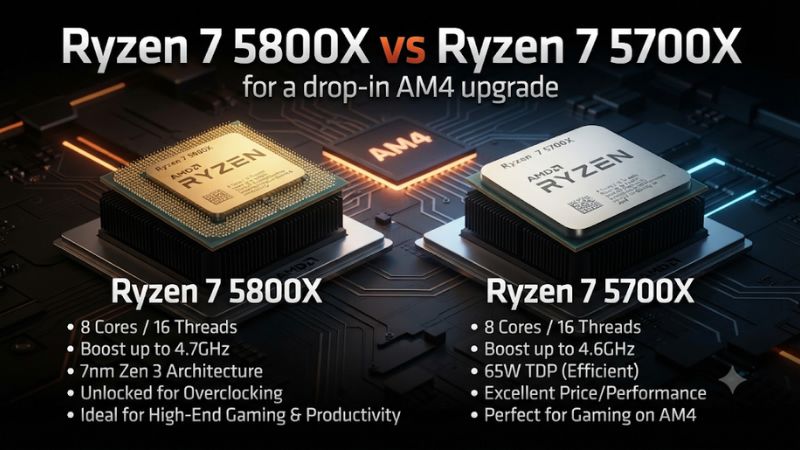
| Cores and threads | 8 cores, 16 threads | 8 cores, 16 threads |
| Published base clock | 3.8 GHz | 3.4 GHz |
| Published maximum boost | Up to 4.7 GHz | Up to 4.6 GHz |
| L3 cache | 32 MB | 32 MB |
| Default TDP | 105 W | 65 W |
| Socket and memory | AM4, DDR4 | AM4, DDR4 |
| CPU PCIe capability | PCIe 4.0, subject to motherboard and slot | PCIe 4.0, subject to motherboard and slot |
| Integrated graphics | None | None |
The shared architecture, core count, and cache make this a comparison of two closely related processors. Both can give an older compatible AM4 system a useful upgrade. The bigger distinction is how the two behave under extended work and what the existing system will need to cool them.
The 100 MHz gap between their rated maximum boosts describes a small difference in advertised light-load headroom. The gap in base clocks and the separate power classes are more relevant to sustained tasks, though neither specification predicts your exact all-core clock. Workload, cooling, and motherboard settings decide where the chip settles.
Compare gaming and work you can time
Check the gaming gap at stock settings
In the stock 1080p suite from Tom’s Hardware, the 5800X was about 1.9% ahead of the 5700X overall. The reviewer used a fast graphics card to expose CPU differences. That specific result gives a useful scale for the purchase decision, while individual games can produce larger or smaller gaps.
If you play visually demanding titles with a midrange GPU, the difference can be harder to see. The graphics card spends more time rendering each frame as you raise settings or resolution. If you mainly play at lower competitive settings, look up a same-system test of your title. Inspect slower frames as well as the average, especially if smoothness is your reason for upgrading.
These results also show why a recent six-core AM4 CPU deserves its own baseline. A stable Ryzen 5 5600 can already perform closely to a 5700X in some game averages. The eight-core upgrade may still give you useful headroom for simultaneous work. Run the game with your usual browser, voice chat, recording software, or other active applications before deciding whether the extra cores solve a problem.
Time the CPU work you repeat
The 5800X is more interesting if a project regularly keeps most cores busy. Examples include CPU rendering, large compiles, and applications using a software encoder. Use a task whose completion time has a real consequence for you.
Test an actual project where possible. Make sure the application uses the intended CPU path. A hardware-accelerated export may put much of its work on the GPU or a dedicated encoder. A synthetic all-core score is useful context, while the clock behavior under your own renderer or compiler is more directly relevant.
For example, if a task finishes a few minutes sooner and you run it several times each day, the savings can justify the higher power class. If it is a background job you run once a month, the quieter or less expensive install may be more worthwhile. Compare the measured time along with noise and the need for extra cooling.
Watch for sustained performance. Start the test from similar temperatures, let the cooler warm, and compare the middle and end of the run. A short boost near startup does not show how the CPU behaves after several minutes in a closed case. When looking at published benchmarks, check test length and configuration before extrapolating.
Identify the upgrade from the CPU you already own
An upgrade from a Ryzen 5 2600 or 3600 combines changes in architecture and, for these parts, a move to eight cores. An upgrade from a six-core Zen 3 chip keeps the same general architecture and adds two cores. The results can feel quite different. Write down your current model alongside the task you want to improve.
If your current PC is already limited by the GPU, a CPU purchase may leave the game much where it was. Test at a lighter render load and see whether the frame rate moves. If it rises strongly, the original graphics load is worth addressing first. If it stays nearly flat, rule out a frame cap before investigating the CPU or game engine.
A CPU-side issue can also show up as inconsistent frames in only one scene. Use the section where it happens, not a menu benchmark. Keep the graphics card and software unchanged for the before-and-after comparison. That gives you a way to confirm what the drop-in upgrade accomplished.
Compare power, heat, and the cooler you can keep
Read the 65 W and 105 W labels in context
AMD rates the 5700X at 65 W default TDP and the 5800X at 105 W. TDP helps describe the thermal design class. It is separate from CPU package power reported by a sensor and separate from the total power a system uses at the wall. Each measurement answers a different question.
For a cooling comparison, check package power, CPU temperature, and fan RPM under the same workload. For electricity use, a wall meter reflects the complete machine. For noise, listen or measure from the same place. A room with the case on a desk beside you can feel different from a machine under a large open desk.
A 5800X can be a good fit in a well-ventilated system with a capable cooler. In a small or poorly ventilated case, the cost of keeping it quiet can exceed the CPU price difference. The 5700X suits many upgrades where the cooler and fans are already sufficient for the job and the user wants to keep them.
Check the cooler mount, case clearance, and fan behavior
Confirm AM4 mounting hardware and case clearance. If buying a used tower cooler, check that the backplate or mounting bars it relies on are included. Verify the fan works and can be controlled by the motherboard. A cooler that fits the socket can still collide with tall memory or the case panel.
Once the CPU is installed, monitor a short task first. Record the CPU temperature and fan speed. Then run the sustained workload you actually care about if the short check is normal. If the fan jumps sharply between speeds during game menus, adjust the fan response using supported motherboard controls once the basic cooling is verified. This can improve daily use without changing the CPU profile.
If a long workload pushes the current cooler beyond what you consider acceptable, inspect mounting, thermal paste, and case airflow. Compare fan RPM and temperatures with the case configured as you normally use it. A temporary test with better ventilation can help tell a cooler problem from a case airflow problem.
Treat a lower-power 5800X profile as a separate deal
A motherboard with appropriate options can let you run a 5800X at lower power, including a supported Eco Mode or appropriate limit setting where available. This can make sense if you already own the processor or the 5800X offer is clearly better. Confirm that the option exists on your exact board and BIOS.
If you plan to run it at reduced power, evaluate that configuration directly. Save the original settings and compare performance, fan behavior, and stability before and after the change. Sustained work is the kind most likely to expose the effect of the tighter limit. A stock review of the 5800X does not tell you what your limited build will do in every task.
For a buyer seeking an uncomplicated low-power upgrade, the stock 5700X keeps the decision straightforward. It also lets you compare the two purchase offers without assuming the board provides a particular mode. A well-priced 5800X with supported control remains a practical alternative when you can verify the configuration.
Verify the drop-in swap before ordering
Find each CPU on the motherboard support list
Use the exact retail motherboard model and revision. A suffix such as Wi-Fi or a revision number can affect which BIOS file applies. Find the 5800X and 5700X entries and the first BIOS each requires. The models entered the product line at different times, so their minimum versions may differ.
An old socket-compatible board can need a vendor update to recognize either processor. Check whether the update supports your current CPU through the process or requires a documented intermediate version. If the motherboard has a supported CPU-less Flashback feature, read its instructions on ports, filenames, and indicator behavior.
An OEM AM4 system can have a narrower support list. Use the system maker’s information instead of relying on a similar retail board. If both processors are listed and the machine boots already, record the firmware version and keep the working CPU available until the new setup passes its tests.
Check the rest of the platform you intend to reuse
A CPU swap does not change the board’s storage layout or fix faulty RAM. Identify what you are keeping. Test any older parts whose condition is uncertain. Verify that the graphics card is installed and you have a cable connected to its working output.
Check memory capacity and slot population. If the current profile is stable, write down its settings. After the CPU change, confirm both modules are detected and the system starts normally before restoring an optional memory profile. An unstable memory profile can make a healthy processor appear defective.
Verify the relevant PCIe capability at the board level. Both CPUs support PCIe 4.0, but the motherboard and slot can run at another generation. A PC with a PCIe 3.0 link will not gain a faster link from the model swap alone. Compare the graphics and storage performance you actually need instead of treating the CPU specification as a promise about every slot.
Install and test one change at a time
Before removing the old AM4 CPU, power the system off and follow the cooler’s instructions. Thermal paste can hold an AM4 cooler firmly against the chip. Release it according to the cooler maker’s procedure and avoid pulling upward with force if it remains stuck. Install the replacement with fresh thermal compound and reconnect the fan or pump as appropriate.
Boot into UEFI and confirm the exact processor, full memory capacity, and cooling readouts. A stable first boot is the place to start. Keep CPU tuning and optional memory changes out of the first verification run. Record what the board reports and use the same monitoring metrics you captured with the previous chip.
Once the system enters Windows, run a short CPU test and then a longer version of the main workload. Watch completion, temperature, power, clocks, and noise. Follow with a game you can repeat. If the new system is unstable, verify the cooler, memory, and BIOS before drawing a conclusion about the processor.
Judge the deal using the installed cost
Count the cost of cooling and compatibility
Compare CPU price, any cooling replacement, shipping, and service costs needed to put the system into use. If a seller includes a cooler, check the model and mounting hardware first. Give it value based on what you would otherwise buy and what works in your own case.
For example, a $90 5800X that pushes you to buy a $35 cooler costs $125 to install, while a $100 5700X that works with your present cooler stays at $100. If you already own the stronger cooler, the 5800X can become the cheaper offer. Those prices illustrate the method. Use actual offers when you decide.
Condition can change the calculation too. A processor that passes a benchmark in a demonstrated system with clear return terms is easier to buy than one listed loose with unknown pins and no useful recourse. Compare the buying risk and the cooler together. A nominal price difference can be small next to the cost of a second round of shipping or troubleshooting.
Check whether a different AM4 upgrade fits better
If your main goal is faster CPU-limited gaming, compare a supported X3D chip, especially the 5700X3D when available at a reasonable price. The additional cache affects some titles more than the small stock clock gap between the 5700X and 5800X. Check the price and evidence for your games before changing the plan.
If your system already has eight Zen 3 cores, quantify the problem before buying another member of that class. It may make more sense to fix the actual bottleneck or put the money toward a future platform upgrade. If you are coming from an older Ryzen and need ordinary eight-core capacity, the 5700X can be a clean and useful stop on AM4.
The best purchase saves time, improves a game, or makes the machine easier to live with. Write down which one you expect and test it. A measured result in your own workload is a better basis for deciding whether the upgrade was worthwhile than a single boost reading.
Conclusion
Choose the Ryzen 7 5700X for a straightforward eight-core AM4 upgrade with a lower stock power class. Choose the 5800X when the total price is better or a recurring sustained task gets a useful benefit and your cooler can handle it. Verify exact BIOS support and test the new processor with your actual workload before changing other parts.