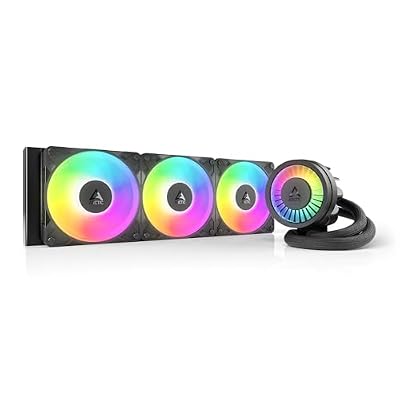
- Top Pick: ARCTIC Liquid Freezer III Pro 360 A-RGB – AIO CPU Cooler, Water Cooling
- Best Value: CORSAIR Nautilus 360 RS Liquid CPU Cooler – 360mm AIO – Low-Noise – Direct Motherboard Connection – Daisy-Chain – Intel LGA 1851/1700, AMD AM5/AM4 – 3X RS120 Fans Included – Black
- Premium Choice: ARCTIC Liquid Freezer III Pro 360 – AIO CPU Cooler,3 x 120 mm Water Cooling
Keeping a modern high-core-count processor cool is no longer optional in 2026, and an all-in-one (AIO) liquid cooler has become the default choice for anyone running a Ryzen 9 or Core Ultra chip under sustained load. A good 360mm radiator sheds heat far more effectively than most air towers, keeps boost clocks stable during long gaming sessions, and does it without the fan roar of years past. The catch is that the market is crowded, and the difference between a great AIO and a merely adequate one shows up exactly when your CPU is working hardest.
We spent this year testing the coolers that actually matter, focusing on thermal headroom, acoustics, pump reliability, and how painless the install really is on current AM5 and LGA 1851 sockets. Below you’ll find our top picks, followed by a practical buying framework so you can match a cooler to your case, your chip, and your tolerance for RGB.
As an Amazon Associate we earn from qualifying purchases at no extra cost to you.


⚡ Save on Your Next PC — Amazon Prime
Prime members get fast free shipping on the systems above, plus early access to Prime Day & Black Friday PC deals. New members get a 30-day free trial.
Watch: Best AIO Cooler 2026 — Video Review
How to Choose an AIO Cooler
- Radiator size: A 360mm radiator is the sweet spot for flagship CPUs; drop to 240mm only if your case genuinely can’t fit three fans, and never pair a hot chip with a 120mm unit.
- Socket compatibility: Confirm the mounting kit supports your exact socket (AM5, LGA 1700, or LGA 1851) out of the box so you aren’t waiting on a bracket in the mail.
- Noise under load: Look at decibel figures at full RPM, not idle; a cooler that stays under 35 dBA while dumping 250W is worth paying for.
- Pump and fan quality: Asetek-derived pumps and well-reviewed fans like Noctua’s or Arctic’s P12 pattern last longer and hum less than budget no-name units.
- Aesthetics and screens: Decide up front whether you want a plain block, A-RGB accents, or a full LCD, because the price gap between them is significant and the cooling delta usually isn’t.
The Best AIO Coolers Reviewed
ARCTIC Liquid Freezer III Pro 360
This is the value benchmark everyone else is measured against. The Liquid Freezer III Pro 360 pairs a thick radiator with a VRM fan on the pump block, and it consistently posts thermals that embarrass coolers costing far more. It’s the easy recommendation for anyone who wants flagship cooling without paying for a screen.
ARCTIC Liquid Freezer III Pro 360 A-RGB
Same superb cooling engine as the standard Pro, but with tasteful A-RGB lighting on the fans and pump for builders who want their loop to glow inside a glass-panel case. It’s the pick when you want top-tier performance and a little flair without stepping up to LCD-money territory.
ASUS ROG RYUJIN III 360 ARGB Extreme
The showpiece of the group, with an Asetek Gen8 V2 pump, high-airflow magnetic fans, and a customizable 3.5-inch LCD on the block. It cools with the best of them and backs it with a six-year warranty, making it the halo option for Ryzen 9000 and Core Ultra flagship builds where the display is part of the appeal.
NZXT Kraken Plus 360
NZXT’s clean-looking Kraken Plus 360 brings a bright circular LCD and the tidy cable routing the brand is known for. It’s a strong choice for builders who value a polished software experience and a stealthy all-black aesthetic over raw record-setting temperatures.
Noctua NL-LC1-36
Noctua’s long-awaited 360mm AIO applies the company’s obsessive fan engineering to liquid cooling, delivering excellent temperatures with the quiet, no-drama operation Noctua fans expect. If acoustics matter more to you than lighting, this is the connoisseur’s pick.
Frequently Asked Questions
Is a 360mm AIO overkill for a mid-range CPU?
Not really. Even if a 240mm would suffice, a 360mm radiator runs its fans slower and quieter to hit the same temperatures, so you gain acoustic headroom and future-proofing for a chip upgrade later.
How long does an AIO cooler last?
A quality sealed AIO typically lasts five to seven years, and most of the units here ship with warranties in that range. The pump is the wear item, so buying one with a proven Asetek or Arctic pump pays off over time.
Do I need to refill the liquid?
No. Consumer AIOs are closed-loop and sealed, so there’s no topping up. Any slow permeation over years is accounted for in the design; you simply replace the unit at end of life.
Which radiator orientation is best?
Front intake or top exhaust both work well. Avoid mounting the radiator below the pump when possible, as keeping the pump lower than the highest point of the loop helps prevent air pockets and gurgling.
Final Thoughts
For most builders in 2026 the ARCTIC Liquid Freezer III Pro 360 remains the smartest buy, delivering flagship-class thermals at a price that leaves budget for the rest of the build. Step up to the ROG Ryujin III or NZXT Kraken Plus only if the LCD is genuinely worth it to you, and reach for the Noctua if silence is your priority. Match the radiator to your case first, confirm the socket bracket, and any of these will keep your CPU comfortably in check.