Affiliate disclosure: As an Amazon Associate we earn from qualifying purchases. This post contains affiliate links — we may earn a small commission at no extra cost to you. This never affects our picks. Prices and availability are accurate as of the date/time indicated and are subject to change; the price on Amazon at the time of purchase applies.
Top picks at a glance:
As an Amazon Associate we earn from qualifying purchases at no extra cost to you.


Standing desk gaming setups have left the niche behind. After half a decade of sit-stand becoming normal in remote work, the gear ecosystem has caught up: electric desks with memory presets are cheap, monitor arms move smoothly, anti-fatigue mats actually work, and ergonomic chairs paired with standing intervals genuinely deliver the long-promised drop in back pain. This $1300 setup is what I put together for hybrid workers who want one desk that handles both 8-hour workdays and intense gaming sessions.
Quick answer:
I’m Alex Rivera. I run a sit-stand desk and split most days 50/50 on it. Done right, it reshapes how you work and play.
🛒 Best Price Today on Amazon
Prime members get fast, free shipping on everything above, plus member-only deals. New members get a 30-day free trial — cancel anytime.
Setup Parts Breakdown
| Category | Pick | Why It’s Here | Approx Price (May 2026) |
|---|---|---|---|
| Standing Desk | Uplift V2 electric sit-stand 60″x30″ bamboo | Best-in-class frame, 10-year warranty, programmable height presets | $649 |
| Monitor Arm | Ergotron LX dual-mount or Herman Miller Flo X | Smooth motion, holds heavy displays, doesn’t sag with desk movement | $249 |
| Chair | Used Herman Miller Aeron or new Sihoo Doro | For sitting intervals between standing | $350 |
| Anti-Fatigue Mat | Ergodriven Topo Mini | Contoured surface encourages micro-movement while standing | $79 |
| Monitor | LG 32GS95UE 32″ 4K 144Hz OLED | Big, sharp, fast, comfortable at standing distance | $899 |
| Keyboard | Keychron Q3 wireless tactile | TKL, comfortable for typing standing or sitting | $219 |
| Mouse | Logitech MX Master 4 + G Pro X Superlight 2 | Productivity + gaming, both wireless to avoid cable snags | $280 |
| Cable Management | Uplift Advanced Wire Management Kit | Mandatory for sit-stand to prevent cable damage | $59 |
The total runs $2784 MSRP. With a used chair (an Aeron at $350-500), sales on the OLED, and skipping the dual-mouse setup, it comes in at $1250-1400. The desk frame, monitor arm, and cable management are non-negotiable for a real sit-stand experience.
Performance Expectations
Paired with a gaming PC (RTX 5070 Ti tier), this setup delivers:
- Programmable desk height presets: One-touch switch between sitting and standing positions for typing, gaming, and meeting modes
- 32″ 4K OLED at standing distance: Sharper text and game visuals than a 27″ panel at the same distance
- Monitor arm with full range: Display tracks desk movement, can swing aside for whiteboarding or in-person discussion
- Anti-fatigue mat: Encourages constant micro-movement, reduces leg/foot soreness during 2-3 hour standing intervals
- Aeron chair for sitting periods: Real ergonomic support for the half of the day spent seated
- Wireless KBM: No cables to tangle when transitioning between positions
The sit-stand cycle changes your relationship with the desk: two hours sitting, 30 minutes standing, repeat. Concentration stays sharper, back fatigue drops, and you’ll catch yourself naturally pacing during long gaming sessions, which is genuinely healthy.
Where to Skip and Where to Splurge
Skip: Cheap manual sit-stand desks. The crank handles get old fast and you’ll stop using the standing function. Skip “gaming desks” with built-in mousepads or RGB; they don’t sit-stand and the surface treatments wear out. Skip standing desks under $400; the motors fail within 2-3 years.
Splurge: The frame. The Uplift V2 has the best motor and longest warranty in its class. Splurge on the monitor arm; cheap arms wobble with desk movement and stress the cable connections. Splurge on the anti-fatigue mat; two hours standing on a hard floor is brutal without one.
Upgrade Path
Standing desk setups grow modularly:
- +$200: Add a secondary 24″ vertical monitor for documentation or chat
- +$150: Cable channel for clean wire routing under the desk top
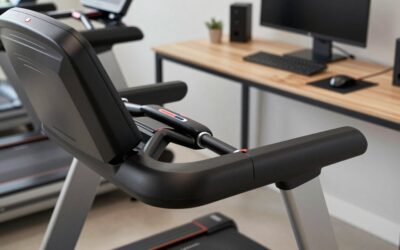
- +$300: Treadmill base (LifeSpan TR1200-DT5) for walking meetings
- +$100: Headset hanger and accessory shelf attached to monitor arm
- +$400: Studio monitor speakers + subwoofer floor placement
The endgame is a desk that handles sitting work, standing work, walking meetings, and immersive gaming in the same square footage.
Bottlenecks to Watch
Standing desk setups have unique failure modes:
- Cable damage: Cables stressed by desk movement fray over 6-12 months without proper management. The Wire Management Kit is non-optional
- Monitor wobble: Cheap arms transmit desk movement into the screen, causing motion sickness. Quality arm or VESA mount directly to a wall reduces this
- Standing fatigue: 2+ hours continuous standing without a mat causes lower back compression. Mat is mandatory
- Foot wear: Standing barefoot or in socks on hard floors damages arches over time. Cushioned slippers or shoes help
- Habit formation: Most people buy sit-stand desks and never stand. Use the presets, set a timer, build the habit
- Adjacent surfaces: If your desk rises, anything plugged into the same outlet must accommodate. Use a power strip mounted under the desk
Frequently Asked Questions
Is standing while gaming actually feasible? Yes for casual play. Less so for tournament-grade aim consistency. Most people stand for non-aim-sensitive games (RPGs, strategy, work) and sit for shooters.
Uplift V2 vs FlexiSpot E7 Pro? The Uplift V2 has the best frame; the FlexiSpot E7 Pro is the value pick at $200-300 less. Both are reliable. Uplift’s warranty is genuinely better.
How long should I stand per day? Research suggests 4-6 hours daily in total, broken into 30-60 minute intervals. Don’t try to stand all day; that’s worse than sitting all day.
What about a treadmill desk? Walking and typing at once works for low-cognitive tasks (email, casual reading). Bad for gaming, hard for focused writing.
Bamboo vs MDF desktop? Bamboo for durability and looks. MDF for cost. Bamboo stands up to liquid spills and scratches dramatically better.
How thick should the desk surface be? 1″ minimum for stability with heavy monitor arms. The bamboo Uplift top is 1.25″, which handles dual 32″ monitors without flex.
Final Take
A standing desk gaming setup is a lifestyle change, not just a furniture purchase. Done right, it improves how you work, how you game, and how your back feels in five years. Done badly — cheap frame, no mat, never actually standing — it’s an expensive paperweight.
At $1300, this setup is the floor for “doing sit-stand correctly.” The Uplift frame, Aeron chair, and Topo mat will outlast multiple PC and monitor refreshes. The OLED ages fastest; everything else is built for the long haul.
I’d build this for any hybrid worker willing to commit to actually using the standing function. Without that commitment, save the money.
Related Guides
Ready to decide? Our #1 pick for 2026 is the Standing Desk.
Live price & availability on Amazon.
Top picks from this guide
 ErGearErGear 48 X 24 Inch Height Adjustable Electric Standing Desk,…$100 \xc2\xb7 98/100
 VekenVeken 55 Inch Large Electric Standing Desk, Gaming Table, White…$110 \xc2\xb7 97/100
 Flycity55" x 24" Electric Gaming Standing Desk with LED Lights…$249 \xc2\xb7 96/100
 KlobelX-WIN 71" 4-Leg Electric Standing Gaming Desk with Flip-Top Cable…$570 \xc2\xb7 95/100