🛒 Best Price Today on Amazon
Prime members get fast, free shipping on everything above, plus member-only deals. New members get a 30-day free trial — cancel anytime.
- Best Computer Monitor Stands With Drawers Compared
- Kensington SmartFit Monitor Stand With Drawer
- Targus Adjustable Monitor Riser With Drawer AWE804GL
- Victor 1175 Monitor Riser With Drawer
- HOMCOM Dual Monitor Stand With Drawers
- LUMI STB26-02 Heavy-Duty Monitor Riser
- Which Monitor Stand With Drawer Fits Different Desks?
- How to Choose a Computer Monitor Stand With Drawer
- FAQ
- Conclusion
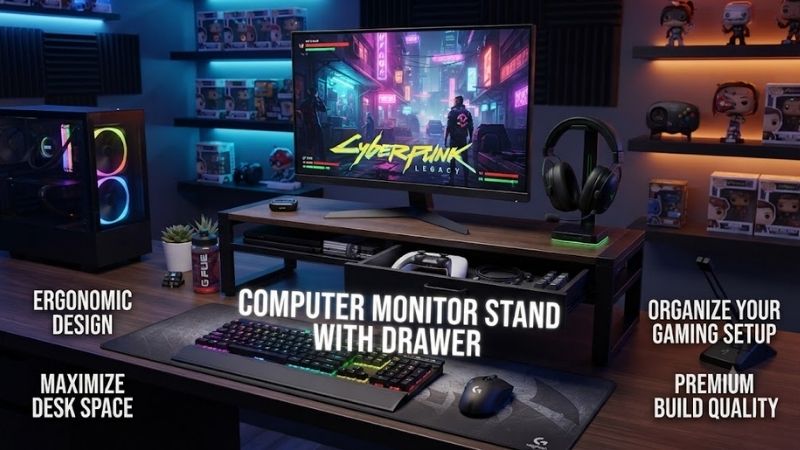
A computer monitor stand with drawer can raise your display to a more comfortable viewing position while creating useful storage beneath the screen. The best models combine a stable platform, practical drawer space, suitable load capacity, non-slip feet, and enough width for your monitor without taking over the entire desk.
Quick answer: For most people in 2026, the best computer monitor stand with drawer is the Monitor Stand — our #1 rated choice. See the full ranked comparison, alternatives and buying advice below.
Best Computer Monitor Stands With Drawers Compared
Monitor risers are simpler than adjustable monitor arms, but they can solve several workspace problems at once. Raising the display can improve screen positioning, while the drawer stores pens, chargers, notes, cables, and small accessories. Some models also provide extra shelves, USB hubs, wireless charging, or enough width for dual-monitor setups.
| Monitor Stand | Best For | Width | Load Capacity | Drawer Setup | Height Adjustment |
|---|---|---|---|---|---|
| Kensington SmartFit Monitor Stand With Drawer | Best overall | 21.7 in | 33 lb | Large A4 drawer | 3 positions |
| Targus AWE804GL | Adjustable height | 21.65 in | 33 lb | Pull-out drawer | 2 positions |
| Victor 1175 Monitor Riser | Premium office setup | 13 in | Monitor riser use | Large movable drawer | Fixed |
| HOMCOM Dual Monitor Stand | Dual monitors | 23.6–45.7 in | 30.9 lb total | 2 drawers | Fixed height |
| LUMI STB26-02 | Heavy-duty support | 20.1 in | Up to 66 lb top layer | Integrated drawer | Fixed |
Kensington SmartFit Monitor Stand With Drawer
Best For: Overall office and gaming desk organization
The Kensington SmartFit Monitor Stand With Drawer combines monitor elevation with adjustable height and a large storage drawer. Its 21.7-inch-wide platform supports monitors and all-in-one computers up to 30 inches and a maximum weight of 33 pounds, making it suitable for many mainstream office and gaming displays.
The biggest advantage is its three-position height adjustment. Monitor risers with a single fixed height can place the screen too high or too low depending on the user’s chair and body proportions. Kensington’s adjustable setup gives more flexibility when positioning the upper portion of the display closer to a comfortable viewing level.
The stand measures approximately 21.7 inches wide and 9.5 inches deep. Height can be configured from roughly 2.8 to 5.1 inches depending on the selected position. This gives users enough adjustment to compensate for low monitor stands without requiring a separate VESA arm attached to the desk.
Its A4-sized drawer measures about 12.4 inches wide, 8.3 inches deep, and 1.6 inches high. That makes it useful for pens, chargers, sticky notes, USB drives, notebooks, cables, and small computer accessories. The drawer is large enough to provide meaningful organization rather than functioning only as a decorative compartment.
Kensington also uses its SmartFit positioning concept to help users select an appropriate height. While no monitor stand can guarantee perfect ergonomics for every person, having several height choices is more useful than relying on one fixed riser height that cannot be changed after purchase.
What makes the SmartFit different is its combination of a legitimate 33-pound capacity, large storage drawer, and height adjustment. It is not the widest model in this roundup, but its dimensions make it easier to place on a conventional desk without consuming excessive surface depth.
Key Features:
- 21.7-inch-wide platform
- Supports monitors up to 30 inches
- 33-pound maximum load
- Three height positions
- Large A4-sized drawer
- Non-slip support
- MDF and ABS construction
Pros:
- Useful height adjustment
- Large drawer
- Good mainstream load capacity
- Compact depth
- Suitable for all-in-one computers
Cons:
- Not intended for dual large monitors
- No built-in USB hub or charging
Use Case: Home offices, work desks, gaming setups, study areas, and users who need both monitor elevation and everyday accessory storage.
Who It’s For: Buyers who want the best balance of adjustability, storage, and dependable capacity in a conventional single-monitor riser.
Targus Adjustable Monitor Riser With Drawer AWE804GL
Best For: Simple two-height adjustment
The Targus AWE804GL is an adjustable monitor riser with a pull-out drawer and a relatively low-profile design. Targus specifies a maximum load of 33 pounds and two selectable height settings, approximately 2.75 and 3.94 inches, making it easy to increase screen height without adding a bulky structure to the desk.
Its overall platform measures approximately 21.65 inches long and 9.45 inches deep. That is large enough for the stands of many conventional desktop monitors while remaining shallow enough to preserve workspace in front for a full-size keyboard, mouse, wrist rest, notebook, or gaming mouse pad.
The pull-out drawer is intended for frequently used office items. Pens, memory cards, charging cables, USB adapters, sticky notes, and other small accessories can be stored away instead of spreading across the desk. The drawer also remains accessible without moving the monitor or lifting the stand.
Targus uses anti-slip rubber feet underneath the unit to help reduce movement and protect the desktop surface. This is especially helpful when users repeatedly open the drawer or operate monitor controls, because a lightweight stand without grip can slide across smooth laminated or glass surfaces.
The two height settings are more limited than Kensington’s three-position system, but they still provide a useful choice between a subtle lift and a higher display position. Users should measure current screen height before buying because even a few inches can substantially change where the monitor sits relative to eye level.
What makes the Targus model appealing is simplicity. There are no complex shelves, wireless chargers, or accessory modules. It performs the core tasks of supporting the display, raising it, and creating enclosed desk storage while maintaining a clean rectangular shape.
Key Features:
- 21.65-inch width
- 9.45-inch depth
- Two height positions
- 2.75 or 3.94-inch height
- 33-pound load capacity
- Pull-out storage drawer
- Anti-slip rubber feet
Pros:
- Easy height adjustment
- Useful 33-pound capacity
- Shallow desk footprint
- Built-in drawer
- Minimalist appearance
Cons:
- Only two height choices
- Not designed for dual monitors
- No cable-management system
Use Case: Office displays, compact home workstations, printers, laptops, gaming consoles, and monitors using conventional center stands.
Who It’s For: Users who want a straightforward adjustable monitor stand without paying for extra technology or decorative materials.
Victor 1175 Monitor Riser With Drawer
Best For: Premium traditional office desks
The Victor 1175 takes a furniture-style approach instead of looking like a typical plastic computer accessory. It uses a wooden structure with a finished exterior, brushed metal drawer handle, faux-leather top surface, and frosted detail, making it especially suitable for professional offices where appearance matters.
The stand measures approximately 13 inches wide, 13 inches deep, and 6.5 inches high. This is significantly taller than most adjustable risers, so buyers need to check monitor position carefully. A screen with an already tall factory stand could end up too high once placed on top.
Its large drawer can be installed in two positions, allowing users to change how storage is organized within the stand. There is also open shelf space for papers, notebooks, documents, or frequently accessed items that should remain visible rather than being placed inside the drawer.
Rear cable access helps route monitor power and video cables away from the desktop. This detail is useful because a riser can otherwise create another obstacle that cables must wrap around. Keeping them behind the stand helps maintain the organized appearance that is one of the Victor 1175’s main selling points.
Non-slip rubber feet provide traction while protecting the desk surface. The product also arrives assembled, avoiding the panel assembly required by some larger particle-board stands. Users can place it on the desk, position the drawer, and begin organizing the workspace immediately.
What makes the Victor 1175 different is its furniture-inspired design. It does not offer adjustable height or wide dual-monitor support, but it looks more appropriate in an executive office or traditional workspace than many utilitarian plastic and metal monitor risers.
Key Features:
- 13 x 13-inch footprint
- 6.5-inch height
- Large storage drawer
- Drawer supports two positions
- Open document shelf
- Rear cable-management space
- Non-slip rubber feet
- Fully assembled design
Pros:
- Premium office appearance
- Large storage drawer
- Useful open shelf
- Cable-management access
- No assembly required
Cons:
- Fixed 6.5-inch height is relatively tall
- Narrower than wide monitor risers
- Not intended for dual-display arrangements
Use Case: Executive offices, study rooms, traditional home workspaces, and users who want desk storage that resembles furniture rather than a computer accessory.
Who It’s For: Buyers who prioritize appearance, enclosed storage, and organization more than height adjustment or maximum platform width.
HOMCOM Dual Monitor Stand With Drawers
Best For: Dual-monitor setups
The HOMCOM dual monitor stand is designed for users who need significantly more width than a normal single-display riser. Its adjustable layout extends from approximately 60 to 116 centimeters, or about 23.6 to 45.7 inches, allowing the side sections to spread apart for two monitors or fold inward for smaller desks.
The design includes two storage drawers, giving each side of the workstation its own compartment for small accessories. This can be especially useful on shared desks or gaming setups where controllers, cables, adapters, USB drives, pens, and other items quickly accumulate around the monitors.
Additional open storage beneath the center section creates room for a keyboard, mouse, notebooks, or smaller accessories. When the computer is not being used, placing the keyboard underneath can free a substantial amount of desk surface for paperwork, study, drawing, or other activities.
HOMCOM lists a total load capacity of 14 kilograms, approximately 30.9 pounds, with drawer capacity rated separately. The product is designed around monitors up to 24 inches according to the manufacturer, so users with larger or particularly heavy displays should verify stand dimensions and base sizes before purchase.
The stand can also change angle as its sections are repositioned. This is useful for users who prefer two displays arranged inward toward the chair rather than placed in one perfectly straight horizontal line. However, positioning should remain stable and symmetrical enough to keep monitor bases fully supported.
What makes the HOMCOM stand different is its width flexibility. Most monitor risers with drawers are designed around one monitor, whereas this model can organize a dual-screen workstation while still providing storage underneath.
Key Features:
- Adjustable 23.6–45.7-inch width
- Designed for two monitors
- Two built-in drawers
- Open center storage
- Adjustable monitor arrangement
- Approximately 30.9-pound total capacity
- Particle-board construction
Pros:
- Excellent dual-monitor width
- Two storage drawers
- Keyboard storage underneath
- Adjustable configuration
- Good for larger workstations
Cons:
- Lower capacity than some heavy-duty single stands
- Requires more desk space
- Particle-board construction
Use Case: Dual-monitor offices, study desks, productivity setups, streaming workstations, and compact gaming stations with two smaller screens.
Who It’s For: Users who want one monitor riser to organize two displays rather than buying separate stands for each monitor.
LUMI STB26-02 Heavy-Duty Monitor Riser
Best For: Heavy monitors and durable construction
The LUMI STB26-02 is a heavy-duty monitor riser combining steel with rubberwood finger-joint board construction. Its platform measures approximately 20.1 inches wide, 9.4 inches deep, and 4.9 inches high, giving it a substantial but manageable footprint for office and gaming desks.
The top layer is rated for up to 30 kilograms, or about 66 pounds, which is considerably more than most conventional monitor stands with drawers. The lower storage layer carries a separate lower capacity, but the strong top platform makes this model attractive for heavier monitors, all-in-one computers, printers, and other desktop equipment.
A built-in drawer provides enclosed storage for frequently used accessories, while an additional shelf creates another organizational layer. This combination lets users separate small loose objects from items they want visible, such as a notebook, keyboard, external drive, controller, or charging equipment.
Cable-management provisions help route wires through the stand instead of allowing power and display cables to spread across the workspace. This becomes particularly useful with heavier monitors because the stand is likely to remain permanently installed rather than being moved frequently.
The 4.9-inch fixed height provides a substantial display lift. That can work well for monitors with short factory stands, but buyers should measure their current setup first. A monitor that already places the top of the display near eye level may become uncomfortable if another five inches are added underneath.
What makes the STB26-02 stand out is load capacity. Users with a heavy professional display, all-in-one PC, or equipment that exceeds the typical 30-pound limit can benefit from the stronger platform rather than choosing a lightweight plastic riser.
Key Features:
- 20.1-inch width
- 9.4-inch depth
- 4.9-inch fixed height
- Steel and rubberwood construction
- Up to 66-pound top capacity
- Integrated storage drawer
- Additional shelf
- Cable management
Pros:
- Excellent load capacity
- Strong mixed-material construction
- Drawer plus open storage
- Useful cable management
- Suitable for heavier equipment
Cons:
- Fixed height
- Height may be excessive for some monitors
- Less widely available than mainstream office brands
Use Case: Heavy monitors, all-in-one computers, printers, professional workstations, and users who prioritize strength over lightweight portability.
Who It’s For: Buyers who need significantly more load capacity than a conventional plastic monitor stand normally provides.
Which Monitor Stand With Drawer Fits Different Desks?
Kensington SmartFit is the strongest general-purpose choice because it combines adjustable height, a substantial drawer, and support for monitors up to 30 inches and 33 pounds. Its three height positions also make it easier to tune the screen level after installation instead of committing to one fixed elevation.
Targus AWE804GL is a good alternative when simplicity matters. Its two heights, wide platform, drawer, and 33-pound rating cover the essential requirements without adding unnecessary shelves or accessories. It is particularly suitable for a conventional single-monitor work desk.
Victor 1175 is the better fit for traditional or executive spaces where a plastic monitor riser may look out of place. HOMCOM is preferable for dual monitors, while the heavy-duty LUMI STB26-02 makes the most sense when equipment weight is the primary concern.
How to Choose a Computer Monitor Stand With Drawer
Measure Your Monitor Base
Screen size alone does not determine whether a monitor will fit. Measure the width and depth of the actual stand base, then compare those dimensions with the riser platform. Every part of the monitor base should remain securely supported.
Check Weight Capacity
Large professional monitors and all-in-one computers can weigh significantly more than ordinary office displays. Compare the monitor’s complete weight, including its factory stand, with the riser’s maximum load rating and leave reasonable headroom.
Choose the Right Height
A monitor riser should improve screen position rather than simply make the display taller. A useful starting point places the upper part of the screen near eye level or slightly below while allowing a comfortable natural viewing angle.
Consider Adjustable Height
Adjustable risers are safer choices when you are unsure of the exact height required. Two or three positions can accommodate different chairs, monitor stands, and users more effectively than a fixed-height platform.
Evaluate Drawer Size
Some monitor stands include extremely shallow drawers that hold little more than pens. Larger drawers can store charging cables, adapters, notebooks, external drives, and other desk accessories, providing much greater organizational value.
Look at Desk Depth
A deep monitor riser can push the screen closer to the user when placed on a shallow desk. Check both stand depth and monitor base dimensions, particularly when using large 27-inch, 32-inch, or ultrawide displays.
Consider Keyboard Storage
A stand with sufficient open space underneath can hold a keyboard when it is not being used. This is particularly valuable for small desks because it instantly converts the front work area into open space for writing, studying, or other tasks.
FAQ
Is a Monitor Stand With a Drawer Worth It?
Yes, especially on small or cluttered desks. It can raise the monitor while storing small accessories that would otherwise occupy the main work surface. The benefit is greatest when the height also matches your ergonomic needs.
How High Should a Monitor Stand Be?
The required height depends on your chair, monitor, desk, and body proportions. The upper portion of the screen is commonly positioned near eye level or slightly below, so measure your current display before choosing a fixed-height riser.
Can a Monitor Riser Hold a 32-Inch Monitor?
Some can, but screen size is not enough to determine compatibility. Check the stand’s load capacity and platform dimensions against the monitor’s weight and base size before placing a large display on it.
Can I Put an All-in-One PC on a Monitor Stand?
Yes, when the riser is rated for the computer’s weight and the entire base fits securely on the platform. Kensington specifically supports compatible all-in-one systems up to its stated 33-pound capacity.
Is a Monitor Arm Better Than a Monitor Riser?
A monitor arm offers greater height, depth, and angle adjustment, while a riser is simpler and provides useful storage. A stand with drawers is usually better when desk organization matters as much as screen positioning.
Conclusion
The best computer monitor stand with drawer should raise your screen safely while making the desk easier to organize. Kensington SmartFit offers the best overall balance, Targus provides simple adjustment, Victor emphasizes office styling, HOMCOM suits dual monitors, and LUMI delivers heavy-duty support. Measure monitor weight, base size, and required height before buying.
Ready to decide? Our #1 pick for 2026 is the Monitor Stand.
Live price & availability on Amazon.