
🛒 Best Price Today on Amazon
Prime members get fast, free shipping on everything above, plus member-only deals. New members get a 30-day free trial — cancel anytime.
- Best Hall Effect Keyboards Compared
- Wooting 80HE — Best for Competitive Gaming
- SteelSeries Apex Pro Gen 3 — Best for Easy Esports Tuning
- Keychron Q1 HE 8K — Best Premium Hall Effect Keyboard
- Corsair K70 MAX — Best Full-Size Hall Effect Keyboard
- Akko MOD 007B HE — Best for Enthusiast-Style Builds
- How Hall Effect Keyboards Work
- How to Choose the Best Hall Effect Keyboard
- Hall Effect vs Mechanical Keyboards
- FAQ
- Conclusion
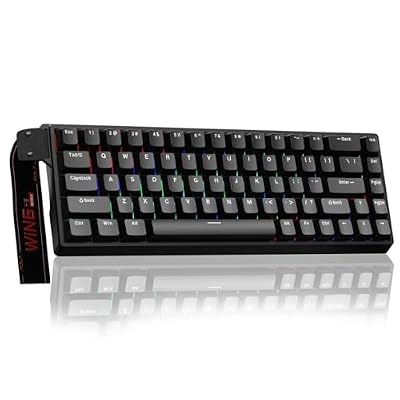
AULA WIN68 HE Mechanical Gaming Keyboard 60%, Hall Effect Magnetic Switch, Fast Trigger Mode Adjustable Actuation, 8000Hz Polling Rate, RGB Backlit, Wired Black Keyboard for Laptop/PC Gamer
Included for 'Best Hall Effect Keyboard: 5 Top Magnetic Gaming Models' because the listing specifies Hall Effect Magnetic Switch and Fast Trigger Mode Adjustable Actuation, details this guide uses to compare options.
View on AmazonThe best Hall Effect keyboard should turn magnetic switch technology into a practical gaming advantage through adjustable actuation, Rapid Trigger, stable key sensing, and useful software. This roundup compares proven Hall Effect models for competitive FPS play, mixed gaming, customization, and full-size desktop use.
Best Hall Effect Keyboards Compared
| Keyboard | Best For | Layout | Rapid Trigger | Adjustable Actuation | Connection |
|---|---|---|---|---|---|
| Wooting 80HE | Competitive gaming | Compact TKL-style | Yes | Yes | Wired |
| SteelSeries Apex Pro Gen 3 | Easy esports tuning | Full-size | Yes | Yes | Wired |
| Keychron Q1 HE 8K | Premium custom builds | 75% | Yes | Yes | Wired |
| Corsair K70 MAX | Full-size gaming | Full-size | Yes | Yes | Wired |
| Akko MOD 007B HE | Enthusiast-style value | 75% | Yes | Yes | Varies by version |
Wooting 80HE — Best for Competitive Gaming
Best For: Competitive FPS players who want extensive magnetic-switch tuning and a compact gaming layout.
The Wooting 80HE is built for competitive players who want deep control over how each key reacts. Its Lekker magnetic switches support adjustable actuation and Rapid Trigger, while Wootility keeps tuning straightforward. The compact TKL-style layout also preserves arrow keys without taking the space of a full-size board.
Key Features
- Hall Effect Lekker magnetic switches
- Adjustable actuation
- Rapid Trigger
- Analog input support
- Per-key configuration
- Wootility configuration software
- Compact layout with dedicated arrow keys
- Detachable USB-C connection
What Makes It Different
What makes the 80HE different is the balance between advanced magnetic input and software that exposes those controls clearly. Players can tune movement keys for short activation while leaving utility keys deeper to reduce accidental presses. The trade-off is that its wired design favors a dedicated gaming desk over cable-free setups.
Pros
- Extensive actuation customization
- Rapid Trigger support
- Strong software control
- Compact footprint
- Dedicated navigation keys
- Designed around competitive gaming
Cons
- Wired-only focus
- No dedicated numpad
- Advanced tuning can require experimentation
Use Case: Competitive Counter-Strike 2, Valorant, Overwatch 2, Fortnite, Apex Legends, and other games where fast movement changes matter.
Who It’s For: Players who want deep control over actuation and reset behavior rather than a conventional fixed-switch keyboard.
SteelSeries Apex Pro Gen 3 — Best for Easy Esports Tuning
Best For: Gamers who want Hall Effect performance with familiar controls, game profiles, and full-size functionality.
SteelSeries Apex Pro Gen 3 targets players who want Hall Effect tuning without giving up a familiar mainstream gaming-keyboard design. OmniPoint 3.0 switches offer adjustable actuation and Rapid Trigger, while Protection Mode can lower the sensitivity of nearby keys to help reduce accidental inputs during hectic movement.
Key Features
- OmniPoint 3.0 Hall Effect switches
- Adjustable actuation
- Rapid Trigger
- Rapid Tap
- Protection Mode
- GG QuickSet profiles
- OLED Smart Display
- Full-size layout
What Makes It Different
Its key advantage is how many performance controls are integrated into the SteelSeries ecosystem. Rapid Tap, game presets, onboard adjustments, and an OLED display make profile changes easier without rebuilding a layout from scratch. The drawback is that advanced configuration remains tied closely to SteelSeries GG on supported Windows systems.
Pros
- Broad actuation adjustment
- Rapid Trigger support
- Protection Mode for accidental inputs
- Convenient game profiles
- Dedicated media and display controls
- Familiar full-size layout
Cons
- Takes more desk space than TKL or 75% boards
- Software ecosystem matters for advanced configuration
- Numpad may be unnecessary for FPS-focused users
Use Case: Competitive gaming mixed with everyday desktop work where dedicated media controls and a numpad remain useful.
Who It’s For: Gamers who want advanced magnetic features without moving to a highly specialized compact keyboard.
Keychron Q1 HE 8K — Best Premium Hall Effect Keyboard
Best For: Gamers who want Hall Effect performance inside a substantial aluminum custom-keyboard platform.
The Keychron Q1 HE 8K combines Hall Effect gaming features with the heavy aluminum construction associated with Keychron’s custom boards. It uses magnetic switches, adjustable actuation, Rapid Trigger, dynamic multi-action keys, and a wired 8K polling option, making it relevant for gamers who also care about premium case feel.
Key Features
- Keychron magnetic switches
- Adjustable actuation
- Rapid Trigger
- Dynamic multi-action keys
- Hall Effect sensing
- 75% layout
- Aluminum chassis
- Wired high-polling-rate operation
- Magnetic switch hot-swap support
What Makes It Different
Unlike many esports-first magnetic boards, the Q1 HE 8K emphasizes enthusiast-style construction as much as input tuning. Its 75% layout keeps arrows and navigation keys while saving space, but the aluminum chassis is heavy. Magnetic hot-swap support is limited to compatible Keychron magnetic switches rather than standard MX switches.
Pros
- Premium aluminum construction
- Compact 75% layout
- Rapid Trigger support
- Adjustable key actuation
- Dynamic multi-action functions
- Dedicated arrow and navigation keys
Cons
- Heavy for transportation
- Wired rather than wireless
- Magnetic switch compatibility is restricted
- Less minimalist than esports-focused boards
Use Case: A permanent gaming setup where competitive features and custom-keyboard construction are equally important.
Who It’s For: Mechanical keyboard enthusiasts who want Hall Effect technology without giving up an aluminum custom-board experience.
Corsair K70 MAX — Best Full-Size Hall Effect Keyboard
Best For: Gamers who want magnetic switches without abandoning a traditional full-size keyboard layout.
The Corsair K70 MAX suits gamers who want Hall Effect technology in a traditional full-size layout. Its MGX magnetic-mechanical switches support adjustable actuation and Rapid Trigger, while the dedicated numpad and media-oriented design suit users who mix competitive games with productivity, streaming controls, or number-heavy work.
Key Features
- Corsair MGX magnetic switches
- Adjustable actuation
- Rapid Trigger support
- Full-size layout
- Dedicated numpad
- RGB lighting
- Detachable USB-C cable
- iCUE configuration
- Included palm rest
What Makes It Different
Its main distinction is familiarity: the K70 MAX keeps the proportions and controls of a conventional full-size gaming keyboard while adding magnetic sensing. That makes the transition easier for users who dislike compact layouts. The trade-off is desk space, because the numpad pushes the mouse farther right during low-sensitivity FPS play.
Pros
- Full-size key arrangement
- Adjustable magnetic switches
- Rapid Trigger
- Dedicated numpad
- Familiar desktop layout
- Useful for gaming and productivity
Cons
- Wide footprint
- Less mouse space than compact keyboards
- Full-size design is harder to transport
- Numpad offers little benefit for many esports games
Use Case: Gaming, streaming, productivity, editing, and general desktop use from one full-size keyboard.
Who It’s For: Players who want Hall Effect controls but have no interest in moving to a smaller keyboard layout.
Akko MOD 007B HE — Best for Enthusiast-Style Builds
Best For: Users who want a compact magnetic keyboard with custom-keyboard styling and a 75% layout.
The Akko MOD 007B HE is aimed at buyers who want magnetic switches, a compact 75% layout, and a more enthusiast-oriented chassis. Depending on the specific version, it combines Hall Effect switch sensing with Rapid Trigger, RGB lighting, hot-swap support for compatible magnetic switches, and Akko Cloud Driver configuration.
Key Features
- Hall Effect magnetic switches
- Rapid Trigger support
- Adjustable actuation
- 75% layout
- RGB lighting
- Akko Cloud Driver
- Magnetic switch hot-swap support
- Gasket-mounted designs available
- Multiple MOD 007B HE variants
What Makes It Different
Its appeal comes from combining gaming-oriented magnetic input with the layout and construction style common in custom mechanical keyboards. The 75% format preserves arrows and navigation keys without full-size width. Buyers should check the exact version because switch type, polling behavior, and cross-compatibility can differ between revisions.
Pros
- Compact 75% format
- Magnetic switch technology
- Rapid Trigger
- Adjustable actuation
- Enthusiast-oriented construction
- Dedicated arrow keys
Cons
- Specifications vary between versions
- Magnetic switch support depends on the revision
- Software is less universal than standard mechanical hot-swap ecosystems
Use Case: Gaming setups where magnetic performance, compact dimensions, and custom-keyboard aesthetics all matter.
Who It’s For: Enthusiasts who want Hall Effect features without choosing a purely esports-focused keyboard design.
How Hall Effect Keyboards Work
Hall Effect switches use magnetic sensing to measure key travel rather than relying on a fixed electrical contact point. That lets supported keyboards change when a key activates and resets through software. In competitive games, the practical benefit is faster repeated directional input when Rapid Trigger is configured appropriately.
Unlike a conventional mechanical switch with one predetermined activation behavior, a magnetic keyboard can measure how far a compatible switch has moved. Manufacturers can use that information for adjustable actuation, dynamic actions, analog-style input, Rapid Trigger, or other functions, although the exact feature set varies between keyboard models.
How to Choose the Best Hall Effect Keyboard
Adjustable Actuation
Adjustable actuation changes how far a key must travel before the keyboard registers the press. A shallow setting can make movement keys react with less travel, while a deeper setting can reduce accidental inputs on keys such as abilities, inventory, or chat. The best setting depends on control habits rather than the smallest number available.
Competitive players may prefer sensitive WASD settings while keeping surrounding keys deeper to avoid unwanted presses. A keyboard with per-key adjustment provides more control than one that applies the same actuation point everywhere. This matters when movement speed is important but accidental ability or menu inputs would be disruptive.
Rapid Trigger
Rapid Trigger changes the reset behavior of supported magnetic keys so they can deactivate as the key begins moving upward instead of waiting for a fixed reset point. This is most useful for repeated movement and counter-strafing in shooters. Very sensitive settings can also cause unwanted inputs until your fingers adapt to them.
Rapid Trigger should therefore be treated as a configurable control rather than something that must always run at maximum sensitivity. Players with heavier fingers may benefit from slightly larger reset distances, while experienced competitive users may prefer extremely responsive movement keys after spending time adapting their technique.
Keyboard Layout
Layout matters because Hall Effect performance does not compensate for poor mouse positioning or missing controls. A 60% board maximizes mouse space, 75% keeps dedicated arrows and navigation keys, TKL removes only the numpad, and full-size keeps every major key group. Choose around your games and desk before comparing polling specifications.
| Layout | Main Advantage | Trade-Off | Best For |
|---|---|---|---|
| 60% | Maximum mouse space | Heavy shortcut reliance | Competitive FPS |
| 75% | Compact with arrows | No numpad | Mixed gaming |
| TKL | Familiar layout without numpad | Wider than 75% | FPS and general gaming |
| Full-size | Complete key set | Largest footprint | Gaming and productivity |
Software and Profiles
Software is especially important on a Hall Effect keyboard because actuation, Rapid Trigger, multi-action keys, profiles, and input-priority features often depend on configuration tools. A powerful sensor is less useful if settings are difficult to understand or profiles are hard to switch. Check whether the software fits your system and workflow.
Players who regularly switch between games should also consider how profiles are stored and selected. A very shallow movement setup for Valorant may feel inappropriate in an RPG or while typing. Convenient profile switching allows the same magnetic keyboard to behave differently across competitive gaming, casual play, productivity, and everyday text entry.
Magnetic Switch Compatibility
Hall Effect keyboards should not be treated like universal MX hot-swap boards. Magnetic switches interact with sensors and firmware, so physical fit alone does not establish compatibility. If customization matters, verify which switch families the specific PCB supports rather than assuming every magnetic switch can be installed interchangeably.
This distinction becomes important when buying replacement switches or changing their feel later. Some Hall Effect platforms support only a narrow family of magnetic switches, while newer designs may offer broader compatibility. The safest approach is to follow the compatibility list for the exact keyboard revision instead of relying on switch appearance.
Hall Effect vs Mechanical Keyboards
| Feature | Hall Effect | Traditional Mechanical |
|---|---|---|
| Adjustable actuation | Common on HE gaming models | Usually fixed |
| Rapid Trigger | Supported on many models | Generally unavailable in the same form |
| Analog key-position sensing | Possible | Usually no |
| Switch compatibility | Platform-dependent | Broad on MX hot-swap boards |
| Typing variety | Growing | Very broad |
| Competitive customization | Extensive | More limited |
| Software dependence | Often higher | Usually lower |
Hall Effect keyboards provide their clearest advantage when players actively use adjustable actuation and Rapid Trigger. Someone who leaves every setting at a conventional activation depth may gain less from magnetic technology. Traditional mechanical keyboards still offer a much broader switch ecosystem for users focused primarily on typing feel and sound.
FAQ
Are Hall Effect keyboards actually faster?
A Hall Effect keyboard is not automatically faster in every situation, but magnetic sensing enables features that fixed-actuation mechanical switches cannot offer in the same way. Adjustable actuation and Rapid Trigger can reduce movement travel and reset distance, which matters most in games where rapid directional changes are frequent.
Is Rapid Trigger useful for gaming?
Rapid Trigger is most useful for competitive shooters and games where keys must activate and reset repeatedly with very little movement. It can make strafing feel more immediate, but the most sensitive configuration is not always easiest to control. Players should tune activation and reset behavior instead of copying one universal setting.
Are Hall Effect keyboards good for typing?
Hall Effect keyboards can work well for typing because the magnetic sensing itself does not prevent normal text input. However, extremely shallow actuation may cause accidental letters during writing. A practical setup is to use deeper actuation for general typing or non-gaming keys and more sensitive settings only where fast response is useful.
Can you put any magnetic switch in a Hall Effect keyboard?
Magnetic hot-swap support is not the same as standard mechanical hot-swap compatibility. Hall Effect switches depend on magnets, sensors, firmware, and calibration designed for a specific keyboard. A switch that physically fits may still be unsupported, so buyers should use only magnetic switch families listed by the keyboard manufacturer.
Is Hall Effect better than mechanical for FPS games?
Hall Effect technology offers useful advantages for FPS players because adjustable actuation and Rapid Trigger can make movement keys activate and reset with less travel. Traditional mechanical switches remain fully capable for competitive play, but they generally lack the same degree of per-key travel-based configuration available from magnetic sensing.
Should I choose 60%, 75%, TKL, or full-size?
Choose 60% when maximum mouse room matters, 75% when you also want dedicated arrows, TKL when you prefer a familiar layout without a numpad, and full-size when numeric input is important. The magnetic technology works across different formats, so desk space and key access should determine layout rather than Hall Effect features alone.
Conclusion
The best Hall Effect keyboard depends on whether you prioritize competitive tuning, premium construction, compact size, or a traditional full-size layout. Wooting and SteelSeries focus strongly on game controls, Keychron and Akko add enthusiast appeal, while Corsair keeps familiar full-size ergonomics. Match features to your actual games and desk.









