
🛒 Best Price Today on Amazon
Prime members get fast, free shipping on everything above, plus member-only deals. New members get a 30-day free trial — cancel anytime.
- Best Optical Switch Keyboards Compared
- 1. Razer Huntsman V3 Pro — Best for Competitive Gaming
- 2. Corsair K100 RGB OPX — Best Feature-Rich Optical Keyboard
- 3. ASUS ROG Strix Scope RX — Best for Traditional FPS Gaming
- 4. SteelSeries Apex 9 TKL — Best TKL Optical Keyboard
- 5. Razer Huntsman Mini — Best Compact Optical Keyboard
- How to Choose the Best Optical Switch Keyboard
- Optical vs Mechanical vs Hall Effect Keyboards
- FAQ
- Conclusion
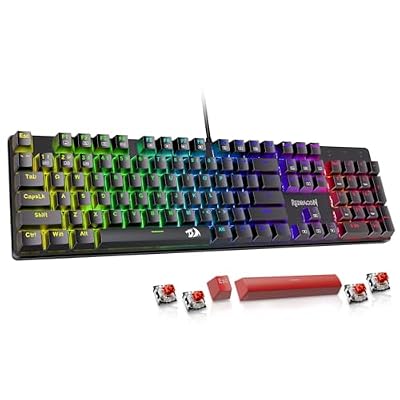
Redragon Mechanical Gaming Keyboard Wired, 11 Programmable Backlit Modes, Hot-Swappable Red Switch, Anti-Ghosting, Double-Shot PBT Keycaps, Light Up Keyboard for PC Mac
Included for 'Best Optical Switch Keyboard: 5 Fast Gaming Picks for 2026' because the listing specifies 11 Programmable Backlit Modes and Hot-Swappable Red Switch, details this guide uses to compare options.
View on Amazon
GATERON KS-15 Optical Keyboard Switches(35PCS,Silver)
Included for 'Best Optical Switch Keyboard: 5 Fast Gaming Picks for 2026' because the listing specifies Silver), details this guide uses to compare options.
View on Amazon
Razer Huntsman V2 Gaming Keyboard, Analog Optical Switches, Black | Adjustable Actuation, Rapid Trigger Mode, Dedicated Media Keys & Dial, Chroma RGB Lighting, Magnetic Plush Wrist Rest
Included for 'Best Optical Switch Keyboard: 5 Fast Gaming Picks for 2026' because the listing specifies Analog Optical Switches and Black, details this guide uses to compare options.
View on AmazonThe best optical switch keyboard should deliver fast, consistent key registration without sacrificing layout, comfort, or control. This roundup compares proven optical gaming keyboards from Razer, Corsair, ASUS, and SteelSeries, focusing on switch behavior, form factor, programmability, and the games each model suits best.
Best Optical Switch Keyboards Compared
| Keyboard | Best For | Switch Type | Form Factor | Adjustable Actuation | Rapid Trigger |
|---|---|---|---|---|---|
| Razer Huntsman V3 Pro | Competitive gaming | Analog Optical Gen-2 | Full-size | Yes | Yes |
| Corsair K100 RGB OPX | Feature-rich desktop setups | Corsair OPX Optical-Mechanical | Extended full-size | No | No |
| ASUS ROG Strix Scope RX | Traditional FPS gaming | ROG RX Optical Mechanical | Full-size | No | No |
| SteelSeries Apex 9 TKL | TKL esports setups | OptiPoint Optical | TKL | Two settings | No |
| Razer Huntsman Mini | Compact gaming setups | Razer Optical | 60% | No | No |
1. Razer Huntsman V3 Pro — Best for Competitive Gaming
Best For: Competitive FPS players who want adjustable actuation and Rapid Trigger.
Razer Huntsman V3 Pro is built for competitive players who want more control than a fixed-actuation optical board can provide. Its Analog Optical Gen-2 switches support adjustable actuation and Rapid Trigger, letting you tune how quickly movement keys reset while keeping a familiar full-size layout for everyday use.
That flexibility matters most in FPS and rhythm games, where repeated directional inputs can benefit from a shorter reset distance. The trade-off is complexity: players who prefer a simple plug-and-play keyboard may not use its analog input, dual-step actuation, or onboard tuning enough to justify the extra controls.
Key Features
- Razer Analog Optical Switches Gen-2
- Adjustable actuation
- Rapid Trigger Mode
- Analog input
- Dual-step actuation
- 1000 Hz polling rate
- Doubleshot PBT keycaps
- Full-size layout
- Multi-function dial
- Magnetic wrist rest
- Up to six onboard profiles
- Detachable USB-C cable
What Makes It Different
The Huntsman V3 Pro goes beyond simple optical detection by letting players tune how far a key must travel before registering. Rapid Trigger also changes reset behavior dynamically, making the keyboard particularly relevant to competitive movement-heavy games where repeated key transitions matter more than traditional fixed actuation.
Pros
- Adjustable actuation
- Rapid Trigger support
- Analog input
- Full-size layout
- Doubleshot PBT keycaps
- Dedicated media controls
- Onboard adjustment options
Cons
- Full-size chassis takes more desk space
- Advanced features add setup complexity
- No wireless connectivity
Use Case
Choose the Huntsman V3 Pro for Counter-Strike, Valorant, Overwatch, rhythm games, or other titles where movement timing is important. Its configurable switches also help players create deeper actuation for keys they hit accidentally while keeping movement controls sensitive for rapid directional changes.
Who It’s For
Competitive players who actively tune keyboard behavior will get the most from this model. It makes less sense for someone who wants only a basic optical switch with one predictable actuation point, because much of its value comes from Rapid Trigger, analog controls, and customizable actuation behavior.
2. Corsair K100 RGB OPX — Best Feature-Rich Optical Keyboard
Best For: Gamers, streamers, and power users who want extensive controls.
Corsair K100 RGB with OPX switches targets users who want optical actuation in a feature-heavy full-size board. Its dedicated media controls, macro keys, onboard profiles, USB passthrough, and control wheel suit players who also stream, edit, or manage shortcuts, but the extended chassis occupies more desk space.
The OPX switch uses infrared light to register a press, with a short actuation distance and linear feel. That can make repeated inputs feel immediate, while the full-size layout preserves a number pad and dedicated controls. The limitation is portability, because this is a large wired keyboard designed for a permanent desktop setup.
Key Features
- Corsair OPX optical-mechanical switches
- 1.0 mm actuation distance
- 45 g actuation force
- 3.2 mm total travel
- Up to 8,000 Hz report rate
- Six dedicated macro keys
- iCUE control wheel
- Dedicated media controls
- USB passthrough
- 8 MB onboard storage
- Magnetic cushioned palm rest
- Full-key rollover
What Makes It Different
The K100 RGB focuses less on adjustable switch behavior and more on surrounding functionality. Dedicated macro keys, a multifunction control wheel, media controls, USB passthrough, and extensive onboard storage make it useful beyond gaming, especially when a single keyboard handles streaming, productivity, editing, and complex shortcuts.
Pros
- Short optical actuation
- Up to 8,000 Hz report rate
- Dedicated macro keys
- Extensive onboard profile storage
- USB passthrough
- Dedicated media controls
- Included palm rest
Cons
- Large desktop footprint
- Wired only
- Fixed actuation
- Extra controls may be unnecessary for minimalist setups
Use Case
The K100 RGB works well when your keyboard doubles as a command center for gaming and content creation. MMO players can use dedicated macro keys, streamers gain easy media and shortcut access, and productivity users retain a number pad. FPS gamers with limited mouse space may prefer a smaller TKL or 60% alternative.
Who It’s For
Choose it if you value dedicated controls more than portability or switch adjustability. The K100 RGB makes the strongest case on a permanent desktop where its macro column, control wheel, number pad, wrist rest, and USB passthrough can remain useful instead of becoming extra hardware you rarely touch.
3. ASUS ROG Strix Scope RX — Best for Traditional FPS Gaming
Best For: FPS players who prefer fixed optical switches and a full-size layout.
ASUS ROG Strix Scope RX is a simpler full-size alternative centered on ROG RX optical mechanical switches. It adds a wide Ctrl key for FPS commands, per-key RGB, USB passthrough, an alloy top plate, and IP57 water and dust resistance, giving players useful durability features without the analog tuning found on Razer’s flagship.
Its appeal is consistency rather than deep adjustment. The RX switch design keeps each keystroke stable, while the enlarged Ctrl key makes crouch and modifier commands easier to hit during fast movement. Gamers who want Rapid Trigger or variable actuation should look elsewhere, but traditional FPS players may prefer this fixed behavior.
Key Features
- ROG RX Red optical mechanical switches
- Full-size layout
- 1000 Hz USB report rate
- Per-key RGB lighting
- USB 2.0 passthrough
- IP57 water and dust resistance
- Alloy top cover
- Enlarged Ctrl key
- Fully programmable keys
- On-the-fly macro recording
- Onboard profile support
What Makes It Different
The enlarged Ctrl key is specifically useful in shooters because crouch is frequently mapped there, while IP57 protection addresses accidental spills and desk dust. Instead of providing adjustable optical behavior, ASUS concentrates on predictable key response, physical stability, straightforward macros, and features relevant to a fixed gaming desk.
Pros
- ROG RX optical switches
- Enlarged Ctrl key
- IP57 protection
- USB passthrough
- Per-key RGB
- Programmable keys
- Full-size functionality
Cons
- Fixed actuation
- No Rapid Trigger
- Full-size footprint
- Wired connectivity only
Use Case
This keyboard makes sense for shooters where you want optical switches but do not want to configure individual actuation distances. The wide Ctrl key is useful for crouching and movement combinations, while the number pad keeps the board practical for productivity. It fits mixed gaming and desktop use better than a stripped-down 60% model.
Who It’s For
The Strix Scope RX suits players who value durability, stable key feel, and familiar full-size controls over experimental switch features. Buyers comparing it with the Huntsman V3 Pro should decide whether adjustable actuation is important, because the ASUS design deliberately favors simpler fixed optical input.
4. SteelSeries Apex 9 TKL — Best TKL Optical Keyboard
Best For: Esports players who want mouse space without losing arrow keys.
SteelSeries Apex 9 TKL is designed for players who want optical switches and more mouse room without moving to a 60% layout. Its OptiPoint switches offer two actuation settings and can be swapped, so the board combines a familiar tenkeyless arrangement with more switch flexibility than most fixed optical keyboards.
The TKL format keeps arrow keys and the navigation cluster while removing the number pad, making it easier to position the mouse for low-sensitivity aiming. Its two actuation depths are useful, but they are less granular than fully adjustable analog systems, so buyers should decide whether simple presets are enough for their games.
Key Features
- SteelSeries OptiPoint optical switches
- Tenkeyless form factor
- 1.0 mm gaming actuation option
- 1.5 mm deliberate actuation option
- Swappable OptiPoint switches
- PBT keycaps
- Aluminum top plate
- RGB lighting
- Zero-debounce optical detection
What Makes It Different
Most optical keyboards lock users into the switches installed at the factory, but the Apex 9 platform supports swappable OptiPoint switches. Its two-stage actuation selection also gives players a simple way to choose between faster input and more deliberate keystrokes without requiring the continuous adjustment range of an analog keyboard.
Pros
- Space-saving TKL design
- Two actuation settings
- Swappable optical switches
- Keeps arrow and navigation keys
- PBT keycaps
- Aluminum top plate
Cons
- No number pad
- Actuation adjustment is limited to two points
- Less granular than analog optical keyboards
Use Case
The Apex 9 TKL is particularly effective for low-sensitivity FPS players who need more horizontal mouse room but still use arrow keys, Delete, Home, or other navigation controls. The faster setting can prioritize gaming, while the deeper option can reduce accidental inputs during typing or slower-paced desktop work.
Who It’s For
Choose the Apex 9 TKL if 60% keyboards feel too restrictive but full-size boards interfere with mouse movement. Its layout provides a useful middle ground, while swappable OptiPoint switches appeal to buyers who want more customization than a permanently fixed optical switch system normally provides.
5. Razer Huntsman Mini — Best Compact Optical Keyboard
Best For: Gamers who want maximum mouse room and a portable 60% layout.
Razer Huntsman Mini is the compact option for gamers who want optical switches in a 60% chassis. It removes the function row, navigation cluster, and number pad, placing those commands on secondary layers instead. In return, the board creates significantly more room for wide mouse movements and is easier to carry between setups.
Its choice of linear or clicky optical switches lets buyers prioritize a smoother or more tactile-feeling experience, while doubleshot PBT keycaps and a detachable USB-C cable support frequent use and travel. The main compromise is access to secondary functions, which can slow productivity or games that rely on many dedicated keys.
Key Features
- 60% form factor
- Razer Linear or Clicky Optical Switch options
- 1000 Hz polling
- Doubleshot PBT keycaps
- Detachable USB-C cable
- N-key rollover
- Anti-ghosting
- Fully programmable keys
- RGB backlighting
- Aluminum construction
What Makes It Different
The Huntsman Mini combines genuine optical switches with one of the smallest mainstream gaming layouts. Instead of giving you dedicated navigation and function keys, it prioritizes free desk space. That makes the mouse easier to position during sweeping FPS movements, but it demands greater familiarity with secondary key layers.
Pros
- Compact 60% footprint
- Linear and clicky optical options
- Detachable USB-C cable
- Doubleshot PBT keycaps
- Easy to transport
- More mouse space
Cons
- No dedicated arrow keys
- No function row
- No number pad
- No dedicated media controls
- Secondary layers require adjustment
Use Case
The Huntsman Mini works best in competitive setups where the keyboard’s physical size matters almost as much as its switches. It leaves substantial space for low-DPI mouse movement and fits easily into portable setups. Games requiring many dedicated commands may expose the limitations of its layered 60% layout.
Who It’s For
It fits FPS players, tournament travelers, and users with narrow desks who already understand compact keyboard shortcuts. MMO players, spreadsheet users, or anyone frequently using function and navigation keys should consider the Apex 9 TKL or a full-size optical model instead of accepting the Mini’s reduced direct key access.
How to Choose the Best Optical Switch Keyboard
Understand How Optical Switches Work
Optical switches use light to detect a keypress rather than relying on a conventional metal contact point. For gaming, that design can remove electrical debounce from the switch mechanism and allow consistent registration. It does not automatically make every optical keyboard faster, because firmware, polling, and actuation design also matter.
Consider Actuation Distance
Actuation distance determines how far a key moves before the input registers. A shorter point can feel quicker for movement and repeated commands, while a deeper point can reduce accidental presses. Adjustable optical boards give competitive players more control, but fixed switches are easier for users who do not want to manage per-game settings.
Choose the Right Form Factor
Form factor changes both desk space and key access. Full-size keyboards keep a number pad and dedicated controls, TKL models remove the number pad, and 60% boards also drop the function row and navigation cluster. FPS players often benefit from the extra mouse room of smaller layouts, while MMO and productivity users may value more physical keys.
Decide Whether You Need Rapid Trigger
Rapid Trigger differs from a normal fixed reset point because the key can reset based on movement rather than returning to one fixed height. That can help with repeated strafing and fast directional changes in games that reward rapid input transitions. It is less important for slower genres where deliberate commands matter more than reset speed.
Check Software and Onboard Memory
Software and onboard memory affect how easily you can carry settings between games or PCs. Macro support, remapping, RGB control, and saved profiles are useful when you maintain different layouts for shooters, MOBAs, or productivity. The trade-off is added setup time, so simpler onboard controls can be preferable for tournament or shared-PC use.
Optical vs Mechanical vs Hall Effect Keyboards
| Feature | Optical | Mechanical | Hall Effect |
|---|---|---|---|
| Detection Method | Light sensor | Electrical contact | Magnetic sensor |
| Electrical Debounce | Typically unnecessary | Commonly required | Typically unnecessary |
| Adjustable Actuation | Available on some models | Usually fixed | Common on advanced models |
| Rapid Trigger | Available on some analog optical models | Rare | Common on gaming models |
| Switch Variety | More limited | Very broad | Growing |
| Hot-Swap Options | Model-dependent | Widely available | Model-dependent |
| Best Use | Fast gaming and optical enthusiasts | General gaming and customization | Advanced adjustable gaming input |
FAQ
Are Optical Keyboards Faster Than Mechanical Keyboards?
Optical keyboards can feel faster because many optical switches use short actuation points and avoid electrical debounce required by traditional contact switches. Real gaming performance still depends on firmware, polling behavior, and player settings, so switch technology alone should not be treated as a guarantee of lower total latency.
Are Optical Switches Good for Typing?
Optical switches can work well for typing, but comfort depends more on switch weight, key travel, layout, and sound than on the sensing method. Linear optical switches may feel light for long sessions, while clicky versions add feedback. Writers should prioritize key feel and layout instead of choosing optical technology only for speed.
Is Rapid Trigger Worth It?
Rapid Trigger is most useful for competitive games that involve frequent changes in movement direction, such as tactical shooters and arena FPS titles. It allows a key to reset sooner as it rises, which can make repeated inputs more responsive. For strategy, MMO, or casual gaming, adjustable actuation may matter more than Rapid Trigger itself.
Is TKL or 60% Better for an Optical Gaming Keyboard?
A TKL optical keyboard is often the most balanced size for gaming because it keeps arrow keys and navigation controls while removing the number pad. That creates more space for the mouse without forcing every command onto secondary layers. A 60% model is better when maximum desk space and portability matter more than direct key access.
Are Optical Switches Better Than Hall Effect Switches?
Optical switches are not automatically better than Hall effect switches. Optical designs detect movement with light, while Hall effect switches use magnetic sensing and may support similar actuation features. The better choice depends on implementation, software, layout, switch feel, and whether adjustable input behavior matters to you.
Conclusion
The best optical switch keyboard depends on how much control you want over actuation and layout. Razer Huntsman V3 Pro suits adjustable competitive play, Corsair K100 RGB favors feature-rich desktops, Apex 9 TKL balances space and direct keys, Strix Scope RX favors simplicity, and Huntsman Mini maximizes mouse room.









