🛒 Best Price Today on Amazon
Prime members get fast, free shipping on everything above, plus member-only deals. New members get a 30-day free trial — cancel anytime.
As an Amazon Associate we earn from qualifying purchases.
The real decision behind a gaming mouse is not how much you spend, but what each step up in spending actually buys you. A mouse that costs twice as much does not aim twice as well, and a cheaper mouse is not automatically a bargain if its shape fights your hand or its clicks wear out within a year. Value is the gap between what a mouse does every day and what you gave up to own it, so the winning buyer can tell a genuine improvement from a headline feature that never matters in a match.
This guide serves players who want strong performance without paying for features they will never use, first-time buyers choosing a mouse for a new setup, and experienced players replacing a worn mouse who want to spend wisely this time. It explains how to judge sensor behaviour, shape, weight, switches, connection type and build quality, so you can compare mice across spending tiers and spot where extra spending stops improving your game.
How to Choose
Value only makes sense once you know which features change your play and which ones sit quietly in the background. The four factors below decide most of that, and they matter in a different order for every player.
Judge the sensor by how it tracks in real play
A sensor earns its keep when it tracks cleanly at the sensitivity you actually use, holds its aim through a fast flick, and stays still when you lift the mouse to reposition it. Maximum sensitivity figures tell you almost nothing about that behaviour, because most players use a modest sensitivity in shooters and never approach the top of the range. Look instead for stable tracking on your mousepad, a polling rate that matches your monitor and your game, and a lift-off distance you can adjust so the cursor does not drift during lifts. A mouse that spins out during a fast turn will cost you more fights than a slightly lower headline number ever will.
Start with shape, because a poor fit wastes everything else
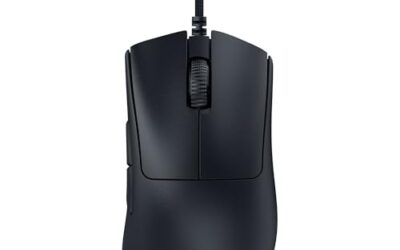
Shape decides whether a mouse feels like an extension of your hand or a distraction you notice every few minutes. Measure your hand from the wrist crease to the tip of your middle finger, then compare that length with the shell, noting where the hump sits and how wide the grip is. A palm grip needs a longer shell with support under the whole hand, a claw grip needs a shorter shell with a hump under the arch of the palm, and a fingertip grip needs a compact shell that the fingers can control without palm contact. Side buttons should fall under your thumb without a stretch, and the scroll wheel should sit where your index finger rests naturally.
Weigh the trade between light weight and solid build
Weight changes how a mouse feels during fast repositioning and how tired your hand gets over a long session. Many fast shooter players prefer a light shell because it needs less force to start and stop, which suits flicks and frequent lifts at low sensitivity. Players who track targets smoothly or play at high sensitivity often prefer a slightly heavier shell, because extra mass steadies small movements. Build quality matters just as much as the number on the scale: a light shell that flexes or creaks under grip pressure will feel cheap within weeks, while a solid shell will still feel new after a year of daily use.
Decide what wireless, battery and buttons are worth to you
Connection type, battery design and button count are where mice gain or lose value fastest, because each one suits a different kind of player. A wired mouse removes charging and battery worries entirely and suits a fixed desk setup, while a wireless mouse suits players who hate cable drag or move between machines, provided it uses a dedicated receiver. Battery design matters too: a replaceable battery lets you swap in a fresh cell in seconds, while a rechargeable mouse needs a cable nearby and a charging habit that fits your routine. Extra buttons earn their keep in games with many abilities, yet buttons you never press add weight and cost without improving a single match.
Which One Fits Your Situation
The right value choice depends on how you play, how long you play, and what your desk looks like. Match your situation below to the type of mouse it points toward.
You play fast shooters and want every flick to land
Choose a light, simple mouse with a clean-tracking sensor, a shape that matches your grip, and a polling rate that suits your setup. Fast shooters reward low mass, a low lift-off distance and crisp primary buttons, because you lift and reposition constantly and fire the moment your crosshair lands. Skip extra buttons and heavy shells here, since they slow the small adjustments that decide duels, and put your attention on a shell that stays stable through wide arm movements.
You play a mix of genres and need one mouse for everything
Choose a versatile middle-ground mouse with a comfortable shape, a reliable sensor and a few well-placed extra buttons. Mixed play means one session might demand fast flicks while the next needs steady tracking or many ability keys, so a one-trick mouse will frustrate you. Look for a shape that suits more than one grip, a scroll wheel with a clear step for menus, and software that stores your settings on the mouse itself.
You play long sessions and comfort matters most
Choose a mouse shaped for your grip with a supportive hump, a coating that stays secure when your hands warm up, and switches that stay consistent after thousands of clicks. Long sessions punish a poor fit far more than a short match does, so a shell that supports your palm or your claw arch will keep your hand fresh into the evening. A slightly heavier shell can feel steadier, and long battery life removes cable tug during wide movements.
You are building a first setup and want to spend wisely
Choose a proven, simple mouse that covers the fundamentals well and leaves room for a good mousepad. First-time buyers gain the most from a reliable sensor, a safe shape that suits several grips, and a sturdy build, because those three things affect every game you play. Avoid exotic features until you know your main games and grip, since a feature that sounds exciting on a product page may never matter in your actual play.
Common Mistakes
- Chasing the highest sensitivity number on the box and ignoring how the mouse tracks at the sensitivity you actually use. Most players settle on a modest sensitivity in shooters and never approach the top of a headline range, yet a sensor that loses tracking during a fast flick will ruin aim at any setting. Focus on clean tracking, adjustable lift-off distance and a polling rate that matches your monitor, and treat the maximum sensitivity figure as background information rather than a reason to choose one mouse over another, because it tells you almost nothing about how the mouse behaves in your hands.
- Buying the most talked-about mouse without measuring your hand or checking the shape against your grip. A shell that suits a large hand can feel like a brick in a smaller hand, because the fingers flatten, the palm loses its arch and the thumb stretches for the side buttons. Measure your hand from the wrist crease to the tip of your middle finger, compare that length with the shell dimensions, and remember that a mouse praised by professional players was chosen for their hands and their sensitivity, not yours, so popularity alone is a poor guide to fit.
- Paying for buttons, lighting and software features you will never use, then wondering why the mouse feels heavy and cluttered. Extra side buttons earn their keep only in games with many abilities, and a dozen programmable keys add weight, bulk and cost when your main games need two buttons and a scroll wheel. Count the buttons you actually press in a normal week before you choose, and put the same scrutiny on lighting and macro software, because a simpler mouse that fits well will usually serve you better than a feature-packed mouse that fights your hand.
- Choosing the lightest mouse available and ignoring balance, coating and build quality. A shell can be extremely light yet feel awkward if its weight sits toward the front or the rear, because balance decides how the mouse pivots under your fingertips during flicks and tracking. A slippery coating makes a light mouse harder to control when your hands warm up, while a shell that flexes or creaks under grip pressure will feel worn within weeks. A slightly heavier mouse with centred balance, a secure finish and tight seams often controls better and lasts longer than a lighter one that tips forward.
- Forgetting the cable, the feet and the mousepad as part of the system you are actually buying. A stiff cable drags during flicks and pulls at your aim, worn feet scratch across the pad and change how the mouse glides, and a sensor tuned for cloth can behave differently on a hard surface or a bare desk. Check whether the cable is light and flexible or whether a wireless link removes the problem entirely, confirm that replacement feet exist for the model, and test the mouse on the pad you actually use, because a great mouse on the wrong surface can feel ordinary.
Frequently Asked Questions
How much should I spend on a gaming mouse?
Spend enough to get a reliable sensor, a shape that fits your grip and a build that survives daily use, and stop when extra spending buys features you will not notice in play. For most players that point sits in the middle of the range, where sensors track cleanly and shells feel solid, while higher tiers mainly add lighter materials, faster polling or extra buttons.
Is a wireless gaming mouse as good as a wired one for gaming?
A modern wireless mouse with a dedicated receiver can match a wired mouse for responsiveness in normal play, provided the link stays stable and the polling rate suits your setup. The real differences are practical: wireless mice need charging or battery swaps and can cost more for the same sensor, while wired mice never run flat but need a flexible cable that does not drag.
Does a higher sensitivity sensor make me aim better?
No, because aim comes from a sensor that tracks cleanly at the sensitivity you already use, a shape that fits your hand and practice that builds consistent movement. A higher maximum sensitivity only raises a ceiling you will probably never reach, while a sensor that spins out during a fast flick or drifts during lifts will hurt your aim at any setting.
What should I check first when a new mouse arrives?
Check the fit first by holding the mouse in your normal grip and moving through a few flicks and lifts, then confirm the side buttons fall under your thumb and the scroll wheel feels clear. Next, check that the sensor tracks cleanly on your mousepad at your usual sensitivity and that the lift-off distance keeps the cursor still when you reposition.