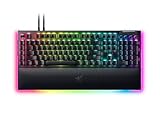
The Razer BlackWidow V4 has become the default recommendation whenever someone asks for a full-featured mechanical gaming keyboard in 2026, and after living with it for several weeks it is easy to see why.
- Watch: Razer BlackWidow V4 Review — Video Review
- Design & Build
- Performance
- Pros & Cons
- Alternatives to Consider
- What to Look For in a Full-Size Gaming Keyboard
- Which One Should You Buy?
- Common Mistakes When Buying a Mechanical Keyboard
- Standard V4 Versus V4 Pro at a Glance
- Setting It Up and Keeping It Clean
- How the Features Map to the Games You Play
- Frequently Asked Questions
- Verdict
- Related Articles
This review focuses on the mainline BlackWidow V4, the version most buyers land on, while pointing out where its siblings make more sense. If you want per-key RGB, dedicated media controls, doubleshot ABS keycaps, and a plush leatherette wrist rest without stepping up to Pro money, this is the board Razer is steering you toward.
As an Amazon Associate we earn from qualifying purchases at no extra cost to you.




⚡ Save on Your Next PC — Amazon Prime
Prime members get fast free shipping on the systems above, plus early access to Prime Day & Black Friday PC deals. New members get a 30-day free trial.
Watch: Razer BlackWidow V4 Review — Video Review
Design & Build
The V4 keeps a full 104-key layout on a reinforced steel plate, so the 2.4 lb chassis barely flexes even when you press hard on the center. Two rows of underglow RGB spill onto the desk and the six-zone effects sync with the rest of Razer’s ecosystem through Synapse. The magnetic wrist rest attaches with a satisfying snap, the braided cable routes through a channel underneath, and two extra macro keys plus a volume roller and four media buttons live along the top-left edge.
Performance
Razer’s Green switches actuate at 1.9mm with a 50g force and a loud, tactile click that is genuinely fun for typing but distracting on voice calls; the Yellow linear switches on the V4 X and V4 Pro are the quieter, faster choice for competitive shooters. Polling runs at 1000Hz over USB, latency is imperceptible in fast-paced play, and full N-key rollover means no dropped inputs during frantic combos. Two layers of sound-dampening foam give each keystroke a deeper, less hollow tone than previous BlackWidows. Across a week of mixed FPS and long writing sessions, the V4 never missed an input.
Pros & Cons
- Rock-solid steel-reinforced build with almost no deck flex
- Dedicated media roller and macro keys are genuinely useful
- Comfortable magnetic leatherette wrist rest included
- Bright, even per-key RGB with deep ecosystem sync
- Green switches are loud enough to annoy anyone on your mic
- ABS keycaps will eventually shine compared to PBT
- Synapse software is heavier than it needs to be
- No wireless on the base model, unlike the V4 TKL and Low Profile versions
Alternatives to Consider
What to Look For in a Full-Size Gaming Keyboard
A keyboard in this class is usually judged on feel, features and software. These are the areas where specs actually translate into a different daily experience, so they are worth understanding before comparing models.
Switch Type and What the Numbers Mean
The Razer Green switch on this keyboard is a clicky, tactile design with a 1.9 mm actuation point and about 50 g of actuation force, and it is rated for 100 million presses. Those numbers describe a switch that registers early and gives a clear tactile bump, but it is also loud. Linear switches skip the bump and click, and tactile non-clicky switches keep the bump without the noise. If you share a room or use voice chat, switch type matters more than any other decision. Most listings for this keyboard describe the Green clicky option, but some variants and siblings use other switches, so confirm the exact one on the listing.
Polling Rate and Latency
The keyboard supports polling rates up to 8,000 Hz, which means the keyboard can report its state to the computer every 0.125 milliseconds at the top setting. The usual default is 1,000 Hz, or one report per millisecond. Higher rates reduce input delay only slightly and use more CPU time, so they matter mostly to competitive players with fast monitors and capable systems.
Extra Keys and Controls
This version includes six dedicated macro keys on the left side and a media roller with buttons. The more expensive Pro sibling adds a Command Dial, more macro keys and a USB pass-through port. If you only want volume control and a few shortcuts, the base model covers it. If you want a dial for in-game functions, look at the Pro version.
Wrist Rest and Ergonomics
A magnetic plush leatherette wrist rest attaches to the keyboard, which keeps it from sliding. A full-size layout with a number pad pushes the mouse further to the right. If you play with low sensitivity and wide mouse sweeps, that extra distance can cause shoulder strain, and a tenkeyless board may suit you better.
Software and Features
Razer’s Synapse software handles lighting and remapping, and a feature called Snap Tap is available through Synapse 4 and is off by default. Some competitive communities treat input shortcuts like this differently, so check the rules of any game or league you play before enabling it.
Which One Should You Buy?
| If you… | Choose… |
|---|---|
| Want a wired, full-size keyboard with macro keys and a wrist rest | Razer BlackWidow V4 |
| Need Bluetooth or 2.4 GHz wireless | A different wireless model, because the standard V4 is wired only |
| Stream with an open microphone | A quieter switch option, since the Green switch is audible on voice chat |
| Want a Command Dial and extra macro keys | The Pro version in the same family |
| Play with a small desk and low mouse sensitivity | A tenkeyless layout in place of a full-size board |
Common Mistakes When Buying a Mechanical Keyboard
- Ignoring noise. Clicky switches are loud in quiet rooms, and microphones pick them up even with noise suppression. Think about where the keyboard will live.
- Confusing the V4 with the V4 Pro. The two names look alike, but the Pro has a different feature set, with a Command Dial, more macro keys and a USB pass-through port.
- Buying for features you will not use. Macro keys and a media roller are great if you use them. If you do not, a simpler board is lighter and cheaper to replace.
- Skipping software checks. Remapping and lighting rely on Razer’s software. If you dislike background apps, check how much of your configuration is stored on the keyboard itself.
- Forgetting the desk setup. A full-size keyboard with a wrist rest takes up a lot of room. Measure the desk and check how far your mouse hand reaches.
Standard V4 Versus V4 Pro at a Glance
The two names are easy to confuse. These differences, drawn from the manufacturer’s listings and reviewer coverage, are worth knowing before you order. Confirm the details on the exact listing, since retailers sometimes bundle variants.
| Feature | BlackWidow V4 | BlackWidow V4 Pro |
|---|---|---|
| Dedicated macro keys | Six on the left side | Eight |
| Command Dial | Not included | Included, in the top-left corner |
| Media roller and buttons | Included | Included |
| Polling rate | Up to 8,000 Hz | Up to 8,000 Hz |
| Wrist rest | Magnetic, plush leatherette | Magnetic, plush leatherette |
| Underglow | Two sides | Three sides |
| USB pass-through | Not listed | USB 2.0 |
| Connection | Wired, detachable USB-C cable | Wired |
Setting It Up and Keeping It Clean
- Install Razer’s software before connecting profiles, so firmware updates and lighting options are available from the start.
- Attach the wrist rest and position the keyboard so your forearms rest roughly level with the desk, with wrists straight.
- Assign macro keys to simple, repeatable actions such as push-to-talk, a screenshot shortcut or a media control, and add more as habits form.
- Keep polling at the default unless you have a fast monitor and a capable processor, then raise it and watch for any change in system load.
- Unplug the cable and pull the keycaps with a puller every few months. Clean the dust beneath them with compressed air or a soft brush.
- Wipe the wrist rest with a slightly damp cloth, since leatherette surfaces collect oil from the hands over time.
How the Features Map to the Games You Play
| Play style | Features that help | Features you can skip |
|---|---|---|
| Competitive shooters | Fast actuation, a high polling option, a clear lighting profile for key binds | Macro keys and wrist-rest underglow |
| MMOs and MOBAs | Dedicated macro keys for abilities, profile switching for each game | The highest polling rates |
| Strategy and simulation | Media roller for quick volume changes, a wrist rest for long sessions | Extreme actuation speed |
| Streaming and content work | Programmable keys for scene or sound shortcuts | Loud switches, if the microphone is open |
| Typing-heavy work | A tactile bump and a firm, stable frame | Anything that adds noise for coworkers |
If the Green Switch Is Not for You
Razer sells related keyboards with different switch families, including linear and quieter tactile options, so a loud clicky switch is a choice rather than a requirement. The mainline V4 covered here is commonly sold with the Green clicky switch. If you want something quieter, check the switch name on the listing carefully, because the product images look identical across switch types.
Desk Space and Cable Routing
A full-size board with a wrist rest is wide and deep, so measure before you commit. Leave enough room to the right of the number pad for a mouse to move freely, and check that the detachable USB-C cable reaches the computer without strain. Routing the cable behind a monitor stand keeps it from catching on the desk edge, and a short, flat path is less likely to loosen the connector over time.
Firmware and Profiles
Where onboard profile storage is available (confirm this on the listing), lighting and macro profiles can travel between computers without the software running. It is worth saving a backup copy of each profile, especially if you have spent time building macro layouts for several games.
Frequently Asked Questions
Are the Green switches too loud for streaming?
They can be. The clicky Green switches are satisfying but a cardioid mic will pick up every keystroke. Streamers usually prefer the Yellow linear switches found on the V4 X or V4 Pro.
Does the BlackWidow V4 support wireless?
The base V4 is wired only.
Is the wrist rest included?
Yes, the mainline V4 ships with a magnetic leatherette wrist rest.
Can I remap the macro keys and volume roller?
Yes. Razer Synapse lets you rebind the two dedicated macro keys, the roller, and any key to macros, media, or launch commands, with onboard profile storage.
Verdict
The Razer BlackWidow V4 earns its spot as a premium all-rounder. Choose the Yellow-switch V4 X or V4 Pro if you stream, and step up to the Pro only if the command dial matters to you; otherwise the standard V4 is the sweet spot of the lineup.