Mac users have long been stuck with either Apple’s low-profile Magic Keyboard or a Windows-oriented mechanical board with the wrong modifier layout. The good news in 2026 is that plenty of quality mechanical keyboards now ship with dedicated Mac modes, correct Command and Option keycaps, and wireless connectivity that pairs cleanly with macOS. You no longer have to choose between typing feel and Mac compatibility.
We gathered the best mechanical keyboards for Mac this year, focusing on boards that handle macOS shortcuts natively, offer comfortable switches, and connect over Bluetooth or 2.4GHz without fuss. From compact wireless layouts to full-size tactile boards, there is a pick here whether you code, write, or game on your Mac.
As an Amazon Associate we earn from qualifying purchases at no extra cost to you.








⚡ Save on Your Next PC — Amazon Prime
Prime members get fast free shipping on the systems above, plus early access to Prime Day & Black Friday PC deals. New members get a 30-day free trial.
Watch: Best Mechanical Keyboard for Mac — Video Review
How to Choose
- Mac mode and keycaps: Look for a physical or software Mac toggle and included Command and Option keycaps so shortcuts map correctly out of the box.
- Connectivity: Bluetooth is convenient for a clean desk, but a 2.4GHz dongle gives lower latency if you also game.
- Switch type: Tactile browns suit typing, linear reds suit gaming, and quiet switches keep an office setup peaceful.
- Layout size: A 75% board saves desk space while keeping arrow keys; full-size adds a numpad for spreadsheet work.
- Hot-swappable sockets: These let you change switches later without soldering, extending the board’s life as your preferences evolve.
The Best Picks Reviewed
Keychron K3 Version 2 (Low-Profile, 75%)
Our top Mac pick. Keychron builds for macOS first, and this low-profile 75% wireless board feels closest to a Magic Keyboard while adding real mechanical switches. QMK support, a dedicated Mac layout, and slim profile make it the natural upgrade for Apple users.
Keychron K10 Max (Full-Size)
For those who need a numpad. The full-size K10 Max brings QMK customization, wireless connectivity, and native Mac keys, ideal for accountants, data workers, or anyone who lives in spreadsheets on a Mac.
Logitech MX Mechanical (Tactile)
A polished productivity board that plays nicely with macOS. Its tactile switches, backlighting, and Logitech Options software make it a comfortable, refined choice for writers and professionals who want understated design.
Keychron C2 Full-Size (Brown Switch)
The value pick. This wired full-size board with tactile brown switches offers the Keychron Mac layout at a budget price, a great entry into mechanical typing for Mac users who do not need wireless.
Logitech Alto Keys K98M (Wireless Gasket)
A newer gasket-mount wireless option that softens each keystroke for a cushioned feel. It suits Mac users who type all day and want a quieter, more comfortable board than a stiff standard mount provides.
Frequently Asked Questions
Do mechanical keyboards work with Mac?
Yes. Any USB or Bluetooth keyboard works with macOS, but boards with a dedicated Mac mode and Command and Option keycaps, like Keychron models, integrate far more smoothly.
Bluetooth or 2.4GHz for Mac?
Bluetooth is cleaner and fine for typing; a 2.4GHz dongle offers lower latency if you also game and want the most responsive input.
Which switches are best for typing on a Mac?
Tactile browns are the popular all-rounder, giving a satisfying bump without the loud click of blues, which keeps them office-friendly.
Can I remap keys on these boards?
Boards with QMK or VIA support, including several Keychron models, let you remap any key and build custom macOS shortcuts without third-party apps.
Final Thoughts
The Keychron K3 Version 2 is our overall recommendation for Mac users thanks to its low-profile feel and native macOS support. If you need a numpad, step up to the K10 Max, and budget buyers get plenty from the wired C2. Prioritize a proper Mac mode and correct keycaps, and mechanical typing on your Mac becomes a genuine pleasure.
Top picks from this guide
 KeychronKeychron K3 Version 2 QMK 75% Wireless Low-Profile Mechanical Keyboard…$63 \xc2\xb7 97/100
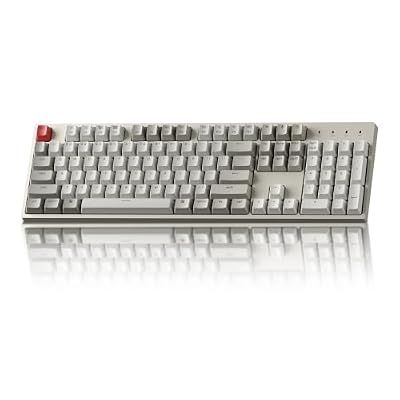 KeychronKeychron C2 Full Size Wired Mechanical Keyboard, Brown Switch, Retro…$43 \xc2\xb7 97/100
 AULAAULA F75 Pro Wireless Mechanical Keyboard,75% Hot Swappable Custom Keyboard…$65 \xc2\xb7 95/100
 LogitechLogitech MX Mechanical Wireless Illuminated Keyboard Tactile - Graphite |…$150 \xc2\xb7 95/100