
🛒 Best Price Today on Amazon
Prime members get fast, free shipping on everything above, plus member-only deals. New members get a 30-day free trial — cancel anytime.
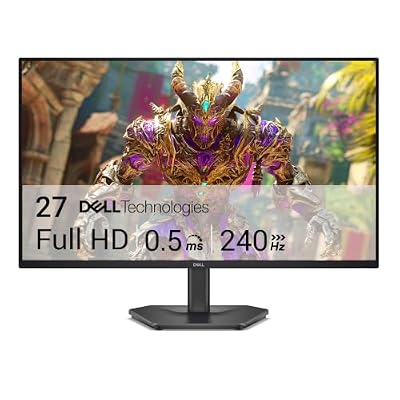
- Top Pick: Dell 27 240Hz Gaming Monitor – SE2726HG – 27-inch FHD (1920×1080) 240Hz Display, in-Plane Switching (IPS) Technology, AMD FreeSync Premium, TÜV 3-Star, 2X HDMI, DisplayPort 1.4, Tilt
- Best Value: Dell 24 240Hz Gaming Monitor – SE2426HG – 23.8-inch FHD (1920×1080) 240Hz Display, in-Plane Switching (IPS) Technology, AMD FreeSync™ Premium, TÜV 3-Star, 2X HDMI, DisplayPort 1.4, Tilt
- Premium Choice: AOC 27" Gaming Monitor QHD 260Hz Overclocked IPS NVIDIA G-SYNC Q27G41ZE
A high refresh rate no longer costs a fortune, and 240Hz panels have become the sweet spot for competitive gamers who want fluid motion without breaking the bank. Whether you are pushing frames in Valorant, tracking flicks in Counter-Strike, or simply want buttery-smooth desktop performance, these displays deliver responsiveness at price points that would have seemed impossible a few years ago.
We compared a wide range of budget and mid-tier 240Hz monitors to separate the genuinely great panels from those that cut corners on color accuracy, build quality, or adaptive sync implementation. Below you will find our ranked picks covering everything from sub-$100 IPS options to a QHD panel that overclocks beyond its rated refresh rate.
As an Amazon Associate we earn from qualifying purchases at no extra cost to you.






Quick Picks
| Product | Best For | Price |
|---|---|---|
| Dell SE2726HG | Overall Value | Check on Amazon |
| Dell SE2426HG | Smallest Desktops | Check on Amazon |
| AOC Q27G41ZE | Resolution Seekers | Check on Amazon |
| ArcticPro 24-inch | Ultra Budget | Check on Amazon |
| SANSUI 32-inch Curved | Immersive Workspace | Check on Amazon |
| ASUS TUF VG279QM5A | G-SYNC Compatibility | $179 |
| Sceptre C255B-FWT240 | Curved on a Budget | Check on Amazon |
| Sceptre E255B-FWD240 | Color Accuracy on a Budget | Check on Amazon |
How We Compared
We evaluated each monitor on panel quality, sustained refresh rate stability, adaptive sync performance, input latency, connectivity, and real-world gaming feel. A display earns a spot by delivering a smooth 240Hz experience without visible ghosting or sync glitches. We also weighed value relative to the asking price, favoring options that prove you do not need to spend heavily for a genuinely competitive panel.
The 8 Best Picks
1. Dell SE2726HG
The Dell SE2726HG is our top value pick for anyone who wants a reliable 27-inch FHD IPS panel at 240Hz. AMD FreeSync Premium keeps tearing in check, and the TUV 3-Star certification means eye strain stays minimal during marathon sessions. Dual HDMI plus DisplayPort 1.4 covers virtually every source you might connect.
- Pros: IPS viewing angles at a price that rivals VA panels; solid port selection including DisplayPort 1.4
- Con: Stand only offers tilt adjustment, so you may want a monitor arm
Skip this one if you need height adjustment or QHD resolution; otherwise it is the smartest dollar-per-frame choice in this group.
2. Dell SE2426HG
The smaller sibling of the SE2726HG delivers identical panel technology in a 23.8-inch footprint, making it ideal for compact desks or dual-monitor setups where screen real estate per inch matters. At around $94 it also undercuts the 27-inch version while keeping the same FreeSync Premium and DisplayPort 1.4 spec.
- Pros: Compact size with no feature compromise; lowest Dell price in the lineup
- Con: Tilt-only stand limits ergonomic flexibility
Pass on this if your GPU struggles above 1080p anyway and you would rather have a larger panel for the same money.
3. AOC Q27G41ZE
The AOC Q27G41ZE is the resolution outlier in this list, offering QHD at a factory 180Hz that overclocks to 260Hz over DisplayPort. IPS panel with NVIDIA G-SYNC compatibility makes it the best choice for RTX owners who want sharper visuals without sacrificing speed. At around $160 the value proposition is hard to ignore.
- Pros: QHD clarity with a refresh rate that exceeds the 240Hz target; G-SYNC certified for smooth NVIDIA performance
- Con: Requires overclocking beyond native spec to hit 260Hz, which demands a strong GPU
Skip this if you are locked to an older GTX card that cannot push enough frames at QHD to take advantage of the higher refresh.
4. ArcticPro 24-inch
At around $85 the ArcticPro 24-inch is the cheapest way to enter 240Hz gaming. Adaptive Sync helps reduce tearing across a range of GPU brands, and the FHD 1080p panel keeps frame demands manageable even on mid-tier hardware. It is a no-frills entry point that gets the job done.
- Pros: Lowest absolute price for a true 240Hz panel; Adaptive Sync works beyond just AMD cards
- Con: Limited feature set and thinner build quality compared to established brands
Consider skipping this if you already own a G-SYNC NVIDIA card, because the lack of certified sync may produce minor stutter in fast pan shots.
5. SANSUI 32-inch Curved
The SANSUI 32-inch curved display brings a wraparound feel to the 240Hz category, which works well for racing sims and immersive single-player titles alongside competitive play. The FHD resolution at this size is a compromise, but the curve and size create presence on a desk that flat panels cannot match.
- Pros: Large curved screen for immersion at a surprisingly low price; consistent 240Hz refresh
- Con: Pixel density is low at FHD on 32 inches, so text and UI elements look soft
Skip this if you do productivity work at the same desk, because the coarse pixels will frustrate anyone accustomed to sharper panels.
6. ASUS TUF VG279QM5A
The ASUS TUF VG279QM5A pairs a Fast IPS panel with genuine G-SYNC compatibility, making it the go-to for NVIDIA users who want the smoothest possible motion at 240Hz. The 27-inch FHD format hits the sweet spot between immersion and pixel density, and TUF build quality is consistently above budget rivals.
- Pros: G-SYNC delivers the best adaptive sync experience for NVIDIA GPUs; Fast IPS reduces overdrive artifacts
- Con: $179 pricing is the steepest in this list without resolution to show for it
Pass on this if you are on AMD hardware and FreeSync already handles your sync needs at a lower price elsewhere.
7. Sceptre C255B-FWT240
The Sceptre Curved 24.5-inch Prime Gaming Monitor offers an R1500 curve at 240Hz with 1ms response, built-in speakers, and dual HDMI plus DisplayPort. At around $120 it undercuts most flat alternatives while adding curvature for a slightly more enveloping feel, and Blue Light Shift helps with evening sessions.
- Pros: Curved panel with solid connectivity including two HDMI ports; built-in speakers save desk clutter
- Con: VA panel means narrower viewing angles than the IPS rivals on this list
Skip this if you share the screen with a second person regularly, since off-angle color shift will be visible.
8. Sceptre E255B-FWD240
The Sceptre E255B-FWD240 is a 2026 release that bumps the spec sheet with 100% sRGB coverage, making it the best choice in this roundup for anyone who also edits photos or watches color-critical media. 240Hz, 1ms, and FreeSync Premium cover the gaming side, while the dual HDMI plus DisplayPort layout remains generous for the price.
- Pros: Full sRGB gamut at this price is exceptional; built-in speakers and wide port selection
- Con: Flat panel offers no immersion bonus compared to the curved SANSUI or Sceptre above
Skip this if pure speed and sync certification matter more to you than color accuracy, in which case the ASUS G-SYNC pick edges ahead.
Buying Guide
Panel Type and Resolution
IPS panels dominate this segment because they deliver the fastest response times with wide viewing angles. VA panels like the SANSUI and Sceptre curved options trade off-angle clarity for deeper contrast. At 27 inches and below, FHD 1080p remains ideal for 240Hz because most mid-range GPUs can sustain frame rates high enough to fill the buffer, and pixel density stays sharp.
Adaptive Sync Matters
Running at 240Hz without sync support can produce tearing just as badly as at 60Hz. FreeSync Premium works across AMD and most NVIDIA cards via DisplayPort, while G-SYNC certification guarantees tested smoothness on NVIDIA hardware. Check that your GPU and cable support the sync mode before buying, because a missing DisplayPort connection often disables adaptive sync entirely.
Ergonomics and Connectivity
Tilt-only stands are common at this price tier, which means a VESA mount adapter and monitor arm should be budgeted if you need height or swivel. Port-wise, dual HDMI plus DisplayPort 1.4 has become the standard here and covers consoles, PCs, and laptops simultaneously without constant cable swapping.
Our Verdict
The Dell SE2726HG earns our top spot because it balances price, panel quality, and connectivity better than anything else in this group. If you need QHD or G-SYNC certification, the AOC Q27G41ZE and ASUS TUF VG279QM5A justify their higher asking prices. Every option here proves that 240Hz gaming is no longer reserved for premium panels, and the right choice simply depends on your GPU, desk size, and whether you value sharpness or immersion more.
FAQ
Is 240Hz worth it over 144Hz?
The jump from 60Hz to 144Hz is dramatic and obvious to anyone. Moving from 144Hz to 240Hz is more subtle but still meaningful for competitive play, particularly in tracking and flick shots. If your GPU consistently produces over 200 frames in your titles, the upgrade is worthwhile. For casual play at lower frame rates, 144Hz remains adequate.
Do I need G-SYNC or is FreeSync Premium enough?
FreeSync Premium works over DisplayPort on virtually all modern NVIDIA and AMD GPUs and eliminates tearing across the full refresh range. G-SYNC hardware modules offer the most tested experience, but G-SYNC Compatible mode on NVIDIA cards now delivers very similar smoothness with FreeSync panels, so you rarely need the premium certification.
Is 1080p at 32 inches bad?
It depends on your viewing distance. At 32 inches FHD produces roughly 69 pixels per inch, which is noticeably coarse at a typical desk distance of two feet. For racing or console gaming where you sit back slightly further, the curve and size offset the softness. For mixed use with text-heavy work, the 27-inch FHD or QHD options are sharper.
Can these monitors handle console gaming at 240Hz?
Current PlayStation 5 and Xbox Series X consoles top out at 120Hz output. A 240Hz monitor will accept that 120Hz signal without issue and still provide lower input latency than a 60Hz panel, so they work well for console players today while future-proofing for any next-gen hardware that exceeds the current ceiling.
Top picks from this guide
 AOCAOC 27" Gaming Monitor QHD 260Hz Overclocked IPS NVIDIA G-SYNC…$160 \xc2\xb7 99/100
 SceptreNew! Sceptre 24.5-inch Gaming Monitor 240Hz 1ms DisplayPort x2 HDMI…$105 \xc2\xb7 98/100
 SANSUISANSUI 32 Inch Curved 240Hz Gaming Monitor High Refresh Rate,…$180 \xc2\xb7 98/100
 DellDell 27 240Hz Gaming Monitor - SE2726HG - 27-inch FHD…$150 \xc2\xb7 96/100








