
🛒 Best Price Today on Amazon
Prime members get fast, free shipping on everything above, plus member-only deals. New members get a 30-day free trial — cancel anytime.

Huuger 63 Inch L Shaped Desk with Power Outlets & 0.95 Inch Thicker Desktop | Reversible Computer Desk, Larger Office Corner Gaming Desk, Metal Frame, for Home Office, Study, Rustic Brown
Included for 'Best L-Shaped Desk for Dual Monitors: 5 Spacious Picks 2026' because the listing specifies Reversible Computer Desk and Larger Office Corner Gaming Desk, details this guide uses to compare options.
View on Amazon
PRAISUN 63 Inch L Shaped Desk with Power Outlets and USB-C Port, Computer Corner Home Office Desk with File Fabric Drawers and Movable Monitor Stand, Larger Storage, Gaming, Writing, Work, Grey
Included for 'Best L-Shaped Desk for Dual Monitors: 5 Spacious Picks 2026' because the listing specifies Larger Storage and Gaming, details this guide uses to compare options.
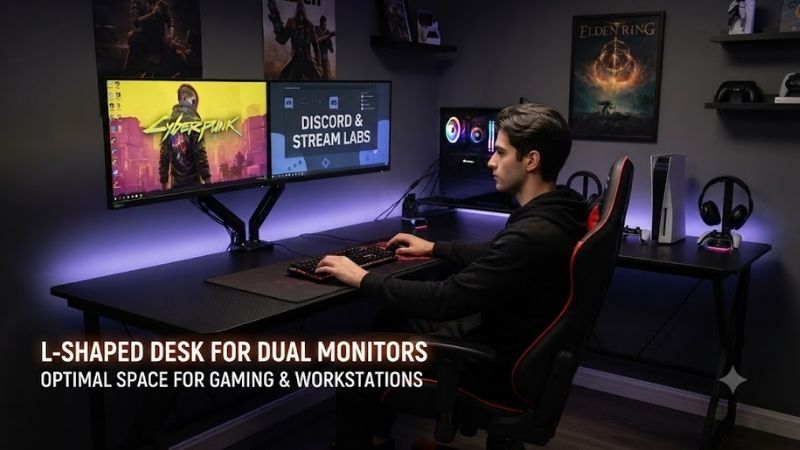
View on AmazonThe best L-shaped desk for dual monitors should provide enough width for two displays without forcing your keyboard, speakers, PC, and accessories into the same crowded zone. This roundup focuses on spacious corner desks with strong frames, practical cable management, monitor-arm support, and layouts suited to gaming and productivity.
Quick Comparison
| Desk | Best For | Size / Surface | Weight Capacity | Height Adjustable |
|---|---|---|---|---|
| UPLIFT V3 L-Shaped Standing Desk | Heavy dual-monitor setups | Multiple configurations | 535 lb | Yes |
| FlexiSpot E7L | Standing dual-monitor workstation | 63 x 47 or 71 x 48 in options | 330 lb listed spec | Yes |
| Autonomous Desk 2 L-Shaped | Large ergonomic workstation | 77 x 64 in overall | 400 lb | Yes |
| Eureka Ergonomic L60 | Fixed-height gaming setup | 61.06 x 43.86 in | 176 lb | No |
| Eureka GTG-L60 | RGB gaming setup | 60 x 40.25 in | 200 lb | No |
UPLIFT V3 L-Shaped Standing Desk
Best For: Heavy dual-monitor and workstation setups
Key Features:
- Triple-motor V3 frame
- 535-pound lifting capacity
- 22.6 to 48.7-inch height range
- Reversible return on stocked tops
- Included FlexMount cable management
- 90-point accessory mounting system
- ANSI/BIFMA X5.5-2021 compliant
The UPLIFT V3 L-Shaped Standing Desk is built for demanding multi-monitor setups where stability matters as much as desktop size. Its three-leg frame uses one motor per leg and supports up to 535 pounds including the desktop, giving users substantial headroom for dual monitors, monitor arms, speakers, a PC tower, and creator equipment.
UPLIFT lists a height range of 22.6 to 48.7 inches on the current complete desk, making it usable for both seated and standing positions across a broad range of users. The frame adjusts the entire L-shaped surface together, so both displays and accessories rise without requiring separate desks or independent lifting systems.
A dual-monitor setup benefits from the desk’s large continuous work area because the main section can hold both displays while the return remains free for a laptop, notebook, audio interface, controller dock, or second task zone. UPLIFT states that the L-shape provides roughly 40 percent more usable surface than a standard rectangular desk.
Cable management is included through the FlexMount Cable Manager and mounted cable wraps. That is particularly useful with monitor arms because display cables, power leads, USB connections, and charging cords all need enough slack to move safely during height changes without hanging beneath the desk or pulling against ports.
What Makes It Different: The V3 combines unusually high lifting capacity with a three-motor frame and extensive accessory mounting. UPLIFT also uses TremorGuard feet, stability plates, larger precision-cut legs, and central I-beam crossbars to reduce flex across the wider L-shaped surface when equipment is spread across both sides.
Pros:
- 535-pound lifting capacity
- Triple-motor frame
- Broad sit-stand height range
- Reversible stocked desktop layouts
- Included cable management
- Excellent monitor-arm potential
- High accessory flexibility
Cons:
- Large footprint
- More assembly than a simple fixed desk
- High capacity may be unnecessary for lighter setups
Use Case: Two large monitors on arms, a desktop PC, speakers, streaming gear, and productivity equipment sharing one adjustable corner workstation.
Who It’s For: Gamers, creators, and professionals who need a highly stable L-shaped standing desk and expect their setup to grow over time.
FlexiSpot E7L
Best For: Balanced standing desk for two monitors
Key Features:
- Triple-motor lifting system
- Three-stage legs
- 25 to 50.8-inch height range
- Up to 330-pound listed static load
- Reversible desktop orientation
- Three programmable height presets
- Anti-collision functionality
The FlexiSpot E7L is a practical alternative for users who want an L-shaped standing desk without moving into the heaviest workstation category. Its triple-motor frame independently powers the three legs, and FlexiSpot lists an adjustable height range from approximately 25 to 50.8 inches for the current E7L configuration.
Dual-monitor users can choose between supported desktop configurations such as 63 x 47 inches and 71 x 48 inches on the current product page. The broad main run gives enough width for two displays, while the return provides a separate area for a laptop, documents, speakers, controllers, or work equipment that would otherwise crowd the keyboard zone.
FlexiSpot lists a 330-pound maximum static load in the current specifications. That provides ample capacity for most two-monitor systems, even when monitor arms, a desktop PC, peripherals, and accessories move with the desk. Users planning extremely heavy studio hardware should still calculate total equipment weight before assembly.
The E7L also supports a reversible panel layout, so the return can accommodate left- or right-handed room arrangements. This matters more than it sounds because an L-shaped desk occupies substantial floor space. A reversible design makes it easier to adapt the same desk when moving rooms or changing the direction of the gaming setup.
What Makes It Different: FlexiSpot provides a large sit-stand work surface and three-motor construction without making the frame overly specialized. The premium keypad includes three height presets, while anti-collision protection can stop and reverse movement when the desktop encounters an unexpected obstruction during adjustment.
Pros:
- Triple-motor height adjustment
- Reversible L-shaped layout
- Multiple desktop sizes
- Three programmable presets
- Anti-collision feature
- Strong load capacity
- Suitable for monitor arms
Cons:
- Large footprint
- Three-leg assembly takes planning
- Surface is assembled from multiple sections
Use Case: A dual-monitor gaming and work setup where both displays, keyboard, speakers, and accessories need to move together between seated and standing positions.
Who It’s For: Users who want a spacious electric L-shaped desk with strong adjustability but do not require UPLIFT’s higher 535-pound lifting capacity.
Autonomous Desk 2 L-Shaped
Best For: Large dual- or triple-monitor workstations
Key Features:
- 77-inch main surface
- 35-inch return
- Triple-motor system
- 400-pound capacity
- 29.4 to 48-inch height range
- Four programmable presets
- Reversible short side
- Included cable tray
The Autonomous Desk 2 L-Shaped gives dual-monitor users a particularly wide primary surface. Autonomous lists a 77-inch main top with a 35-inch return and describes enough room for three 27-to-32-inch monitors alongside a PC and laptops, making a two-monitor configuration relatively easy to arrange without squeezing the displays together.
Its three motors move the L-shaped surface together, with a listed lifting capacity of 400 pounds. That is enough for substantial gaming and productivity hardware, including heavy monitors and desktop systems. Autonomous also lists a lifting speed of 2.3 inches per second and maximum operating noise around 50 dB.
The current desktop measures 77 inches across the main section and 29 inches deep, while the smaller section measures 29 by 35 inches. This arrangement provides enough depth for monitor stands or arms without forcing the keyboard too close to the front edge, which can be useful with 27-inch, 32-inch, or curved displays.
Four programmable height settings make the desk convenient for shared setups or users who switch frequently between seated gaming, standing work, and intermediate positions. The short side is reversible, letting the return sit on either side without purchasing a separate orientation, which adds useful flexibility when room layouts change.
What Makes It Different: The Autonomous desk emphasizes a very large 77-inch main run while keeping a dedicated return for secondary hardware. Its SPCC steel frame has been bench-tested beyond 50,000 adjustment cycles according to Autonomous, and the frame is listed as conforming to ANSI/BIFMA testing requirements.
Pros:
- Very wide 77-inch primary surface
- 400-pound capacity
- Triple-motor lifting
- Four height presets
- Reversible return
- Cable tray included
- Strong fit for three monitors
Cons:
- Minimum height is higher than some competitors
- Large desktop needs considerable room
- Fewer surface choices than highly configurable systems
Use Case: Two or three monitors plus a PC tower, laptop, speakers, peripherals, and a separate work or streaming zone on the return.
Who It’s For: Users who prioritize a wide primary monitor area and want a standing desk large enough for gaming, work, and multiple computers simultaneously.
Eureka Ergonomic L60
Best For: Fixed-height dual-monitor gaming setups
Key Features:
- 61.06-inch overall width
- 43.86-inch return depth
- 30.08-inch desk height
- 176-pound capacity
- Carbon-steel frame
- Two cable grommets
- Power-strip holder
- Left- and right-side versions
The Eureka Ergonomic L60 is a simpler fixed-height alternative for gamers who do not need motorized adjustment. Its 61.06-inch-wide L-shaped surface gives two monitors enough horizontal room while leaving the return available for a PC, speakers, controller charging, consoles, or general work equipment.
Eureka rates the desk for up to 176 pounds and uses a carbon-steel frame with adjustable feet. That capacity is sufficient for many conventional dual-monitor gaming systems, but users mounting unusually heavy displays and a large desktop PC should calculate the full load rather than assuming every corner desk supports unlimited equipment.
Two cable grommets provide routes for monitor, power, USB, and peripheral leads, while an integrated power-strip holder helps keep the main electrical connections below the desktop. These details matter with two displays because cable clutter grows quickly once monitor power, DisplayPort, HDMI, USB hubs, speakers, and accessories are connected.
The fixed 30.08-inch height is the main ergonomic limitation compared with adjustable desks. Users should verify that the height matches their chair and body proportions. A fixed desk can still work comfortably when the chair and monitor arms are adjustable, but shorter users may need a footrest if the keyboard surface sits too high.
What Makes It Different: The L60 focuses on space and cable organization without adding motors or electronic controls. That reduces setup complexity and removes moving components, making it suitable for users who already know their preferred seated height and simply need more surface area for dual monitors and gaming hardware.
Pros:
- Spacious dual-monitor surface
- 176-pound capacity
- Cable grommets
- Power-strip holder
- Steel frame
- Simple fixed design
- Five-year frame warranty
Cons:
- No height adjustment
- 30-inch fixed height may not fit everyone
- Less load capacity than standing alternatives
Use Case: A dedicated seated gaming room where two monitors stay in a fixed position and the return holds the PC, console, or productivity hardware.
Who It’s For: Gamers who want an affordable, straightforward L-shaped layout and do not need sit-stand functionality.
Eureka GTG-L60
Best For: RGB-focused dual-monitor gaming setups
Key Features:
- 60 x 40.25-inch overall layout
- 6mm tempered-glass desktop
- 200-pound capacity
- Reversible left or right configuration
- Built-in RGB lighting
- Bluetooth app control
- Power-strip holder
- Dual headphone hooks
The Eureka GTG-L60 targets gamers who want the desk itself to become part of the RGB setup. Its L-shaped tempered-glass surface measures approximately 60 by 40.25 inches, providing enough room for dual monitors and peripherals while leaving a return section for speakers, controllers, a laptop, or additional gaming hardware.
The 6mm tempered-glass surface contains integrated lighting that can be controlled through compatible hardware and, on the listed model, a Bluetooth app. Lighting supports adjustable effects and music-responsive behavior, allowing the desktop to contribute to an RGB gaming room instead of relying entirely on strips attached around the back edge.
Eureka lists a maximum weight capacity of 200 pounds and uses a four-pillar steel frame. The desk also supports compatible monitor arms, which is important because arms can free substantial surface area beneath two displays. Users should still confirm the clamp design because tempered-glass desktops require careful adherence to manufacturer mounting guidance.
Organization features include a power-strip holder, adhesive cable ties, a cup holder, and dual headphone hooks. These additions reduce the need to leave accessories across the main keyboard and mouse zone. With two monitors already occupying much of the visual space, keeping small items beneath or beside the surface helps the setup feel less crowded.
What Makes It Different: GTG-L60 integrates RGB beneath the tempered-glass desktop rather than simply including a separate light strip. When the lighting is off, the surface returns to a restrained black-glass appearance, so the desk can shift between a gaming aesthetic and a cleaner workspace without physically removing accessories.
Pros:
- Integrated RGB glass surface
- 200-pound capacity
- Reversible layout
- Monitor-arm compatibility
- Cable-management accessories
- Headphone and cup holders
- Strong gaming aesthetic
Cons:
- Fixed 30-inch height
- Glass needs more cleaning than laminate
- Monitor clamps require careful installation
Use Case: A two-monitor gaming setup where RGB lighting, accessories, and visual presentation matter nearly as much as desk surface area.
Who It’s For: Gamers building a coordinated RGB room who want a corner desk that looks more distinctive than a conventional laminate workstation.
How to Choose an L-Shaped Desk for Dual Monitors
Measure the Main Monitor Run
Two monitors need enough horizontal space before the return is considered. Measure the combined width of both displays, including bezels and any gap between them. If you use an ultrawide plus a secondary monitor, include the actual screen width rather than relying on diagonal size because ultrawide displays occupy considerably more horizontal space.
Consider Monitor Arms
Monitor arms can make an L-shaped desk far more usable by removing factory stands from the desktop. They also allow both displays to align at a consistent height and viewing distance. Before mounting them, verify desktop thickness, edge clearance, material, and total monitor weight, particularly when the desk uses glass or a segmented top.
Check Desk Depth
Depth affects viewing comfort as much as width. A shallow surface can place large 32-inch displays or ultrawides too close to the user, especially when they use deep factory stands. Around 24 to 30 inches provides more flexibility, while monitor arms can reclaim depth by moving the display mounting point toward the rear edge.
Decide Which Side Needs the Return
The return should match how you use secondary equipment. Right-handed mouse users may prefer an uncluttered main surface while moving notebooks or consoles to the opposite side. Reversible desks are useful when you are uncertain because the same product can adapt if the room layout or workstation orientation changes later.
Calculate Total Equipment Weight
Include every item supported by the desk: displays, arms, PC towers, speakers, laptops, microphones, audio interfaces, chargers, shelves, and the desktop itself when manufacturers specify capacity that way. Standing desks need enough lifting capacity for the complete moving load, not just the monitors sitting directly on top.
Plan Cable Management Before Assembly
Dual monitors can require two power cords, two display cables, USB connections, monitor-arm wiring, and several peripherals. Route cables before pushing the desk into a corner because access becomes difficult afterward. Standing desks also need enough slack for full vertical travel without cables pulling on the monitor or PC.
Fixed vs Standing L-Shaped Desk
A fixed desk costs less and removes motors, controls, and moving cables from the setup. A standing model lets users change posture and can make monitor height easier to coordinate across different activities. If the workstation is used for eight or more hours daily, adjustable height can be more valuable than additional gaming accessories.
FAQ
Is an L-Shaped Desk Good for Dual Monitors?
Yes. An L-shaped desk provides a wide main surface for displays while the return creates a separate area for laptops, consoles, paperwork, or the PC tower. The design works especially well when the monitors remain centered on one side instead of being split around the corner, which can force frequent neck rotation.
How Wide Should a Desk Be for Two Monitors?
Around 55 to 70 inches of primary width works for many dual-monitor arrangements, but the correct size depends on display width and orientation. Two 27-inch monitors need less space than dual 32-inch screens or an ultrawide paired with another display. Measure the physical width of the monitors before selecting the desk.
Can I Use a Dual Monitor Arm on an L-Shaped Desk?
Yes, provided the desktop material and thickness support the clamp or grommet. Monitor arms are especially useful on L-shaped desks because they free the area beneath both screens. Check where desktop seams and frame rails sit, since a clamp cannot always be installed directly above structural beams or across joined panels.
Should My Monitors Sit in the Corner?
Usually not. Placing two monitors directly across the inside corner can make keyboard placement awkward and may force the user to sit too far from both sides. A better layout often uses one straight section as the main workstation while the return serves as secondary space for hardware, documents, or another computer.
Is a Standing L-Shaped Desk Worth It?
It can be worthwhile when the workstation is used for long periods and the entire monitor setup needs to move between sitting and standing positions. A three-leg frame also offers additional support across a large surface. Fixed desks remain perfectly practical when the user has a comfortable seated configuration and does not need height changes.
Conclusion
The best L-shaped desk for dual monitors depends on whether you prioritize lifting capacity, sit-stand adjustment, fixed simplicity, or gaming aesthetics. UPLIFT V3 handles heavy setups, FlexiSpot E7L balances adjustability and space, Autonomous offers a huge main run, while Eureka L60 and GTG-L60 suit seated gaming rooms.









