🛒 Best Price Today on Amazon
Prime members get fast, free shipping on everything above, plus member-only deals. New members get a 30-day free trial — cancel anytime.
Buying at the top of the gaming mouse market is not really a decision about a badge or a logo. It is a decision about which flagship features you will genuinely use: true 8K wireless polling, optical switches that actuate with light, shells pared down to the mid-50-gram range, and charging systems that top the battery up without a cable. Pay for the wrong combination and the extras sit idle; pay for the right one and every component pulls in the same direction.


This shortlist is for competitive FPS players chasing the fastest wireless link, palm and claw grippers who want an ergonomic flagship shell, and all-rounders who would rather have buttons and a tilt wheel than the lightest possible mouse. Every pick was chosen from its Amazon product name and the specifications on its listing, and premium here means flagship hardware — top-end sensors, high polling rates, optical switches and advanced charging — rather than any claim about cost.
Quick Picks
As an Amazon Associate we earn from qualifying purchases
| Product | Best for | Key spec from title |
|---|---|---|
| Razer Viper V3 Pro | Ranked FPS players who want true 8K wireless polling | 54 g shell with a 35K DPI optical sensor |
| Logitech G PRO X Superlight 2 | Symmetrical-shape players who want cable-free charging options | HERO 2 sensor with up to 8 kHz report rate |
| Razer DeathAdder V3 Pro | Palm grippers who prefer a sculpted ergonomic shell | Focus Pro 30K optical sensor at 63 g |
| Logitech G PRO X Superlight 2 DEX | Right-handed ergo fans already in the Logitech ecosystem | 44K DPI HERO 2 sensor, POWERPLAY supported |
| Razer Basilisk V3 Pro | Players who want maximum controls and a tilt wheel | HyperScroll tilt wheel, 13 programmable controls |
How to Choose
Polling rate, and the wireless link behind it
Polling rate describes how often the mouse reports its position, and the flagship tier has moved well past the long-standing 1,000 Hz standard. The Razer Viper V3 Pro reports at a true 8,000 Hz over its wireless connection, and Logitech’s current Superlight models reach up to 8 kHz as well, while the DeathAdder V3 Pro runs at 1,000 Hz unless you add Razer’s separate HyperPolling dongle. Higher rates smooth cursor movement on high-refresh monitors, but they also draw more power and ask more of your system, so match the rate to the screen and the games you actually play.
Sensor ceilings versus the sensitivity you actually run
Flagship sensors advertise enormous maximum DPI figures — 30,000 on Razer’s Focus Pro 30K, 35,000 on the Viper V3 Pro’s second-generation sensor, and up to 44,000 on Logitech’s HERO 2. Almost nobody plays anywhere near those ceilings; most competitive players settle somewhere in the hundreds or low thousands. What the flagship sensor really buys you is clean, consistent tracking at your chosen setting, high maximum tracking speed, and in Razer’s case stated tracking even on glass. Read the ceiling as headroom and engineering margin, not as a number you are meant to use directly.
Shell shape and weight for your grip
Shape decides comfort long before specifications do. Symmetrical shells such as the Viper V3 Pro at 54 g and the Superlight 2 at 60 g suit claw and fingertip grips and let either hand position work for right-handed players. Sculpted ergonomic shells — the DeathAdder V3 Pro at 63 g and the Superlight 2 DEX at 60 g — fill the palm and support a relaxed palm grip, but they are right-handed only. Feature-loaded mice like the Basilisk V3 Pro carry a thumb rest and far more hardware, so they feel planted rather than flickable. Start from your grip, then weigh the spec sheet.
Switches, battery life and the charging ecosystem
Optical switches are now the flagship default: Razer’s third-generation optical switches are rated for a 90-million-click lifecycle with actuation that avoids the debounce delay behind double-click faults, and Logitech’s LIGHTFORCE design pairs an optical actuation point with a mechanical click feel. Battery claims deserve a close read, because the stated hours assume a 1,000 Hz polling rate — run 8K and endurance falls sharply. Finally, charging splits the field: the Logitech flagships support POWERPLAY wireless charging through a compatible mat, while the Razer mice here charge over USB-C, with dock charging on the Basilisk line requiring a separate accessory.
The 5 Best Options
Razer Viper V3 Pro
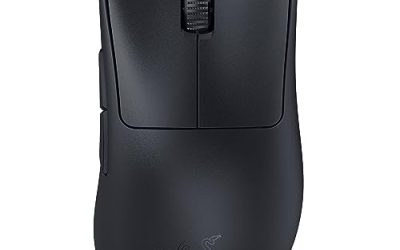
Razer’s flagship is the purest expression of the current esports formula: a symmetrical shell at 54 g, a second-generation Focus Pro sensor, and a wireless link that polls at a true 8,000 Hz straight out of the box, with no extra dongle to buy. That combination suits claw and fingertip players in tactical shooters who pair the mouse with a high-refresh monitor and want the shortest possible path between hand movement and cursor movement. Eight programmable controls keep the layout complete without disturbing the clean, ambidextrous-style shape that made the Viper line popular.
Specs
- Sensor: Razer Focus Pro 35K Optical Sensor Gen-2, up to 35,000 DPI
- Polling rate: True 8000 Hz wireless polling
- Switches: Razer Optical Mouse Switches Gen-3
- Weight: 54 g (black)
- Battery life: Up to 95 hours as listed
- Buttons: 8 programmable controls
- Shape: Symmetrical, right-handed with side buttons
Best for: Competitive FPS players who want genuine 8K wireless polling without add-on hardware.
Watch out for: Battery life drops steeply at 8,000 Hz, and the symmetrical shell offers little palm support for relaxed palm grips.
ASIN: B0CW25XR5R
Logitech G PRO X Superlight 2
Logitech’s flagship keeps the familiar Superlight silhouette and upgrades everything inside it: the HERO 2 sensor now reaches 44,000 DPI with a report rate of up to 8 kHz, and LIGHTFORCE hybrid switches combine optical actuation with a mechanical click feel. At 60 g with zero-additive PTFE feet, it glides with very little resistance, which claw and fingertip players tend to appreciate during long ranked sessions. It also plugs into Logitech’s wider ecosystem, including POWERPLAY wireless charging support, so owners of that mat can skip cables entirely.
Specs
- Sensor: HERO 2, up to 44,000 DPI as listed
- Report rate: Up to 8 kHz
- Switches: LIGHTFORCE hybrid optical-mechanical switches
- Weight: 60 g
- Battery life: Up to 95 hours as listed
- Buttons: 5 programmable buttons
- Charging: USB-C, POWERPLAY wireless charging supported
Best for: Players who want a proven symmetrical flagship with the option of mat-based wireless charging.
Watch out for: The five-button layout is minimal, and reaching the highest report rates means configuring the mouse in Logitech’s software.
ASIN: B09NBWL8J5
Razer DeathAdder V3 Pro
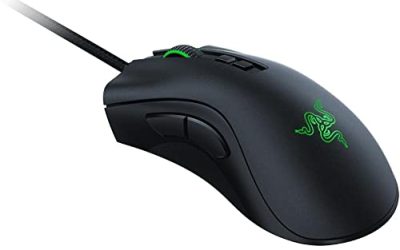
The DeathAdder shape has been the reference ergonomic design for years, and the V3 Pro trims it to 63 g while fitting the Focus Pro 30K sensor, which Razer states tracks flawlessly on a wide range of surfaces including glass. Third-generation optical switches carry a 90-million-click rating, and the HyperSpeed wireless connection keeps the full-size shell feeling responsive despite its larger footprint. This is the flagship for players whose hand rests on the mouse rather than hovering over it, and who find symmetrical mice cramped during long sessions.
Specs
- Sensor: Razer Focus Pro 30K Optical Sensor
- Switches: Razer Optical Mouse Switches Gen-3, rated for 90 million clicks
- Weight: 63 g (black)
- Battery life: Up to 90 hours as listed
- Buttons: 5 programmable buttons
- Connection: Razer HyperSpeed wireless
- Shape: Ergonomic right-handed
Best for: Palm and relaxed claw grippers with medium to large hands who want a flagship ergonomic shell.
Watch out for: This listing runs at 1,000 Hz out of the box; 8,000 Hz requires Razer’s HyperPolling Wireless Dongle, which is a separate purchase.
ASIN: B0B6XZLNHQ
Logitech G PRO X Superlight 2 DEX

The DEX takes the Superlight 2’s internals — HERO 2 sensor, up to 8 kHz polling, LIGHTFORCE switches, 95-hour battery rating — and wraps them in an asymmetrical right-handed shell shaped with input from professional players. For palm and claw grippers who liked the Superlight formula but found the symmetrical body too neutral, that sculpted right side and repositioned thumb buttons change the feel completely while keeping the weight at 60 g. It keeps POWERPLAY wireless charging support too, so it drops into an existing Logitech desk setup without new charging habits.
Specs
- Sensor: HERO 2, up to 44,000 DPI as listed
- Polling rate: Up to 8 kHz over LIGHTSPEED wireless
- Switches: LIGHTFORCE hybrid optical-mechanical switches
- Weight: 60 g
- Battery life: Up to 95 hours as listed
- Buttons: 5 buttons
- Charging: USB-C, POWERPLAY wireless charging supported
- Shape: Asymmetrical right-handed ergonomic
Best for: Right-handed palm and claw players who want Superlight hardware in an ergonomic shell.
Watch out for: The shape is strictly right-handed, and left-handed players or symmetrical-shape fans should look at the standard Superlight 2 instead.
ASIN: B0DB5JJTC9
Razer Basilisk V3 Pro
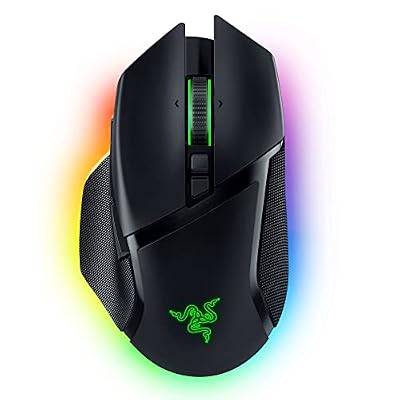
Where the other flagships strip features away, the Basilisk V3 Pro stacks them up: thirteen programmable controls, a HyperScroll tilt wheel that switches between free-spinning and tactile modes and also clicks side to side, thirteen zones of Chroma RGB with underglow, and three connection modes covering HyperSpeed wireless, Bluetooth and wired play. The Focus Pro 30K sensor and third-generation optical switches keep its competitive credentials intact, while the sculpted shell with a thumb rest suits players who split time between games, work and long browsing sessions and want one mouse to cover everything.
Specs
- Sensor: Razer Focus Pro 30K Optical Sensor
- Scroll wheel: Razer HyperScroll Tilt Wheel with free-spin and tactile modes
- Switches: Razer Optical Mouse Switches Gen-3
- Controls: 13 programmable controls as listed
- Lighting: 13-zone Chroma RGB with underglow
- Connections: HyperSpeed wireless, Bluetooth and wired (3 modes)
- Battery life: Up to 150 hours as listed
Best for: Players who want a feature-complete flagship for gaming, productivity and media control in one mouse.
Watch out for: The extra hardware makes it far heavier than the esports shells above, and wireless dock charging needs a separate Razer accessory.
ASIN: B0B6Y3XYFG
Which One Fits Your Situation
You play ranked FPS on a high-refresh monitor
The Razer Viper V3 Pro is the natural pick here. Its true 8,000 Hz wireless polling is available out of the box, the 54 g symmetrical shell rewards fast claw and fingertip movements, and the Focus Pro 35K sensor provides far more tracking headroom than any sensitivity setting will use. Just budget your charging around the shorter battery life that 8K polling brings.
Your palm grip leaves your hand aching for support
Choose between the DeathAdder V3 Pro and the Superlight 2 DEX. Both fill the palm with a sculpted right-handed shell at a similar weight, so the decision comes down to ecosystem and polling: the DeathAdder offers Razer’s sensor and switches at 1,000 Hz, while the DEX adds up to 8 kHz polling and POWERPLAY charging support for Logitech desks.
One mouse has to cover gaming and the working day
The Basilisk V3 Pro earns its place on a mixed-use desk. Thirteen programmable controls, the dual-mode tilt wheel and Bluetooth pairing make spreadsheets, timelines and browsers easier to navigate, then HyperSpeed wireless and the Focus Pro 30K sensor take over when you switch to games. It is the least specialised mouse here, and that is exactly its strength.
Your desk already runs on Logitech gear
If a POWERPLAY mat already sits under your keyboard, either Logitech flagship keeps its battery topped up while you play, removing charging from your routine entirely. Pick the Superlight 2 for a symmetrical shape or the DEX for an ergonomic one; both share the HERO 2 sensor, LIGHTFORCE switches and up to 8 kHz reporting, so the choice is purely about hand fit.
Common Mistakes
- Chasing the highest DPI figure and then playing at a few hundred DPI anyway, instead of comparing tracking quality, shape and switches.
- Turning on 8,000 Hz polling without checking the battery cost, then blaming the mouse when it needs charging mid-week.
- Buying an ergonomic flagship in the wrong size for your hand, when shell dimensions matter more than sensor specifications.
- Assuming every premium mouse charges the same way, when POWERPLAY mats, charging docks and plain USB-C cables are separate ecosystems.
- Paying for buttons and lighting you will never map, when a simpler five-button flagship would fit your games better.
Frequently Asked Questions
Is 8K polling worth choosing a flagship mouse for?
It depends on your monitor and games. On a high-refresh display, an 8,000 Hz report rate delivers more frequent position updates and visibly smoother cursor movement in fast shooters. The trade-offs are real, though: battery drains faster and the system works harder. If you play at 144 Hz or below, 1,000 Hz remains perfectly serviceable.
Do optical switches actually feel different from mechanical ones?
Slightly, and the bigger difference is consistency. Optical switches actuate with a light beam rather than metal contacts, so there is no debounce delay and the double-click faults that plague ageing mechanical switches are designed out. Razer rates its third-generation optical switches for 90 million clicks; Logitech’s LIGHTFORCE design keeps a mechanical click feel on top of optical actuation.
Does a higher maximum DPI make a mouse more accurate?
Not by itself. Maximum DPI is a ceiling, and most players use a small fraction of it. Accuracy at your chosen setting comes from the sensor tracking cleanly without unwanted acceleration or smoothing. Flagship sensors such as the Focus Pro 35K and HERO 2 are worth choosing for that consistency and headroom, not for the headline number.
Can a premium wireless mouse charge without a cable?
Two of the mice here can. The Logitech Superlight 2 and Superlight 2 DEX support POWERPLAY, which charges the mouse through a compatible mat while you play. The Razer flagships charge over USB-C, and the Basilisk V3 Pro can also sit on Razer’s wireless charging puck or dock — but those Razer accessories are separate purchases, so check what is in the box.