🛒 Best Price Today on Amazon
Prime members get fast, free shipping on everything above, plus member-only deals. New members get a 30-day free trial — cancel anytime.
A gaming mouse can be perfectly chosen and still feel unfinished. The cable snags on the desk edge during a wide flick, the shell turns slippery once palms warm up, the stock feet drag after months of daily use, and the mouse rides loose in a backpack between desks. The real decision is not whether accessories help, but which annoyance to fix first, because each add-on solves a different problem and none of them solves the others.
This roundup is for wired players fighting cable drag, wireless owners who carry a mouse to events, classes, or offices, and anyone whose current mouse feels close but not quite right. The five picks were chosen from their Amazon listing names and stated specifications, and they cover five separate jobs: cable control, grip, glide, wrist support, and travel protection.
Quick Picks
As an Amazon Associate we earn from qualifying purchases.
| Product | Best for | Key spec from title |
|---|---|---|
| Razer Gaming Mouse Bungee V3 Chroma | Wired players who hate cable drag | Spring arm with clip-on cable catch |
| Pulsar Gaming Gears SUPERGRIP Pre-Cut 1 Universal Griptape | Slippery shells and warm palms | Ultra-thin 0.5mm pre-cut grip tape |
| Pulsar Superglide Glass Mouse Skates | Owners of one named mouse chasing speed | Aluminosilicate glass feet, Type-C white |
| HyperX Wrist Rest – Mouse | Long sessions at a fixed desk | Cooling gel memory foam, mouse size |
| Hermitshell Hard Travel Case | Carrying a Logitech Pro mouse safely | EVA hard shell, fitted interior |
How to Choose
Start from the friction point, not the product shelf
Accessories fail when they answer a problem you do not have. Name the moment that bothers you: the cable catching mid-swipe, fingers sliding off the buttons, a scratchy glide, an aching wrist, or a mouse rattling around in a bag. Each category in this guide maps to exactly one of those moments. A bungee changes nothing about glide, and new skates do nothing for cable drag, so buying in the wrong order wastes money and leaves the original irritation untouched.
Check compatibility before you fall for a listing
Some accessories are universal and some are cut for one shell. Grip tape in a universal pre-cut set can go on almost any mouse, while replacement skates and fitted travel cases are shaped for a named model and often for one generation of it. The listings below state their target mice plainly, so read that line twice. A case or skate set made for the first Superlight generation may not match the second, even when the names look nearly identical.
Let the material tell you what will change
Materials decide how an accessory behaves after the first week. Glass skates glide faster and resist wear far longer than standard feet, but they demand a cloth or hybrid pad rather than a glass one. Gel-infused memory foam in a wrist rest spreads pressure and feels cool at first touch. A rigid EVA shell shrugs off bumps in a bag where a soft pouch only stops scratches. Match the material to your pad, your desk, and how roughly the mouse travels.
Treat tape and skates as consumables, the rest as keepers
Grip tape and mouse feet wear down, pick up dust, and eventually need replacing, so a sensible pick is easy to remove and easy to reorder. Residue-free adhesive matters here, because a tape that leaves glue behind makes the second set harder to fit than the first. A bungee, a wrist rest, and a hard case are one-time purchases by contrast. Spend your checking effort accordingly: fit and finish on the keepers, clean removal and fresh stock on the consumables.
The 5 Best Options
Razer Gaming Mouse Bungee V3 Chroma

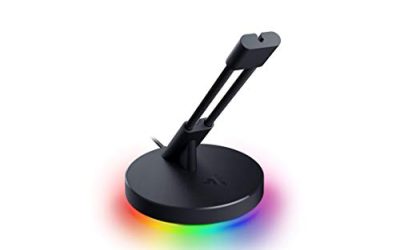
A bungee holds the cable of a wired mouse up off the desk, so the cord stops dragging across the surface and catching on the pad edge during fast swipes. This Razer version adds Chroma RGB lighting to the base, which suits players already running Razer lighting elsewhere in the setup. The spring arm flexes as you move, feeding cable out and pulling slack back without a tug at the mouse. If cable drag is your main complaint, this is the single most direct fix in the roundup.
Specs
- Brand: Razer
- Spring arm with clip-on cable catch
- Weighted base with anti-slip feet
- Powered by Razer Chroma RGB lighting
- Color: Black
- Purpose: drag-free support for wired gaming mice
Best for: Wired players whose cable keeps snagging or dragging mid-game.
Watch out for: It does nothing for a wireless mouse, and the lighting needs a USB connection and Razer software to sync.
ASIN: B08HCF3W5Q
Pulsar Gaming Gears SUPERGRIP Pre-Cut 1 Universal Griptape

Grip tape changes the contact between your fingers and the shell, and this Pulsar set is the flexible option because the pieces arrive pre-cut in universal shapes rather than traced for one mouse. At half a millimeter thick it adds traction without making the mouse feel noticeably wider, and the sweat-absorbing surface is aimed at players whose grip fades as hands warm up. The residue-free adhesive matters when the set eventually wears and comes off. It also works on buttons and side panels selectively, so you can tape only where your fingers actually sit.
Specs
- Brand: Pulsar Gaming Gears
- Ultra-thin 0.5mm (0.02in) pre-laminated tape
- Pre-cut universal shapes for mouse and other gear
- Sweat-absorbing, anti-slip surface
- Residue-free 3M adhesive backing
- Model number: SGDIY2
- Manufacturer: AplusX Inc.
Best for: Players whose fingers slip on smooth shells during long or warm sessions.
Watch out for: Universal pieces may need trimming around unusual button layouts, and coverage is smaller than a full model-specific kit.
ASIN: B0C2PY22BF
Pulsar Superglide Glass Mouse Skates

Replacement skates decide how a mouse starts and stops on the pad, and these glass feet from Pulsar are the speed-leaning end of that choice. They are cut for the Logitech G Pro X Superlight 2 and use aluminosilicate glass with polished round edges, a material the listing positions as far more wear-resistant than the feet the mouse ships with. The glide feels fast and consistent on cloth pads, which suits fingertip players making constant small corrections. Because the fit is model-specific, this is a commitment to one mouse rather than a transferable upgrade.
Specs
- Brand: Pulsar Gaming Gears
- Material: aluminosilicate glass
- Polished round edge finish
- Style: Type-C, White
- Compatibility: Logitech G Pro X Superlight 2
- Purpose: replacement gaming mouse feet with a durable sole
Best for: Superlight 2 owners who want a faster, longer-lasting glide on a cloth pad.
Watch out for: Glass skates are not recommended for glass mouse pads, and this set fits only the named Logitech model.
ASIN: B0CKXQ5R7S
HyperX Wrist Rest – Mouse

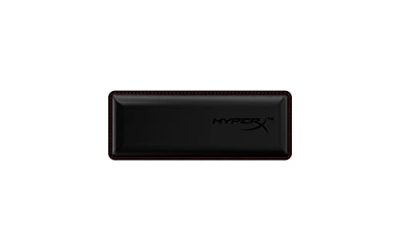
A mouse wrist rest supports the heel of the hand so the wrist floats straighter during long sessions, and this mouse-sized HyperX version keeps the footprint small enough to sit beside the pad without crowding it. The fill pairs cooling gel with memory foam, so it feels cool on first contact and then molds slowly under pressure. An anti-slip rubber base keeps it from wandering across the desk. It changes nothing about aim mechanics directly, but for players whose discomfort builds over hours, it is the accessory most likely to be used every single day.
Specs
- Brand: HyperX
- Model number: 4Z7X2AA
- Cooling gel-infused memory foam fill
- Anti-slip rubber underside
- Size option made for use with a mouse
- Color: Black
Best for: Desk-bound players who feel wrist pressure building during long sessions.
Watch out for: A rest this small supports the wrist only; players who rest the whole forearm need a longer pad instead.
ASIN: B09SGTWKWV
Hermitshell Hard Travel Case

A fitted hard case protects the shell, wheel, and buttons when a wireless mouse travels in a bag, and this Hermitshell case is shaped around Logitech Pro models instead of offering a loose generic pouch. The EVA shell resists bumps and dents, and the listing gives exact internal dimensions so you can confirm the fit before ordering. It holds the mouse only, which keeps it compact for a backpack or gear bag. For players who carry the same mouse between home, office, and events, this is cheap insurance against a cracked shell or a lost week of practice.
Specs
- Brand: Hermitshell
- Material: EVA hard shell
- Color: Black
- Compatibility: Logitech G Pro X Superlight 2, Superlight, and G Pro 2 Wireless
- Internal dimensions: 5.6 x 3.4 x 2.5 inches
- Case only; mouse and accessories not included
Best for: Players who regularly carry a Logitech Pro series mouse in a bag.
Watch out for: The fitted interior leaves little room for a charging cable, so plan a separate pocket for extras.
ASIN: B08K2XTYDR
Which One Fits Your Situation
You play wired and the cable runs the game
Start with the Razer bungee. Cable drag distorts low-sensitivity aim more than any other single factor, and lifting the cord off the desk removes the tug entirely. Set the bungee far enough back that the spring arm stays loaded through your widest swipe, and leave enough slack that the arm never reaches its limit during a full pad sweep.
Your grip fades as sessions get longer
Look at the Pulsar SUPERGRIP set first, since warm palms are a surface problem and tape is the direct answer. If the discomfort is pressure rather than slipping, the HyperX wrist rest is the better buy, and the two combine well: tape for control at the fingers, gel foam for support under the wrist during slower menu and work time between matches.
Your mouse feels scratchy or slow on the pad
Worn stock feet are the usual cause, so replacement skates are the fix, with the Superglide set fitting Superlight 2 owners who want speed that lasts. Before ordering, confirm your exact mouse generation, clean the old adhesive fully, and give new feet a short break-in period on your pad, because fresh skates of any material feel slightly different for the first sessions.
Your mouse travels with you every week
The Hermitshell case earns its place if the mouse rides in a shared bag with keys, bottles, or a laptop. A fitted shell stops the buttons being held down in transit and keeps the wheel from taking knocks. Players who only move between two desks at home can skip it, but regular commuters and event players will use it constantly.
Common Mistakes
- Buying model-specific skates or a fitted case for the wrong mouse generation, when the listing names a single model and revision.
- Covering the sensor, charging contacts, or button seams with grip tape, instead of placing pieces only where fingers rest.
- Running glass skates on a glass mouse pad, a pairing the skate makers warn against because both surfaces can scratch.
- Ordering a bungee for a wireless mouse, where there is no cable to manage and the accessory solves nothing.
- Changing tape, skates, and pad in the same week, which makes it impossible to tell which change helped or hurt.
Frequently Asked Questions
Does a mouse bungee help a wireless mouse?
No. A bungee manages a physical cable, and a wireless mouse has none to lift, so the accessory adds nothing during play. It can hold a charging cable neatly at the desk edge between sessions, but that is tidiness rather than performance. Wireless owners get more from skates, grip tape, or a travel case matched to their mouse.
Will grip tape damage my mouse or leave glue behind?
The Pulsar set uses residue-free 3M adhesive according to its listing, so it is designed to peel away cleanly when the tape wears out. Any adhesive product can misbehave on soft-touch coatings, though, so test one small piece first, remove tape slowly, and avoid stretching it during fitting, because stretched tape tends to lift at the edges later.
How long do replacement mouse skates last?
It depends on the material and your pad. Standard feet gradually thin and turn scratchy over months of daily use, while the glass Superglide feet are listed as a durable sole built to resist that wear far longer. A rough or dirty pad shortens the life of any skate, so keeping the pad clean extends the interval between replacements noticeably.
Should I buy a wrist rest or a bigger mouse pad instead?
They solve different problems. A wrist rest supports the wrist itself and suits players who feel pressure or tingling during long sessions at one desk. A larger pad gives the mouse more room and helps low-sensitivity players, but it does nothing for wrist posture. If discomfort is the complaint, choose the rest; if running out of surface is, choose the pad.