🛒 Best Price Today on Amazon
Prime members get fast, free shipping on everything above, plus member-only deals. New members get a 30-day free trial — cancel anytime.
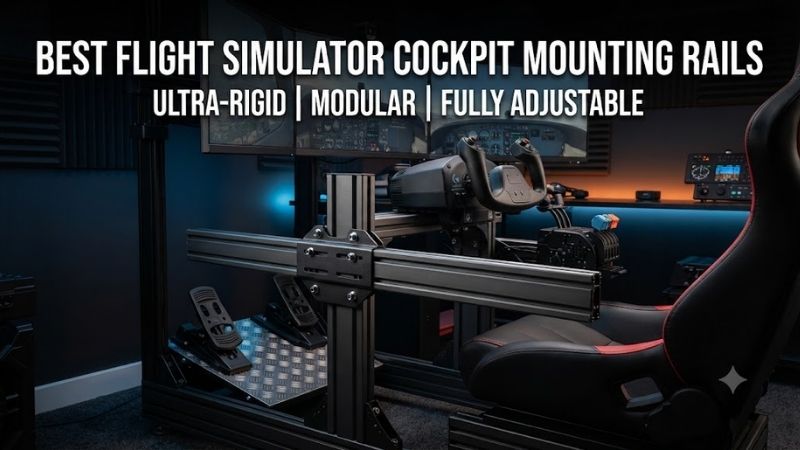
The best flight simulator cockpit mounting rails provide stable, adjustable support for joysticks, throttles, yokes, and other flight controls. A good mounting system keeps controls within comfortable reach without shifting under pressure. This roundup compares six cockpit mounting solutions, including aluminum-profile accessories, adjustable HOTAS supports, and conversion hardware for compatible racing and flight simulator frames.
Quick Verdict
The Trak Racer Flight Sim Control Mount Kit is our best overall option for supported aluminum-profile cockpits because it provides adjustable side supports for flight controls.
The MONSTERTECH MTSIM mounting ecosystem is an excellent alternative when extensive adjustment and modularity are priorities.
For users converting an existing Next Level Racing cockpit, the Combat Flight Pack provides dedicated joystick and throttle mounting hardware without requiring an entirely new frame.
Quick Comparison Table
| Product | Mounting Approach | Best For | Main Limitation |
|---|---|---|---|
| Trak Racer Flight Sim Control Mount Kit | Adjustable side supports | Best overall | Extrusion cockpit required |
| Trak Racer HOTAS Flight Sim Mounts | Left/right control mounts | HOTAS systems | Frame compatibility |
| Trak Racer Universal Side Peripheral Mount | Side mounting plate | Mixed controls | Hole-pattern verification |
| MONSTERTECH MTSIM Stand | Adjustable aluminum frame | Modular cockpit | Larger assembly |
| MONSTERTECH Chair Mount Rail System | Chair-based mounting rails | Office-chair setups | Chair-specific compatibility |
| Next Level Racing Combat Flight Pack | Adjustable support arms | Cockpit conversion | Only supported frames |
These products include mounting rails, rail-based assemblies, and mounting kits that serve the same search intent. They are not all interchangeable lengths of raw aluminum extrusion.
How We Selected These Mounting Solutions
We prioritized purpose-built flight-simulation hardware that supports adjustable control positioning.
The main evaluation criteria were rigidity, compatibility, adjustment range, mounting geometry, and whether the product works with a standalone cockpit or a specific existing frame.
Mounting systems should be evaluated as mechanical structures, not simply as decorative accessories.
A joystick subjected to repeated force must remain stable, while a throttle should be positioned where the user can comfortably operate it during extended flights.
Detailed Product Recommendations
1. Trak Racer Flight Sim Control Mount Kit — Best Overall
Best For: Owners of compatible aluminum-profile simulator cockpits.
Why We Picked It: The kit provides two adjustable side supports intended for mounting flight controls.
Key Specifications
-
Product: Flight Sim Control Mount Kit
-
Configuration: Two side supports
-
Adjustable support length: 350mm configuration
-
Intended compatibility: Supported aluminum-profile cockpits
-
Mounting application: Flight controls and HOTAS systems
Features and Performance
The main advantage is placing flight controls beside the pilot rather than on a conventional desk.
This improves ergonomics because the joystick and throttle can be positioned closer to the seated user’s natural hand location.
The kit uses adjustable support structures that accommodate different control arrangements.
For example, a pilot flying combat aircraft may prefer a central stick and left-side throttle, while a space-simulation user may want two side-mounted joysticks.
However, the kit should not be assumed compatible with every cockpit frame.
Its mounting arrangement depends on suitable aluminum-profile rails and fastening points.
Pros: Adjustable positioning, dual-side configuration, suitable for flight controls.
Cons: Requires compatible cockpit geometry; control-specific plates may need checking.
Buy If: You already own a compatible extrusion cockpit.
Skip If: You need a simple desk clamp.
2. Trak Racer HOTAS Flight Sim Mounts — Best Dedicated HOTAS Option
Best For: Pilots who want a joystick and throttle mounted beside the seat.
Why We Picked It: These mounts provide separate left- and right-side positions for common HOTAS equipment.
Key Specifications
-
Product: HOTAS Flight Sim Mounts
-
Configuration: Left and right
-
Intended frame type: Aluminum extrusion
-
Control category: Joystick and throttle
-
Compatibility: Model-specific mounting-hole patterns
Features and Performance
Dedicated HOTAS mounts reduce the need to place controls on the desktop.
This can improve access to buttons, switches, and throttle movement.
The main technical consideration is mounting rigidity.
A joystick with a strong centering spring or force-feedback mechanism may place more load on the mounting assembly than a lightweight controller.
Buyers should verify whether the selected mount supports their exact hardware.
A bracket that fits a Thrustmaster product does not necessarily fit a VKB or Virpil base.
Pros: Dedicated side mounting, compatible cockpit ecosystem, suitable for dual-control arrangements.
Cons: Control compatibility varies; rigidity depends on supporting frame.
Buy If: Your cockpit and HOTAS model are listed as compatible.
Skip If: You use a desk rather than a simulator frame.
3. Trak Racer Universal Side Peripheral Mount — Best for Mixed Controls
Best For: Cockpits combining flight controls with shifters, handbrakes, or other peripherals.
Why We Picked It: The Universal Side Peripheral Mount offers a flexible plate-based mounting approach.
Key Specifications
-
Product: Universal Side Peripheral Mount with Brackets
-
Intended equipment: Flight controls and compatible peripherals
-
Installation: Side mounting on supported Trak Racer frames
-
Mounting plate: Multi-hole arrangement
-
Required fit: Device-specific hole alignment
Features and Performance
A modular cockpit may be used for both flight and racing simulations.
In such setups, permanently installing one fixed control arrangement can be inconvenient.
A versatile side mounting plate provides more options for attaching different peripherals.
For example, a user may install a throttle quadrant for commercial aviation and replace it with another control for combat simulation.
However, universal should not be interpreted literally.
Hole patterns, mounting heights, and equipment weight limits still determine compatibility.
Pros: Multi-purpose design, flexible peripheral placement, useful for hybrid cockpits.
Cons: May require additional hardware; not all controls use matching hole patterns.
Buy If: You frequently change controls or use a hybrid flight/racing cockpit.
Skip If: You need a precisely engineered mount for one demanding control base.
4. MONSTERTECH MTSIM Stand — Best Modular Rail-Based System
Best For: Flight simulation enthusiasts building a configurable standalone control station.
Why We Picked It: MONSTERTECH’s MTSIM stand uses an aluminum-profile structure with adjustable control mounting positions.
Key Specifications
-
Product family: MTSIM Stand
-
Frame material: Aluminum profile
-
Control support: Joystick, throttle, yoke, and other compatible peripherals
-
Adjustment: Height and distance
-
Design: Modular standing cockpit structure
Features and Performance
The MTSIM system is useful for users who want a dedicated flight-control frame without necessarily building a complete seat-integrated cockpit.
Its aluminum-profile construction allows mounting positions to be adjusted along the frame.
This is particularly useful when switching from a side-stick arrangement to a central joystick configuration.
The structure can also accommodate different seated positions and control heights.
However, modular systems require careful configuration.
The selected mounting plate must match the control hardware, and the stand must remain stable when the joystick is operated.
Pros: Extensive adjustment, modular construction, multiple control options.
Cons: Larger investment in space and assembly; exact configuration affects compatibility.
Buy If: You want a configurable standalone simulator control structure.
Skip If: You only need an inexpensive replacement bracket.
5. MONSTERTECH Chair Mount Rail System — Best for Office Chairs
Best For: PC pilots who use an office or gaming chair instead of a dedicated cockpit seat.
Why We Picked It: MONSTERTECH offers chair-mounted flight-control arrangements that place joystick and throttle hardware beside the user.
Key Specifications
-
Product family: MONSTERTECH Chair Mount
-
Mounting approach: Chair attachment
-
Adjustable rails: Configuration-dependent
-
Intended devices: Compatible flight controls
-
Compatibility: Supported chair structures and mounting adapters
Features and Performance
Chair mounting is attractive because it lets a flight-simulation user maintain an ordinary computer desk setup.
Controls can be mounted beside the seat at a more natural height than a desk surface.
This may improve comfort during long flights.
However, chair compatibility is critical.
Not every chair has the same underside structure, armrest attachment, or mounting geometry.
The user must also consider whether the chair can rotate or move safely with controls attached.
Pros: Comfortable control positioning, preserves desk space, suitable for non-cockpit users.
Cons: Chair-specific compatibility; extra attached equipment can affect chair movement.
Buy If: You want cockpit-like HOTAS positioning with a supported office chair.
Skip If: Your chair has no compatible mounting arrangement.
6. Next Level Racing Combat Flight Pack — Best Cockpit Conversion
Best For: Owners of supported Next Level Racing racing cockpits who want to add flight controls.
Why We Picked It: The Combat Flight Pack adds adjustable joystick and throttle mounting options to compatible frames.
Key Specifications
-
Product: Combat Flight Pack
-
Manufacturer model: NLR-A013
-
Supported frames: Selected Next Level Racing cockpits
-
Intended controls: Joysticks and throttles
-
Configuration: Side or supported center mounting
-
Adjustment: Slotted support arms
Features and Performance
The Combat Flight Pack addresses a common problem: a racing cockpit may already provide a comfortable seat and stable frame but lack proper flight-control positions.
Instead of replacing the entire cockpit, the user can install compatible flight mounting hardware.
The elongated mounting slots allow control positions to be adjusted.
This helps account for different arm lengths and controller dimensions.
However, the product is not a universal replacement for aluminum-profile rails.
It was designed for specific Next Level Racing cockpit structures.
Pros: Converts supported existing cockpits, adjustable mounting positions, dedicated flight-control support.
Cons: Limited frame compatibility, additional hardware may be needed for unusual controls.
Buy If: You own a compatible Next Level Racing cockpit.
Skip If: You use an unrelated cockpit without verified support.
Buying Guide: Choosing Flight Simulator Mounting Rails
Identify Your Cockpit Frame
The first requirement is knowing whether the cockpit uses aluminum extrusion, steel tubes, dedicated mounting plates, or a chair-mounted arrangement.
Different structures require different hardware.
Aluminum-profile mounts are especially flexible because T-slot channels allow adjustable component positions.
However, extrusion dimensions and fastening standards vary.
Check Your Joystick and Throttle Hole Patterns
Flight controls do not share a universal mounting pattern.
Thrustmaster, Logitech, VKB, Virpil, and MOZA products can use different fastening arrangements.
Before purchasing, compare the control base’s mounting-hole spacing with the bracket design.
Consider Center Versus Side Mounting
A center-mounted joystick can provide an aircraft-inspired layout.
A side-mounted joystick may be more convenient for certain combat aircraft or space-simulation configurations.
The correct choice depends on the simulator, seating position, and flight-control hardware.
Evaluate Mounting Rigidity
A flexible mount can reduce control precision.
Repeated joystick forces may also loosen inadequate fasteners.
Higher-force controls require particularly careful evaluation of the supporting frame and mounting hardware.
Choose Appropriate Adjustment Range
The joystick should be positioned where the arm can remain relaxed.
The throttle should be reachable throughout its operating range without forcing the user to lean forward.
A mount with height and reach adjustment makes it easier to achieve a comfortable position.
Plan Future Upgrades
A modular mounting system can support future equipment changes.
This matters when adding pedals, a throttle quadrant, extra button boxes, or a different joystick base.
However, upgradeability is only useful when the manufacturer offers compatible components for the selected frame.
Frequently Asked Questions
Can racing cockpit rails support flight simulator controls?
Often yes, especially on compatible aluminum-profile rigs, but the correct mounting plates and brackets are required.
Are HOTAS mounts universal?
No. Control mounting holes, weight, and dimensions vary.
Should I choose a center-mounted or side-mounted joystick?
Choose based on the aircraft type, intended control layout, and personal comfort.
Can I mount flight controls to an office chair?
Yes, if the chair has a supported mounting arrangement.
Are aluminum-profile rails better than fixed steel brackets?
They provide greater adjustment flexibility, while a well-designed fixed bracket may be simpler for one specific setup.
Conclusion
The Trak Racer Flight Sim Control Mount Kit is our best overall choice among flight simulator cockpit mounting rails for compatible aluminum-profile rigs. MONSTERTECH’s MTSIM and chair-mount systems offer extensive customization, while the Next Level Racing Combat Flight Pack is a practical conversion option for supported cockpits. Before purchasing, verify frame compatibility, control mounting-hole patterns, and the rigidity required by your joystick or throttle.