🛒 Best Price Today on Amazon
Prime members get fast, free shipping on everything above, plus member-only deals. New members get a 30-day free trial — cancel anytime.
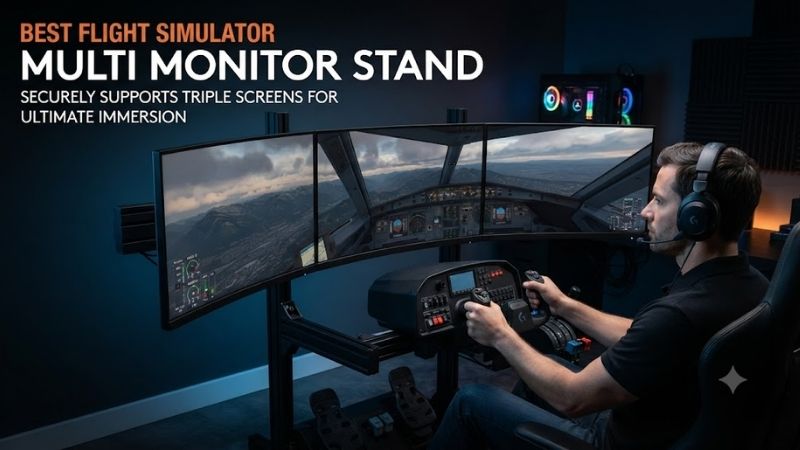
The best flight simulator multi monitor stand should position multiple displays at comfortable viewing angles while providing sufficient structural stability for a dedicated home cockpit. Triple-monitor arrangements expand peripheral visibility, making it easier to observe runway surroundings, cockpit instruments, and aircraft movements. However, screen alignment, VESA compatibility, cockpit clearance, and load capacity matter more than the stand’s appearance.
Quick Verdict
The Next Level Racing Elite Freestanding Triple Monitor Stand is our best overall recommendation for builders who want a dedicated three-screen structure independent of the cockpit.
The Trak Racer Freestanding Triple Monitor Stand is an attractive alternative for users prioritizing adjustability and compatibility with aluminum-profile simulation setups.
The Sim-Lab Freestanding Vario Triple Monitor Mount is especially interesting for enthusiasts who want fine adjustment of individual display positions.
For builders considering future cockpit changes, a freestanding system is often easier to adapt than a mount permanently attached to the simulator frame.
Quick Comparison Table
| Product | Mounting Type | Display Arrangement | Best For |
|---|---|---|---|
| Next Level Racing Elite Freestanding Triple | Freestanding | Three monitors | Best overall |
| Trak Racer Freestanding Triple | Freestanding | Three monitors | Versatility |
| Sim-Lab Freestanding Vario Triple | Aluminum profile | Three monitors | Precision alignment |
| Advanced SimRacing Freestanding HD Triple | Aluminum profile | Three monitors | Modular systems |
| GT Omega Simulator Monitor Stand Triple | Freestanding profile | Three monitors | Upgrade flexibility |
| Next Level Racing Round Tube Triple | Freestanding steel | Three monitors | Simpler installation |
How We Selected These Monitor Stands
We focused on identifiable stands designed for multi-monitor simulation setups.
Although many are marketed toward sim racing, their function also applies to flight simulation when the monitors, cockpit, and supporting geometry are compatible.
Selection criteria included structural design, supported monitor configurations, adjustment flexibility, VESA compatibility, cockpit clearance, and installation complexity.
The stand must support the actual weight of each display, not simply its advertised diagonal measurement.
We also considered how easily users can align three monitors into a continuous viewing surface.
Detailed Product Recommendations
1. Next Level Racing Elite Freestanding Triple Monitor Stand — Best Overall
Best For: Dedicated three-monitor flight simulation cockpits.
Why We Picked It: The Elite Freestanding Triple Monitor Stand uses a substantial aluminum-profile construction designed for simulator installations.
Key Specifications
-
Product family: Elite Freestanding Triple Monitor Stand
-
Material: Anodized aluminum profile
-
Configuration: Three displays
-
Supported screen sizes: Up to approximately 43 inches each in the designated triple-screen configuration
-
Mounting: Freestanding
-
Adjustment: Height and monitor positioning
Features and Performance
The freestanding design is useful for flight simulator setups because the monitors do not have to be physically attached to the cockpit seat or control frame.
This allows the display assembly to remain stationary when the pilot adjusts or modifies the cockpit.
The aluminum-profile structure also provides adjustability for different monitor sizes and positions.
For example, a pilot using three 32-inch displays may want the side screens angled inward to create a more continuous field of view.
The stand provides a framework for that arrangement.
However, final alignment still depends on the monitors’ VESA locations, bezel thickness, and available adjustment mechanisms.
Pros
-
Dedicated triple-monitor structure.
-
Freestanding arrangement.
-
Strong aluminum-profile design.
-
Adjustable display positioning.
Cons
-
Requires substantial floor space.
-
Assembly and alignment take time.
-
Monitor compatibility must be verified.
Buy If: You want a stable freestanding triple-display cockpit.
Skip If: Your room cannot accommodate a separate floor stand.
2. Trak Racer Freestanding Triple Monitor Stand — Best Versatile Alternative
Best For: Flight simulator builders who want flexible multi-monitor positioning.
Why We Picked It: Trak Racer offers freestanding triple-monitor configurations for different screen-size ranges.
Key Specifications
-
Product family: Freestanding Triple Monitor Stand
-
Structure: Steel frame
-
Configurations: Multiple monitor-size variants
-
VESA compatibility: Model-dependent
-
Optional accessories: Additional mounting and alignment hardware
Features and Performance
The Trak Racer stand is suitable for users who want a dedicated display frame positioned around an existing flight simulator cockpit.
Its freestanding structure allows the cockpit to be changed without requiring the monitors to be reattached to a different frame.
This is particularly valuable when upgrading from a conventional chair setup to a more elaborate yoke-and-pedal cockpit.
Trak Racer offers different monitor-size configurations, making model selection important.
A stand designed for smaller monitors should not automatically be used with larger, heavier displays.
Pros
-
Multiple configurations.
-
Freestanding installation.
-
Suitable for varied cockpit layouts.
-
Optional ecosystem accessories.
Cons
-
Exact screen limits vary by model.
-
Additional alignment hardware may increase cost.
Buy If: You want a flexible three-screen stand that can surround a flight cockpit.
Skip If: You need an integrated mount attached directly to the cockpit.
3. Sim-Lab Freestanding Vario Triple Monitor Mount — Best for Precision Alignment
Best For: Enthusiast flight-simulation cockpits where accurate screen alignment is a priority.
Why We Picked It: Sim-Lab’s Vario system provides fine adjustment of individual monitors.
Key Specifications
-
Product family: Freestanding Vario Monitor Mount
-
Configuration: Triple display
-
Structure: Aluminum profile
-
Standard VESA support: 75 × 75mm and 100 × 100mm configurations
-
Alignment system: Vario adjustment hardware
-
Intended use: Simulator display setups
Features and Performance
A triple-monitor cockpit can be difficult to align accurately.
Even a small difference in monitor height or angle can create visible discontinuities at the boundaries between screens.
Sim-Lab’s Vario mounting approach addresses this through fine adjustment.
This is useful when the displays have narrow bezels and the user wants their edges positioned closely together.
It also helps compensate for small differences in VESA mounting locations.
However, precision alignment cannot eliminate every visual mismatch.
Displays with different panel dimensions, resolutions, or bezel thicknesses may still produce noticeable discontinuities.
Pros
-
Fine alignment capability.
-
Modular aluminum-profile design.
-
Appropriate for dedicated triple-screen setups.
Cons
-
More involved assembly.
-
Monitor size and weight must be checked.
-
Precision hardware may be unnecessary for casual setups.
Buy If: You want carefully aligned triple monitors.
Skip If: You only need a basic display stand.
4. Advanced SimRacing Freestanding HD Triple Monitor Stand — Best Modular Profile System
Best For: Builders who want a substantial aluminum-profile monitor structure with optional alignment accessories.
Why We Picked It: Advanced SimRacing provides a modular freestanding triple-monitor ecosystem intended for simulation rigs.
Key Specifications
-
Product family: Freestanding HD Triple Monitor Stand
-
Structure: Aluminum extrusion
-
Configuration: Three monitors
-
Supported screen sizes: Model-dependent, including large triple-display arrangements
-
Additional options: Advanced VESA adjustment accessories
Features and Performance
The primary advantage of a modular aluminum-profile stand is the ability to make positioning adjustments and integrate compatible accessories.
This can be valuable when constructing a cockpit around a specific aircraft.
For example, a wide display arrangement may need additional clearance for a large yoke, instrument panel, or central console.
A freestanding stand allows the screens to be positioned around that equipment without depending entirely on the cockpit frame.
The main limitation is the need to verify monitor weight and supported VESA patterns.
Pros
-
Modular aluminum-profile construction.
-
Designed for simulator use.
-
Compatible accessory ecosystem.
Cons
-
Requires substantial floor space.
-
Exact configuration and accessories must be selected carefully.
Buy If: You want a modular monitor structure for a long-term cockpit project.
Skip If: You need an inexpensive, compact desk mount.
5. GT Omega Simulator Monitor Stand Triple — Best for Future Expansion
Best For: Builders who want a triple-display configuration with an upgrade path.
Why We Picked It: GT Omega’s monitor stand ecosystem includes single, triple, and quad-display configurations.
Key Specifications
-
Product family: Simulator Monitor Stand
-
Configuration: Triple monitor
-
Frame: Aluminum profile
-
Mounting: Freestanding
-
Expansion: Supported additional monitor configurations
-
Adjustment: Height and positioning
Features and Performance
The GT Omega stand is relevant to flight simulator users because cockpit requirements often change as additional hardware is introduced.
A user might begin with three displays showing the outside view and later add another screen for supplementary information.
The modular ecosystem provides potential expansion options.
However, buyers should confirm the required accessory package rather than assuming every triple-monitor stand includes quad-monitor hardware.
The supported display weight and VESA pattern also need checking.
Pros
-
Multiple configuration options.
-
Modular design.
-
Suitable for future expansion.
Cons
-
Additional screens require appropriate upgrades.
-
Large installations occupy significant space.
Buy If: You want a monitor stand with a possible upgrade path.
Skip If: You only need a fixed small-screen arrangement.
6. Next Level Racing Round Tube Freestanding Triple Monitor Stand — Best Simpler Steel Alternative
Best For: Users who prefer a freestanding steel-tube stand rather than an extensive aluminum-profile assembly.
Why We Picked It: Next Level Racing offers a round-tube triple-monitor stand designed for simulation installations.
Key Specifications
-
Product family: Round Tube Freestanding Triple Monitor Stand
-
Frame: Steel tubing
-
Display configuration: Three monitors
-
Installation: Freestanding
-
Adjustment: Supported height and screen positioning
-
Intended applications: Racing and flight simulation
Features and Performance
The round-tube design provides a different approach from modular extrusion frames.
Its appeal is a more defined structure with fewer profile-based configuration decisions.
For a flight simulator user who knows the intended screen arrangement, this may simplify equipment selection.
However, fewer modular adjustment options can make precise positioning more difficult in certain cases.
The user should verify the monitor-size range and VESA hardware for the exact model.
Pros
-
Freestanding steel design.
-
Intended for simulator installations.
-
Suitable for triple-display configurations.
Cons
-
Less modular than profile-based alternatives.
-
Screen-size restrictions require verification.
Buy If: You want a dedicated triple-monitor stand without building a highly customized profile structure.
Skip If: Fine alignment and modular expansion are your main priorities.
Buying Guide: Choosing a Flight Simulator Multi-Monitor Stand
Freestanding Versus Cockpit-Mounted Stands
A freestanding monitor stand supports the displays independently of the simulator cockpit.
This can reduce the transfer of seat or control-frame movement into the displays.
A cockpit-mounted stand saves floor space and may be convenient when the frame is designed around compatible accessories.
Neither design is universally superior.
For a motion simulator, a separately mounted screen assembly may require particular attention to relative movement and safety.
Choose the Right Monitor Size
Triple-monitor setups commonly use matching displays.
Monitor size influences the width of the stand, side-screen angles, and distance from the pilot.
Three 27-inch monitors require less horizontal space than three 43-inch displays.
However, diagonal measurements alone do not describe the full installation width.
Panel aspect ratio and side-screen angle also matter.
Check VESA Compatibility
VESA mounting describes the standardized pattern of mounting holes behind the monitor.
Common examples include 75 × 75mm and 100 × 100mm.
Larger monitors may use different patterns.
Before purchasing, verify that the stand includes suitable VESA hardware for all three displays.
Calculate the Total Display Weight
A stand’s structural capability depends on more than screen size.
Two monitors of the same diagonal can have different weights.
Check each monitor’s weight without its original desktop stand and compare it with the mounting system’s supported limits.
Do not use a stand beyond its documented capacity.
Consider Side-Monitor Alignment
Small height and angle differences can create distracting gaps between displays.
Fine-adjustment mounts help correct these problems.
They are particularly useful for narrow-bezel triple-screen configurations.
However, the three monitors should ideally have matching dimensions and similar display characteristics.
Plan Viewing Distance and Field of View
The displays should be positioned at a comfortable viewing distance.
Moving the screens closer increases apparent field of view, but can also reduce space for physical controls.
Flight simulator setups with large yokes and instrument panels may require a different monitor position from racing rigs.
Field-of-view settings should correspond to the physical screen geometry where supported.
Account for Cockpit Clearance
A monitor stand may technically support your displays but interfere with pedal plates, cockpit rails, or other equipment.
Before purchasing, measure the distance between the stand’s legs and compare it with the cockpit’s width and depth.
Also consider whether cables and control hardware can be accessed after assembly.
Understand GPU Performance Requirements
A triple-screen configuration can require substantially more graphics processing than one monitor.
For example, three 2560 × 1440 displays have a combined pixel count of 11,059,200 pixels.
A single 2560 × 1440 monitor contains 3,686,400 pixels.
The triple-monitor arrangement therefore requires rendering approximately three times as many pixels, before accounting for the specific simulator’s rendering method and settings.
A suitable monitor stand does not eliminate the need for sufficient GPU capability.
Frequently Asked Questions
Is a triple-monitor setup worth it for flight simulation?
It can improve peripheral visibility and immersion, especially for pilots who want a wider external view while retaining physical controls.
Can I use a sim racing monitor stand for flight simulation?
Yes, provided the stand is compatible with the displays and fits around the flight cockpit.
Are three matching monitors necessary?
They are not strictly required, but matching dimensions and resolutions simplify alignment and visual consistency.
Is freestanding better than cockpit-mounted?
Freestanding designs offer independent positioning. Integrated mounts can save space and work well with compatible frames.
Do triple monitors require three HDMI connections?
Not necessarily. A computer may use HDMI and DisplayPort connections, depending on GPU outputs and monitor inputs.
Can I add a fourth monitor later?
Some modular systems support additional display hardware. The exact upgrade path must be confirmed before purchase.
Conclusion
The Next Level Racing Elite Freestanding Triple Monitor Stand is our preferred overall choice among the best flight simulator multi monitor stand options for users building a dedicated three-screen cockpit. The Trak Racer Freestanding Triple offers useful flexibility, while the Sim-Lab Vario system is especially appealing when precise alignment matters. Advanced SimRacing and GT Omega provide modular alternatives, and the Next Level Racing Round Tube design suits buyers who prefer a simpler steel structure. Choose based on monitor weight, VESA compatibility, cockpit clearance, and adjustment requirements.