🛒 Best Price Today on Amazon
Prime members get fast, free shipping on everything above, plus member-only deals. New members get a 30-day free trial — cancel anytime.
- Logitech Gaming Mice at a Glance
- How to Choose a Logitech Gaming Mouse
- Budget Tier: Logitech Mice for Newcomers
- Mid-Range Tier: The G502 Family and Everyday Workhorses
- Premium Tier: Logitech Esports Mice
- Best Logitech FPS Gaming Mouse
- Best Gaming Mouse Logitech G7 Series, G903 and G Pro Wireless
- Best Gaming Mouse Pad for G903 and Other Logitech Mice
- Alternatives Worth Considering
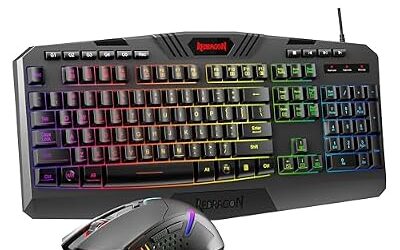
- Best Logitech Gaming Keyboard to Pair With Your Mouse
- Pick X If You Are… Decision Table
- Fit, Size and Compatibility Notes
- Frequently Asked Questions
Updated November 2026 – The best Logitech gaming mouse for most competitive players is the G Pro X Superlight 2 (or its DEX variant for right-handed ergonomic comfort), the G502 X Plus suits button-heavy play, and the G305 or G203 cover budget buyers.
If you are searching for the best Logitech gaming mouse, the answer depends on grip, hand size and the games you play more than on any single spec. Logitech G sells ultralight esports mice, heavier shape-focused workhorses and low-cost entry models, and the names overlap enough to confuse. This guide sorts the current lineup into budget, mid-range and premium tiers, attributes specs to the maker or to named reviewers, and explains which model fits which buyer. It covers the questions buyers type most often: the best Logitech FPS mouse, the best RGB G502, whether the G7-series name still matters, and which mouse pad to pair with a G903.
Logitech Gaming Mice at a Glance
| Model | Best for | Key stated specs | Limits |
|---|---|---|---|
| G Pro X Superlight 2 | Competitive FPS, claw and fingertip grips | Around 60 g, HERO 2 sensor, LIGHTSPEED wireless (maker lists) | Symmetrical shape, few buttons, premium tier |
| G Pro X Superlight 2 DEX | Right-handed players wanting a contoured shape | Ultralight, HERO 2 sensor, wireless (maker lists) | Right-handed only, premium tier |
| G Pro X3 Superstrike | FPS players who care about click feel | 59 g (61 g EU), HERO 2 up to 48,000 DPI, 8 kHz, up to 135 hours (maker lists) | New and premium tier, limited long-term feedback |
| G502 X Plus | MMO, productivity and mixed-genre play | 89 g, HERO 44K, 13 programmable controls, up to 130 hours with RGB off (maker lists) | Heavier, not an esports mouse |
| G502 X | Wired all-rounder | Wired, shape and button layout shared with the Plus | Cable, weight |
| G305 Lightspeed | Budget wireless | AA battery, HERO sensor, 1,000 Hz polling (maker lists) | Dated shape, modest polling rate |
| G305 X Superlight | Casual and long sessions | About 60 g, HERO 44K, 130-plus hours, up to 6 buttons, Bluetooth and wireless (maker lists) | Fewer buttons |
| G203 | Budget wired | About 85 g, 6 buttons, RGB (reviewers list) | No onboard extras, cable |
Spec figures for Logitech mice differ between outlets, especially polling rate and battery life. Where a number matters, this guide says who lists it. Before buying, compare the figure against the product page for the exact variant, because regional versions occasionally differ by a gram or two.
How to Choose a Logitech Gaming Mouse
Start with grip. Claw and fingertip grips tend to suit symmetrical, low-weight shapes such as the Superlight line, while palm grips are usually more comfortable on taller, contoured shapes like the G502 family or the DEX variant. Next consider weight: reviewers commonly describe sub-65 g mice as the esports tier, and the maker lists the G502 X Plus at 89 g, which is a deliberate trade for extra controls and a larger body.
Connection is the third factor. Logitech uses LIGHTSPEED for its 2.4 GHz wireless link, and several current models also work wired over USB-C. Buyers who dislike charging routines often prefer the AA-powered G305, while players who want a mouse that never needs a cable choose one of the rechargeable models. Finally, think about buttons: a shooter player rarely uses more than the two side buttons, while MMO and strategy players benefit from the extra programmable controls on the G502 family.
Budget Tier: Logitech Mice for Newcomers
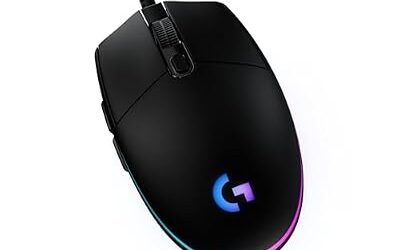
Logitech G203 – Best for Budget Wired Play
Wired · about 85 g · 6 programmable buttons · RGB lighting · classic ergonomic shape (as reviewers list)
The G203 remains the default entry-level pick in many 2026 roundups because its familiar shape suits most hands and it avoids battery or pairing complexity. The trade-off is a plain feature set: there is no wireless option, the cable is a standard rubber one, and it is heavier than the ultralights. It suits students, shared setups and anyone buying a first gaming mouse who wants a wired mouse that simply works.

Logitech G203 Wired Gaming Mouse for Laptop & Computer, 8,000 DPI - Black | Rainbow Optical Effect, 6 Programmable Buttons, On-Board Memory, Screen Mapping, PC/Mac Computer and Laptop Compatible
Included for 'Best Logitech Gaming Mice in 2026: G Pro X Superlight, G502, G305 and More' as a representative home product in this roundup; selection reflects the product set returned for this topic.
View on AmazonLogitech G305 Lightspeed – Best for Budget Wireless
Wireless LIGHTSPEED · AA battery · HERO sensor · 1,000 Hz polling · compact right-hand shape (maker and roundups list)
One 2026 roundup still calls the G305 the best wireless gaming mouse in its price class, with the limits being a 12,000 maximum DPI and a 1,000 Hz polling rate. The AA battery means no charging cable but adds weight. It fits small to medium hands and general play, and it is a sensible choice for a laptop bag. Players who want the lightest possible shape, or polling above 1,000 Hz, should look higher in the lineup.

Logitech G305 LIGHTSPEED Wireless Gaming Mouse, Hero 12K Sensor - Black | 12,000 DPI, lightweight, 6 programmable buttons, 250h battery life, on-board memory, PC/Mac, lightweight gaming mouse
Included for 'Best Logitech Gaming Mice in 2026: G Pro X Superlight, G502, G305 and More' as a representative home product in this roundup; selection reflects the product set returned for this topic.
View on AmazonLogitech G305 X Superlight – Best for Comfort and Long Casual Sessions
About 60 g · HERO 44K · 44,000 DPI · up to 6 programmable buttons · LIGHTSPEED, Bluetooth and USB-C wired · 130-plus hours (maker lists)
This is a different mouse from the original G305 despite the similar name. Logitech positions it for RPGs, cozy games and long sessions rather than for esports, and its Bluetooth option makes it useful for switching between a PC and a laptop. Treat the battery figure as an “up to” number that depends on settings and polling.
Mid-Range Tier: The G502 Family and Everyday Workhorses
Logitech G502 X Plus – Best for Button-Heavy and Mixed-Genre Play
89 g · HERO 44K (100 to 44,000 DPI) · 13 programmable controls · LIGHTSPEED and wired · up to 130 hours RGB off, 37 hours RGB on (maker lists)
This is the model most buyers mean when they search for the best RGB gaming mouse in the G502 line. The Plus adds RGB lighting and wireless to the G502 X shape, and the maker positions it for everything from MMOs to shooters to strategy games. Reviewers note that it is not aimed at esports players because the weight and bulk trade speed for functionality. The lighting is also the main drain on battery, which is why the maker lists two very different figures.
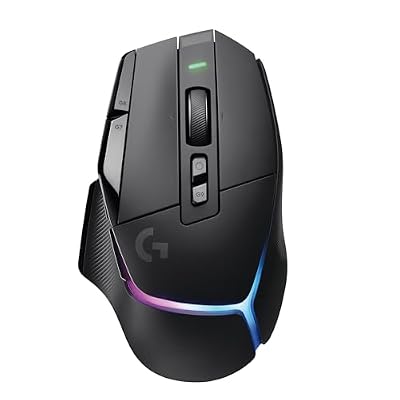
Logitech G502 X Plus Wireless RGB Gaming Mouse - Black | Optical Switches, RGB, 13 Buttons , Infinite Scroll Toggle, <130 hr Battery, USB-C, Wireless Charging Capable, for PC/MacOS
Included for 'Best Logitech Gaming Mice in 2026: G Pro X Superlight, G502, G305 and More' as a representative home product in this roundup; selection reflects the product set returned for this topic.
View on AmazonLogitech G502 X – Best Wired All-Rounder
Wired · G502 X body and button layout · hybrid switches (maker lists)
RTINGS names the G502 X as the best wired mouse it has reviewed, praising the mix of comfort, high-end gaming performance and productivity features. It suits desk workers who also game, because the programmable buttons and scroll wheel behavior help in spreadsheets and editing. It is a cabled mouse, so players who want freedom of movement should step up to the Plus.

Logitech G502 X Wired Gaming Mouse - Black | Optical Switches, 13 Buttons, Infinite Scroll, PC/MacOS Compatible
Included for 'Best Logitech Gaming Mice in 2026: G Pro X Superlight, G502, G305 and More' as a representative home product in this roundup; selection reflects the product set returned for this topic.
View on AmazonPremium Tier: Logitech Esports Mice
Logitech G Pro X Superlight 2 – Best for Competitive FPS
Around 60 g · HERO 2 sensor · LIGHTSPEED wireless · symmetrical shape (maker lists)
Most 2026 roundups pick the Superlight 2 as the best Logitech gaming mouse overall. It carries the HERO 2 sensor and focuses on light weight and a neutral, symmetrical shape. Reviewers report that the uniform shape suits claw and fingertip grips but can feel flat to palm-grip users. Published battery and polling figures vary between outlets, so confirm them on the maker page.

Logitech G Pro X Superlight 2 Lightspeed Wireless Gaming Mouse, Black | Lightweight, LIGHTFORCE hybrid switches, HERO 2 sensor, 32,000 DPI, 5 programmable buttons, USB-C charging, Mac & PC gaming
Included for 'Best Logitech Gaming Mice in 2026: G Pro X Superlight, G502, G305 and More' because the listing is a hybrid/pocket-spring build, which is the attribute this article compares.
View on AmazonLogitech G Pro X Superlight 2 DEX – Best for Right-Handed Ergonomic Comfort
Ultralight · HERO 2 sensor · contoured right-handed shape · LIGHTSPEED wireless (maker lists)
GamesRadar prefers the DEX variant, praising its improved form factor, clicks and sensor speed over the standard model. If you found the standard Superlight 2 too flat or too small, the DEX is the logical alternative. It is right-handed only, which is the main limit for left-handed buyers.

Logitech G PRO X SUPERLIGHT 2 DEX LIGHTSPEED Wireless Gaming Mouse | 60g pro-grade lightweight mouse with 5 programmable buttons, USB-C charging, 32k DPI sensor for PC/Mac - Black Mouse
Included for 'Best Logitech Gaming Mice in 2026: G Pro X Superlight, G502, G305 and More' as a representative home product in this roundup; selection reflects the product set returned for this topic.
View on AmazonLogitech G Pro X3 Superstrike – Best for Click Feel in FPS
59 g (61 g in the EU) · HERO 2 at up to 48,000 DPI · 8 kHz polling wired and wireless · up to 135 hours (maker lists)
Logitech’s own guide recommends this model for competitive FPS where click feel and consistency matter most. Because it is among the newest Logitech releases, long-term durability feedback is thinner than for the Superlight 2. Buyers who prefer a proven design may still choose the Superlight 2.

Logitech G PRO X3 SUPERSTRIKE Gaming Mouse - Black | LIGHTSPEED Wireless, Programmable Buttons, Ultra-Lightweight, PC, Mac
Included for 'Best Logitech Gaming Mice in 2026: G Pro X Superlight, G502, G305 and More' as a representative home product in this roundup; selection reflects the product set returned for this topic.
View on AmazonBest Logitech FPS Gaming Mouse
The best Logitech FPS gaming mouse is the G Pro X Superlight 2 for most players, with the Superlight 2 DEX for right-handers who want more shape and the Pro X3 Superstrike for those who prioritize click feel. FPS players generally favor low weight, a stable sensor and a predictable shape, and these three satisfy that profile. For tight budgets, the G305 Lightspeed is the lightweight-ish wireless starting point, though its 1,000 Hz polling is below the premium models. Whichever you choose, set DPI and in-game sensitivity so that your aim feels controllable before chasing higher numbers; most shooter players use modest DPI values.
Best Gaming Mouse Logitech G7 Series, G903 and G Pro Wireless
The “G7” searches usually refer to older G700-class or G703 mice, and the G903 and original G Pro Wireless are previous-generation designs. They were popular wireless models, and some are still sold or traded used, but the Superlight 2 and G502 X Plus have replaced them in the current lineup. The G903 in particular was the ambidextrous, button-heavy option, and its natural successor for that role is the G502 X Plus. If you already own one, it can still serve well, particularly with the PowerPlay charging mat, which the maker lists as compatible with the G903, G502 Lightspeed and G Pro Wireless among others.
Best Gaming Mouse Pad for G903 and Other Logitech Mice
The best gaming mouse pad for a G903 is either a PowerPlay mat, if you want wireless charging while you play, or a standard cloth pad sized for your sensitivity. A larger low-friction pad suits low-DPI arm aim, while a smaller one suits wrist aim. Logitech’s own pads and third-party options both work with the HERO sensor because the sensor tracks well on most opaque, non-glossy surfaces. Avoid glass or highly reflective surfaces unless the maker says the sensor supports them. Pick a pad large enough for a full swipe without lifting, and choose a control-focused surface if your clicks tend to overshoot.
Alternatives Worth Considering
Logitech G309 Lightspeed – Best for Mid-Range Wireless With Long Battery
The G309 sits between the G305 and the Superlight in positioning. It is a wireless mouse that suits buyers who want a lighter and newer option than the G305 without moving into the premium tier. Read the exact weight, sensor and battery claims on the maker page before buying.

Logitech G309 Lightspeed Wireless Gaming Mouse | Optical Switches, 68g w/ PowerPlay Wireless Charging & 86g w/ AA Battery, 300+ Hr Battery Life, 6 Buttons, PC/Mac Compatible
Included for 'Best Logitech Gaming Mice in 2026: G Pro X Superlight, G502, G305 and More' as a representative home product in this roundup; selection reflects the product set returned for this topic.
View on AmazonLogitech G705 – Best for Smaller Hands
Marketed toward smaller hands and a more compact build with a distinctive look, it suits players who find the G502 family too large. It is a wireless design with Bluetooth; check the maker page for sensor and battery details.
Logitech G604 – Best for Older MMO Setups
The G604 is a wireless MMO-style mouse with a large thumb button grid. It is an older design, so treat it as a previous-generation option for MMO players who need many thumb buttons and do not want the G502 layout.

Logitech G604 Lightspeed Wireless Gaming Mouse
Included for 'Best Logitech Gaming Mice in 2026: G Pro X Superlight, G502, G305 and More' as a representative home product in this roundup; selection reflects the product set returned for this topic.
View on AmazonBest Logitech Gaming Keyboard to Pair With Your Mouse
The best Logitech gaming keyboard for most mouse-focused players is a tenkeyless G Pro-style layout, because dropping the number pad frees desk space for wide mouse swipes. Logitech also sells full-size and compact options with mechanical switches. Choose the layout first, then switch type, and match the keyboard family to the same wireless receiver system if you want a single dongle.
Pick X If You Are… Decision Table
| Pick this model | If you … |
|---|---|
| G Pro X Superlight 2 | play competitive FPS with claw or fingertip grip and want a neutral shape |
| G Pro X Superlight 2 DEX | are right-handed and want a more contoured esports mouse |
| G Pro X3 Superstrike | value click feel and high polling in shooters |
| G502 X Plus | play MMOs or mixed genres and want many programmable controls |
| G502 X | want the same shape wired for work and play |
| G305 Lightspeed | need budget wireless and use an AA battery |
| G305 X Superlight | want a light, quiet-session mouse with Bluetooth |
| G203 | want the cheapest dependable wired option |
Fit, Size and Compatibility Notes
- Hand size: reviewers describe the Superlight 2 as comfortable for small to large hands in claw grip but flat for large palm grips; the G502 family is larger and favors medium to large hands.
- Software: Logitech G HUB handles DPI, buttons and lighting on current models, and onboard memory stores profiles so the mouse works without the app open.
- Receivers: LIGHTSPEED mice use a USB receiver; an extension cable can improve signal if the receiver sits behind a case.
- Surface: use a clean, opaque, matte surface; check the manual for any surface the sensor does not support.
- Battery: all runtimes are maker “up to” figures and fall with RGB, high polling and heavy use.
Frequently Asked Questions
What is the best Logitech gaming mouse overall in 2026?
The G Pro X Superlight 2 is the most commonly named overall pick, with the DEX variant preferred by some reviewers for shape. For button-heavy play the G502 X Plus is the usual choice. Your grip and games should decide between them.
Is the G502 a good gaming mouse for FPS?
The G502 family works for FPS if you like a larger palm-grip shape, but reviewers note it is heavier than esports-focused mice. The maker lists the X Plus at 89 g. Competitive players who want speed usually prefer the Superlight line.
Which Logitech mouse is best on a budget?
The G203 is the usual wired budget pick and the G305 Lightspeed is the usual budget wireless pick. Both are modest in weight and polling rate compared with premium models. They suit casual and entry-level players well.
Does Logitech G HUB come with every mouse?
G HUB is Logitech’s free software for configuring supported G-series mice, and it works with most current models. Some older mice use previous software. Check the maker support page for your exact model.
What mouse pad works best with a G903?
Either a PowerPlay mat for wireless charging or a standard cloth pad works well. Choose a size that allows full swipes for your sensitivity. Avoid glossy or transparent surfaces.
Are older models like the G903 or G Pro Wireless still worth buying?
They are previous-generation designs and remain usable, but current models offer lighter builds and newer sensors. If you already own one, there is no urgent reason to replace it. For a new purchase, the current lineup is a safer choice.