🛒 Best Price Today on Amazon
Prime members get fast, free shipping on everything above, plus member-only deals. New members get a 30-day free trial — cancel anytime.
- LGA 1151 v1 vs v2: Which CPUs Fit Which Board
- Best Z390 Motherboards
- Best Z370 Motherboards
- Best Z270 and Z170 Motherboards
- Best Motherboards for i7-8700K and i7-6700K
- Pick X If… Decision Table
- Windows 11 and Security Caveats
- Buying Used: Inspection Checklist
- Memory, Storage and Cooler Notes
- Alternatives to LGA 1151
- Frequently Asked Questions
Updated November 2026 – The best LGA 1151 motherboards for a used or upgrade build are the ASUS ROG Strix Z390-E Gaming and Gigabyte Z390 Aorus Pro for 8th and 9th gen Core chips such as the i7-8700K and i9-9900K, and the ASUS ROG Strix Z270E Gaming or MSI Z270 Gaming Pro Carbon for 6th and 7th gen chips such as the i7-6700K and i7-7700K.
If you are looking for the best LGA 1151 motherboards, treat this as a previous-generation platform. Intel moved on through LGA 1200, LGA 1700 and LGA 1851, so LGA 1151 now suits budget, repair and second-hand builds rather than new systems. Availability varies and new stock is very limited, so most buyers will be shopping used boards. The single most important rule is that LGA 1151 came in two versions that look identical but are not interchangeable.
LGA 1151 v1 vs v2: Which CPUs Fit Which Board
The socket has 1151 pins in both versions, but the electrical design changed. Reviewers and Intel documentation describe two groups. Revision 1 covers 6th gen Skylake and 7th gen Kaby Lake chips on boards such as H110, B150, H170, Z170, B250, H270 and Z270. Revision 2 covers 8th gen Coffee Lake and 9th gen Coffee Lake Refresh chips on H310, B360, H370, Z370, B365 and Z390 boards. An 8th or 9th gen CPU will not work in a Z170 or Z270 board, and a 6th or 7th gen CPU will not work in a Z370 or Z390 board.
| Chipset | Socket version | CPU generations | Typical chips | Notes |
|---|---|---|---|---|
| Z170 | v1 | 6th gen (7th gen after BIOS) | i7-6700K, i5-6600K | DDR4 on most boards; some DDR3L variants exist |
| Z270 | v1 | 6th and 7th gen | i7-7700K, i5-7600K | Adds more PCIe lanes and Optane support |
| Z370 | v2 | 8th gen (9th gen after BIOS on many boards) | i7-8700K, i5-8600K | 9th gen support depends on the exact board and BIOS |
| Z390 | v2 | 8th and 9th gen | i9-9900K, i7-9700K | Best fit for the top LGA 1151 chips |
Best Z390 Motherboards
For the best Z390 motherboards, the choice is about power delivery for an i9-9900K or i7-9700K and the features you need. Z390 is the strongest answer if you want the highest-end chips the socket supports, because it supports all 8th and 9th gen mainstream desktop CPUs out of the box.
ASUS ROG Strix Z390-E Gaming – Best for a premium Z390 gaming build
Z390 · ATX · DDR4 · LGA 1151 v2 · Intel Wi-Fi on the E model as listed by the maker
The Strix Z390-E was one of ASUS’s flagship mainstream boards for 9th gen. Reviewers praised its VRM cooling, Aura RGB support and two M.2 slots. It suits an overclocked i9-9900K or i7-9700K, although any overclock should be kept conservative and may void warranties.

Asus ROG Strix Z390-E Gaming Motherboard LGA1151 (Intel 8th 9th Gen) ATX DDR4 DP HDMI M.2 USB 3.1 Gen2 802.11AC Wi-Fi
Included for 'Best LGA 1151 Motherboards for Skylake to Coffee Lake Builds (Z170, Z270, Z370, Z390)' as a representative home product in this roundup; selection reflects the product set returned for this topic.
View on AmazonGigabyte Z390 Aorus Pro – Best for value in the mid to high tier
Z390 · ATX · DDR4 · LGA 1151 v2 · dual M.2 as listed by the maker
The Aorus Pro sat below the Aorus Master and Ultra in the Gigabyte line and was often described as the sweet spot for 8th and 9th gen CPUs. Look for the Wi-Fi variant if you need wireless, as the base model name does not always include it.

GIGABYTE Z390 AORUS PRO (Intel LGA1151/Z390/ATX/2xM.2 Thermal Guard/Realtek ALC1220/RGB Fusion/Gaming Motherboard)
Included for 'Best LGA 1151 Motherboards for Skylake to Coffee Lake Builds (Z170, Z270, Z370, Z390)' as a representative home product in this roundup; selection reflects the product set returned for this topic.
View on AmazonMSI MPG Z390 Gaming Edge AC – Best for a clean look with built-in wireless
Z390 · ATX · DDR4 · LGA 1151 v2 · wireless-AC as listed by the maker
MSI’s MPG Z390 Gaming Edge AC offers wireless and a respectable heatsink layout for a mid-range i7. It is a sensible alternative where the more expensive boards are not available.

MSI MPG Z390 Gaming Edge AC LGA1151 (Intel 8th and 9th Gen) M.2 USB 3.1 Gen 2 DDR4 HDMI DP Wi-Fi SLI CFX ATX Z390 Gaming Motherboard
Included for 'Best LGA 1151 Motherboards for Skylake to Coffee Lake Builds (Z170, Z270, Z370, Z390)' as a representative home product in this roundup; selection reflects the product set returned for this topic.
View on AmazonASRock Z390 Phantom Gaming 4 – Best for a budget Z390 build
Z390 · ATX · DDR4 · LGA 1151 v2 as listed by the maker
Budget-focused buyers look at the Phantom Gaming 4 for a lower-cost route into Z390. It is not designed for heavy overclocking, so pair it with a locked or modestly clocked chip.

ASRock Motherboard (Z390 Phantom Gaming 4)
Included for 'Best LGA 1151 Motherboards for Skylake to Coffee Lake Builds (Z170, Z270, Z370, Z390)' as a representative home product in this roundup; selection reflects the product set returned for this topic.
View on AmazonASRock Z390 Taichi – Best for feature-heavy ASRock builds
Z390 · ATX · DDR4 · LGA 1151 v2 · multiple M.2 slots as listed by the maker
The Taichi was ASRock’s upper-tier Z390 board, with a strong VRM and ample connectivity for the time. Used examples are the easiest way to find one now.
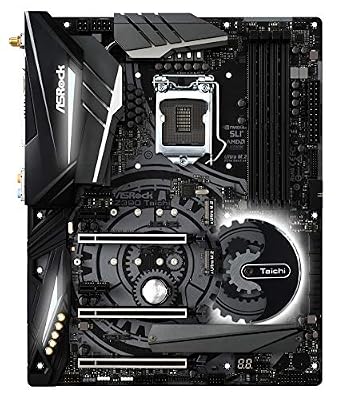
ASRock Motherboard (Z390 Taichi)
Included for 'Best LGA 1151 Motherboards for Skylake to Coffee Lake Builds (Z170, Z270, Z370, Z390)' as a representative home product in this roundup; selection reflects the product set returned for this topic.
View on AmazonBest Z370 Motherboards
For the best Z370 motherboards, remember that Z370 launched with 8th gen CPUs first. Reviewers note that Z370 was essentially a rebranded Z270 and that later BIOS versions enabled 9th gen CPUs on many Z370 boards, but not every board received that update. Always check the board maker’s CPU support list for your exact model before pairing it with an i9-9900K.
ASUS ROG Strix Z370-E Gaming – Best for an 8700K build
Z370 · ATX · DDR4 · LGA 1151 v2 as listed by the maker
The Strix Z370-E is a common answer to “best 8700k motherboards” because it was a popular pairing with the i7-8700K when that chip launched. It has solid heatsinks, Aura lighting and a straightforward BIOS.
MSI Z370 Gaming Pro Carbon – Best for a mid-range Z370 PC
Z370 · ATX · DDR4 · LGA 1151 v2 as listed by the maker
MSI’s Gaming Pro Carbon is a mid-range choice with a recognisable carbon-pattern design. It suits an i5-8600K or i7-8700K, and updating to the latest BIOS from the maker’s support page matters.
Gigabyte Z370 Aorus Gaming 5 – Best for balanced features
Z370 · ATX · DDR4 · LGA 1151 v2 · dual M.2 as listed by the maker
The Gaming 5 sat in the middle of the Gigabyte lineup and balanced RGB, storage options and power delivery. It remains a reasonable used buy if the BIOS is current.
Best Z270 and Z170 Motherboards
For the best Z270 motherboards and best Z170 motherboards, the target audience is people repairing or upgrading a 6th or 7th gen system, for example an i7-6700K or i7-7700K. These boards are the oldest on this page and are not on Microsoft’s Windows 11 supported processor list, which matters if you plan to run that OS.
ASUS ROG Strix Z270E Gaming – Best for an i7-7700K build
Z270 · ATX · DDR4 · LGA 1151 v1 as listed by the maker
The Z270E Gaming was a premium Z270 offering with strong VRM cooling and dual M.2 support. It is the sort of board reviewers pointed to for the “best motherboards for 6700k” question as well, since it supports 6th and 7th gen chips.
MSI Z270 Gaming Pro Carbon – Best for a clean Z270 gaming PC
Z270 · ATX · DDR4 · LGA 1151 v1 as listed by the maker
A mid-range option with a straightforward feature set. Look for a unit that has a recent BIOS and an intact I/O shield.

MSI Z270 Gaming PRO Carbon Motherboard
Included for 'Best LGA 1151 Motherboards for Skylake to Coffee Lake Builds (Z170, Z270, Z370, Z390)' as a representative home product in this roundup; selection reflects the product set returned for this topic.
View on AmazonASUS Maximus VIII Hero – Best for a Z170 overclocking build
Z170 · ATX · DDR4 · LGA 1151 v1 as listed by the maker
The Maximus VIII Hero was a popular enthusiast Z170 board in the Skylake era. It supports 7th gen CPUs only after a BIOS update, so confirm the version before installing an i7-7700K.

Asus ROG Maximus VIII Hero LGA1151 DDR4 M.2 SATA 6Gb/s USB 3.1 Type A Type C Intel Z170 ATX Motherboard
Included for 'Best LGA 1151 Motherboards for Skylake to Coffee Lake Builds (Z170, Z270, Z370, Z390)' as a representative home product in this roundup; selection reflects the product set returned for this topic.
View on AmazonBest Motherboards for i7-8700K and i7-6700K
A frequent search is “best motherboards 8700k” or “best 8700k motherboards”, and the answer is any Z370 or Z390 board with solid heatsinks, such as the ASUS ROG Strix Z370-E Gaming, MSI Z370 Gaming Pro Carbon or Gigabyte Z390 Aorus Pro. For the “best motherboards 6700k” query, look at Z170 or Z270 boards like the ASUS Maximus VIII Hero or ROG Strix Z270E Gaming. The 8700K and 6700K are unlocked K chips, and the Z-series chipsets allow overclocking, while H, B and non-Z chipsets do not. If you plan to leave the CPU at stock, a cheaper B360 or H270 board can work, but you lose the option to overclock.
Pick X If… Decision Table
| Pick this | If you… | Skip it if… |
|---|---|---|
| ASUS ROG Strix Z390-E Gaming | are pairing an i9-9900K or i7-9700K with a premium board | you only need stock-speed performance |
| Gigabyte Z390 Aorus Pro | want value with a strong VRM | you need integrated wireless and the base model lacks it |
| MSI MPG Z390 Gaming Edge AC | want wireless and a tidy layout | you plan extreme overclocks |
| ASRock Z390 Phantom Gaming 4 | need the cheapest Z390 | you want maximum expansion |
| ASUS ROG Strix Z370-E Gaming | own an i7-8700K or i5-8600K | you plan to fit a 9th gen CPU without confirming the BIOS |
| ASUS ROG Strix Z270E Gaming | own an i7-7700K or i7-6700K | you want a Windows 11 supported processor |
| ASUS Maximus VIII Hero | have a 6th gen overclocking build | you want a 7th gen CPU out of the box |
Windows 11 and Security Caveats
Microsoft states that Windows 11 supports 8th gen and newer Intel Core processors for most devices, so 8th and 9th gen LGA 1151 v2 systems are on the supported list when TPM 2.0 and Secure Boot are enabled in firmware. 6th and 7th gen CPUs, which sit on Z170 and Z270 boards, are not on that list. Reviewers note that Windows 11 can sometimes be installed on unsupported systems through workarounds, but Microsoft does not support that route and it may affect updates. One site claimed both versions are supported, which contradicts Microsoft’s published requirements, so rely on Microsoft’s own processor list for your exact chip. Windows 10 reached its end of mainstream support in October 2025, so an unsupported board also raises a long-term security question. Plan your operating system before you buy.
Firmware updates are the other concern. These boards are many years old, so the maker may no longer publish new BIOS releases, and some security-related microcode fixes may not be present. Keep the OS updated and use the latest BIOS the maker lists.
Buying Used: Inspection Checklist
- Socket pins: Ask for a clear photo of the CPU socket. Bent pins are the most common fatal fault on LGA boards.
- BIOS version: Ask the seller to confirm the version, or buy a board with USB BIOS Flashback so you can update without a CPU.
- VRM and capacitors: Look for bulging capacitors, discolouration near the VRM, or heat marks.
- Ports and slots: Test every RAM slot, PCIe slot, M.2 slot and USB header if you can.
- Accessories: I/O shield, SATA cables and the manual help, but are not essential.
- Return window: Insist on a return or warranty period from the seller, because boards of this age fail without warning.
Memory, Storage and Cooler Notes
Most LGA 1151 boards in this guide use DDR4, with up to 64 GB total on many Z370 and Z390 boards, although you should read the individual manual for the maximum and the supported speeds. Some early boards used DDR3L, so confirm the memory type on the listing. NVMe SSDs work on boards with M.2 slots, but the interface is PCIe 3.0, and some boards need a BIOS update before they can boot from an NVMe drive. LGA 1151 coolers also fit LGA 1150 and some LGA 1200 coolers in many cases, but check the cooler maker’s compatibility list.
Alternatives to LGA 1151
Newer used Intel: LGA 1200 or LGA 1700
A used LGA 1200 board with a 10th or 11th gen chip, or a modern LGA 1700 board, gives better Windows 11 support and a longer software life. It costs more but removes the compatibility worries.
AMD AM4 with a Ryzen 5000 chip
For buyers who want a budget path with current-generation-ish performance, AM4 is a widely available platform with PCIe 4.0 on B550 and X570 boards.
A complete refurbished system
If you are not comfortable with BIOS updates and pin checks, a refurbished prebuilt with a warranty is lower risk than a loose board.
Frequently Asked Questions
What is the best LGA 1151 motherboard?
For 8th and 9th gen CPUs, the ASUS ROG Strix Z390-E Gaming and Gigabyte Z390 Aorus Pro are the boards most often named. For 6th and 7th gen CPUs, the ASUS ROG Strix Z270E Gaming is a common pick. Which is best depends entirely on which CPU generation you own.
Can I put an i7-8700K in a Z270 motherboard?
No. Z270 uses LGA 1151 revision 1, which supports 6th and 7th gen CPUs only. The i7-8700K needs a revision 2 board such as Z370 or Z390.
Does Z370 support 9th gen CPUs like the i9-9900K?
Many Z370 boards gained 9th gen support through later BIOS updates, but it is not guaranteed on every model. Open the maker’s CPU support list for your exact board and note the minimum BIOS version. If the board does not list the CPU, pick a Z390 board instead.
Is Z390 or Z370 better for an i7-8700K?
Z390 is the later chipset and supports both 8th and 9th gen CPUs without caveats, so it is the safer choice if you might upgrade. Z370 is perfectly capable with an 8700K and is often cheaper used. Compare the specific boards, because power delivery matters more than the chipset name.
Do LGA 1151 motherboards work with Windows 11?
Microsoft lists 8th gen and newer Intel Core processors as supported, so Z370 and Z390 systems can run Windows 11 when TPM 2.0 and Secure Boot are enabled. Z170 and Z270 systems with 6th or 7th gen CPUs are not on the supported list. Always follow Microsoft’s published requirements.
Is it worth building on LGA 1151 in 2026?
It can be, for a cheap used system, a repair or a media or office PC, especially if you already own a compatible CPU and DDR4 memory. For a new gaming build, a newer platform gives better support, more modern ports and a longer upgrade path. Availability varies and new stock is limited, so most purchases will be second-hand.