🛒 Best Price Today on Amazon
Prime members get fast, free shipping on everything above, plus member-only deals. New members get a 30-day free trial — cancel anytime.
- Quick Answer: Which AM4 Board Fits Which Buyer
- AM4 Basics Before You Choose
- Best B550 Motherboards
- Best X570 Motherboards for AM4
- Best B450 Motherboards for Ryzen 5000
- Pick X If… Decision Table
- Best Motherboard for a Ryzen 7 5800X3D or 5700X3D
- Best AMD Motherboards: AM4 or AM5?
- Compatibility and Fit Notes
- Alternatives to AM4 Boards
- Frequently Asked Questions
Updated November 2026 – The best AM4 motherboards for most builders are the MSI MAG B550 Tomahawk and the ASUS ROG Strix B550-F Gaming WiFi II for a Ryzen 5000 gaming PC, the Gigabyte B550 Aorus Elite AX V2 and ASRock B550M Steel Legend for tight budgets, and the Gigabyte X570 Aorus Pro or ASUS ROG Crosshair VIII Hero when you want the extra PCIe lanes and connectivity of the X570 chipset.
If you are searching for the best AM4 motherboards in 2026, start with one fact: AM4 is a previous-generation platform. AMD moved its current desktop line to the AM5 socket with DDR5, so AM4 now suits budget builds, upgrades of existing systems and second-hand projects built around chips such as the Ryzen 5 5600, Ryzen 7 5700X3D and Ryzen 7 5800X3D. Availability varies, and new stock of some boards is limited, so treat the list below as a guide to which models were well regarded rather than a promise of what is on shelves today.
Quick Answer: Which AM4 Board Fits Which Buyer
Most AM4 builders end up on a B550 board, because it pairs the PCIe 4.0 graphics slot and primary M.2 slot that Ryzen 5000 supports with a sensible feature set. B450 boards are the cheaper route and still work with Ryzen 5000 after a BIOS update, but they are limited to PCIe 3.0 chipset links and need more care around CPU support. X570 boards add a PCIe 4.0 chipset, more lanes and often stronger power delivery, and suit people who plan several fast SSDs or add-in cards.
| Board | Chipset and size | Best for | Limit to know |
|---|---|---|---|
| MSI MAG B550 Tomahawk | B550, ATX, DDR4 | All-round Ryzen 5000 gaming build | No built-in wireless on the base model |
| ASUS ROG Strix B550-F Gaming WiFi II | B550, ATX, DDR4 | Feature-rich B550 with strong power delivery | Priced above other B550 boards |
| ASUS TUF Gaming B550-Plus WiFi II | B550, ATX, DDR4 | Long gaming and streaming sessions | Fewer extras than ROG Strix |
| Gigabyte B550 Aorus Elite AX V2 | B550, ATX, DDR4 | Value for most gamers | Mid-level heatsinks for heavy loads |
| ASRock B550M Steel Legend | B550, micro-ATX, DDR4 | Compact budget builds | Fewer expansion slots |
| MSI MAG B550M Mortar WiFi | B550, micro-ATX, DDR4 | Small case with wireless | Two-slot spacing limits big add-in cards |
| Gigabyte X570 Aorus Pro | X570, ATX, DDR4 | PCIe 4.0 chipset and many SSDs | Older design; chipset fan on many X570 boards |
| ASUS ROG Crosshair VIII Hero | X570, ATX, DDR4 | Enthusiast Ryzen 9 builds | Previous-generation flagship, limited new stock |
| MSI MAG B450 Tomahawk Max II | B450, ATX, DDR4 | Cheapest route to Ryzen 5000 | PCIe 3.0 chipset; needs BIOS support check |
| ASUS TUF Gaming B450-Plus II | B450, ATX, DDR4 | Budget upgrade of an older AM4 PC | Basic features; used stock may have old BIOS |
AM4 Basics Before You Choose
What “AM4+”, “AMD3” and “AMD4” searches actually mean
People searching for “best am4+ motherboards”, “best amd4 motherboards” or “best amd3 motherboards” are almost always looking for the same thing: a board with the AM4 socket. AM4 covers Ryzen 1000 through Ryzen 5000 and several APUs. AM3 and AM3+ are much older sockets for FX and Phenom chips and are not compatible with Ryzen. If a listing says AMD3 or AM3+, it will not take a Ryzen 5000 processor.
BIOS update and Ryzen 5000 support
The most common AM4 mistake is buying a board that cannot yet recognise the CPU. Many B450 and X470 boards, and some early B550 and X570 units, shipped before Ryzen 5000 existed. Reviewers report that the Ryzen 7 5700X3D, which arrived in 2024, can need a newer BIOS than the one in an old board. Always open the board maker’s CPU support list, find the exact CPU, and note the minimum BIOS version. If the board has a USB BIOS Flashback button, which Gigabyte calls Q-Flash Plus, you can update from a USB drive without a CPU or memory installed, which removes the problem entirely. Updating a BIOS carries some risk, so follow the manufacturer’s instructions and keep the PC on stable power while it flashes.
DDR4 only
All AM4 boards use DDR4 memory. You cannot reuse DDR5 modules, and DDR4 sticks from an old PC may work if their speed and capacity suit the board’s memory support list. Ryzen 5000 is commonly paired with DDR4 at moderate speeds, and the memory qualification list from the board maker is the safest guide.
PCIe 4.0 and what you need it for
PCIe 4.0 applies on B550 and X570 only when paired with a Ryzen 3000 or 5000 CPU that supports it. B450 boards run PCIe 3.0. For most gaming PCs, the practical difference shows up with fast NVMe SSDs more than with the graphics card, so a B450 board can still be a reasonable choice for a budget machine.
Best B550 Motherboards
If you want the best B550 motherboards, the list below covers the models that review roundups returned most often. The ones to focus on are the MSI MAG B550 Tomahawk, ASUS ROG Strix B550-F Gaming WiFi II, ASUS TUF Gaming B550-Plus WiFi II and Gigabyte B550 Aorus Elite AX V2. The “best motherboards B550” question comes down to size, wireless and how much power delivery you want for a Ryzen 7 or Ryzen 9 chip.
MSI MAG B550 Tomahawk – Best for an all-round Ryzen 5000 build
B550 · ATX · DDR4 · PCIe 4.0 graphics and M.2 · 2.5G LAN as listed by the maker
Several roundups name the MAG B550 Tomahawk as their overall pick for AM4 in 2026, and it is frequently paired with the Ryzen 7 5800X3D in buyer guides. Reviewers praise its large VRM heatsinks, plain BIOS and balanced port selection. The base model has no built-in wireless, so add a USB or M.2 Wi-Fi card if your desk is far from the router. A WiFi variant has been sold in some regions, so match the exact name when ordering.
ASUS ROG Strix B550-F Gaming WiFi II – Best for a feature-rich B550 build
B550 · ATX · DDR4 · WiFi 6E · 2.5G LAN · dual M.2 as listed by the maker
One roundup ranks this board first for 2026, citing power delivery that comfortably handles a Ryzen 7 5800X3D, along with faster networking and two M.2 slots. It also includes RGB lighting support through ASUS Aura, which matters for the “best asus motherboards rgb” crowd. If you plan a Ryzen 9 5900X or 5950X, this is the type of board that gives more thermal headroom than the entry B550 boards.

Asus ROG Strix B550-F Gaming WiFi II AMD AM4 (3rd Gen Ryzen) ATX DDR4 Gaming Motherboard (PCIe 4.0, WiFi 6E, 2.5Gb LAN, BIOS Flashback, HDMI 2.1, Addressable RGB Header and Aura Sync)
Included for 'Best AM4 Motherboards in 2026: B450, B550 and X570 for Ryzen 5000 Builds' as a representative home product in this roundup; selection reflects the product set returned for this topic.
View on AmazonASUS TUF Gaming B550-Plus WiFi II – Best for long gaming and streaming sessions
B550 · ATX · DDR4 · WiFi 6E · BIOS Flashback as listed by the maker
The TUF Gaming B550-Plus WiFi II is the hardy mid-range choice. Reviewers like its Flashback button, which makes a Ryzen 5000 upgrade from an old BIOS painless, and its heatsink coverage. It lacks a few premium touches such as the extra headers on ROG boards, but it covers what most gaming and streaming PCs need.

ASUS TUF Gaming B550-PLUS WiFi II AMD AM4 (3rd Gen Ryzen™) ATX DDR4 Gaming Motherboard (PCIe 4.0, WiFi 6, 2.5Gb LAN, BIOS Flashback, USB 3.2 Gen 2, Addressable RGB Header and Aura Sync)
Included for 'Best AM4 Motherboards in 2026: B450, B550 and X570 for Ryzen 5000 Builds' as a representative home product in this roundup; selection reflects the product set returned for this topic.
View on AmazonGigabyte B550 Aorus Elite AX V2 – Best for value
B550 · ATX · DDR4 · WiFi 6 · dual M.2 as listed by the maker
One budget-focused guide calls this the best overall value for most gamers. It sits at the middle of the Gigabyte B550 range, with built-in Wi-Fi, an easy-to-read BIOS and enough connectivity for a typical Ryzen 5 or Ryzen 7 build. Check the revision (V2) on the box, as Gigabyte sold several revisions of its B550 boards with small changes.
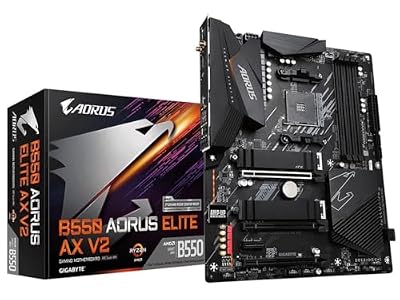
GIGABYTE B550 AORUS Elite AX V2 AMD AM4 ATX Motherboard, Supports Ryzen 5000/4000/3000 Processors, DDR4, 12+2 Power Phase, 2X M.2, PCIe 4.0, Front USB-C, WIFI6, 2.5 GbE LAN, Q-Flash Plus, RGB Fusion
Included for 'Best AM4 Motherboards in 2026: B450, B550 and X570 for Ryzen 5000 Builds' as a representative home product in this roundup; selection reflects the product set returned for this topic.
View on AmazonASRock B550M Steel Legend – Best for compact budget builds
B550 · micro-ATX · DDR4 · PCIe 4.0 · four DIMM slots as listed by the maker
Reviewers highlight the Steel Legend as a way to get B550 features in a smaller, lower-cost micro-ATX layout. It suits a modest Ryzen 5 5600 build in a compact case. The trade-offs are fewer expansion slots and lighter heatsinks, so it is a poor match for a heavily loaded Ryzen 9.

ASRock B550M Steel Legend Supports 3rd Gen AMD AM4 Ryzen™ / Future AMD Ryzen™ Processors Motherboard
Included for 'Best AM4 Motherboards in 2026: B450, B550 and X570 for Ryzen 5000 Builds' as a representative home product in this roundup; selection reflects the product set returned for this topic.
View on AmazonMSI MAG B550M Mortar WiFi – Best for a small case with wireless
B550 · micro-ATX · DDR4 · WiFi 6 · 2.5G LAN as listed by the maker
The Mortar WiFi is a standard recommendation for people who want a micro-ATX board with built-in wireless. It keeps the Tomahawk-style look and a solid feature set at a smaller size. Check clearance for large CPU coolers and wide graphics cards in a compact case.
Best X570 Motherboards for AM4
X570 is the high-end AM4 chipset, and it sits on the previous generation of enthusiast hardware. It is worth considering when you want several NVMe drives, more USB ports or better power delivery for a Ryzen 9 CPU. Many X570 boards use a small chipset fan, so noise is worth reading about in reviews.
Gigabyte X570 Aorus Pro – Best for PCIe 4.0 chipset connectivity
X570 · ATX · DDR4 · PCIe 4.0 · multiple M.2 slots as listed by the maker
A PC Guide article names the X570 Aorus Pro as its pick for the 5800X3D, noting that an older board and a not-new CPU pair well together. The board has a strong VRM and plenty of storage options, and used examples are common. If you buy used, check that the BIOS has been updated for Ryzen 5000 or that Q-Flash Plus is present.
ASUS ROG Crosshair VIII Hero – Best for enthusiast Ryzen 9 builds
X570 · ATX · DDR4 · WiFi 6 · 2.5G LAN · PCIe 4.0 as listed by the maker
The Crosshair VIII Hero was the flagship-leaning X570 board for the Ryzen 3000 and 5000 era. It suits someone building around the Ryzen 9 5950X who wants strong VRMs, high-end audio and a deep BIOS. It is expensive for an end-of-life platform, so it makes the most sense used or as part of a complete second-hand system.
MSI MAG X570S Tomahawk MAX WiFi – Best for a quieter X570 build
X570S · ATX · DDR4 · WiFi 6 · passive chipset cooling as listed by the maker
The X570S refresh was designed to drop the chipset fan, which attracted buyers who care about noise. It keeps the Tomahawk power delivery and adds wireless. Availability varies, so rely on the maker’s own product page rather than older roundups for stock and BIOS details.
Best B450 Motherboards for Ryzen 5000
For “best b450 motherboards” searches, the practical answer is that B450 is a budget choice with caveats. It was the best-selling AM4 chipset, which is why the used market is full of it, but it needs a BIOS update before a Ryzen 5000 chip will boot, and PCIe is limited to 3.0.
MSI MAG B450 Tomahawk Max II – Best for the cheapest route to Ryzen 5000
B450 · ATX · DDR4 · PCIe 3.0 chipset · Ryzen 5000 support after BIOS update as listed by the maker
The Tomahawk Max II is the version sold with the later BIOS for Ryzen 5000 support, and it is commonly mentioned by budget guides. It pairs well with a Ryzen 5 5600. Always confirm the BIOS version on the packaging or check the maker’s support page for the minimum version your CPU needs.
ASUS TUF Gaming B450-Plus II – Best for a budget upgrade of an older AM4 PC
B450 · ATX · DDR4 · Ryzen 5000 support after BIOS update as listed by the maker
If your existing PC already has an AM4 board, the TUF Gaming B450-Plus II type of model is what many owners upgrade from or keep. It handles Ryzen 5 and mid-range Ryzen 7 CPUs. Avoid pairing it with a Ryzen 9 or a 5800X3D unless the VRM heatsink and BIOS support are confirmed, since boards without VRM heatsinks are described by one source as risky for the 5700X3D.

ASUS TUF Gaming B450-PLUS II AMD AM4 Ryzen 5000 ATX Motherboard With DDR4 4400(O.C.), HDMI 2.0b, USB 3.2 Gen 2 Type-C, BIOS Flashback, AI Noise Cancelling Mic
Included for 'Best AM4 Motherboards in 2026: B450, B550 and X570 for Ryzen 5000 Builds' as a representative home product in this roundup; selection reflects the product set returned for this topic.
View on AmazonPick X If… Decision Table
| Pick this | If you… | Skip it if… |
|---|---|---|
| MSI MAG B550 Tomahawk | want one dependable board for a Ryzen 5 5600 to 5800X3D | you need built-in Wi-Fi without adding a card |
| ASUS ROG Strix B550-F Gaming WiFi II | want wireless, 2.5G LAN and RGB in one ATX board | you are on a strict budget |
| ASUS TUF Gaming B550-Plus WiFi II | value BIOS Flashback and robust cooling | you want extra premium headers |
| Gigabyte B550 Aorus Elite AX V2 | want the best value for a typical gaming PC | you plan a Ryzen 9 workload |
| ASRock B550M Steel Legend | are building a small, cheap Ryzen 5 PC | you need several expansion cards |
| Gigabyte X570 Aorus Pro | want several NVMe drives and PCIe 4.0 chipset lanes | noise from a chipset fan bothers you |
| ASUS ROG Crosshair VIII Hero | are building a Ryzen 9 enthusiast PC from used parts | you want to buy new stock |
| MSI MAG B450 Tomahawk Max II | are on the tightest budget and accept PCIe 3.0 | you want the 5700X3D without a BIOS plan |
Best Motherboard for a Ryzen 7 5800X3D or 5700X3D
The 5800X3D and 5700X3D are among the strongest AM4 gaming chips, and reviewers describe supply as drying up. The board advice is straightforward. Pick a B550 or X570 board with solid VRM heatsinks, confirm that the board maker lists the exact CPU with a minimum BIOS version, and favour a model with BIOS Flashback. The MSI MAG B550 Tomahawk and ASUS ROG Strix B550-F Gaming WiFi II are the boards that kept appearing in X3D-focused roundups. Remember that the X3D chips are normally locked, so you are paying for cache, not overclocking headroom, and a high-end X570 board adds little for these CPUs.
Best AMD Motherboards: AM4 or AM5?
If you came here searching for the “best amd motherboards” in general, the answer depends on whether you are reusing parts. AM5 boards, such as B650 and B850 models, use DDR5 and are the platform AMD is actively supporting, so they suit a new build. AM4 makes sense if you already own DDR4 memory and a Ryzen 3000 or 5000 chip, or if a cheap used build is the goal. If you are buying everything new, compare the total cost of an AM5 setup against an AM4 setup before deciding, because the cheaper board may not save money once DDR4 and a limited CPU upgrade path are included.
Compatibility and Fit Notes
- Form factor: ATX fits most mid-tower cases, micro-ATX suits compact builds and mini-ITX is rarer on AM4. Check the case’s supported form factors.
- CPU cooler: The AM4 cooler mounting is common across the platform, so older AM4 coolers usually fit, but check the maker’s note on tall heatsinks and RAM clearance.
- Memory: Stick to modules on the board maker’s qualified memory list when possible, and use the BIOS memory profile setting carefully.
- Storage: Count the M.2 slots and check whether a slot shares bandwidth with SATA ports, as the manual states.
- Windows 11: Ryzen 3000 and 5000 CPUs are on Microsoft’s supported list, and most B550 and X570 boards offer TPM through firmware. Follow the maker’s instructions for enabling it.
Alternatives to AM4 Boards
Move to AM5 with a B650 or B850 board
If you want a longer upgrade path, a B650 or B850 board with DDR5 is the current mainstream AMD route. It costs more up front but keeps support for newer Ryzen CPUs.
Buy a complete used AM4 system
A pre-built or second-hand system with a working B550 board can offer a lower cost of entry, but ask for the exact board model, BIOS version and a photo of the VRM area, and make sure there is a return window.
Choose an Intel LGA 1700 board for a cheaper new build
For buyers who need new stock, an LGA 1700 board with a Core i5 may be easier to find than AM4 hardware. It is a different platform, so compare memory type and CPU choices first.
Frequently Asked Questions
What is the best AM4 motherboard in 2026?
The MSI MAG B550 Tomahawk is the board that review roundups most often name as the best all-rounder for AM4. The ASUS ROG Strix B550-F Gaming WiFi II takes the top spot on other lists. Both suit Ryzen 5000 chips up to the 5800X3D.
Is B550 or X570 better for Ryzen 5000?
B550 is the mainstream pick for most Ryzen 5000 builds because it offers PCIe 4.0 for the graphics card and primary M.2 slot. X570 is better when you want more PCIe lanes, several fast SSDs or stronger power delivery for a Ryzen 9. For a Ryzen 5 5600 or a 5800X3D, a good B550 board is normally enough.
Will a B450 motherboard run a Ryzen 7 5800X3D?
Some B450 boards support the 5800X3D after a BIOS update, but support depends on the exact board and BIOS version. Open the maker’s CPU support list and confirm the minimum BIOS before buying. Boards without VRM heatsinks are a poor fit for this chip.
Do I need to update the BIOS for a Ryzen 5000 CPU?
You may, especially on older B450, X470, B550 or X570 stock that shipped before Ryzen 5000. Look for BIOS Flashback or Q-Flash Plus, which lets you update from a USB drive without a CPU installed. If the board has neither, you may need a supported older CPU to boot and update.
Are AM4 motherboards still worth buying?
They are worth it for budget builds, upgrades and second-hand projects, especially if you already own DDR4 memory and a Ryzen 3000 or 5000 chip. They are less attractive for a brand-new build, because AM5 is the platform AMD continues to support. Availability varies and new stock of some boards is limited.
What does AM4+ or AMD4 mean in a listing?
Both normally refer to the AM4 socket, which is the one used by Ryzen 1000 to 5000 desktop CPUs. They do not refer to a separate socket. AM3 and AM3+ boards are a different, older socket and will not accept Ryzen processors.