🛒 Best Price Today on Amazon
Prime members get fast, free shipping on everything above, plus member-only deals. New members get a 30-day free trial — cancel anytime.
- Verdict at a glance
- What Motherboard Does Intel Core Ultra Need?
- Best Motherboards for Intel Ultra Compared
- MSI MAG Z890 Tomahawk WiFi — Best Overall
- Gigabyte Z890 AORUS Elite WiFi7 — Best for Easy Upgrades
- ASRock Z890 Steel Legend WiFi — Best White Motherboard
- MSI MPG Z890 Carbon WiFi — Best for Networking and I/O
- ASUS ROG Maximus Z890 Hero — Best Premium Motherboard
- ASUS TUF Gaming B860-Plus WiFi — Best Value
- ASUS ROG Strix Z890-E Gaming WiFi — Best for Storage and USB4 Below Flagship Tier
- ASUS TUF Gaming Z890-Plus WiFi — Best Value Z890
- GIGABYTE B860M AORUS Elite WIFI6E ICE — Best Budget Micro-ATX
- ASRock H810M-P Gen5 — Cheapest Way Onto LGA1851
- Alternative: MSI MAG B860 Tomahawk WiFi
- Product Listings for the Main Picks
- Z890 vs B860 for Intel Core Ultra
- Z890 vs B860 vs H810: Chipset Tier Table
- BIOS Note for the Core Ultra 7 270K Plus and 250K Plus
- Buying Guide: How to Choose an Intel Ultra Motherboard
- How We Compared
- FAQ
- Conclusion
Choosing the best motherboard for Intel Ultra starts with the LGA1851 platform, not older LGA1700 boards. This guide compares six boards for Core Ultra Series 2 desktops, focusing on gaming, PCIe 5.0, DDR5, M.2 storage, networking, USB connectivity, expansion, and the features that actually matter in a modern PC build.
Verdict at a glance
Updated October 2026, including support notes for Intel’s Core Ultra 200S Plus refresh (Core Ultra 7 270K Plus and Core Ultra 5 250K Plus).
- Best overall: MSI MAG Z890 Tomahawk WiFi. Gen5 M.2, four M.2 slots, 5Gb Ethernet, Wi-Fi 7 and Thunderbolt 4 without flagship pricing; an ideal match for a Core Ultra 7 270K Plus.
- Best value: ASUS TUF Gaming B860-Plus WiFi. PCIe 5.0 graphics and Gen5 storage for gaming builds that do not need CPU overclocking.
- Best premium: ASUS ROG Maximus Z890 Hero for dense storage, or the ASUS ROG Strix Z890-E Gaming WiFi for two Thunderbolt 4 ports and seven M.2 slots at a lower tier.
- Best budget micro-ATX: GIGABYTE B860M AORUS Elite WIFI6E ICE, a white mATX board with a 12+1+2+1 phase VRM.
- Cheapest way onto LGA1851: ASRock H810M-P Gen5, for locked chips such as the Core Ultra 5 225 in simple gaming or office builds.
What Motherboard Does Intel Core Ultra Need?
Intel Core Ultra desktop processors in Series 2 use the LGA1851 socket and Intel 800-series chipsets, so older 600- and 700-series motherboards are not compatible. That makes socket support the first filter. For most builders, the practical choice is between feature-rich Z890 and more cost-conscious B860 motherboards.
Z890 is the better fit when you want broader expansion, more high-speed I/O, stronger enthusiast features, or extra flexibility for a high-end Core Ultra build. B860 can make more sense when your priorities are gaming, one GPU, a few NVMe drives, fast networking, and DDR5 without paying for extras you may never use.
Best Motherboards for Intel Ultra Compared
| Motherboard | Chipset | M.2 Slots | Fastest M.2 | Wired LAN | Wireless | Thunderbolt 4 |
|---|---|---|---|---|---|---|
| MSI MAG Z890 Tomahawk WiFi | Z890 | 4 | PCIe 5.0 x4 | 5GbE | Wi-Fi 7 | Yes |
| Gigabyte Z890 AORUS Elite WiFi7 | Z890 | 4 | PCIe 5.0 x4 | 2.5GbE | Wi-Fi 7 | Yes |
| ASRock Z890 Steel Legend WiFi | Z890 | 4 | PCIe 5.0 x4 | 2.5GbE | Wi-Fi 7 | Yes |
| MSI MPG Z890 Carbon WiFi | Z890 | 5 | PCIe 5.0 x4 | 5GbE + 2.5GbE | Wi-Fi 7 | Yes |
| ASUS ROG Maximus Z890 Hero | Z890 | 6 | PCIe 5.0 x4 | 5GbE + 2.5GbE | Wi-Fi 7 | Yes |
| ASUS TUF Gaming B860-Plus WiFi | B860 | 3 | PCIe 5.0 x4 | 2.5GbE | Wi-Fi 7 | No |
MSI MAG Z890 Tomahawk WiFi — Best Overall

MSI MAG Z890 Tomahawk WiFi Gaming Motherboard (Supports Core Ultra Series 2 Intel Processors, LGA 1851, DDR5, PCIe 5.0, M.2, SATA, 5Gbps LAN, USB Type-C, Wi-Fi 7, Bluetooth 5.4, Thunderbolt 4, ATX)
Included for 'Best Motherboard for Intel Ultra: 6 LGA1851 Picks for PCs' as a representative home product in this roundup; selection reflects the product set returned for this topic.
View on AmazonBest For: Balanced high-end gaming and general-purpose Core Ultra builds
The MSI MAG Z890 Tomahawk WiFi is the most balanced option in this group because it pairs LGA1851 support with PCIe 5.0 graphics, a Gen5 M.2 slot, four M.2 slots, Thunderbolt 4, 5Gb Ethernet, Wi-Fi 7, and a useful rear I/O layout. It covers high-end gaming needs without moving into flagship-board excess.
Its strongest advantage is how little compromise it asks from a mainstream enthusiast. You can run a fast GPU, several NVMe drives, high-capacity DDR5, wired multi-gig networking, and modern wireless connectivity on one ATX board. The trade-off is simple: premium Z890 boards still offer more storage lanes, rear USB, and specialty controls.
This board suits builders using a Core Ultra 7 or Core Ultra 9 who want a gaming-first system with room for creator workloads and future storage upgrades. It also fits users who value straightforward assembly, because MSI includes tool-free M.2 hardware and practical troubleshooting features instead of focusing only on cosmetic extras.
Key Features
- Intel Z890 chipset and LGA1851 socket
- Four DDR5 DIMM slots
- PCIe 5.0 x16 graphics slot
- Four M.2 slots
- PCIe 5.0 x4 primary M.2
- 5Gb Ethernet
- Wi-Fi 7
- Thunderbolt 4
- EZ M.2 and EZ PCIe installation features
Pros
- Excellent balance of storage and networking
- Strong rear connectivity
- Four M.2 slots provide useful expansion
- 5Gb LAN is valuable for fast NAS setups
- Builder-friendly installation features
Cons
- More board than basic gaming systems require
- Premium boards provide additional M.2 and I/O options
Use Case: Gaming, streaming, productivity, and enthusiast Core Ultra systems
Who It’s For: Buyers who want Z890 features without moving to a flagship motherboard
Gigabyte Z890 AORUS Elite WiFi7 — Best for Easy Upgrades
Best For: Gaming PCs that will receive frequent SSD or hardware upgrades
The Gigabyte Z890 AORUS Elite WiFi7 is a strong alternative for builders who want a capable Z890 platform with four M.2 slots, PCIe 5.0 x16 graphics support, one PCIe 5.0 x4 M.2 slot, 2.5Gb Ethernet, Wi-Fi 7, and Thunderbolt 4. Its layout is especially appealing if you expect to add several SSDs over time.
What makes the AORUS Elite different is its emphasis on storage access and build convenience. Gigabyte uses screwless M.2 heatsink and latch designs, while the main GPU slot includes reinforced hardware. That does not increase frame rates, but it can make repeated upgrades, SSD swaps, and troubleshooting much less frustrating in a gaming tower.
Choose it when you want Z890 expansion but do not need dual Ethernet or six M.2 sockets. The main limitation is that its networking and rear I/O are less extravagant than the most expensive boards here. For a conventional gaming build with one graphics card and several NVMe drives, however, its feature balance is easy to justify.
Key Features
- Intel Z890 chipset
- PCIe 5.0 x16 GPU support
- Four M.2 connectors
- One PCIe 5.0 x4 M.2 socket
- 2.5Gb Ethernet
- Wi-Fi 7
- Thunderbolt 4
- Screwless M.2 installation hardware
Pros
- Practical tool-free storage design
- Four M.2 sockets
- Modern wireless connectivity
- Strong fit for conventional gaming systems
Cons
- 2.5Gb LAN instead of 5Gb LAN
- Fewer premium connectivity features than flagship models
Use Case: Gaming PCs with several SSDs and regular component upgrades
Who It’s For: Builders who prioritize straightforward installation and storage expansion
ASRock Z890 Steel Legend WiFi — Best White Motherboard
Best For: White-themed Intel Core Ultra gaming builds
The ASRock Z890 Steel Legend WiFi is the most natural choice for a white or silver-themed Intel Ultra build, but its appeal is not only visual. It supports LGA1851 Core Ultra Series 2 chips, PCIe 5.0 graphics, one Gen5 M.2 slot, three additional M.2 sockets, 2.5Gb Ethernet, Wi-Fi 7, and two rear Thunderbolt 4 ports.
ASRock also gives this board an 18+1+1+1+1 power-phase design with 80A stages for the main CPU rails, plus large heatsinks and BIOS Flashback. Those details matter most for sustained high-load systems, where stable delivery and easier recovery are more useful than decorative lighting. It also supports high-speed DDR5 and CUDIMM memory.
The Steel Legend fits gamers who want a visually distinctive ATX board without giving up modern connectivity. It is less compelling if you need 5Gb Ethernet, dual LAN, or the maximum number of Gen5 M.2 sockets. For a clean showcase build with a Core Ultra processor and one powerful GPU, it delivers a sensible mix of function and styling.
Key Features
- Intel Z890 chipset
- 18+1+1+1+1 power-phase design
- PCIe 5.0 x16 graphics
- Four M.2 sockets
- PCIe 5.0 x4 M.2
- 2.5Gb Ethernet
- Wi-Fi 7
- Dual Thunderbolt 4 Type-C
- BIOS Flashback
Pros
- Distinctive light-colored design
- Two Thunderbolt 4 ports
- Four M.2 sockets
- Strong CPU power hardware
Cons
- No 5Gb Ethernet
- Premium connectivity remains below flagship boards
Use Case: Showcase gaming PCs, white builds, and mixed gaming/productivity systems
Who It’s For: Buyers who want a white motherboard without sacrificing modern expansion
MSI MPG Z890 Carbon WiFi — Best for Networking and I/O
Best For: Gaming and creator PCs connected to fast storage and many peripherals
The MSI MPG Z890 Carbon WiFi targets users who need more connectivity than the Tomahawk provides. It combines five M.2 slots, two rear Thunderbolt 4 ports, 5Gb and 2.5Gb Ethernet, Wi-Fi 7, PCIe 5.0 graphics support, and a large set of rear USB 10Gbps ports. That makes it useful for fast external storage and workstation peripherals.
Its dual wired networking is the clearest differentiator. A creator can dedicate one interface to a fast NAS or local production network while keeping the second for normal internet access. The extra M.2 slot also helps when scratch drives, game libraries, and project storage all need to live inside the system instead of external enclosures.
The Carbon is best for hybrid gaming and content-creation PCs that will actually use its networking and I/O. If your setup has one internet cable, one or two SSDs, and a handful of USB devices, much of its capability may sit idle. In that case, the Z890 Tomahawk or AORUS Elite can cover the same CPU and GPU foundation more efficiently.
Key Features
- Intel Z890 chipset
- Five M.2 sockets
- PCIe 5.0 graphics support
- 5Gb and 2.5Gb Ethernet
- Wi-Fi 7
- Two Thunderbolt 4 ports
- Extensive rear USB 10Gbps connectivity
Pros
- Dual wired Ethernet
- Five internal M.2 sockets
- Strong USB selection
- Excellent fit for high-speed NAS workflows
Cons
- Extra networking is unnecessary for many gamers
- Features are aimed at heavier workstation-style setups
Use Case: Streaming, video editing, NAS access, gaming, and external high-speed storage
Who It’s For: Creators and power users who can use multiple fast network and storage connections
ASUS ROG Maximus Z890 Hero — Best Premium Motherboard
Best For: Storage-heavy flagship Core Ultra builds
The ASUS ROG Maximus Z890 Hero is the premium pick for builders who need unusually dense storage and enthusiast-class connectivity. It supports six M.2 slots, including three PCIe 5.0 x4 sockets, dual Ethernet with 5Gb and 2.5Gb links, Wi-Fi 7, two Thunderbolt 4 ports, and a PCIe 5.0 x16 slot for the graphics card.
Its storage flexibility is the main reason to consider it over cheaper Z890 boards. Multiple high-speed NVMe drives can handle games, media, cache, and active projects without add-in cards. ASUS notes that enabling certain Gen5 M.2 slots can reduce the primary PCIe 5.0 graphics slot to x8, so lane sharing should be planned before assembly.
The Hero makes sense for builders who know why they need six M.2 sockets, dual LAN, extensive USB, and advanced tuning features. It is harder to justify for a typical gaming PC because extra motherboard features do not automatically raise frame rates. Its value appears when a demanding workstation-style build can use the added I/O.
Key Features
- Intel Z890 chipset
- Six M.2 sockets
- Three PCIe 5.0 x4 M.2 sockets
- PCIe 5.0 x16 graphics
- 5Gb and 2.5Gb Ethernet
- Wi-Fi 7
- Two Thunderbolt 4 ports
- Extensive enthusiast tuning features
Pros
- Six M.2 sockets, three of them Gen5
- Multiple Gen5 NVMe options
- Dual Ethernet
- Dense rear and internal connectivity
Cons
- Excessive for typical gaming systems
- Some M.2 configurations share lanes with the GPU slot
Use Case: Flagship gaming, editing workstations, large NVMe arrays, and enthusiast builds
Who It’s For: Power users who can genuinely use extensive storage and I/O
ASUS TUF Gaming B860-Plus WiFi — Best Value
Best For: Straightforward gaming systems where motherboard cost should stay controlled
The ASUS TUF Gaming B860-Plus WiFi is the value-oriented pick for Intel Ultra users who do not need a Z890 feature set. It still provides LGA1851 support, PCIe 5.0 x16 graphics, a PCIe 5.0 x4 M.2 slot, three M.2 sockets total, 2.5Gb Ethernet, Wi-Fi 7, DDR5 support, and a 20Gbps rear USB-C connection.
The key trade-off is expansion rather than basic gaming capability. A single-GPU system with two or three NVMe drives can fit comfortably on this board, while users with larger storage arrays, heavy Thunderbolt workflows, or elaborate PCIe plans will benefit from Z890. For many builds, paying for unused lanes offers little return.
Consider this board when the budget should favor the graphics card, larger SSD, quieter cooling, or more memory instead of motherboard extras. It suits Core Ultra builds that will stay close to a conventional gaming layout. The main caution is to confirm that its rear ports and internal headers match the peripherals you plan to use.
Key Features
- Intel B860 chipset
- LGA1851 socket
- PCIe 5.0 x16 graphics slot
- Three M.2 sockets
- PCIe 5.0 x4 primary M.2
- 2.5Gb Ethernet
- Wi-Fi 7
- Rear USB 20Gbps Type-C
Pros
- Covers essential modern gaming features
- Three M.2 sockets are enough for many builds
- PCIe 5.0 GPU and NVMe support
- Good fit for budget allocation toward GPU and storage
Cons
- Less expansion than Z890
- No onboard Thunderbolt 4
Use Case: Mainstream gaming PCs with one GPU and a modest SSD configuration
Who It’s For: Buyers who want Core Ultra compatibility without paying for flagship expansion
ASUS ROG Strix Z890-E Gaming WiFi — Best for Storage and USB4 Below Flagship Tier

ASUS ROG Strix Z890-E Gaming WiFi Intel® Z890 LGA 1851 ATX Motherboard, Advanced AI PC-Ready, 18+2+1+2 Stages, DDR5, WiFi 7, 7X M.2, Thunderbolt™ 4, USB Type-C®, AI Overclocking, Cooling & Networking
Included for 'Best Motherboard for Intel Ultra: 6 LGA1851 Picks for PCs' because the listing adds cooling or gel-infused layers, which is the attribute this article compares.
View on AmazonThe ROG Strix Z890-E sits between the MSI Carbon and the Maximus Hero, and for many high-end Core Ultra builds it is the sweet spot. ASUS fits seven M.2 slots: three PCIe 5.0 x4 slots and one PCIe 4.0 x4 slot wired to the CPU, plus three PCIe 4.0 x4 slots from the chipset. Rear I/O includes two Thunderbolt 4 (USB4) Type-C ports at up to 40Gbps, a 10Gbps Type-C port with up to 30W charging, Realtek 5Gb Ethernet and Intel Wi-Fi 7 with 320MHz channel support. Power delivery uses an 18+1+2+2 stage design with 110A stages on the main CPU rail.
Who it is for: creators and enthusiasts running a Core Ultra 9 285K or Core Ultra 7 270K Plus who need lots of fast storage and external Thunderbolt devices, but cannot justify the Hero.
Strengths: the most M.2 capacity in this roundup, three Gen5 SSD slots, dual Thunderbolt 4, strong VRM for sustained 250W loads and ASUS’s mature BIOS with AI overclocking tools.
Drawbacks: only two full-length PCIe slots, with the second running at x4, so it is not suited to multiple add-in cards. As with most Z890 boards, populating certain Gen5 M.2 slots shares lanes with the graphics slot, so read the manual before filling all of them.
How it compares: more storage and Thunderbolt than the MSI MAG Z890 Tomahawk, fewer premium extras than the Maximus Z890 Hero, and a better fit than the Carbon if you need storage density more than dual LAN.
ASUS TUF Gaming Z890-Plus WiFi — Best Value Z890

ASUS TUF Gaming Z890-PLUS WiFi Z890 LGA 1851 ATX Motherboard, Intel® Core™ Ultra Series 2 Ready, Advanced AI PC-Ready, 16+1+2+1 Stages, DDR5, PCIe® 5.0, Thunderbolt™ 4 Type-C®, 4X M.2, Wi-Fi 7, 2.5Gb
Included for 'Best Motherboard for Intel Ultra: 6 LGA1851 Picks for PCs' as a representative home product in this roundup; selection reflects the product set returned for this topic.
View on AmazonIf you want an unlocked K-series chip with full CPU overclocking but do not need the Tomahawk’s 5Gb Ethernet, the TUF Gaming Z890-Plus WiFi is the most affordable well-equipped Z890 board. It uses a 16+1+2+1 phase design with 80A power stages and enlarged VRM heatsinks, four M.2 slots (one PCIe 5.0 from the CPU), one Thunderbolt 4 Type-C port, a front-panel 20Gbps USB-C header, Intel 2.5Gb Ethernet and Wi-Fi 7.
Who it is for: gamers pairing a Core Ultra 7 270K Plus or Core Ultra 5 250K Plus with a single graphics card who want CPU and memory overclocking without paying for premium networking.
Strengths: more expansion slots than most boards here (five in total, including a PCIe 5.0 x16), solid VRM cooling, Thunderbolt 4 on the rear, and TUF’s durability-focused component choices.
Drawbacks: 2.5Gb rather than 5Gb Ethernet, only one Gen5 M.2 slot, and a utilitarian look. The Wi-Fi 7 module supports 160MHz channels rather than the 320MHz of pricier boards.
How it compares: a cheaper alternative to the MSI MAG Z890 Tomahawk if you can live without 5Gb LAN, and a clear upgrade over B860 boards for anyone who wants CPU overclocking.
GIGABYTE B860M AORUS Elite WIFI6E ICE — Best Budget Micro-ATX

GIGABYTE B860M AORUS Elite WF6E ICE Motherboard - Intel Core Ultra Series CPUs, 12+1+2+1 Phases VRM, up to 9200MHz DDR5, 1xPCIe 5.0 + 2xPCIe 4.0 M.2, 2.5GbE LAN, WiFi 6E, USB 4
Included for 'Best Motherboard for Intel Ultra: 6 LGA1851 Picks for PCs' as a representative home product in this roundup; selection reflects the product set returned for this topic.
View on AmazonThe B860M AORUS Elite WIFI6E ICE is a white micro-ATX board that suits compact and themed Core Ultra builds. GIGABYTE lists a 12+1+2+1 phase VRM and DDR5 support up to 9200MT/s with memory overclocking, which B860 allows even though CPU overclocking is reserved for Z890. Connectivity includes Wi-Fi 6E, USB-C and PCIe 5.0 support for the graphics card.
Who it is for: gamers building in a micro-ATX case with a Core Ultra 5 250K Plus, Core Ultra 5 245K or Core Ultra 7 265K/270K Plus at stock settings, and anyone who wants a white board for less than the ASRock Steel Legend.
Strengths: a strong VRM for its size and tier, XMP memory tuning, a white finish, and GIGABYTE’s tool-free M.2 and PCIe release features.
Drawbacks: no CPU overclocking (a B860 limitation), Wi-Fi 6E rather than Wi-Fi 7, and fewer M.2 slots and rear ports than ATX boards. Check GIGABYTE’s spec sheet for exact M.2 lane allocation before buying several SSDs.
How it compares: the compact, lower-tier alternative to the ASUS TUF Gaming B860-Plus WiFi, and the budget white option next to the ASRock Z890 Steel Legend.
ASRock H810M-P Gen5 — Cheapest Way Onto LGA1851

ASRock H810M-P Gen5 Micro-ATX Motherboard, Intel Core Ultra Processors (Series 2), DDR5 6400, PCIe 5.0, 2 x M.2, 2.5G LAN
Included for 'Best Motherboard for Intel Ultra: 6 LGA1851 Picks for PCs' as a representative home product in this roundup; selection reflects the product set returned for this topic.
View on AmazonH810 is Intel’s entry chipset for Core Ultra Series 2, and the ASRock H810M-P Gen5 is one of the boards that keeps a PCIe 5.0 graphics slot at the budget tier. ASRock’s listing specifies DDR5-6400 support, PCIe 5.0, two M.2 slots and 2.5Gb Ethernet in a micro-ATX layout, and ASRock confirmed in March 2026 that its H810 boards support the Core Ultra 200S Plus chips with a BIOS update.
Who it is for: budget gaming or office builds using locked processors such as the Core Ultra 5 225 or Core Ultra 7 265 at Intel’s default power limits.
Strengths: the lowest-cost route onto LGA1851, a PCIe 5.0 x16 slot for a modern GPU, and enough M.2 storage for a simple build.
Drawbacks: H810 allows neither CPU nor memory overclocking, supports one DIMM per channel (two slots), offers no CPU-attached Gen5 M.2 slot and has far fewer chipset lanes than B860 or Z890. Reviewers advise against pairing a 250W Core Ultra 7 270K Plus or Core Ultra 9 285K with an entry H810 board.
How it compares: a budget step below the B860 boards; buy it only when every bit of budget must go to the GPU and the CPU is a locked model.
Alternative: MSI MAG B860 Tomahawk WiFi
The MSI MAG B860 Tomahawk WiFi sits between basic B860 boards and mainstream Z890 models. It supports PCIe 5.0 graphics, a Gen5 M.2 slot, DDR5, Thunderbolt 4, 5Gb Ethernet, Wi-Fi 7, and practical EZ-DIY hardware. For buyers who want strong external connectivity but do not need a full Z890 lane budget, that is a useful combination.
Compared with the ASUS TUF B860 option, the MSI board is more attractive for fast network storage or Thunderbolt devices because it includes 5Gb LAN and Thunderbolt 4. The trade-off is that B860 remains more limited than Z890 for complex expansion. It is best treated as a feature-rich gaming board, not a workstation base.
Pick the B860 Tomahawk for a clean one-GPU build that needs faster wired networking and modern peripheral support. It works well for gamers who stream, move large files to a NAS, or dock high-speed external storage. If you expect multiple add-in cards or a large internal NVMe array, stepping up to Z890 is the more flexible long-term choice.
Product Listings for the Main Picks
For quick reference, these are the exact versions of the boards reviewed above. Board makers have released revised models with similar names (for example “WiFi II” and “Plus” variants in 2026), so confirm the model before buying.
MSI MAG Z890 Tomahawk WiFi
Best overall: Gen5 M.2, four M.2 slots, 5Gb LAN, Wi-Fi 7 and Thunderbolt 4; its product box appears in the Best Overall section above.
GIGABYTE Z890 AORUS Elite WIFI7

GIGABYTE Z890 AORUS Elite WIFI7 Intel Core Ultra (Series 2) LGA 1851 Motherboard, ATX, DDR5, 4X M.2, PCIe 5.0, Thunderbolt 4, 2.5GbE LAN, EZ-Latch
Included for 'Best Motherboard for Intel Ultra: 6 LGA1851 Picks for PCs' as a representative home product in this roundup; selection reflects the product set returned for this topic.
View on AmazonBest for easy upgrades: four M.2 slots with screwless installation hardware.
ASRock Z890 Steel Legend WiFi

ASRock Intel Core Ultra Z890 Steel Legend WiFi 7 ATX LGA1851RL-ILM Motherboard DDR5 M.2 PCle 5.0 ARGB SATA3 6.0 Gb/s Thunderbolt
Included for 'Best Motherboard for Intel Ultra: 6 LGA1851 Picks for PCs' as a representative home product in this roundup; selection reflects the product set returned for this topic.
View on AmazonBest white board: 18+1+1+1+1 phase VRM and dual Thunderbolt 4.
MSI MPG Z890 Carbon WiFi

MSI MPG Z890 Carbon WiFi Gaming Motherboard (Support Core Ultra Series 2 Intel Processors, LGA 1851, DDR5, PCIe 5.0, M.2, SATA, 5Gbps LAN, USB Type-C, Wi-Fi 7, Bluetooth 5.4, Thunderbolt 4, ATX)
Included for 'Best Motherboard for Intel Ultra: 6 LGA1851 Picks for PCs' as a representative home product in this roundup; selection reflects the product set returned for this topic.
View on AmazonBest for networking and I/O: five M.2 slots and dual 5Gb plus 2.5Gb Ethernet.
ASUS ROG Maximus Z890 Hero

ASUS ROG Maximus Z890 Hero Intel® Z890 LGA 1851 ATX Motherboard, Advanced AI PC-Ready, 22+2+1+2 Stages, DDR5, WiFi 7, 3X PCIe® 5.0 M.2, Thunderbolt™ 4, USB Type-C®, AI Overclocking/Cooling/Networking
Included for 'Best Motherboard for Intel Ultra: 6 LGA1851 Picks for PCs' because the listing adds cooling or gel-infused layers, which is the attribute this article compares.
View on AmazonBest premium: six M.2 slots and enthusiast tuning features.
ASUS TUF Gaming B860-Plus WiFi
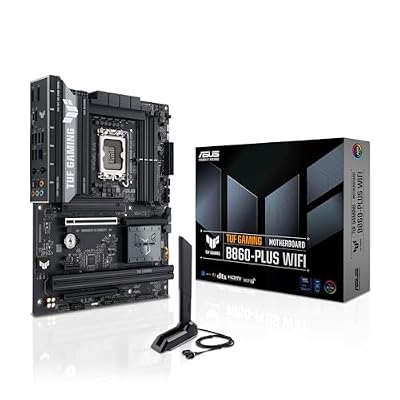
ASUS TUF Gaming B860-PLUS WiFi B860 LGA 1851 ATX Motherboard, Intel® Core™ Ultra Series 2 Ready, Advanced AI PC-Ready, 12+1+2+1 Stages, DDR5,PCIe 5.0, 3X M.2, Wi-Fi 7, 2.5Gb LAN, USB 20Gbps Type-C®
Included for 'Best Motherboard for Intel Ultra: 6 LGA1851 Picks for PCs' as a representative home product in this roundup; selection reflects the product set returned for this topic.
View on AmazonBest value: PCIe 5.0 graphics and Gen5 M.2 without Z890 pricing.
MSI MAG B860 Tomahawk WiFi

MSI MAG B860 Tomahawk WiFi Motherboard, ATX - Supports Intel Core Ultra Processors (Series 2), LGA 1851 - DDR5 Memory Boost 9200+ MT/s OC, 1 x PCIe 5.0 x16, 1 x M.2 Gen5, 5G LAN, Wi-Fi 7
Included for 'Best Motherboard for Intel Ultra: 6 LGA1851 Picks for PCs' as a representative home product in this roundup; selection reflects the product set returned for this topic.
View on AmazonAlternative: a feature-rich B860 board with 5Gb Ethernet.
Z890 vs B860 for Intel Core Ultra
The biggest differences across these boards are not CPU compatibility, because all six support Intel Core Ultra Series 2 on LGA1851. The meaningful differences are M.2 count, Thunderbolt availability, Ethernet speed, rear USB density, and chipset expansion. Those features decide how comfortably each board fits your workflow after the build.
For a straightforward gaming PC, the B860 options already cover DDR5, PCIe 5.0 graphics, modern NVMe storage, and fast networking. Z890 becomes more valuable when the system must host more drives, faster external devices, extra PCIe hardware, or enthusiast controls. Paying more only makes sense when those additions solve a real need.
Z890 vs B860 vs H810: Chipset Tier Table
All three chipsets accept every Core Ultra Series 2 desktop chip, including the 200S Plus refresh, but they differ sharply in overclocking, lanes and storage. The table summarises Intel’s chipset specifications and the typical board features at each tier.
| Feature | Z890 | B860 | H810 |
|---|---|---|---|
| Tier | Mid-range to premium | Budget to mid-range | Budget |
| CPU overclocking | Yes | No | No |
| Memory overclocking (XMP) | Yes | Yes | No |
| DIMM slots | Up to 4 | Up to 4 | 2 (one per channel) |
| CPU-attached Gen5 M.2 | Yes, often several slots on premium boards | Yes, usually one slot | No (Gen4 x4 only) |
| Chipset uplink | 8 lanes | 4 lanes | 4 lanes |
| Thunderbolt 4 / USB4 | Common, often two ports on upper boards | On some boards | Rare |
| Typical VRM | 16 to 22+ phases, 80A to 110A stages | 10 to 14+ phases | 6 to 8 phases |
| Best CPU match | Core Ultra 9 285K, Core Ultra 7 270K Plus | Core Ultra 7 270K Plus at stock, Core Ultra 5 250K Plus | Locked Core Ultra 5 / 7 (non-K) |
BIOS Note for the Core Ultra 7 270K Plus and 250K Plus
Intel’s Core Ultra 200S Plus chips launched in March 2026 on the same LGA1851 socket. Every Z890, B860 and H810 board can run them, but boards built before early 2026 shipped with firmware that does not recognise the new CPUs. Before installing a 270K Plus or 250K Plus:
- Check the board’s CPU support list for the minimum BIOS version. ASRock, for example, listed versions such as 3.09 for the Z890 Taichi and 2.07 for the B860 Steel Legend WiFi; ASUS, GIGABYTE and MSI released equivalent updates across their 800-series lines.
- Use BIOS Flashback if available. Most boards here can update from a USB stick without a compatible CPU installed. Without Flashback, you need an older Core Ultra 200S chip to update first.
- Install Intel’s platform driver package. Some board makers bundle Intel’s performance package for the Plus chips, which enables tuning features after the BIOS update.
- Re-enable XMP after updating. A BIOS flash resets memory settings. The Plus chips officially support DDR5-7200, up from DDR5-6400 on the original Series 2 chips.
Buying Guide: How to Choose an Intel Ultra Motherboard
Check LGA1851 Compatibility First
Start with the processor and socket. Intel Core Ultra desktop processors in Series 2 require LGA1851, so a Z790, B760, or older LGA1700 motherboard will not work even if the board looks similar. Check the exact CPU support list for the model you plan to buy, especially if the motherboard may have shipped with an older BIOS.
Decide Between Z890 and B860
Choose Z890 for maximum platform flexibility and B860 when your build is simpler. Z890 boards in this roundup provide broader storage, USB, networking, and expansion options, while B860 boards can still handle high-end graphics cards and fast DDR5. The right chipset depends on connected devices and upgrade plans, not simply the CPU tier.
Count M.2 Slots and Check Lane Sharing
Count M.2 slots before focusing on headline SSD speeds. One Gen5 drive is enough for many users, while extra Gen4 sockets often matter more because they separate the operating system, game library, capture files, and project data. Also check lane-sharing notes, because filling one M.2 slot can change how another expansion slot operates.
Match Ethernet and Wi-Fi to Your Network
Networking should match the rest of your home or office hardware. A 5Gb Ethernet port offers little benefit if your router, switch, NAS, and cabling are limited to 1Gb, while 2.5Gb can already improve local transfers. Wi-Fi 7 is useful for a new wireless setup, but real speed still depends on the router and local conditions.
Count USB and Thunderbolt Devices
Rear USB and Thunderbolt matter more for creators than many gaming buyers realize. Audio interfaces, capture devices, external SSDs, docks, controllers, and VR hardware can quickly consume ports. Count the connectors you use today and leave room for growth. A board with the right native ports is often cleaner than adding hubs later.
Be Realistic About DDR5 Speeds
Do not buy a motherboard only because it advertises extreme DDR5 overclocking numbers. Achievable memory speed depends on the CPU memory controller, module type, capacity, DIMM count, and validated kits. For a stable gaming system, checking the vendor memory support list and using a sensible XMP setup matters more than chasing the maximum rating.
How We Compared
We did not bench-test these motherboards ourselves. The picks are based on manufacturer specifications and CPU support lists, Intel’s 800-series chipset documentation, independent motherboard and CPU reviews from outlets such as TechPowerUp, Tom’s Hardware and The FPS Review, and owner reports on BIOS stability, memory compatibility and build experience. We weighted M.2 layout and lane sharing, VRM quality for 250W Core Ultra chips, networking, USB and Thunderbolt connectivity, BIOS support for the 200S Plus refresh and price tier. Last reviewed October 2026.
FAQ
What motherboard is compatible with Intel Core Ultra desktop CPUs?
For Intel Core Ultra desktop processors in Series 2, look for an LGA1851 motherboard using an Intel 800-series chipset. Z890 and B860 are the most relevant options in this roundup. Older LGA1700 boards such as Z790 and B760 are not compatible, even though the physical socket dimensions may appear similar at a glance.
Do I need Z890 for an Intel Core Ultra gaming PC?
Z890 is not automatically necessary for an Intel Core Ultra gaming PC. B860 can support the same LGA1851 processor family while still offering PCIe 5.0 graphics, DDR5, fast M.2 storage, and modern networking. Z890 is worth considering when you need more expansion, more high-speed I/O, additional storage options, or enthusiast-oriented controls.
Does a more expensive motherboard increase gaming performance?
A motherboard does not usually create a large gaming-performance difference when the CPU, GPU, memory, and power settings are equivalent and the board can run them correctly. Its real impact is feature availability, expansion, connectivity, power delivery, cooling, and upgrade flexibility. Spend more when those capabilities matter to your system.
Is Wi-Fi 7 worth having on an Intel Ultra motherboard?
Wi-Fi 7 is useful if you own, or plan to buy, a compatible router and want high wireless throughput with current hardware. It is not mandatory for gaming, especially when Ethernet is available. Several boards here combine Wi-Fi 7 with 2.5Gb or 5Gb wired networking, giving you flexibility between low-latency wired use and wireless convenience.
Do I need a PCIe 5.0 SSD for an Intel Ultra gaming PC?
PCIe 5.0 M.2 support is valuable for users who move very large files or want the fastest current NVMe storage, but it is not essential for a responsive gaming PC. Gen4 SSDs remain practical for game libraries and everyday use. More important is having enough M.2 sockets, adequate heatsinks, and a lane layout that does not disrupt other devices.
Will the Core Ultra 7 270K Plus work in my existing Z890 or B860 board?
Yes, after a BIOS update. The 200S Plus chips use the same LGA1851 socket and work in all 800-series boards, but older firmware will not recognise them. Use BIOS Flashback or update with an older Series 2 CPU installed first.
Is an H810 motherboard good enough for a Core Ultra 7 270K Plus?
It will run, but it is a poor match. H810 has no memory overclocking, only two DIMM slots, no CPU-attached Gen5 M.2 and lighter VRMs. For a 250W unlocked chip, a B860 board at minimum, or a mid-range Z890 board, is the better choice.
Conclusion
The best motherboard for Intel Ultra depends on how much expansion your build actually needs. MSI’s Z890 Tomahawk is the strongest all-rounder, while B860 options suit simpler gaming rigs and premium Z890 boards serve storage-heavy creator systems. Match the socket, M.2 layout, networking, and I/O to your hardware before paying for extras.