🛒 Best Price Today on Amazon
Prime members get fast, free shipping on everything above, plus member-only deals. New members get a 30-day free trial — cancel anytime.
- Which Socket Does Your Intel CPU Use?
- Best Motherboards for i7 and i9 on LGA 1700 (Z790)
- Best Motherboards for i5 on LGA 1700 (B760)
- Best Motherboards for Core Ultra 200S on LGA 1851 (Z890 and B860)
- K vs Non-K: What It Means for Your Board
- VRM: How Much Do You Need?
- DDR4 vs DDR5 Boards on LGA 1700
- Pick X If… Decision Table
- Older Intel i5 and i7 Searches
- Compatibility and Fit Notes
- Alternatives
- Frequently Asked Questions
Updated November 2026 – The best motherboards for Intel Core i7, i5 and i9 CPUs depend on the socket: for 12th to 14th gen chips pick an LGA 1700 board such as the ASUS TUF Gaming Z790-Plus WiFi, MSI MPG Z790 Carbon WiFi II or MSI PRO B760-P WiFi DDR4, and for Core Ultra 200S chips pick an LGA 1851 board such as the MSI MAG Z890 Tomahawk WiFi, ASUS ROG Strix Z890-E Gaming WiFi or MSI MAG B860 Tomahawk WiFi.
Searching for the best motherboards for i7 CPUs is confusing because Intel’s “i7” name has covered more than a dozen sockets. A Core i7-14700K and a Core i7-7700K share a name but not a motherboard, so the first step is always to match the socket. This guide covers the two sockets that matter for new builds: LGA 1700 (12th, 13th and 14th gen Core) and LGA 1851 (Core Ultra 200S). Older i5 and i7 chips from the 2500K, 6600K, 7600K era sit on previous-generation sockets, which are covered briefly near the end.
Which Socket Does Your Intel CPU Use?
| CPU family | Socket | Common chipsets | Memory | Notes |
|---|---|---|---|---|
| Core Ultra 5, 7, 9 200S | LGA 1851 | Z890, B860, H810 | DDR5 only | Current Intel desktop platform |
| 12th to 14th gen Core i5, i7, i9 | LGA 1700 | Z790, Z690, B760, B660, H770 | DDR5 or DDR4 depending on board | Mature platform with many boards |
| 10th and 11th gen | LGA 1200 | Z490, Z590, B460, B560 | DDR4 | Previous generation |
| 6th and 7th gen (i5-6600K, i5-7600K) | LGA 1151 v1 | Z170, Z270 | DDR4 | Previous generation |
| 2nd gen (i5-2500K) | LGA 1155 | Z68, Z77 | DDR3 | Very old; used builds only |
Core Ultra 200S chips will not fit LGA 1700 boards, and 12th to 14th gen chips will not fit LGA 1851 boards, despite the similar appearance of the sockets. A cooler that fits one may also need a different bracket for the other, so read the cooler maker’s compatibility list.
Best Motherboards for i7 and i9 on LGA 1700 (Z790)
For the best i9 motherboards on LGA 1700, Z790 is the chipset to look at, because it allows overclocking of K chips and offers the most PCIe lanes. Roundups also suggest Z790 for i7-14700K builds that need to hold boost clocks. LGA 1700 has been in the market since 2021, so availability varies, though plenty of new and used boards remain.
ASUS TUF Gaming Z790-Plus WiFi – Best for most Core i7 builds
Z790 · ATX · DDR5 · LGA 1700 · WiFi 6 · PCIe 5.0 graphics slot as listed by the maker
Review Consensus names this board its best overall Z790 pick, and another roundup calls it the best choice for most modern i7 builds. It balances VRM cooling, M.2 slots and a sensible feature set without the premium of the ROG range. A DDR4 version of the board exists in the TUF line, so check the memory type in the product name.
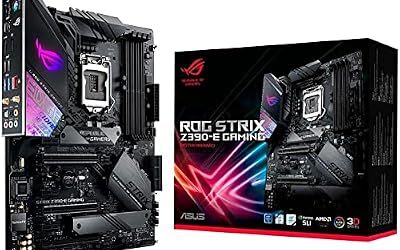
ASUS ROG Strix Z790-E Gaming WiFi II – Best for premium i9 overclocking
Z790 · ATX · DDR5 · LGA 1700 · WiFi 6E or newer · strong VRM as listed by the maker
Gaming PC Guru names this the best premium Z790 for i9 and i7 overclocking, noting a 20+1 phase VRM with 90A power stages. It suits a Core i9-14900K or i9-13900K, though those chips draw a lot of power and any overclock is at your own risk and can void warranties.

ASUS ROG Strix Z790-E Gaming WiFi II LGA 1700(Intel 14th & 13th & 12th Gen)ATX gaming motherboard(DDR5,PCIe 5.0,2.5 Gb LAN,5XM.2 slots,PCIe 5.0 x16,WiFi 7 front-panel connector with PD 3.0 up to 30W.
Included for 'Best Motherboards for Intel Core i7, i5 and i9 CPUs (LGA 1700 and LGA 1851)' as a representative home product in this roundup; selection reflects the product set returned for this topic.
View on AmazonMSI MPG Z790 Carbon WiFi II – Best for aggressive power limits
Z790 · ATX · DDR5 · LGA 1700 · 19+1+1 phase power as reported by reviewers
Reviewers describe this as a performance-focused pick for K-series chips run with raised power limits. It carries strong heatsinks and an updated feature set, and suits someone building around an i7-14700K or i9-14900K.

MSI MPG Z790 Carbon WiFi II Gaming Motherboard (Supports 12th/13th/14th Gen Intel Processors, LGA 1700, DDR5, PCIe 5.0, M.2, 2.5Gbps LAN, USB 3.2 Gen2, Wi-Fi 7, Bluetooth 5.4, ATX)
Included for 'Best Motherboards for Intel Core i7, i5 and i9 CPUs (LGA 1700 and LGA 1851)' as a representative home product in this roundup; selection reflects the product set returned for this topic.
View on AmazonGigabyte Z790 Aorus Elite AX – Best for value with solid features
Z790 · ATX · DDR5 · LGA 1700 · WiFi 6E as listed by the maker
The Aorus Elite AX is a mainstream Z790 board that reviewers call a value pick. It has enough VRM for an i7 at stock or mild overclocks. Gigabyte also sold a Z790 Eagle AX in a lower tier with similar features.
MSI PRO Z790-A MAX WiFi – Best for a plain, dependable Z790 build
Z790 · ATX · DDR5 · LGA 1700 · WiFi as listed by the maker
A roundup suggests this model along with the Gigabyte Z790 Eagle AX for people who want to stay on LGA 1700 without chasing a flagship. It is a no-frills pick for a Core i7 gaming PC.

MSI PRO Z790-A MAX WiFi ProSeries Motherboard (Supports 12th/13th/14th Gen Intel Processors, LGA 1700, DDR5, PCIe 5.0, M.2, SATA 6G, 2.5Gbps LAN, USB 3.2 Gen2, Wi-Fi 7, Bluetooth 5.4, ATX)
Included for 'Best Motherboards for Intel Core i7, i5 and i9 CPUs (LGA 1700 and LGA 1851)' as a representative home product in this roundup; selection reflects the product set returned for this topic.
View on AmazonBest Motherboards for i5 on LGA 1700 (B760)
For “best motherboards for i5” searches on the current LGA 1700 platform, B760 is the answer. B760 boards do not support CPU overclocking, which is fine for non-K chips such as the Core i5-14400F or i5-13400F, and you can still run memory at its rated speed. One guide notes B760 boards can run an i7-14700K, but often limit how long the CPU holds its top turbo speeds, so Z790 is the safer match for that chip.
MSI PRO B760-P WiFi DDR4 – Best for a budget i5 or i7 on DDR4
B760 · ATX · DDR4 · LGA 1700 · WiFi as listed by the maker
A value pick for 12th to 14th gen builds where you want to reuse DDR4 memory. DDR4 and DDR5 are not interchangeable, so you must match the board variant to your memory.

MSI PRO B760-P WiFi DDR4 ProSeries Motherboard - Supports 12th/13th/14th Gen Intel Processors, LGA 1700, DDR4, PCIe 4.0, M.2, 2.5Gbps LAN, USB 3.2 Gen2, HDMI/DP, Wi-Fi 6E, Bluetooth 5.3, ATX
Included for 'Best Motherboards for Intel Core i7, i5 and i9 CPUs (LGA 1700 and LGA 1851)' as a representative home product in this roundup; selection reflects the product set returned for this topic.
View on AmazonASUS TUF Gaming B760-Plus WiFi – Best for a reliable mid-range B760 build
B760 · ATX · DDR5 · LGA 1700 · WiFi as listed by the maker
A well-regarded mid-range B760 board that offers more robust VRM cooling than entry boards. It is a sensible pairing with a Core i5-14600K at stock settings or an i7 non-K chip.

ASUS TUF Gaming B760-PLUS WiFi Intel B760 LGA1700 DDR5 7200 DP HDMI 3X M2 USB3.2 AX WiFi + BT 2.5Gbit LAN up to ATX 128GB ram Support, ASUS 5X TUF Motherboard Protection III
Included for 'Best Motherboards for Intel Core i7, i5 and i9 CPUs (LGA 1700 and LGA 1851)' as a representative home product in this roundup; selection reflects the product set returned for this topic.
View on AmazonBest Motherboards for Core Ultra 200S on LGA 1851 (Z890 and B860)
For the newest chips, LGA 1851 uses Z890, B860 and H810 chipsets with DDR5 memory only. Reviewers list Z890 boards from all the major makers, while coverage of B860 boards is thinner. Anyone searching for the best i9 motherboards in the Core Ultra 9 285K class should look at Z890.
MSI MAG Z890 Tomahawk WiFi – Best for a balanced Z890 build
Z890 · ATX · DDR5 · LGA 1851 · WiFi 7 as listed by the maker
The Tomahawk line carries the MAG badge, which sits in the upper-mid tier. Reviewers like the sturdy VRM and clean BIOS, and it is a sensible match for a Core Ultra 7 265K.

MSI MAG Z890 Tomahawk WiFi Gaming Motherboard (Supports Core Ultra Series 2 Intel Processors, LGA 1851, DDR5, PCIe 5.0, M.2, SATA, 5Gbps LAN, USB Type-C, Wi-Fi 7, Bluetooth 5.4, Thunderbolt 4, ATX)
Included for 'Best Motherboards for Intel Core i7, i5 and i9 CPUs (LGA 1700 and LGA 1851)' as a representative home product in this roundup; selection reflects the product set returned for this topic.
View on AmazonASUS ROG Strix Z890-E Gaming WiFi – Best for a premium Z890 build
Z890 · ATX · DDR5 · LGA 1851 · WiFi 7 · PCIe 5.0 as listed by the maker
Roundups name this the best premium Z890 pick. It suits a Core Ultra 9 285K with a high-end graphics card and heavy storage use.

ASUS ROG Strix Z890-E Gaming WiFi Intel® Z890 LGA 1851 ATX Motherboard, Advanced AI PC-Ready, 18+2+1+2 Stages, DDR5, WiFi 7, 7X M.2, Thunderbolt™ 4, USB Type-C®, AI Overclocking, Cooling & Networking
Included for 'Best Motherboards for Intel Core i7, i5 and i9 CPUs (LGA 1700 and LGA 1851)' because the listing adds cooling or gel-infused layers, which is the attribute this article compares.
View on AmazonASUS ROG Maximus Z890 Hero – Best for a flagship Core Ultra 9 build
Z890 · ATX · DDR5 · LGA 1851 · WiFi 7 · multiple PCIe 5.0 slots as listed by the maker
One roundup lists this as its top-tier pick, with 22+2+1+2 power stages and three PCIe 5.0 connections. It sits in the enthusiast price tier and is overkill for stock-speed builds.

ASUS ROG Maximus Z890 Hero Intel Z890 LGA1851 DDR5 9200 HDMI 2xUSB4 6X M2 USB3.2 WiFi 7 + BT Aura RGB 5Gbit + 2.5Gbit LAN ATX 22+1+2+2 Power Phases, Motherboard
Included for 'Best Motherboards for Intel Core i7, i5 and i9 CPUs (LGA 1700 and LGA 1851)' as a representative home product in this roundup; selection reflects the product set returned for this topic.
View on AmazonASUS Prime Z890-P WiFi – Best for a budget Z890 build
Z890 · ATX · DDR5 · LGA 1851 · WiFi as listed by the maker
Tom’s Hardware picks this as its budget Z890 board. It is a lean board that still has the chipset’s overclocking support and PCIe 5.0 graphics.
Gigabyte Z890 Aorus Elite WiFi7 – Best for mid-range value on LGA 1851
Z890 · ATX · DDR5 · LGA 1851 · WiFi 7 as listed by the maker
A mainstream Z890 option that reviewers mention with the TUF Z890-Plus WiFi. It makes sense for a Core Ultra 7 build with mild tuning.

GIGABYTE Z890 AORUS Elite WIFI7 Intel Core Ultra (Series 2) LGA 1851 Motherboard, ATX, DDR5, 4X M.2, PCIe 5.0, Thunderbolt 4, 2.5GbE LAN, EZ-Latch
Included for 'Best Motherboards for Intel Core i7, i5 and i9 CPUs (LGA 1700 and LGA 1851)' as a representative home product in this roundup; selection reflects the product set returned for this topic.
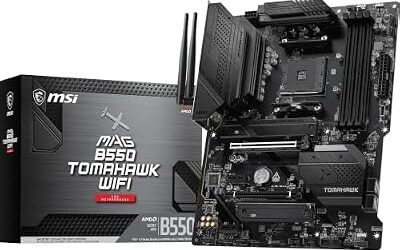
View on AmazonMSI MAG B860 Tomahawk WiFi – Best for a Core Ultra 5 or 7 without overclocking
B860 · ATX · DDR5 · LGA 1851 as listed by the maker
B860 boards are the budget route for Core Ultra 200S. They do not offer CPU overclocking in the way Z890 does, but they cover most needs for a gaming PC with a non-K chip. Search the maker’s page for the exact B860 model you plan to buy, since lineups differ between brands.

MSI MAG B860 Tomahawk WiFi Motherboard, ATX - Supports Intel Core Ultra Processors (Series 2), LGA 1851 - DDR5 Memory Boost 9200+ MT/s OC, 1 x PCIe 5.0 x16, 1 x M.2 Gen5, 5G LAN, Wi-Fi 7
Included for 'Best Motherboards for Intel Core i7, i5 and i9 CPUs (LGA 1700 and LGA 1851)' as a representative home product in this roundup; selection reflects the product set returned for this topic.
View on AmazonK vs Non-K: What It Means for Your Board
K and KF chips such as the Core i7-14700K have unlocked multipliers. Non-K chips such as the Core i7-14700 or i5-14400F are locked. Only Z-series chipsets (Z690, Z790, Z890) allow CPU core overclocking, while B-series chipsets support memory tuning in most cases. If you do not plan to overclock, a K chip on a B760 board still runs, but the maker’s guidance on power limits applies. Reviewers also note that K chips at default settings can draw high power, so a board with a solid VRM and good cooling is worth the extra cost.
VRM: How Much Do You Need?
VRM means voltage regulator module, the set of components that feeds clean power to the CPU. A Core i9 or i7 K chip draws more power than a Core i5, and cheaper boards with small heatsinks can throttle under long loads. Look at the number of power stages as listed by the maker, the size of the heatsinks and whether reviewers report throttling. Power-stage counts are a marketing number and do not tell the whole story, so reviews that measure temperatures are more useful than the spec sheet.
DDR4 vs DDR5 Boards on LGA 1700
LGA 1700 is unusual because both memory types exist on the platform, but each board supports only one. Z790 boards are mostly DDR5, and B760 boards come in both DDR4 and DDR5 versions. DDR4 boards cost less if you already own memory. DDR5 boards have the higher ceiling for memory speed and are the sensible choice for a new build. LGA 1851 supports DDR5 only.
Pick X If… Decision Table
| Pick this | If you… | Skip it if… |
|---|---|---|
| ASUS TUF Gaming Z790-Plus WiFi | have a Core i7-13700K or i7-14700K and want a balanced board | you want extreme overclocking features |
| ASUS ROG Strix Z790-E Gaming WiFi II | are tuning a Core i9-14900K | you are building on a budget |
| MSI MPG Z790 Carbon WiFi II | raise power limits on K chips | you prefer minimalist styling |
| MSI PRO B760-P WiFi DDR4 | have DDR4 memory and an i5 or locked i7 | you plan to overclock |
| MSI MAG Z890 Tomahawk WiFi | are buying a Core Ultra 7 265K | you want a DDR4 board |
| ASUS ROG Maximus Z890 Hero | are building a flagship Core Ultra 9 PC | you run at stock settings |
| MSI MAG B860 Tomahawk WiFi | want a lower-cost Core Ultra board | you need CPU overclocking |
Older Intel i5 and i7 Searches
Some searches, such as “best i5 6600k motherboards”, “best i7600k motherboards”, “best i5 7600 motherboards” and “best i5 2500k motherboards”, point to chips that are many generations old. The i5-6600K and i5-7600K use LGA 1151 revision 1, so they need Z170 or Z270 boards, for example the ASUS ROG Strix Z270E Gaming. The i5-2500K uses LGA 1155 with DDR3, and boards are only available used. These are previous-generation platforms: they can suit a repair or retro build, but they are not on Microsoft’s Windows 11 supported processor list, and finding modern BIOS support or warranties is unlikely. If you are building new, the LGA 1700 or LGA 1851 boards above are the practical choice.
Compatibility and Fit Notes
- BIOS version: Some LGA 1700 boards need a BIOS update before they recognise 13th or 14th gen chips. Look for a BIOS Flashback button, and consult the maker’s CPU support list.
- Intel microcode updates: Intel released microcode updates to address instability on some 13th and 14th gen K chips. Install the latest BIOS the board maker lists and follow Intel’s guidance.
- Cooler mounting: LGA 1700 and LGA 1851 have different cooler hole patterns in some cases, so confirm with the cooler maker before reusing a cooler.
- Form factor: ATX, micro-ATX and mini-ITX boards exist on both sockets. Match the form factor to the case.
- PCIe 5.0: Z790 and Z890 boards often have a PCIe 5.0 x16 slot and an M.2 slot. Whether you can use it depends on the board’s lane sharing, per the manual.
Alternatives
AMD AM5 for a new build
If you are not tied to Intel, AM5 boards with Ryzen 7000 or 9000 chips offer a long upgrade path and DDR5 memory.
Used LGA 1700 hardware
LGA 1700 boards and 12th gen chips are widely available used, which can lower build cost. Use a seller with a return policy and check the socket pins.
Prebuilt systems
If you want a Core i7 without choosing a board, a prebuilt with a clear warranty simplifies compatibility, though you give up part selection.
Frequently Asked Questions
What is the best motherboard for an i7-14700K?
A Z790 board such as the ASUS TUF Gaming Z790-Plus WiFi or MSI MPG Z790 Carbon WiFi II is the usual pick. Z790 offers overclocking support and stronger power delivery than B760. Some B760 boards can run the chip but may limit sustained boost.
Will a Core i9 work on any motherboard?
No. A Core i9-14900K needs an LGA 1700 board, while a Core Ultra 9 285K needs an LGA 1851 board. Within the socket, you also need a board with enough VRM capacity and an up-to-date BIOS.
Do I need a Z790 or Z890 board for an i5?
Not usually. A B760 or B860 board suits non-K Core i5 chips well. Choose Z790 or Z890 only if you have a K chip and plan to overclock, or want extra PCIe lanes.
Can I use DDR4 memory with a Core i7 on LGA 1700?
Yes, but only on boards built for DDR4, such as the MSI PRO B760-P WiFi DDR4. DDR4 and DDR5 slots are different, and you cannot mix them. LGA 1851 boards support DDR5 only.
What is the difference between K and non-K Intel chips for motherboard choice?
K chips have unlocked multipliers and need a Z-series board to overclock the cores. Non-K chips are locked and run fine on B-series boards. K chips also tend to draw more power, so a better VRM is useful.
Is it worth buying an LGA 1700 board now that LGA 1851 exists?
For many buyers, yes. LGA 1700 boards are mature, widely available and often cheaper, and they support strong 12th to 14th gen chips. LGA 1851 is the current platform for Core Ultra 200S, so choose it if you want the newest CPUs and DDR5 only.