🛒 Best Price Today on Amazon
Prime members get fast, free shipping on everything above, plus member-only deals. New members get a 30-day free trial — cancel anytime.

ASUS ROG Strix X870-A Gaming WiFi AMD AM5 X870 ATX Motherboard 16+2+2 Power Stages, Dynamic OC Switcher, Core Flex, DDR5 AEMP, WiFi 7, 4X M.2, PCIe® 5.0, Q-Release Slim, USB4®, AI OCing & Networking
Included for 'Best White Gaming Motherboard Picks for Clean PC Builds' because the listing specifies Dynamic OC Switcher and Core Flex, details this guide uses to compare options.
View on Amazon
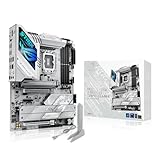
ASUS B650E MAX Gaming WiFi W – AMD B650 AM5 ATX Motherboard, White PCB, DDR5, PCIe 5.0, 3X M.2, Wi-Fi 6E, 2.5Gb LAN, USB 10Gbps Type-C, DisplayPort, HDMI™, BIOS Flashback™, Aura Sync, Advanced AI PC
Included for 'Best White Gaming Motherboard Picks for Clean PC Builds' because the listing specifies AMD B650 AM5 ATX Motherboard and White PCB, details this guide uses to compare options.
View on Amazon
GIGABYTE B850M AORUS Elite WIFI6E ICE AMD AM5 mATX Motherboard, Support AMD Ryzen 9000/8000/7000 Series, DDR5, 12+2+2 Power Phase, 2X M.2, PCIe 5.0, USB-C, WIFI6E, 2.5GbE, EZ-Latch, 5-Year Warranty
Included for 'Best White Gaming Motherboard Picks for Clean PC Builds' because the listing specifies Support AMD Ryzen 9000/8000/7000 Series and DDR5, details this guide uses to compare options.
View on AmazonThe best white gaming motherboard should do more than match a white case. It must support the right CPU, deliver stable power, offer fast storage and networking, and keep expansion practical. This roundup compares current white and silver gaming boards for AMD AM5 and Intel LGA1851 builds. That keeps aesthetics secondary to real gaming value.
Best White Gaming Motherboards Compared
| Motherboard | Platform | Best For | M.2 Storage | Networking | High-Speed USB |
|---|---|---|---|---|---|
| GIGABYTE X870E AORUS PRO ICE | AMD AM5 | Premium white Ryzen build | 4 slots, 3 PCIe 5.0 | 2.5GbE, Wi-Fi 7 | Dual USB4 |
| MSI MPG X870E EDGE TI WIFI | AMD AM5 | Connectivity-heavy build | 4 slots, 2 PCIe 5.0 | 5GbE, Wi-Fi 7 | USB4 |
| ASUS ROG Strix X870-A Gaming WiFi | AMD AM5 | Easy premium assembly | Multiple M.2 slots | 2.5GbE, Wi-Fi 7 | USB4 |
| ASRock X870 Steel Legend WiFi | AMD AM5 | Balanced white Ryzen build | 3 slots, 1 PCIe 5.0 | 2.5GbE, Wi-Fi 7 | Dual USB4 |
| GIGABYTE Z890 AORUS PRO ICE | Intel LGA1851 | Premium white Intel build | 5 M.2 slots | 5GbE, Wi-Fi 7 | Dual Thunderbolt 4 |
| ASUS ROG Strix Z890-A Gaming WiFi | Intel LGA1851 | DIY-friendly Intel build | 5 M.2 slots | 2.5GbE, Wi-Fi 7 | Dual Thunderbolt 4 |
White gaming motherboards now span both AMD X870/X870E and Intel Z890 platforms, so socket choice comes first. AM5 boards suit Ryzen 7000, 8000, and 9000 families, while Z890 boards target Intel Core Ultra Series 2. A beautiful board is useless if it does not match your processor. This is the first compatibility check to make.
The strongest choices also differ in storage, USB4 or Thunderbolt support, networking, and lane sharing. Some boards prioritize several Gen5 M.2 slots, while others emphasize easier installation or more rear I/O. Those differences matter more in daily use than cosmetic accents once the system is assembled.
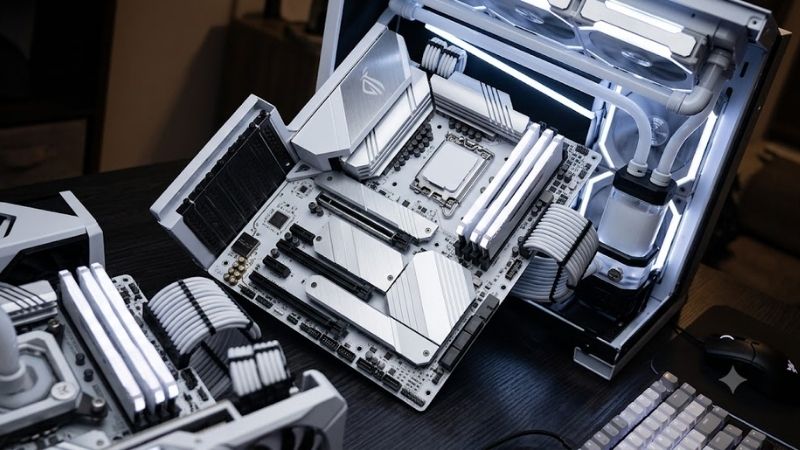
GIGABYTE X870E AORUS PRO ICE
Best For: Premium white AMD gaming builds
Key Features:
- AMD X870E chipset
- AM5 support for Ryzen 7000, 8000, and 9000 series
- Four M.2 slots, including three PCIe 5.0 x4
- PCIe 5.0 x16 graphics slot
- 2.5GbE LAN
- Wi-Fi 7
- Dual USB4 Type-C
- Realtek ALC1220 audio
- Screwless M.2 and PCIe release features GIGABYTE
The X870E AORUS PRO ICE is the most complete white AM5 option here for builders who want a bright PCB theme without giving up high-end expansion. Its X870E platform, reinforced graphics slot, extensive heatsinking, and four M.2 sockets make it a strong fit for premium Ryzen gaming systems with a coherent white aesthetic.
Its biggest advantage is storage bandwidth. Three of the four M.2 slots support PCIe 5.0 x4, giving enthusiasts room for multiple next-generation drives without immediately dropping to older standards. Wi-Fi 7, 2.5GbE, dual USB4 Type-C, and ALC1220 audio round out a broad feature set. That combination suits fast internal and external storage.
What Makes It Different: Three Gen5 M.2 slots combine with a strong white ICE design.
Pros:
- Extensive PCIe 5.0 storage support
- Strong white visual theme
- USB4 and Wi-Fi 7
- Tool-free installation features
- Reinforced primary GPU slot
Cons:
- More expansion capability than basic gaming builds need
- Slot planning remains important in storage-heavy configurations
Use Case: Flagship Ryzen gaming PC with several high-speed NVMe drives.
Who It’s For: Enthusiasts building a premium white AM5 system.
This board makes the most sense for a high-end Ryzen 9000 or 7000 gaming PC with several NVMe drives, a large graphics card, and a white showcase case. The trade-off is complexity: buyers should check lane-sharing notes and revision-specific support details before filling every slot in the system. Careful planning matters here.
MSI MPG X870E EDGE TI WIFI
Best For: White AM5 builds needing 5GbE networking
Key Features:
- AMD X870E chipset
- Ryzen 7000, 8000, and 9000 support
- 14+2+1 power design
- Four M.2 slots
- Two CPU-connected PCIe 5.0 x4 M.2 slots with supported CPUs
- PCIe 5.0 x16
- Wi-Fi 7
- 5GbE LAN
- USB4
- Realtek ALC4080 audio MSI Việt Nam
MSI’s MPG X870E EDGE TI WIFI targets builders who want an unmistakably light-colored AM5 board with strong connectivity and easy assembly features. Its X870E chipset, 14+2+1 power design, 8-layer PCB, large heatsinks, and tool-friendly M.2 hardware suit performance-focused gaming rigs. The design is clearly aimed at premium white showcase systems.
Four M.2 slots provide a useful balance of speed and capacity, including two CPU-connected PCIe 5.0 x4 positions with compatible Ryzen processors. The board also combines USB4, Wi-Fi 7, 5GbE LAN, and Realtek ALC4080 audio, which is appealing for gamers with fast local storage or network gear. It also reduces the need for add-in networking cards.
What Makes It Different: 5GbE networking and strong tool-free installation features.
Pros:
- 5GbE LAN
- Wi-Fi 7
- Two Gen5 M.2 positions with supported CPUs
- USB4 connectivity
- Easy-release PCIe and M.2 hardware
Cons:
- M2_2 shares bandwidth with USB4
- Maximum connectivity requires careful BIOS and slot configuration
Use Case: High-end Ryzen gaming, streaming, and fast NAS workflows.
Who It’s For: Gamers using high-speed wired networking and several NVMe devices.
The key limitation is lane sharing around the second Gen5 M.2 slot and USB4 controller. With a device installed in M2_2, both can operate with reduced bandwidth, while forcing M2_2 to full x4 can disable the 40Gbps USB Type-C ports. That trade-off matters for heavy storage and external-device users. MSI Việt Nam
ASUS ROG Strix X870-A Gaming WiFi
Best For: Easy-to-build premium white Ryzen PCs
Key Features:
- AMD X870 chipset
- Ryzen 7000, 8000, and 9000 support
- Four DDR5 DIMM slots
- PCIe 5.0 x16 with supported Ryzen CPUs
- Wi-Fi 7
- Intel 2.5Gb Ethernet
- Two USB4 ports
- BIOS FlashBack
- ASUS Q-Design installation features
The ROG Strix X870-A Gaming WiFi is a cleaner choice for builders who want premium AM5 features without stepping up to X870E. Its silver-white heatsinks work well in light builds, while the AM5 socket supports Ryzen 7000, 8000, and 9000 desktop processors and four DDR5 memory slots. The overall look is bright without becoming visually busy.
ASUS gives the board a PCIe 5.0 x16 graphics slot with Ryzen 9000 and 7000 CPUs, plus USB4, Wi-Fi 7, Intel 2.5Gb Ethernet, HDMI, DisplayPort, and practical Q-Design installation features. That mix favors gamers who value a polished build process and a strong rear-I/O selection. It balances modern connectivity with straightforward setup.
What Makes It Different: Strong DIY features without requiring an X870E chipset.
Pros:
- USB4
- Wi-Fi 7
- PCIe 5.0 graphics support with compatible CPUs
- Convenient ASUS installation features
- Balanced silver-white appearance
Cons:
- CPU choice affects PCIe behavior
- Some M.2 configurations affect secondary expansion
Use Case: Premium white Ryzen build with one powerful GPU and mainstream storage.
Who It’s For: Builders prioritizing easy assembly and clean aesthetics.
It is best for a white Ryzen gaming PC where ease of assembly matters as much as raw expansion. Buyers using Ryzen 8000 chips should read the slot notes carefully because PCIe behavior changes by CPU family, and certain M.2 configurations can disable the secondary PCIe slot. That makes manual checking important before final assembly.
ASRock X870 Steel Legend WiFi
Best For: Balanced white AM5 gaming builds
Key Features:
- AMD X870 chipset
- Ryzen 7000, 8000, and 9000 support
- 14+2+1 phase power design
- 80A Dr.MOS
- PCIe 5.0 x16
- One Gen5 and two Gen4 M.2 sockets
- 2.5GbE LAN
- Wi-Fi 7
- Dual USB4
- Realtek ALC4082 audio ASRock
The ASRock X870 Steel Legend WiFi is a strong white-themed AM5 option for builders who want modern connectivity without the extra complexity of X870E. Its 14+2+1 phase design, 80A Dr.MOS stages, eight-layer PCB, and enlarged heatsinks are designed for sustained Ryzen gaming workloads. The layout also keeps the visual design clean and restrained.
It includes one PCIe 5.0 x16 graphics slot, one Gen5 x4 M.2 socket, two Gen4 x4 M.2 sockets, four SATA ports, dual USB4 Type-C, 2.5GbE, Wi-Fi 7, and Realtek ALC4082 audio. That is a practical layout for a gaming PC using one flagship SSD plus additional mainstream NVMe storage. It covers the storage mix most gaming systems realistically need.
What Makes It Different: A simpler X870 storage layout paired with premium connectivity.
Pros:
- Clean Steel Legend styling
- Gen5 graphics and storage
- Dual USB4
- Wi-Fi 7 and 2.5GbE
- ALC4082 audio
Cons:
- Only one Gen5 M.2 slot
- Less high-end storage expansion than X870E alternatives
Use Case: White gaming PC with one Gen5 system drive and additional Gen4 storage.
Who It’s For: Ryzen gamers wanting modern features without excessive expansion.
The Steel Legend is especially attractive for builders who prefer a restrained white-and-silver design and do not need several Gen5 SSDs. Its main compromise is storage tiering: only one M.2 socket is Gen5, so users planning multiple cutting-edge drives may prefer an X870E alternative. That is the clearest trade-off against costlier X870E boards.
GIGABYTE Z890 AORUS PRO ICE
Best For: Premium white Intel Core Ultra gaming systems
Key Features:
- Intel Z890 chipset
- LGA1851 socket
- Core Ultra Series 2 support
- Five M.2 slots
- PCIe 5.0 x16 graphics slot
- 5GbE LAN
- Intel Wi-Fi 7
- Two Thunderbolt 4 Type-C ports
- Realtek ALC1220 audio GIGABYTE
For Intel builders, the Z890 AORUS PRO ICE stands out as a full white-platform board for Core Ultra Series 2 processors. It uses the LGA1851 socket and combines a white ICE aesthetic with an ATX layout, five M.2 sockets, PCIe 5.0 graphics support, and extensive high-speed connectivity for current Intel gaming systems.
Its networking package is stronger than many gaming boards, with 5GbE LAN and Intel Wi-Fi 7. Storage includes one CPU-connected Gen5 M.2 slot plus four additional M.2 positions, while two rear Thunderbolt 4 Type-C ports support high-speed peripherals and display output with compatible processors. It is built for demanding I/O use.
What Makes It Different: Full ICE styling combined with 5GbE and Thunderbolt 4.
Pros:
- Five M.2 sockets
- 5GbE wired networking
- Wi-Fi 7
- Dual Thunderbolt 4
- PCIe 5.0 GPU support
Cons:
- Requires an LGA1851 processor
- Cannot reuse older LGA1700 CPUs
Use Case: Intel gaming workstation with fast networking and external storage.
Who It’s For: Core Ultra builders wanting strong connectivity and white styling.
This board suits Intel gamers who move large files, use fast NAS hardware, or connect Thunderbolt docks and external storage. The biggest consideration is platform commitment: Z890 is for LGA1851 Core Ultra Series 2 CPUs, so it is not an upgrade path for older LGA1700 processors. That socket shift matters.
ASUS ROG Strix Z890-A Gaming WiFi
Best For: DIY-friendly white Intel gaming PCs
Key Features:
- Intel Z890 chipset
- LGA1851 socket
- Core Ultra Series 2 support
- Five M.2 slots
- One PCIe 5.0 x4 M.2 socket
- Four additional PCIe 4.0 M.2 positions
- Wi-Fi 7
- Intel 2.5Gb Ethernet
- Dual Thunderbolt 4
- BIOS FlashBack and Clear CMOS
The ROG Strix Z890-A Gaming WiFi gives Intel buyers a polished silver-white alternative centered on Core Ultra Series 2. Its styling is less uniformly white than some ICE boards, but the large silver heatsinks, integrated I/O cover, and RGB accents blend naturally into white or mixed-tone builds. The effect is premium rather than fully monochrome.
Five M.2 slots provide generous storage capacity, with one PCIe 5.0 x4 position and four additional slots using PCIe 4.0, while four SATA ports handle legacy drives. Dual Thunderbolt 4, Wi-Fi 7, Intel 2.5GbE, BIOS FlashBack, Clear CMOS, and tool-free M.2 features improve everyday usability. That feature set suits gaming and creator workloads.
What Makes It Different: ASUS DIY features and five M.2 slots on a silver-white Z890 platform.
Pros:
- Five M.2 sockets
- Dual Thunderbolt 4
- Wi-Fi 7
- Useful BIOS controls
- Strong tool-free installation design
Cons:
- 2.5GbE rather than 5GbE
- Silver-white rather than a fully white PCB aesthetic
Use Case: Core Ultra gaming and streaming PC with several SSDs.
Who It’s For: Intel builders who value assembly convenience and storage capacity.
Choose this board if you want Intel Z890 features, a mature DIY-friendly layout, and plenty of storage without needing 5GbE. Its 2.5Gb Ethernet is slower on paper than the Gigabyte Z890 AORUS PRO ICE, but many gaming networks and home routers cannot exceed 2.5Gbps anyway. In that common scenario, the practical difference may be negligible.
How to Choose the Best White Gaming Motherboard
Check CPU Socket Compatibility First
Start with the CPU socket, not the color. AMD AM5 boards in this list support Ryzen 7000, 8000, and 9000 families, while Intel Z890 models use LGA1851 for Core Ultra Series 2. A motherboard cannot bridge those platforms, so processor choice immediately removes half the shortlist. Confirm the exact CPU model before comparing any secondary features.
Decide Whether You Need X870E
Chipset level matters when expansion is a priority. X870E boards generally expose more high-end connectivity and PCIe resources than simpler X870 designs, but that does not automatically improve frame rates. Pay for the extra chipset capability only if you will use the additional storage, I/O, or lanes.
Count M.2 Slots Carefully
Count M.2 slots and note which generation each one supports. A single Gen5 socket is enough for most gaming PCs because game loading rarely requires several flagship SSDs. Multiple Gen5 slots are more useful for creators, large project libraries, or buyers who keep fast local scratch storage. Capacity matters too.
Match Networking to Your Setup
Networking should match your home infrastructure. Wi-Fi 7 is useful when paired with a compatible router and operating system, while 5GbE matters only if your switch, NAS, or internet connection can exploit it. For ordinary online gaming, stable latency and driver quality matter more than headline bandwidth.
Watch for PCIe Lane Sharing
USB4 and Thunderbolt 4 are valuable for fast external SSDs, docks, displays, and capture workflows, but they can affect internal lane allocation on some boards. Check the manual before assuming every M.2 slot and high-speed USB port can run at maximum bandwidth at the same time. Storage-heavy builders should verify this before buying.
Consider the Entire White PC Build
Finally, judge the white finish as part of the entire build. A white PCB creates a more uniform look, while silver heatsinks on a darker PCB can still disappear beneath a large GPU and cooler. Match the board with your case, memory, graphics card, cables, and lighting rather than choosing by photos alone.
FAQ
What Is the Best White Gaming Motherboard for AMD Ryzen?
For an AM5 gaming build, the X870E AORUS PRO ICE offers the broadest mix of white styling, multiple Gen5 M.2 slots, USB4, Wi-Fi 7, and 2.5GbE. The MSI MPG X870E EDGE TI WIFI is a strong alternative if 5GbE and MSI’s tool-free installation features better match your setup. Both are designed for current Ryzen platforms rather than legacy AM4 chips.
Are White Motherboards as Good as Black Motherboards?
Yes. White motherboards can use the same chipsets, power stages, PCIe standards, memory support, and network controllers as darker models. Color does not reduce gaming performance. The real differences come from board design, chipset, BIOS, cooling, connectivity, and expansion layout. White styling is simply an aesthetic choice.
Is X870E Worth It for Gaming?
X870E is worth considering when you need more high-speed expansion, several fast M.2 devices, or a richer I/O layout. If your gaming PC uses one GPU, one or two SSDs, and standard peripherals, an X870 board such as the Steel Legend or Strix X870-A can cover the important needs. Choose by actual expansion needs, not the chipset badge.
Does Z890 Support Older Intel CPUs?
No. Z890 uses Intel’s LGA1851 socket for Core Ultra Series 2 processors, while older 12th, 13th, and 14th Gen desktop Core CPUs use LGA1700. If you already own an LGA1700 processor, you need a compatible 600- or 700-series motherboard rather than a Z890 model. Socket compatibility is physical, so a BIOS update cannot change that.
Do You Need PCIe 5.0 SSDs for Gaming?
Not necessarily. A Gen5 SSD can deliver higher sequential throughput, but most games do not need several Gen5 drives to feel responsive. A practical gaming build can use one Gen5 drive for premium storage and add larger Gen4 drives for the game library, recordings, and general files. This often gives a better mix of speed and capacity.
Conclusion
The best white gaming motherboard depends first on your CPU platform and then on the expansion you will actually use. X870E AORUS PRO ICE leads for feature-rich AM5 builds, while Z890 AORUS PRO ICE suits current Intel systems. ASUS, MSI, and ASRock offer different balances of storage, I/O, and design.