🛒 Best Price Today on Amazon
Prime members get fast, free shipping on everything above, plus member-only deals. New members get a 30-day free trial — cancel anytime.
- Best Internal Sound Cards at a Glance
- Internal Sound Cards: Who Needs One?
- Best PCIe Sound Cards: Reviews
- Best PCIe x16 and Low Profile Sound Cards: Slot and Fit Notes
- Best Sound Cards with Optical Output
- Best Audiophile Sound Cards for PC
- Drivers, ASIO and Operating Systems
- How to Match a Sound Card to Your Headphones
- Common Mistakes When Buying a Sound Card
- Troubleshooting a New Sound Card
- Pick X If… Decision Table
- Installation Steps for an Internal Card
- Onboard Audio vs a Dedicated Card
- What Happened to Older Cards?
- Alternatives
- Frequently Asked Questions
Updated November 2026 – The best internal sound cards for desktop PCs in 2026 are the Creative Sound Blaster AE-7 for most buyers, the Sound Blaster AE-9 for a flagship build, the Sound Blaster AE-5 Plus for value, and the ASUS Xonar SE for a budget step up from onboard audio.
The best internal sound cards are PCIe add-in cards that give a desktop cleaner analog output, stronger headphone amplification and extra jacks such as optical and multichannel outputs. This guide covers the best PCIe sound cards still sold or reviewed in 2026, how to fit them, what slot and power they need, and what the makers state. Roundups are often affiliate-style, so treat their rankings as pointers and read the maker pages for exact specifications.
Best Internal Sound Cards at a Glance
| Model | Best for | Key stated specs | Slot and power |
|---|---|---|---|
| Sound Blaster AE-9 | Flagship, audiophile and creators | 129 dB DNR, ESS SABRE-class 9038, 16-600 ohm, RCA and optical | PCIe, 6-pin power |
| Sound Blaster AE-7 | Most buyers | 127 dB DNR reported, up to 600 ohm | PCIe |
| Sound Blaster AE-5 Plus | Value gaming with RGB | 122 dB DNR, Dolby Digital Live, DTS Connect | PCIe |
| Sound Blaster AE-X | Newer 2026 card | 130 dB DNR reported | PCIe |
| ASUS Xonar SE | Budget upgrade | Stereo and 5.1 class | PCIe |
| Sound BlasterX G6 (external) | No free slot | 130 dB DNR, 16-600 ohm | USB |
| FiiO K11 (external) | Audiophile outboard | 1400 mW balanced reported | USB, wall power |
Internal Sound Cards: Who Needs One?
A PCIe card is worth considering if your motherboard audio is noisy, you own headphones that need more power, you want optical output to a receiver, or you run a 5.1 or 7.1 speaker set. It is less useful if you only use a USB headset, since that has its own DAC. Reviewers also note that onboard audio on modern boards is good enough for casual use, so the gain depends on your gear.
Best PCIe Sound Cards: Reviews
Creative Sound Blaster AE-9 – Best for a flagship internal card
The maker lists 129 dB dynamic range, an ESS SABRE-class 9038 DAC with PCM up to 32-bit/384 kHz and DSD64, 1 ohm output impedance and support for 16 to 600 ohm headphones. Outputs include stereo RCA, rear 3.5 mm, center/sub 3.5 mm, TOSLINK optical, and 3.5 mm and 6.35 mm headphone jacks on the external Audio Control Module. The card requires a PCIe slot and a 6-pin power connector. Windows 8, 8.1, 10 and 11 are listed, and ASIO is supported; some users report driver recognition issues in certain recording software, so read the maker’s driver notes.
Specs: 129 dB DNR · ESS SABRE-class 9038 · 16-600 ohm · RCA + optical · PCIe with 6-pin
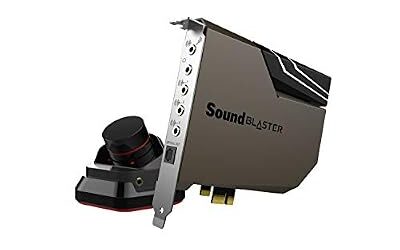
Creative Sound Blaster AE-7 – Best for most internal buyers
PropelRC credits the AE-7 with a 127 dB dynamic range, quad-core processing and a headphone amplifier that drives high-impedance headphones. Technize and others call it the best overall internal card for 2026. It sits below the AE-9 in outputs, but keeps most of the audio hardware at a lower tier.
Specs: 127 dB DNR reported · up to 600 ohm · quad-core processing · PCIe

Creative Sound Blaster AE-7 Hi-Res PCIe Gaming Sound Card and ACM | Hi-res, PCIe DAC, Headphone Amp, Xamp, Audio Control Module, Hi-Res Audio, Sound Card
Included for 'Best Internal PCIe Sound Cards for Desktop PCs' as a representative home product in this roundup; selection reflects the product set returned for this topic.
View on AmazonCreative Sound Blaster AE-5 Plus – Best for value and RGB
Reviewers list 122 dB dynamic range, a Xamp amplifier rated up to 600 ohms, Dolby Digital Live and DTS Connect encoding and RGB lighting. SoundMavericks notes there is no desktop volume module, and Ofzen and Computing calls it the best balance of performance, features and value.
Specs: 122 dB DNR · up to 600 ohm · DDL + DTS Connect · RGB · PCIe

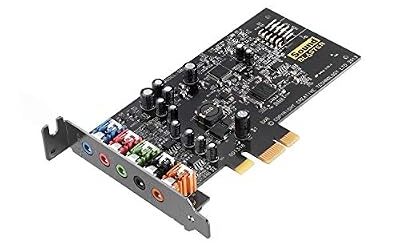
Creative Sound BlasterX AE-5 Plus SABRE32-class Hi-res 32-bit/384 kHz PCIe Gaming Sound Card and DAC with Dolby Digital and DTS, Xamp Discrete Headphone Bi-amp, Up to 122dB SNR, RGB Lighting System
Included for 'Best Internal PCIe Sound Cards for Desktop PCs' as a representative home product in this roundup; selection reflects the product set returned for this topic.
View on AmazonCreative Sound Blaster AE-X – Best for the newest card
Technize and SoundMavericks list the AE-X as new in 2026, with Technize reporting 130 dB dynamic range. Documentation in roundups is thin, so rely on the maker’s page for outputs, size and power needs.
Specs: 130 dB DNR reported · PCIe · new model

Creative Sound Blaster AE-X Hi-Res PCIe Sound Card for PC | Hi-Res, PCIe Sound Card, 32-bit/384kHz, Hi-Res Audio, PC Audio, Desktop App Support
Included for 'Best Internal PCIe Sound Cards for Desktop PCs' as a representative home product in this roundup; selection reflects the product set returned for this topic.
View on AmazonASUS Xonar SE – Best for a budget internal upgrade
Roundups mention the Xonar SE as a budget internal card. It suits those who want cleaner stereo output than onboard audio and basic surround. Expect fewer outputs and less headphone power than the Sound Blaster AE series; check ASUS’s page for its headphone impedance range.
Specs: budget PCIe · stereo and 5.1 class · fewer outputs
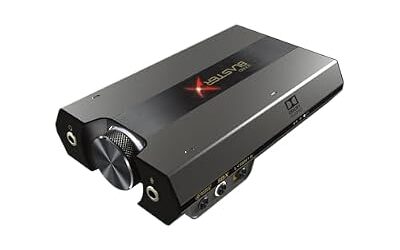
Creative Sound BlasterX G6 – Best for a desktop with no free slot
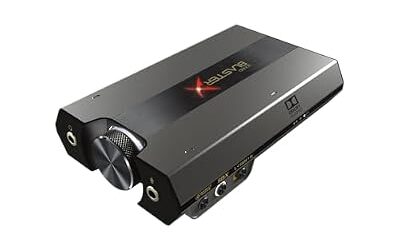
If your graphics card blocks the slots, the G6 is the external alternative reviewers name most often. It lists 130 dB dynamic range, 32-bit/384 kHz playback and a Xamp amplifier for 16 to 600 ohms. It uses USB and works with consoles as well.
Specs: 130 dB DNR · 16-600 ohm · USB · optical

Sound BlasterX G6, Hi-Res Gaming DAC, Headphone Amp, 7.1 Surround, Dolby | Hi-Res DAC, 130dB SNR, 7.1 Surround, Dolby Digital, Console Support, Headphone Amplifier, Portable
Included for 'Best Internal PCIe Sound Cards for Desktop PCs' as a representative home product in this roundup; selection reflects the product set returned for this topic.
View on AmazonFiiO K11 – Best for an audiophile outboard option
The K11 is reported at 1400 mW balanced with 4.4 mm and 6.35 mm outputs. It does not use a slot and suits those who care mostly about stereo music.
Specs: 1400 mW balanced reported · 4.4 mm + 6.35 mm · USB DAC

FiiO K11 DAC and Headphone Amplifier for Home Audio or PC, 6.35mm and Balanced 4.4mm, RCA, Coaxial, Optical, 1400mW, 384kHz/24Bit DSD256 (Black)
Included for 'Best Internal PCIe Sound Cards for Desktop PCs' as a representative home product in this roundup; selection reflects the product set returned for this topic.
View on AmazonBest PCIe x16 and Low Profile Sound Cards: Slot and Fit Notes
Sound cards use PCIe x1 slots in the majority of designs, and they work in larger slots on many boards, but the maker’s manual states the slot type. Check whether the card is full height and whether your case has an open bracket position. For low-profile or small-form-factor cases, read the maker page for a low-profile bracket; if none is listed, an external DAC is the safer route. A large graphics card can cover the nearest x1 slot, so choose a slot with space for airflow and cable access.
- Confirm a free PCIe slot and a free bracket position before buying.
- For the AE-9, plan a free 6-pin lead from the power supply.
- Avoid mounting next to a hot graphics card if you can; the electronics sit better with airflow.
- Shut down and unplug the PC before opening the case. Never open a power supply.
Best Sound Cards with Optical Output
If you want to send audio to a receiver or soundbar, optical (TOSLINK) output matters. The AE-9 lists TOSLINK, and the AE-5 Plus is reported with Dolby Digital Live and DTS Connect encoding, which let the card encode surround into one optical stream. Match the format to what your receiver supports, since not all devices decode both. If you only use headphones, optical is not needed.
Best Audiophile Sound Cards for PC
Audiophile buyers usually look for a low noise floor, a stage that matches their headphones, and clean RCA or balanced outputs. The AE-9 is the internal card that lists the most of these features, with RCA outputs and a bi-amped headphone stage reported by Tech4Gamers. Some audiophiles prefer outboard DACs because the PC case is an electrically noisy place, which is why the FiiO K11 and K7 appear in these lists. Both approaches work; the choice depends on slots and budget.
Drivers, ASIO and Operating Systems
Sound Blaster cards target Windows, with the AE-9 listed for Windows 8 through 11. ASIO support helps low-latency recording. Linux and macOS support for internal cards is limited, so read the maker’s driver page first, and prefer a class-compliant USB DAC if you run those systems. Update drivers from the maker’s page only. BIOS changes, such as disabling onboard audio, can affect stability, so change one setting at a time and note the original.
How to Match a Sound Card to Your Headphones
Start with the headphone maker’s stated impedance and sensitivity. Low-impedance headphones, roughly under 50 ohms, work on almost any output and gain little from an expensive amplifier. Mid-impedance models around 80 to 150 ohms benefit from a stronger stage, and 250 to 600 ohm studio designs are the ones where a dedicated amplifier is most often reported to matter. Amplifiers such as the Xamp stage in the G6 and the AE series list a 16 to 600 ohm range, and desktop DACs like the FiiO K11 are reported at 350 ohm drive. Planar magnetic and some open-back designs are inefficient and want current as well as voltage, so compare the milliwatt rating at your headphone’s impedance when the maker states it.
Output impedance is the other half of the match. A low output impedance, such as the 1 ohm the maker lists for the AE-9, helps keep the frequency response of sensitive in-ear monitors from changing. If you own sensitive in-ear monitors, listen for hiss at zero volume, because a powerful amplifier can reveal noise that a weaker output hides. In that case a unit with a low-gain setting is the better choice.
Common Mistakes When Buying a Sound Card
- Buying for decibel figures alone. Differences in quoted dynamic range above a certain point are hard to hear, so connections and power matter more.
- Forgetting that a USB headset uses its own DAC, so a card changes nothing for it.
- Ignoring slot space and power leads on internal cards.
- Expecting a card to fix a poor headset or a noisy room.
- Installing drivers from third-party sites. Use the maker’s driver page only.
Troubleshooting a New Sound Card
| Symptom | Common cause | Fix |
|---|---|---|
| No sound | Wrong default playback device | Set the new device as default in Windows sound settings |
| Crackling or popping | Duplicate onboard device or outdated driver | Disable the onboard device and install the maker’s current driver |
| Card not detected | Loose seating or missing power lead | Power down, unplug, reseat the card and attach any required lead |
| Hiss at idle | Too much gain for sensitive headphones | Lower the gain setting or volume and keep cables away from the graphics card |
| Microphone too quiet | Input level or boost off | Raise input level in the maker’s software |
If a problem persists after reseating and reinstalling the maker’s driver, contact the maker or a technician rather than opening other components. Never open a power supply.
Pick X If… Decision Table
| Pick this | If you |
|---|---|
| Sound Blaster AE-9 | Want the most outputs and can spare a 6-pin lead |
| Sound Blaster AE-7 | Want strong internal audio for a mid-range tier |
| Sound Blaster AE-5 Plus | Want optical surround encoding and RGB on a budget |
| ASUS Xonar SE | Want a simple upgrade from onboard |
| Sound BlasterX G6 | Have no free slot |
| FiiO K11 | Want an audiophile DAC outside the case |
Installation Steps for an Internal Card
- Fit the card first unless the maker instructs installing the driver package before the hardware.
- Shut down, switch off the supply and unplug the PC. Touch bare metal on the case to discharge static.
- Remove the bracket cover on a free slot, seat the card firmly and fasten the bracket screw.
- Attach any required power lead, such as the 6-pin connector for the AE-9, from the power supply. Never open the power supply itself.
- Connect the external module, speakers or headphones, then boot and install the driver from the maker official page.
- Set the card as the default playback device in Windows and test at low volume before raising it.
Onboard Audio vs a Dedicated Card
Reviewers say the audible gap between a good modern onboard codec and a mid-range card is smaller than marketing implies, and shrinks further with easy-to-drive headphones. The gap grows with demanding headphones, with analog speaker systems that use several channels, and with setups where electrical noise from the graphics card leaks into the onboard output. If you hear graphics-card whine in your headphones as frames change, a card or external DAC can help, since the converter sits away from that noise or isolates it better.
Another reason is features. Optical encoding with Dolby Digital Live or DTS Connect, listed for the AE-5 Plus, lets a PC send surround to a receiver, which many onboard codecs do not offer. Microphone processing in the card software is another practical gain for voice chat.
What Happened to Older Cards?
Many older Sound Blaster and Xonar models are no longer in production or are sold under different names. Where a card is described as a previous generation, buy new stock only if the maker still lists driver support for your Windows version. The maker driver page shows which versions are supported, and community driver packs from untrusted sources are not a substitute.
Alternatives
- Stay with onboard audio: sensible if you use a USB headset or low-impedance headphones.
- Sound Blaster X5: roundups list it as a desktop hub if you want many connections.
- FiiO K7: reported at dual AK4493SEQ DACs and 2000 mW for power-hungry headphones.
Frequently Asked Questions
What are the best PCIe sound cards?
The Sound Blaster AE-7, AE-9 and AE-5 Plus are the names reviewers cite most often. The AE-7 is the all-rounder, the AE-9 the flagship and the AE-5 Plus the value choice.
Does a PCIe sound card fit in an x16 slot?
Many cards will physically fit and work, but the maker’s manual states the supported slot. Using an x1 slot is the normal route.
Is there a low-profile sound card?
Some models offer a low-profile bracket, but availability varies. Read the maker page; if none is listed, an external DAC is simpler.
Which sound cards have optical output?
The AE-9 lists TOSLINK optical, and the AE-5 Plus is reported with Dolby Digital Live and DTS Connect for optical surround. Confirm your receiver’s supported formats.
Are internal sound cards still worth it?
They are if you need more amplification, extra jacks or lower noise than onboard audio. If you use a USB headset, they add little.
Do internal sound cards work on Windows 11?
The maker lists the AE-9 for Windows 10 and 11. Check the driver page for each model before buying.