🛒 Best Price Today on Amazon
Prime members get fast, free shipping on everything above, plus member-only deals. New members get a 30-day free trial — cancel anytime.
The best earphones for PC gaming in 2026 that stay comfortable for long sessions are the Final Audio VR3000 for competitive FPS, the Sennheiser IE 200 for sound quality and all-day fit, and the Logitech G333 for a budget wired option with a clear inline mic. All three use over-ear cables, low impedance drivers that run fine from a motherboard, and stay in place better than flat Apple-style buds.
Unlike over-ear headsets, the best earphones for PC prioritize seal, cable stability, and mic intelligibility over isolation and bass punch. If you get those three right, you can game for 4 hours without ear fatigue or constantly pushing a bud back in.

Razer Hammerhead HyperSpeed Wireless Multi-Platform Gaming Earbuds for PlayStation 5 / PS5, PC, Mobile: ANC - Noise Cancelling Mic - Bluetooth 5.2 - RGB Chroma - 30 Hr Battery
Included for 'Best Earphones for PC Gaming in 2026 That Stay Comfortable' because the listing specifies Mobile: ANC and Noise Cancelling Mic, details this guide uses to compare options.
View on Amazon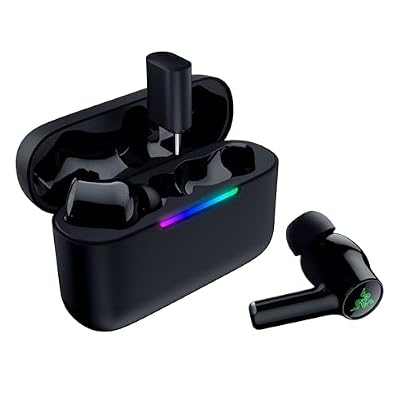
Razer Hammerhead V3 HyperSpeed Wireless Multi-Platform ANC Gaming Earbuds – 2.4GHz & Bluetooth 6.0, Up to 40 Hr Battery, THX Spatial Audio – Black (Renewed)
Included for 'Best Earphones for PC Gaming in 2026 That Stay Comfortable' because the listing specifies 2.4GHz & Bluetooth 6.0 and Up to 40 Hr Battery, details this guide uses to compare options.
View on Amazon
Razer Hammerhead True Wireless (2nd Gen) Bluetooth Gaming Earbuds: Chroma RGB Lighting -60ms Low-Latency- Active Noise Cancellation - Dual Environmental Noise Cancelling Microphones- Classic Black
Included for 'Best Earphones for PC Gaming in 2026 That Stay Comfortable' as a relevant option in this category; details come from the product listing.
View on AmazonWhat to look for in PC gaming earphones
1. Fit: nozzle angle and over-ear hooks matter more than tips
For PC gaming you are mostly sitting still, so the failure mode is not falling out from running. It is slow loosening from jaw movement and cable tug. Over-ear memory wire or molded hooks solve 80% of this by routing cable weight over the ear instead of pulling straight down on the seal.
Look for a small shell with a 30-45 degree angled nozzle and three sizes of silicone tips plus at least one size of foam. Silicone seals better for footsteps and lasts longer. Foam isolates more but gets hot after 90 minutes. If your ear canals are small, avoid bulky 13-14mm driver shells and choose slim IEM shapes like the IE 200 or VR3000.
2. Cable noise: the hidden comfort killer
Cable microphonics is the thump you hear when the cable rubs your shirt or desk. On PC it is worse than on mobile because the cable often drapes across a chair arm or desk edge.
Choose braided or fabric-sheathed cables under 1.3m for desktop use, with a chin slider and shirt clip. A 1.8m+ cable without a slider will drag and break seal on one side. If you use a DAC on your desk, a 1.0-1.2m cable plus a short extension is quieter than a single long cable.
3. Driver size and tuning
Driver size does not equal quality. For gaming, a well-tuned single 6mm to 10mm dynamic driver is usually better than a cheap multi-driver setup:
- 6mm – 8mm single dynamic: lighter shell, better treble detail for reloads, footsteps, and positional cues. Example class: Final Audio VR3000, Sennheiser IE 200.
- 9mm – 11mm single dynamic: more bass impact for single-player immersion, slightly larger shell. Example class: Shure SE215, Moondrop Aria.
- Dual dynamic or hybrid (1 dynamic + 1 balanced armature): wider separation of voice chat vs game effects, but crossover tuning varies. Example class: Logitech G333, Razer Hammerhead Duo.
For competitive shooters like Valorant, CS2, and Apex Legends, prioritize elevated upper-mids (2-4 kHz) and controlled bass. For RPGs and horror, a warmer 10mm driver gives more impact without EQ.
4. Mic clarity on PC
Most gaming earphones use one of three mic systems:
- Single-button inline MEMS mic on 3.5mm: works with a motherboard combo jack or splitter, good for Discord if positioned correctly. Clarity is acceptable, but picks up keyboard noise.
- Inline mic + USB-C / USB-A DAC: louder and cleaner because the DAC provides proper bias power. Best if your front-panel jack hisses.
- Detachable boom mic: rare on earphones, but adapters exist that convert an IEM to a headset-style boom. Best clarity for team comms.
Avoid Bluetooth-only earbuds for PC gaming as primary comms. Even with aptX Low Latency, you typically get 120-200ms delay and the headset profile drops mic quality to 16kHz.
Best earphones for PC in 2026 compared
| Model | Driver | Impedance / Sensitivity | Cable / Plug | Mic | Weight per side |
|---|---|---|---|---|---|
| Final Audio VR3000 | 6mm dynamic, gaming-tuned | 18 ohms / 100 dB/mW | 1.2m, over-ear, 3.5mm | Inline MEMS, single button | 4.5g |
| Sennheiser IE 200 | 7mm dynamic, neutral-bright | 18 ohms / 119 dB (1Vrms) | 1.2m detachable MMCX, over-ear, 3.5mm | No mic stock, compatible with mic cables | 4.0g |
| Shure SE215 | 9mm single dynamic (MicroDriver) | 17 ohms / 107 dB/mW | 1.6m detachable MMCX, over-ear, 3.5mm | Option with inline mic remote | 5.2g |
| Logitech G333 | Dual dynamic 5.8mm + 9.2mm | 24 ohms / 102 dB/mW | 1.2m + USB-C DAC included, 3.5mm | Inline mic, USB-C DAC improves level | 5.8g |
| HyperX Cloud Earbuds II | 14mm dynamic, bass-forward | 16 ohms / 105 dB/mW | 1.2m flat tangle-free, 3.5mm + 4-pole angled plug | Inline mic with multifunction button | 6.1g |
| Razer Hammerhead Duo | Hybrid dynamic + balanced armature | 32 ohms / 122 dB (1kHz) | 1.2m braided, 3.5mm | Inline mic | 5.5g |
Prices in 2026 generally fall into three bands: budget wired gaming buds usually $30-$60, midrange IEMs with detachable cables usually $70-$150, and audiophile-leaning IEMs like the IE 200 usually $140-$200. A USB-C DAC or Y-splitter, if not included, is usually $10-$25 extra.
Do you need a DAC or amp? A quick power check
Almost all gaming earphones are easy to drive, but front-panel noise is common. Use this calculation to see if your motherboard is enough:
Required voltage for peak loudness = 10 raised to ((Target SPL – Sensitivity in dB/V) / 20)
Example with a typical IEM rated 119 dB at 1 Vrms: for 110 dB peaks for gunfire without clipping, you need 10^((110-119)/20) = 10^(-0.45) = 0.35 Vrms. That is about 6.8 mW into 18 ohms (Power = V^2 / R = 0.1225 / 18).
A standard Realtek ALC897 / ALC1220 motherboard output provides 1.0-1.5 Vrms clean, or 55-125 mW into 18 ohms. That is 8-18x more than needed. In short: volume is not the issue. If you hear hiss, hum when moving the mouse, or mic buzz, the issue is grounding and front-panel interference, not power. Fix it with a rear-port connection or an external USB-C DAC, not a more powerful amp.
Which one should you buy? Decision matrix
| If your situation is… | Choose this type | Why |
|---|---|---|
| Competitive FPS, need footsteps, 3-5 hour sessions | Final Audio VR3000 | Lightest shell, soundstage tuned for directionality, non-fatiguing highs |
| You also listen to music, want best detail and replaceable cable | Sennheiser IE 200 + aftermarket mic cable | Excellent seal with memory foam adapters, detachable cable extends life to 3+ years |
| Loud mechanical keyboard, need isolation | Shure SE215 with foam tips | Deep insertion blocks 20-25 dB, over-ear wire prevents mic rub |
| Budget build, Discord + school + Switch / Steam Deck too | Logitech G333 or HyperX Cloud Earbuds II | Included DAC / splitter, louder mic out of box, easy to replace |
| You hate inline mics, teammates complain | Any MMCX IEM + boom-mic adapter cable | Moves mic to mouth, improves signal-to-noise by 10-15 dB vs chest-level inline |
Recommended PC settings for earphones and inline mics
Default Windows and Discord settings are tuned for headsets, not sensitive IEMs. Change these once:
- Windows Sound: Set output to 24-bit, 48000 Hz (DVD quality). Higher rates like 192kHz add CPU load with no benefit for games. Turn OFF all enhancements, bass boost, and loudness equalization.
- Windows Input: Set mic level to 75-85, not 100. Enable AGC off. At 100, MEMS inline mics clip on plosives and pick up fans. Test in Settings – Sound – Input – Test your microphone; peaks should hit 70-80% when speaking normally.
- Discord Voice: Set Input Device to your mic, not Default. Turn OFF Automatically determine input sensitivity, set manual threshold to -45 to -55 dB. Enable Noise Suppression (Krisp) and Echo Cancellation, but turn OFF Automatic Gain Control if friends say your volume pumps up and down.
- Game EQ: If footsteps are buried, cut 60-150 Hz by 3 dB and boost 2.5-4 kHz by 2 dB instead of raising master volume. This improves clarity without increasing ear fatigue.
Fix cable noise in 30 seconds
Route cables over-ear, tighten the chin slider to just under your chin, and clip the cable to your shirt collar. Run the cable behind your monitor arm, not over your keyboard. If you still hear thumps, switch to foam tips: a deeper seal reduces structure-borne cable noise more than any cable upgrade.
What to avoid
Avoid true wireless earbuds as your only PC audio device if you play ranked multiplayer. Latency and automatic switching between stereo and headset modes will cause missing audio cues. Avoid 1.8m+ stiff nylon cables for desktop; they pull seal loose when you lean back. And avoid using a single 4-pole plug in separate headphone + mic jacks without the included Y-splitter – you will get game audio but no mic, or a humming mic.
FAQ
Are earphones better than headsets for PC gaming?
For comfort in heat and for detail, yes. Earphones weigh 8-12g total versus 250-350g for headsets, so there is no clamp force or sweaty ear pads. For team comms in noisy rooms, a closed headset with a boom mic still isolates your voice better.
How do I connect earphones with mic to a desktop PC?
Most desktops have separate green (audio) and pink (mic) 3.5mm ports on the back. Use the included Y-splitter: plug the single 4-pole end into your earphones, then green to green, pink to pink. Laptops and most USB-C DACs use a single combo jack and need no splitter.
Why do my earphones fall out after an hour?
Usually wax and moisture loosen silicone tips. Go one size smaller with deeper insertion, or switch to memory foam for one session to find your true size, then buy that size in silicone. Over-ear routing is mandatory for stays-in-place fit on PC.