🛒 Best Price Today on Amazon
Prime members get fast, free shipping on everything above, plus member-only deals. New members get a 30-day free trial — cancel anytime.
A computer keyboard pullout tray can free valuable desk space while lowering your keyboard and mouse to a more comfortable working position. The best models combine a stable platform, smooth sliding mechanism, enough mouse room, sensible height or tilt adjustment, and mounting hardware that fits your desk without interfering with support beams.
Quick Comparison Table
| Product | Best For | Key Advantage | Limitation |
|---|---|---|---|
| VIVO MOUNT-KB05E | Best overall | Wide clamp-on platform | Limited height adjustment |
| Mount-It! MI-7135 | Full ergonomic adjustment | Tilt, swivel, and height control | Requires under-desk mounting space |
| 3M Adjustable Keyboard Tray | Ergonomic offices | Articulating adjustment system | More complex installation |
| Fellowes Office Suites Underdesk Drawer | Traditional office use | Separate reversible mouse tray | Smaller keyboard platform |
| HUANUO Under Desk Keyboard Tray | Standing desks | Flexible ergonomic positioning | Desk compatibility needs checking |
| Humanscale 6G Keyboard System | Premium workstations | Refined articulating mechanism | Expensive |
Best Computer Keyboard Pullout Tray Picks
VIVO MOUNT-KB05E Clamp-On Keyboard Tray
Best For: Home offices and gaming desks where drilling into the desktop is undesirable.
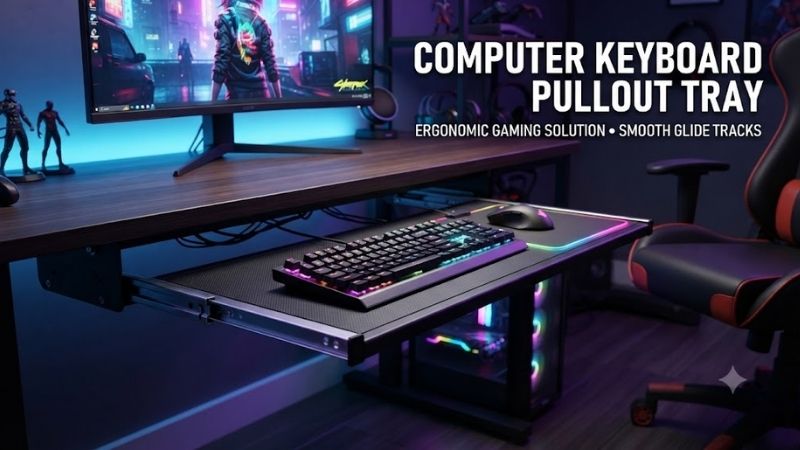
The VIVO MOUNT-KB05E is a clamp-mounted computer keyboard pullout tray designed to create more usable surface space without requiring permanent screw holes. Its broad platform gives a standard keyboard and mouse enough shared working room, while sliding rails let the entire tray disappear beneath the desktop after use.
Key Features:
- Clamp-on installation
- Wide keyboard and mouse platform
- Sliding rail mechanism
- Steel and engineered-wood construction
- Compatible with many standard desks
- Raised rear edge
- No drilling required
The clamp-on format is especially useful for renters, shared offices, or expensive desktops that owners do not want to modify permanently. It also simplifies installation compared with track systems that require several accurately positioned screws beneath the desk.
What Makes It Different: The MOUNT-KB05E combines a relatively large shared surface with simple installation. Many inexpensive trays provide only enough room for a keyboard, forcing the mouse to remain on the desktop and reducing the ergonomic advantage.
Performance & Use Case: It works well for full-size keyboards, compact gaming keyboards, and office mouse setups. Because it hangs below the desktop at a mostly fixed level, it cannot match an articulating arm when precise height and negative tilt adjustment are required.
Pros:
- No-drill installation
- Wide shared work surface
- Smooth pullout storage
Cons:
- Clamps remain visible
- Less ergonomic adjustment than articulated trays
Who Should Buy It: Choose the VIVO MOUNT-KB05E if you want an easy under-desk upgrade that creates more surface space without permanently modifying your desk.
Mount-It! MI-7135 Under Desk Keyboard Tray
Best For: Users who want height, tilt, and swivel adjustment.
Mount-It! MI-7135 is a more sophisticated ergonomic tray than a basic sliding drawer. Its platform measures about 26.4 inches wide by 10 inches deep and can tilt, swivel, and slide beneath the desk, allowing users to position the keyboard and mouse according to body position rather than accepting one fixed height.
Key Features:
- 26.4-inch-wide platform
- 10-inch platform depth
- Adjustable tilt
- Left-right swivel
- Height adjustment
- Pullout track
- Integrated wrist support
The articulating mechanism is the key benefit. A desk may be a comfortable height for writing but too tall for keyboard use. Lowering the keyboard independently can help the user keep shoulders more relaxed and avoid reaching upward toward the keys during long typing sessions.
What Makes It Different: Unlike simple rail-mounted drawers, the MI-7135 lets the user alter several aspects of keyboard position. This makes it more appropriate for a dedicated ergonomic workstation where one fixed tray height would still leave the wrists or elbows poorly positioned.
Performance & Use Case: It suits office typing, programming, data entry, and long productivity sessions. Installation requires enough unobstructed depth beneath the desk for the mounting track, so desks with thick crossbars or cable-management structures need to be measured first.
Pros:
- Strong adjustment range
- Keyboard and mouse share one platform
- Useful wrist support
Cons:
- More complicated installation
- Needs clear space beneath the desktop
Who Should Buy It: Choose the MI-7135 if ergonomics matter more than no-drill convenience and your desk provides enough mounting clearance.
3M Adjustable Keyboard Tray
Best For: Long office sessions and users who need precise ergonomic positioning.
3M adjustable keyboard trays are designed around an articulating arm rather than a simple drawer. This allows the platform to move below the desk, change height, and use negative tilt, which positions the front of the keyboard slightly higher than the rear and can support a more neutral wrist posture for some users.
Key Features:
- Articulating arm mechanism
- Height adjustment
- Negative keyboard tilt
- Retractable under-desk position
- Mouse platform support
- Wrist-rest configurations
- Office-oriented construction
Negative tilt is one of the most useful differences between a serious ergonomic tray and a cheap pullout shelf. Tilting the keyboard away from the body can reduce the tendency to bend the wrists upward when the keyboard sits below elbow level.
What Makes It Different: 3M focuses on fine ergonomic positioning rather than simply recovering desk space. The mechanism is intended to let the keyboard follow the user’s body instead of making the user adapt to a fixed desktop height.
Performance & Use Case: It is especially suitable for full-time office workers, programmers, writers, and anyone who spends most of the day using a keyboard. The more sophisticated hardware costs more and requires careful installation, but those trade-offs make sense for a permanent workstation.
Pros:
- Excellent ergonomic adjustment
- Negative-tilt capability
- Retracts beneath the desk
Cons:
- More expensive than basic trays
- Installation requires accurate mounting
Who Should Buy It: Choose a 3M adjustable tray if typing comfort is the priority and you are willing to install a proper articulating system rather than a simple drawer.
Fellowes Office Suites Underdesk Keyboard Drawer
Best For: Traditional office desks and users who want simple height choices.
The Fellowes Office Suites Underdesk Keyboard Drawer uses a more conventional pullout design with three height settings. It also includes a separate mouse tray that can be positioned on either side, making the system suitable for left-handed and right-handed users while keeping both input devices below the main desktop.
Key Features:
- Three height positions
- Pullout ball-bearing tracks
- Separate mouse platform
- Left- or right-side mouse placement
- Wrist-support area
- Under-desk installation
- Standard office design
The detachable mouse platform is particularly useful on narrower desks because the main keyboard platform does not need to become extremely wide. Users can position the mouse section beside the keyboard while working and move it underneath when storage space is limited.
What Makes It Different: Fellowes prioritizes a conventional office experience rather than maximum adjustability. It offers more positioning flexibility than a fixed shelf while remaining less complicated than a fully articulated arm.
Performance & Use Case: It works best for standard office keyboards and normal productivity use. Gamers using an oversized mouse pad or exceptionally large mechanical keyboard may find the separate mouse area less accommodating than a single wide platform.
Pros:
- Multiple height choices
- Reversible mouse platform
- Smooth sliding mechanism
Cons:
- Smaller keyboard area than wide trays
- Limited tilt adjustment
Who Should Buy It: Choose the Fellowes Office Suites tray if you want a familiar office-style pullout platform with straightforward height adjustment and separate mouse support.
HUANUO Under Desk Keyboard Tray
Best For: Standing desks and users who want a flexible ergonomic platform.
HUANUO produces several under-desk keyboard tray designs, including versions with sliding tracks and more adjustable support mechanisms. The main attraction is positioning the keyboard below the desktop while still providing enough room for a mouse, which can improve both ergonomics and available desk surface.
Key Features:
- Under-desk mounting
- Keyboard and mouse support
- Sliding storage
- Adjustable positioning on selected models
- Wrist-support options
- Broad platform designs
- Suitable for many office desks
A keyboard tray can be especially useful with a standing desk when the desktop height that feels right for the monitor is not ideal for the arms. Separating keyboard height from monitor height gives the user another way to adjust the workstation around posture.
What Makes It Different: HUANUO offers configurations aimed at users who need more movement than a fixed clamp-on tray but do not necessarily want to pay premium ergonomic-brand pricing.
Performance & Use Case: It is useful for seated work, standing-desk setups, gaming, and mixed office use. Compatibility needs attention because standing desks often have crossbars, motors, control boxes, or cable trays directly beneath the surface that can interfere with installation.
Pros:
- Good ergonomic flexibility
- Useful for sit-stand desks
- Keyboard and mouse can move together
Cons:
- Compatibility depends heavily on desk underside
- Installation is more involved than clamp-on models
Who Should Buy It: Choose a HUANUO under-desk tray if you use an adjustable desk and want more positioning control than a simple sliding shelf provides.
Humanscale 6G Keyboard System
Best For: Premium ergonomic workstations and full-time professional use.
The Humanscale 6G Keyboard System is built around a high-quality articulating mechanism designed to let users move the keyboard platform into an ergonomic position quickly. Rather than using a basic sliding drawer, it focuses on smooth adjustment, negative tilt, and stable support for long daily work sessions.
Key Features:
- Articulating keyboard mechanism
- Height adjustment
- Negative tilt
- Multiple platform options
- Mouse-support configurations
- Under-desk storage
- Professional ergonomic design
The adjustment mechanism is intended to require little effort, which matters in shared or sit-stand workstations where the keyboard position may change several times per day. A good tray should make these changes easy enough that users actually adjust it rather than leaving it permanently in one compromise position.
What Makes It Different: Humanscale targets premium workplace ergonomics instead of low purchase price. The system can be configured around different platform sizes and mouse solutions, allowing the workstation to be matched more closely to the user.
Performance & Use Case: It is especially appropriate for professional offices, intensive typing, coding, editing, and enterprise workstation deployments. The main obstacle is price, because casual users may receive enough benefit from a much simpler VIVO or Fellowes tray.
Pros:
- Premium adjustment mechanism
- Strong ergonomic positioning
- Professional workstation quality
Cons:
- Expensive
- More system than casual users need
Who Should Buy It: Choose the Humanscale 6G if the keyboard tray will be used every day for long sessions and ergonomic adjustability is worth a premium investment.
Computer Keyboard Pullout Tray Buying Guide
Measure the Space Under Your Desk
Before choosing any computer keyboard pullout tray, inspect the underside of the desk rather than only measuring the top. Support beams, drawers, motors, control boxes, cable trays, and metal frames can block the mounting track even when the desktop itself appears large enough.
Measure available width, depth, and desktop thickness. Screw-mounted tracks need clear depth extending backward, while clamp-on designs need an unobstructed front edge where the clamps can grip securely.
Check Keyboard and Mouse Width
A full-size keyboard can exceed 17 inches before adding any mouse space. Large gaming keyboards, padded wrist rests, trackballs, and low-sensitivity gaming mice can require substantially more room than an office keyboard alone.
Wide single platforms are usually better for gaming because the mouse can travel freely beside the keyboard. Separate mouse trays save width but provide less movement room and may feel restrictive with lower mouse sensitivity.
Decide Between Clamp-On and Screw-Mounted
Clamp-on trays require little or no permanent modification and can be removed when the desk changes. They are excellent for renters, temporary workstations, or users who do not want holes in a solid-wood or expensive desktop.
Screw-mounted systems usually provide better stability and more adjustment. Articulating arms also need a rigid attachment because the mechanism places more leverage on the underside of the desk.
Look for Negative Tilt
Positive tilt raises the rear of the keyboard, which can bend the wrists upward. Negative tilt does the opposite by positioning the rear lower than the front, helping some users maintain a more neutral wrist position when the tray sits below elbow height.
Negative tilt is not automatically comfortable for everyone, so an adjustable mechanism is preferable. Gaming users may also prefer a relatively flat platform because frequent mouse movement and keyboard shortcuts create different positioning needs from long-form typing.
Check Height Adjustment
Simply placing the keyboard under the desk does not guarantee an ergonomic setup. The tray should ideally position the keyboard near elbow height while allowing shoulders to stay relaxed and forearms to remain roughly parallel to the floor.
Fixed clamp-on trays are useful when the desktop is only slightly too high. Users who need a larger correction should consider an articulated tray with several inches of vertical movement.
Consider Wrist Support
A padded wrist rest can improve comfort during pauses between typing, but users should avoid pressing the wrists heavily into it while actively typing. Support should generally contact the heel of the hand rather than compressing the wrist itself.
Removable wrist rests provide more flexibility because mechanical keyboard users often have strong preferences about height, firmness, and typing angle.
Keyboard Tray Types and Practical Trade-Offs
Clamp-On vs Track-Mounted Tray
Clamp-on trays are fast to install and easy to remove, but the clamps remain visible at the desk edge and usually provide limited vertical adjustment. Track-mounted trays look cleaner and retract farther beneath the desk, although installation requires drilling and careful positioning.
Choose clamp-on hardware for flexibility. Choose track-mounted hardware when the tray will stay on the same desk for years and a clean permanent installation matters more.
Fixed Drawer vs Articulating Arm
A fixed drawer primarily creates desk space and lowers the keyboard by a predetermined amount. An articulating tray allows the user to change height, tilt, and sometimes swivel, making it much better when ergonomics are the primary goal.
The trade-off is cost and complexity. A well-built fixed drawer can be perfectly adequate when desk and chair dimensions already match the user closely.
Keyboard Tray for Gaming vs Office Work
Gamers usually benefit from a wide single surface because large mouse movements require more uninterrupted space. Competitive players should check that the tray does not flex during rapid movement and that its rails remain stable when the mouse reaches the edge.
Office users can accept a separate mouse tray more easily because pointer movement is typically smaller. They may benefit more from negative tilt, wrist support, and precise height adjustment than from maximum platform width.
Installation and Ergonomic Setup
Position the Keyboard Near Elbow Height
Sit in your normal chair with shoulders relaxed. Your elbows should bend naturally without needing to raise the shoulders toward the ears. Position the keyboard so the hands can reach the home row without bending the wrists sharply upward.
If the monitor then becomes too low or high relative to the keyboard, adjust the monitor independently with its stand or a monitor arm rather than compromising the typing position.
Keep Enough Knee Clearance
An under-desk keyboard system occupies vertical space below the desktop. Tall users, thick desks, and trays with large articulating mechanisms can reduce available knee room considerably.
Measure the distance from your thighs to the underside of the desk while seated before choosing a thick mechanism. A theoretically ergonomic tray is not useful if it forces the user to lower the chair excessively just to fit beneath it.
Check Sliding Clearance
A pullout tray must extend far enough for the keyboard and mouse to clear the front edge of the desk. If the rail is too short, the desktop can partially cover the keyboard or interfere with the user’s hands.
The tray should also retract completely enough that it does not hit the chair when standing up or create a permanent obstacle in front of the desk.
FAQ
Is a Computer Keyboard Pullout Tray Worth It?
A keyboard pullout tray is worthwhile when the desktop sits too high for comfortable typing or when you need more usable desk space. It lets the keyboard and mouse sit below the primary work surface and can improve posture when adjusted correctly. The benefit is smaller if your desk is already at an ideal typing height.
Are Clamp-On Keyboard Trays Stable?
A well-designed clamp-on tray can be stable for normal office typing and gaming when attached to a rigid desktop within its supported thickness range. Screw-mounted systems generally provide greater rigidity, however. Avoid clamp mounting on fragile hollow surfaces or locations where the clamp cannot fully contact the desk.
How Wide Should a Keyboard Tray Be?
A compact keyboard can fit on a relatively narrow tray, but a full-size keyboard and mouse usually need a much wider surface. Gamers should allow additional horizontal mouse room. Before buying, place your keyboard and mouse side by side in the desired position and measure the total space they actually require.
Can I Install a Keyboard Tray on a Standing Desk?
Yes, but compatibility must be checked carefully. Standing desks may have crossbars, motors, control boxes, and cable channels beneath the desktop. These components can block mounting tracks or articulating arms. Also confirm that the tray remains stable when the desk moves between sitting and standing positions.
Is Negative Tilt Better for Typing?
Negative tilt can help keep the wrists closer to a neutral position when the keyboard is placed below elbow height. It is often preferable to steep positive tilt for long typing sessions. The ideal angle varies by user, so an adjustable tray is better than one permanently fixed at an aggressive negative angle.
Can a Pullout Tray Hold a Mechanical Keyboard?
Yes, provided the platform is large enough and the weight rating supports the keyboard, mouse, wrist rest, and normal hand pressure. Heavy full-size mechanical keyboards benefit from rigid trays with minimal flex. Check platform depth as well, because some mechanical boards are deeper than standard office keyboards.
Conclusion
The best computer keyboard pullout tray depends on whether you prioritize easy installation, gaming space, or ergonomic adjustment. VIVO MOUNT-KB05E is the strongest no-drill option, Mount-It! MI-7135 and 3M provide greater positioning control, Fellowes suits traditional offices, HUANUO works well for flexible desks, and Humanscale 6G targets premium ergonomic workstations.