🛒 Best Price Today on Amazon
Prime members get fast, free shipping on everything above, plus member-only deals. New members get a 30-day free trial — cancel anytime.
- Top 3 Picks
- Quick Comparison
- How We Chose
- 1. PS5 Stand and Cooling Station with LED Controller Charging – Best for an All-in-One Console Stand
- 2. PowerA Twin Charging Station for DualSense – Best for Everyday Controller Charging
- 3. PS5 Stand With RGB Lights and Auto Fan – Best for a Lit-Up Setup With Automatic Cooling
- 4. PlayStation Media Remote – Best for Streaming Apps and Couch Control
- 5. 24-Piece Silicone Thumb Grip Set – Best Low-Effort Comfort Upgrade
- 6. PlayStation Portal Remote Player – Best for Playing Your PS5 Anywhere at Home
- 7. PS5 Cooling Station With Controller Charging – Best for Slim and Standard Owners Who Want a Vertical Base
- 8. Console Holder Wall Mount for PS5 – Best for Freeing Shelf Space
- 9. PlayStation DualSense Edge Wireless Controller – Best for Competitive and Custom Play
- 10. Tokluck PS5 Cooling Station With Auto Turbofan – Best for Adjustable Fan Control
- How to Choose PS5 Accessories Without Buying Things You Will Not Use
- Setup and Care Tips for Common PS5 Accessories
- Frequently Asked Questions
- Our Recommendation by Situation
The best PS5 accessory for most owners is the PowerA Twin Charging Station for DualSense controllers. It is officially licensed, takes up almost no space and solves the one problem every PS5 household shares: a controller that is flat when you want to play. If you want a bigger upgrade, the PlayStation DualSense Edge adds back buttons, profiles and swappable stick modules for competitive players, while the PlayStation Portal lets you stream your console to an 8-inch screen anywhere in the house. Budget shoppers can fix a lot of comfort problems with a pack of silicone thumb grips, and living-room setups benefit from the Media Remote or a wall mount that frees up shelf space. The fan-equipped cooling and charging stands in this guide are a more debatable purchase, because the console already ships with its own cooling design, so read the notes under each one before deciding. Compatibility matters throughout: PS5 models differ in shape, so confirm that a stand or mount fits your exact console before you order.
Top 3 Picks
Best Overall: PowerA Twin Charging Station
It charges two DualSense controllers at once, carries official licensing and keeps controllers on a stand instead of on a cable. For most players it is the accessory that gets used every single day.

PS5/Slim/Pro Stand and Cooling Station with LED Controller Charging Station for PlayStation 5 Console, Controller Charger, Cooling Stand, PS5/Slim/Pro Skin Accessories Kit with 3 Level Cooler Fan
Included for 'Best PS5 Accessories in 2026' because the listing specifies Controller Charger and Cooling Stand, details this guide uses to compare options.
View on Amazon
PowerA Twin Charging Station for Dualsense Wireless Controllers, Dualsense Controller Charging, Charge, Sony PlayStation, PS5, Officially Licensed - PlayStation 5
Included for 'Best PS5 Accessories in 2026' because the listing specifies Dualsense Controller Charging and Charge, details this guide uses to compare options.
View on Amazon
PS5/Slim/Pro Stand for Disc & Digital Console, PS5 Cooling & Charging Station with RGB Lights, PS5 Controller Charger Built-in 3 Level & AUTO Adjustable Fan, Accessories for PlayStation 4 Chargers
Included for 'Best PS5 Accessories in 2026' because the listing specifies PS5 Cooling & Charging Station with RGB Lights and Accessories for PlayStation 4 Chargers, details this guide uses to compare options.
View on Amazon
Playstation Media Remote
Included for 'Best PS5 Accessories in 2026' as a relevant option in this category; details come from the product listing.
View on Amazon
24 PCS Premium Silicone Thumb Grips for PS4/PS5/Xbox Controller, Rainbow Non-Slip Joystick Caps & Thumbstick Grips, Ultimate Comfort & Protection
Included for 'Best PS5 Accessories in 2026' because the listing specifies Rainbow Non-Slip Joystick Caps & Thumbstick Grips and Ultimate Comfort & Protection, details this guide uses to compare options.
View on Amazon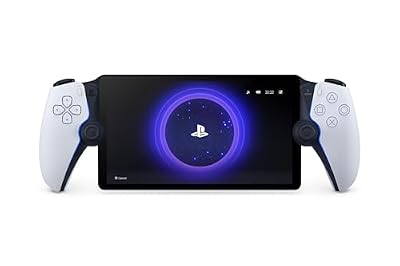
PlayStation 5 Portal Remote Player
Included for 'Best PS5 Accessories in 2026' as a relevant option in this category; details come from the product listing.
View on Amazon
PS5/Slim/Pro Cooling Station with Controller Charging Station for Playstation 5 Slim&Standard&Pro Disc/Digital Console, PS5 Pro Stand Cooler Accessories Incl Cooling Fan/3 USB Hubs
Included for 'Best PS5 Accessories in 2026' because the listing specifies PS5 Pro Stand Cooler Accessories Incl Cooling Fan/3 USB Hubs, details this guide uses to compare options.
View on Amazon
PlayStation DualSense Edge Wireless Controller
Included for 'Best PS5 Accessories in 2026' as a relevant option in this category; details come from the product listing.
View on Amazon
Tokluck PS5/Slim/Pro Cooling Station with Auto Turbofan & 3-Level Speed, PS5 Vertical Stand Cooling Fan Station with Controller Charger, Cooler Docking Station for PlayStation 4 Adapters
Included for 'Best PS5 Accessories in 2026' because the listing specifies Cooler Docking Station for PlayStation 4 Adapters, details this guide uses to compare options.
View on AmazonBest Budget Upgrade: 24-Piece Silicone Thumb Grip Set
A pack of 24 non-slip caps in varied colors is easy to try, protects the stick surface and lets you experiment with different heights and shapes. It is the easiest comfort upgrade on the list.
Best Premium Pick: PlayStation DualSense Edge Wireless Controller
Sony’s pro-style controller adds remappable back buttons, function buttons for switching profiles, adjustable trigger stops and replaceable stick modules. It is the best choice for competitive players who want a controller they can tune.
Quick Comparison
| Product | Best for | Key specs |
|---|---|---|
| PS5 Stand and Cooling Station with LED Charger | All-in-one stand with charging | Console stand, cooling fan, LED lighting, controller charging ports |
| PowerA Twin Charging Station | Everyday controller charging | Charges two DualSense controllers, officially licensed |
| PS5 Stand with RGB Lights and Auto Fan | Lit-up setup with automatic cooling | RGB lights, three fan levels plus auto mode, controller charging |
| PlayStation Media Remote | Streaming apps and TV control | App shortcut buttons, media controls, powers on the console |
| 24-Piece Silicone Thumb Grips | Easy comfort and grip upgrade | 24 caps for PS4, PS5 and Xbox controllers, non-slip silicone |
| PlayStation Portal Remote Player | Remote play around the home | 8-inch screen, DualSense-style controls, streams from your PS5 |
| PS5 Cooling Station with Charger (Slim and Standard) | Vertical stand with fan and charging | Fits Slim, Standard and Pro per listing, controller charging |
| Console Wall Mount for PS5 | Saving shelf space | Wall-mounted holder for disc and digital models |
| PlayStation DualSense Edge | Competitive and customized play | Back buttons, profiles, trigger stops, swappable stick modules |
| Tokluck PS5 Cooling Station | Adjustable fan with controller charger | Auto turbo fan, three speed levels, vertical stand |
How We Chose
Our selection process is research-based. We reviewed the listing name and manufacturer information for each of the ten accessories and compared them with official PlayStation hardware pages and widely reported details about how the PS5 handles cooling, charging and remote play. We then rated each accessory on how much it improves daily use, how well it fits PS5 models, how clearly its features are documented, how safe it is to power and install, and how well it complements the other items on the list. Official PlayStation accessories were weighed for reliability, while third-party items were judged on their stated features and on whether the claims are realistic. When a listing left out a key detail such as exact dimensions, fit or power rating, we say so and tell you what to confirm on the product page.
1. PS5 Stand and Cooling Station with LED Controller Charging – Best for an All-in-One Console Stand
As an Amazon Associate we earn from qualifying purchases at no extra cost to you.

This listing describes a multi-purpose stand for the PlayStation 5 that combines a cooling station, LED lighting and controller charging. It is aimed at players who want one accessory to hold the console upright, charge two controllers and add a bit of light to the entertainment center. It suits tidy-minded gamers with a vertical setup and anyone replacing the stock stand.
What the listing tells us
- Designed for PS5, PS5 Slim and PS5 Pro, according to the product name
- Includes a cooling stand with a fan
- Includes a controller charging station
- LED lighting is part of the design
- Exact fan speeds, charging ports and power input need confirmation on the product page
Strengths
The appeal is consolidation. Instead of a separate stand, a charging dock and a fan, you get a single base that holds everything. For small TV cabinets, that matters because every accessory competes for surface area. A charging station integrated into the stand also means controllers have a home, and the LED lighting helps you see where to place them in a dim room. Vertical stands generally keep the console stable and put the intake and exhaust vents in a predictable position.
Things to keep in mind
Consider whether you need a fan at all. The PS5 includes its own cooling design, and Sony does not require an add-on fan. Fan stands can move air around the console and may reduce dust build-up on some surfaces, but the real-world temperature benefit varies by room, console model and stand design. Treat the cooling claim as a possible extra, not a requirement. Also check where the fan draws power: many stations use a USB port on the console, which can add noise. Make sure the stand does not cover any vents, because blocked airflow is the one thing that genuinely harms a console.
With fan and charging combined, confirm the power source, whether controllers charge through the console’s USB ports or through a separate connection, and whether charging works when the console is in rest mode. Use cables in good condition and avoid stacking items on top of the console.
Pros
- One accessory covers stand, cooling and charging
- Saves shelf space compared with separate items
- LED lighting helps in dark rooms
- Listed as fitting multiple PS5 models
Cons
- Benefit of the fan is debatable
- Fan noise may be noticeable in quiet rooms
- Power and port details need verification
- Fit and stability depend on your exact console model
Versus the nearest alternative
The RGB stand later in the list adds automatic fan control and a three-level speed system. This listing is simpler. If you mainly want a place to charge controllers, the PowerA Twin Charging Station is a cleaner solution.
2. PowerA Twin Charging Station for DualSense – Best for Everyday Controller Charging

The PowerA Twin Charging Station is a simple dock built to charge two DualSense wireless controllers at once. The listing calls it officially licensed for Sony PlayStation and PS5, and its appeal is exactly that: a safe, tidy place to put controllers when the session ends. It suits every household with more than one controller and anyone who has ever found a flat pad at the start of a game night.
Key specs
- Charges two DualSense wireless controllers at the same time
- Officially licensed for PlayStation, according to the listing
- Dock-style design that holds controllers upright
- Powered through a cable; confirm connector and adapter details on the product page
Strengths
The best thing about a charging station is that it removes friction. Putting a controller on a stand is easier than plugging in a cable, so it becomes a habit. Both controllers are ready next time, and neither is left half-charged. A licensed product from PowerA also reduces concern about compatibility and fit, since PowerA has long made officially licensed charging solutions for PlayStation. The design takes up very little room on a shelf or table.
It also helps battery habits. Lithium-ion batteries do not enjoy being drained to zero over and over, and a dock encourages short top-ups rather than deep cycles. As a rough planning figure, suppose a controller lasts about 6 hours per charge, which is a typical estimate that varies with rumble and adaptive triggers. If you play 2 hours a night, that is a recharge every three nights. A dock makes that recharge automatic instead of something you have to remember.
Things to keep in mind
You still need a power source, which is usually a USB port on the console, a wall adapter or a TV. Check the product page to see which is recommended and whether an adapter is included. The dock only works with DualSense controllers, not with older PlayStation pads, and it does not add features to the controller itself. Controllers with thick silicone covers or skins may not seat properly, so remove the cover before docking if fit seems tight.
Pros
- Charges two DualSense controllers at once
- Officially licensed and compact
- Encourages regular top-ups
- Works as a simple home for controllers
Cons
- Needs its own power connection
- Only for DualSense controllers
- Covers or skins can affect fit
- Does not hold the console
Versus the nearest alternative
The combined stand and charger products in this list offer more functions but add fans, lights and more cables. If you already have a stand you like, the PowerA dock is the cleaner option. It also works with the DualSense Edge in principle, but confirm fit because the Edge has a different shape and different contacts.
3. PS5 Stand With RGB Lights and Auto Fan – Best for a Lit-Up Setup With Automatic Cooling
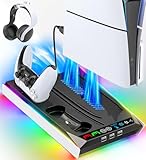
This stand targets players who want their console area to look like a gaming battle station. The listing mentions fit for disc and digital PS5 consoles, a cooling and charging function, RGB lights and a built-in fan with three speed levels and an automatic mode. It suits players who like a customized look and are curious about added airflow.
What the listing tells us
- Fits disc and digital versions of the PS5 family, including Slim and Pro per the product name
- Cooling station with a three-level fan plus an automatic mode
- RGB lighting
- Built-in controller charging
How the automatic fan works in principle
An automatic fan mode generally means the fan responds to a sensor or to console activity so it is not running at full speed all the time. The listing name suggests the fan has three manual levels as well as an auto setting, which is a sensible design. However, specific behavior varies by product, so confirm what triggers the fan and how loud each level is. If the stand is near your seat, noise matters.
It is worth remembering that the PS5 manages its own temperature with an internal fan and a heat sink. Sony ships the console to run without extra cooling, and adding an external fan does not replace keeping the vents clear. What the stand can do is hold the console in a stable position, keep air moving around the case and give you a convenient charger. The lighting is purely cosmetic and, for some players, a bonus. Others will prefer to switch it off, so look for a way to disable or dim it.
Fit and safety
Check that the stand holds your console securely, particularly if you have pets or kids. A top-heavy vertical console can tip if the base is too narrow. Use only the supplied cable for power and avoid draping cables where they could be pulled. If the stand and fan draw power from the console’s USB port, check that the port can supply enough current and that nothing else important is using it.
Pros
- RGB lighting for a customized look
- Three fan levels and an auto mode
- Includes controller charging
- Fits disc and digital models per the listing
Cons
- Cooling advantage is not guaranteed
- Fan and lights add noise and glare
- More cables and power points to manage
- Details on charging speed need confirmation
Versus the nearest alternative
Compared with the Tokluck station later in the list, which emphasizes an auto turbo fan and a three-speed control, this stand adds RGB lighting. Compared with a simple charging dock, it brings more features but also more complexity. If you value a clean, silent shelf, skip the fan and choose a plain charger.
4. PlayStation Media Remote – Best for Streaming Apps and Couch Control
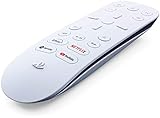
The PlayStation Media Remote is Sony’s own remote for the PS5, designed for people who use the console as an entertainment hub as much as a game machine. It puts playback and app shortcuts under your thumb so you do not need to wake up a full controller to pause a show. It suits households that watch streaming services on the PS5, anyone with a wall-mounted or shelf-hidden console and players who prefer the simplicity of a remote.
Key features, as Sony describes them
- Dedicated buttons for popular streaming and music apps that cannot be reprogrammed
- Playback controls including play, pause, fast forward and rewind
- Ability to power on the console and navigate its menus
- Built-in infrared transmitter for adjusting volume and power on compatible TVs
- Runs on two AA batteries; the box includes batteries, according to common retail descriptions
Strengths
The remote makes the console feel like a streaming box. A single press of an app button can launch a service, and the TV control functions mean one remote handles volume and power for many televisions. It also reduces wear on the controller, since you are not using your DualSense to pause a movie. For households where a parent or grandparent uses the PS5 purely for entertainment, the simple layout is a real plus. The infrared control is especially handy when the console is on a shelf out of sight.
Because it uses replaceable AA batteries, there is nothing to plug in. That is simple, but it does mean you should keep spares and recycle used cells at a battery collection point instead of throwing them away with household trash. Remove the batteries if you will not use the remote for a long period, which helps prevent leakage.
Things to keep in mind
Customer feedback in retail listings has raised a few concerns, such as button placement, no backlight and occasional connection quirks. The remote does not replace the controller for games, and it may not change channels or reach every TV menu. App button availability depends on the services supported on the console, so confirm the current list on Sony’s page. If your TV supports HDMI control, you may be able to use the TV remote instead.
Pros
- Official Sony accessory with dedicated app buttons
- Powers on the console and controls media playback
- Infrared control for compatible TVs
- Simple for non-gamers in the household
- Uses standard AA batteries
Cons
- No backlight in most descriptions
- App buttons cannot be reprogrammed
- Not useful for gameplay
- May duplicate what a smart TV remote already does
Versus the nearest alternative
The nearest comparison is simply the DualSense controller, which can navigate menus and launch apps but is larger and uses more battery. A remote is lighter on effort and gentler on the controller battery, but it only makes sense if you watch media on the PS5.
5. 24-Piece Silicone Thumb Grip Set – Best Low-Effort Comfort Upgrade
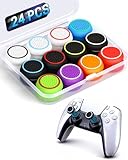
Thumb grips are small silicone caps that slip over the analog sticks, and this pack contains 24 of them. The listing says they suit PS4, PS5 and Xbox controllers and promotes a rainbow of colors, non-slip surfaces and protection for the stick tops. They suit players who want slightly better traction, who play in warm conditions or who want to color-code controllers for a household.
What the listing tells us
- 24 silicone caps in a mixed color assortment
- Marketed for PS4, PS5 and Xbox controllers
- Non-slip texture to improve thumb traction
- Intended to protect the stick surface from wear and sweat
Strengths
The pack is generous. Twenty-four caps give you enough to try several heights and shapes, replace worn ones and share among family members. Silicone can improve the feel of a stick for people with sweaty hands, and a taller cap can alter how far your thumb has to move, which some players say helps with aiming. Color variety makes it easy to identify whose controller is whose in a household with several pads.
A worked example shows how much this matters for a family. If you have four controllers and give each a pair of caps, that is eight caps in use, leaving sixteen spare. Even if kids lose some caps over a year, you will still have enough for replacements.
Things to keep in mind
Thumb grips change stick geometry. Taller caps can make small movements feel larger and may take time to get used to, and they can interfere with how the stick moves if they are too tight. Check fit on your controller: the standard DualSense has a particular stick shape, and the DualSense Edge uses its own replaceable stick caps. Silicone attracts dust and lint and should be washed with mild soap and water. Do not use grips that crack, split or leave residue on the stick. Keep small parts away from young children and pets who might swallow them.
When you first fit the caps, press them down firmly so they sit flat against the stick and do not rotate under your thumb. If the controller has recently been cleaned, make sure the stick tops are dry before pushing the silicone on.
Pros
- Large pack of 24 caps
- Non-slip texture for traction
- Protects stick surfaces
- Works across several controller types per the listing
- Color-coding for shared households
Cons
- Changes the feel of the sticks
- Fit can vary between controllers
- Silicone collects dust and may wear over time
- Small parts are a choking hazard for young children
Versus the nearest alternative
The DualSense Edge solves grip and height issues with its own swappable stick caps, but at a much higher level of commitment. Thumb grips are the budget route to experimenting with stick feel before deciding whether a premium controller is worth it.
6. PlayStation Portal Remote Player – Best for Playing Your PS5 Anywhere at Home

The PlayStation Portal is a dedicated handheld that streams games from your PS5 over Wi-Fi. It is not a standalone console, and that distinction defines who should buy it. It suits households where the main TV is in use, players who want to continue a game in another room, and anyone who wants to play in bed or at a desk without moving the console.
Key specs
- 8-inch LCD screen capable of 1080p at up to 60 frames per second, according to Sony
- DualSense-style controls with haptic feedback and adaptive triggers in supported games
- Streams games installed on your PS5 over Wi-Fi; it does not run games on its own
- Audio through the 3.5mm jack or compatible wireless audio via PlayStation Link
- Cloud streaming of some games is available with a PlayStation Plus Premium subscription, as Sony has announced
Strengths
The Portal turns your home network into a second screen. The controller layout feels familiar because the Portal wraps the DualSense experience around a screen, including haptics and adaptive triggers in supported titles. For parents or roommates, it solves the problem of two people wanting the TV. It works best when your PS5 is on or in rest mode and your Wi-Fi network is strong and stable.
Things to keep in mind
Because it streams, performance depends on your network. A weak router, interference or a long distance from the access point can add lag or reduce picture quality. It does not work away from Wi-Fi in the same way a handheld console does, and you must own a PS5 and the games you play. Some features, such as PS VR2 games, are not supported. Battery life is limited, so plan to charge it between sessions, and keep it away from heat and moisture.
For best results, place the PS5 on a wired Ethernet connection if possible and use a router that supports modern Wi-Fi standards. Check Sony’s support page for the current network recommendations.
Think about where you will actually use it. Playing in the same house as the console on a strong Wi-Fi signal works well, while hotel or dormitory networks that restrict device connections can cause setup problems. Younger players may enjoy the handheld form, but decide on screen time rules first and check the parental control options available through the console’s account settings.
Pros
- Large 8-inch screen with DualSense-style controls
- Lets you play when the TV is in use
- Supports haptics and adaptive triggers in supported games
- Official Sony hardware
Cons
- Needs a PS5 and a good Wi-Fi network
- Not a standalone console
- Latency can vary by network
- Some features, like PS VR2 games, are unsupported
Versus the nearest alternative
The nearest alternative is simply playing on the TV with a DualSense. The Portal adds network needs and complexity but also room-to-room flexibility.
7. PS5 Cooling Station With Controller Charging – Best for Slim and Standard Owners Who Want a Vertical Base

This cooling station is sold for the PlayStation 5 Slim and Standard, with disc and digital versions and the Pro named in the listing. It combines a base stand, a fan and a controller charging station. It suits players who like the vertical position for their console and want to add airflow and charging in one step.
What the listing tells us
- Fits PS5 Slim and Standard, disc and digital; the Pro is named in the product title
- Includes a cooling fan and a controller charging station
- Stand-style base for vertical placement
- Fan speed and LED details are not fully described in the listing name
Why the model matters
PS5 consoles come in different shapes. The original version, the slimmer redesign and the Pro have different footprints and vent layouts, and disc and digital editions are not identical in thickness. A stand that works for one can wobble or block vents on another. That is why the listing’s mention of several models matters, and why you should check the fit instructions and product photos for your console. Look for guidance on how the console seats into the base and whether any adapter pieces are included.
On cooling, keep expectations moderate. The console is designed to manage heat internally, and aftermarket fans mainly help by moving air near the case and encouraging good placement. The best thing you can do for any PS5 is to leave space around the vents, keep the console out of enclosed cabinets and dust the intake periodically. A fan station may help in a warm room or a tight cabinet, but it is not a cure for poor ventilation.
The charging station is the more reliably useful part. Having a spot for two controllers means they are charged and ready. Confirm whether charging draws from the console’s USB ports or from a separate power connection, and whether it works when the console is in rest mode.
Before you commit, measure the shelf or cabinet where the stand will sit and confirm there is room not only for the base but also for the cables that plug into the back of the console. A tight cabinet can defeat the purpose of a fan stand, while an open shelf makes the cooling extra largely unnecessary.
Pros
- Combines base, fan and charging
- Names several PS5 models in the listing
- Vertical layout saves horizontal space
- Controllers have a dedicated home
Cons
- Fan benefit is uncertain
- Fit varies by console version
- Additional cables and noise
- Specs are less detailed than other stands
Versus the nearest alternative
The Tokluck station described below puts more emphasis on adjustable fan speeds. The first stand in this list adds LED lighting. If you want the simplest vertical base with charging, this listing sits in the middle of the group.
8. Console Holder Wall Mount for PS5 – Best for Freeing Shelf Space

A wall mount takes the PS5 off the shelf and fixes it to a wall. This black holder is listed for PS5, PS5 Slim and Pro Digital and Disc editions. It suits small rooms, entertainment setups with limited cabinet space and households where a curious child or pet might knock a console over.
What the listing tells us
- Wall-mounted holder for PS5 consoles
- Listed for PS5, PS5 Slim and Pro, in digital and disc editions
- Black finish
- Mounting hardware, load rating and hole spacing should be confirmed on the product page
Safety first: a load check
Mounting an electronic device to a wall requires care. As a rough check, a PS5 Slim disc console weighs around 3.2 kg and a digital model about 2.6 kg according to Sony’s published figures, and the older standard model is heavier. Add cables and any controller or accessory placed on the holder, say another 0.5 kg. That makes a total of roughly 3.7 kg for a disc console. Many mounts are rated well above this, but you should choose one that clearly states a load rating at least double your estimated weight, or about 7.5 kg, to leave a safety margin. Then check what type of wall you have. Plasterboard requires proper anchors or fixing into studs; masonry needs suitable plugs; and if you are not comfortable drilling, ask a qualified person to install it.
Ventilation is equally important. The console draws air in and pushes it out through vents. A mount that places the console tight against the wall or inside a closed box can trap heat. Leave space around the vents, keep the intake clear of dust and avoid mounting above a heat source. Route cables so they are not under strain, and keep the power cable accessible so you can unplug the console easily.
Strengths
A wall mount keeps floors and surfaces clear, makes cleaning easier and can tidy cable runs. It also makes it harder for a pet or child to knock the console over. Because it holds the console in a fixed position, it works well with a TV mounted nearby.
Pros
- Frees shelf and floor space
- Keeps the console out of reach of kids and pets
- Can make cable routing neater
- Covers several PS5 versions per the listing
Cons
- Requires drilling and a safe installation
- Wall type and load rating must match
- Poor ventilation if mounted badly
- Harder to move or reconfigure later
Versus the nearest alternative
The stands in this list sit on a surface and add charging or cooling features. The wall mount is purely about space and security. If you want both, you can mount the console and use a separate charging dock such as the PowerA Twin Charging Station.
9. PlayStation DualSense Edge Wireless Controller – Best for Competitive and Custom Play

The DualSense Edge is Sony’s high-end controller for the PS5, designed for players who want to tune their inputs. It adds features that the standard DualSense lacks: remappable back buttons, function buttons that switch between profiles, adjustable trigger stops and replaceable stick modules. It suits competitive shooter players, fighting-game fans and anyone who wants a controller built around their preferences.
Key features
- Two remappable back buttons, with interchangeable lever and half-dome caps
- Function buttons for switching profiles on the fly
- Adjustable trigger stops to shorten trigger travel
- Swappable stick modules and stick caps in different heights
- Adjustable stick sensitivity, dead zones and vibration intensity
- Braided USB cable and a carrying case in the box, according to retail descriptions
Strengths
Customization is the core appeal. You can build a profile for a shooter, another for racing and another for casual play, then switch between them in seconds. The back buttons let you keep your thumbs on the sticks while pressing actions, and shorter trigger stops make rapid firing easier. Replaceable stick modules extend the life of the controller, which matters because stick wear is the most common failure on modern pads. The carrying case protects the accessories and the controller in a bag.
Things to keep in mind
Battery life is shorter than the standard DualSense, with Sony describing it as moderately shorter and reviewers reporting a range of roughly five to ten hours, depending on use. For a heavy player, that suggests keeping the cable or a charging dock handy. Some players want more than two back buttons, which this controller does not provide. Its stick modules use conventional sensing, not Hall Effect sensors. Back buttons also need to be assigned in a profile before they work in games.
A quick estimate shows why charging habits matter. If you play 3 hours a night and the controller lasts about 7 hours, you will need to charge roughly every two sessions, so a nightly top-up is wise. A charging dock or the included cable solves that easily.
It is also worth practicing with the profiles away from competitive matches. Create a profile for each game genre, name it clearly and test the back buttons in a quiet menu or training mode before taking them into serious play.
Pros
- Remappable back buttons and profiles
- Adjustable trigger stops
- Replaceable stick modules
- Carrying case and braided cable included per retail descriptions
- Official Sony design
Cons
- Shorter battery life than the standard DualSense
- Only two back buttons
- Conventional stick sensing
- Higher commitment than the standard controller
Versus the nearest alternative
The standard DualSense is the baseline, and thumb grips are the low-effort route to better stick feel. The Edge is the right step if you play enough to benefit from profiles and back buttons. For casual play, the extra features may go unused.
10. Tokluck PS5 Cooling Station With Auto Turbofan – Best for Adjustable Fan Control

The Tokluck Cooling Station is another vertical stand with a fan and controller charger. The listing for PS5, PS5 Slim and Pro highlights an auto turbo fan, three speed levels and a vertical stand design. It suits players who want to choose how much fan they get rather than accept a single fixed speed.
What the listing tells us
- Auto turbo fan with a three-level speed setting
- Vertical stand for PS5, PS5 Slim and Pro
- Includes a controller charger
- Details on power input and charging ports need confirmation
Using the speed levels wisely
Fan speed controls matter because noise grows with speed. A sensible approach is to start on the lowest setting or auto mode during everyday play and raise the level only if the console feels warm to the touch in a hot room. Keep in mind that the console’s own fan will still do most of the work, and the stand’s fan is mainly there to keep air moving around the case.
The auto mode should respond to changing conditions, but the listing does not say whether it uses a temperature sensor or console power state. Check the description and photos for clarity. Make sure the fan guard is solid and that cables do not touch the blades.
Practical advice
Place the stand on a flat surface, keep the console’s vents clear and clean dust from the fan occasionally with the stand unplugged. If the stand draws power from a console USB port, make sure it is a port that stays powered in rest mode only if you want that behavior, since a fan running while the console sleeps would be wasteful. When in doubt, plug the fan in only when you are playing.
Noise is the practical deciding factor with any fan stand. If your console sits in a bedroom or a quiet living room, try the lowest setting during a quiet scene and see whether you can hear it over the game audio. If you can, leave the fan on auto or off when you are not pushing the console hard. Dust also collects faster on a running fan, so schedule a quick clean every few months.
Pros
- Adjustable fan with three speeds
- Auto mode for hands-off use
- Vertical stand with controller charging
- Fits multiple PS5 versions per the listing
Cons
- Cooling benefit is not guaranteed
- Fan noise at higher levels
- Limited detail on power and charging
- Third-party build quality varies
Versus the nearest alternative
Compared with the RGB stand, this one drops the lighting emphasis and focuses on fan control. Compared with the PowerA Twin Charging Station, it adds a base and fan while giving up simplicity. It is a fair choice for those who want adjustable airflow, though most players will be fine without it.
How to Choose PS5 Accessories Without Buying Things You Will Not Use
The PS5 ecosystem is crowded, and many accessories duplicate what you already own. The simplest way to shop is to start from the problem you want to solve, then pick the smallest accessory that solves it. The sections below walk through the main decisions.
Step 1: List your actual pain points
Write down what annoys you. If controllers are always flat, you need charging. If the console takes up too much space, you need a stand or a wall mount. If you cannot use the TV when someone else is watching, a remote player might be the right answer. If your thumbs slip on the sticks, thumb grips are the simplest fix. If you feel limited by the standard controller in competitive games, the DualSense Edge is the logical step. Shopping from this list prevents the common mistake of buying a stack of accessories that turn out to be redundant.
Step 2: Confirm your console model
The PS5 has several versions: the original disc and digital consoles, the redesigned Slim models and the PS5 Pro. They differ in size, weight and vent position. Stands, cooling stations and wall mounts can be model-specific, and the digital edition is thinner than the disc edition. Check the fit notes in the product description, read the dimensions and, if possible, compare them with your console’s published measurements. Sony lists the Slim digital edition at roughly 358 x 80 x 216 mm and the disc edition at roughly 358 x 96 x 216 mm, which shows why a stand designed for one may not suit the other.
Step 3: Decide whether cooling accessories are worth it
The PS5 is built with its own internal fan and heat sink, and Sony does not require extra cooling. Add-on fans can move air around the console, and some players like them for hot rooms or enclosed cabinets, but the benefit is not guaranteed and varies with your environment. The most valuable cooling practices are free: keep at least several inches of open space around the vents, avoid closed cabinets, keep the console off carpets and blankets, and dust the intake periodically. Spend on a fan stand only after you have done those things and still see a problem.
Step 4: Do a quick safety and load check
For wall mounts, add up the weight of your console and cables and compare it with the stated load rating of the mount, aiming for at least double. A disc Slim at about 3.2 kg plus about 0.5 kg for cables is roughly 3.7 kg, so a rating of 7.5 kg or more gives a margin. For anything powered, use certified adapters and cables, avoid overloading power strips, and unplug an accessory if it becomes hot or smells unusual. Keep silicone caps and other small parts away from young children.
Step 5: Estimate battery needs
If you play 14 hours a week and your controller lasts about 7 hours between charges, you will charge it twice a week. With two controllers in rotation, each one is charged about once a week. A charging dock turns this into an automatic routine. If you buy the DualSense Edge with its shorter stated battery life, you may find yourself charging it more often, so consider a dock or keep the cable nearby.
Decision matrix
| Your situation | Best pick | Why |
|---|---|---|
| Controllers are often flat | PowerA Twin Charging Station | Licensed, simple, holds two controllers |
| Thumbs slip or sticks feel worn | 24-piece silicone thumb grips | Traction and stick protection at a small commitment |
| You play competitively | DualSense Edge | Back buttons, profiles, trigger stops, swappable stick modules |
| Someone else uses the TV | PlayStation Portal | Streams the PS5 to an 8-inch screen over Wi-Fi |
| You watch streaming services on the console | PlayStation Media Remote | App buttons, playback and TV controls |
| Space is tight | Wall mount | Keeps the console off shelves and floors |
| You want an upright base with charging | Cooling stand with charger | Base, fan and charging in one place |
| You like RGB and lighting | RGB stand with auto fan | Lighting plus three speeds and an auto mode |
| You want adjustable airflow | Tokluck cooling station | Three speeds and an auto turbo fan |
Step 6: Match each accessory to the right ecosystem
Official accessories are generally the safest for compatibility and warranty. The DualSense Edge, the Media Remote and the Portal come directly from Sony. The PowerA Twin Charging Station is officially licensed. The stands, mount and thumb grips are generic third-party items, so check return policies and customer feedback on fit. Third-party stands that plug into the console’s USB ports should be used with care, and you should unplug them if they cause unexpected behavior.
Common mistakes
One mistake is buying a stand for the wrong console version. Another is assuming a fan station is necessary for stable performance. A third is ignoring Wi-Fi quality before buying a Portal, since streaming depends on your network. Finally, many buyers forget to check how an accessory is powered, which leads to a drawer full of adapters. Buy one accessory at a time and see whether it changes your routine before adding the next.
Setup and Care Tips for Common PS5 Accessories
Charging stations and stands
Place a charging station where you can reach it without stretching, since convenience is what builds the habit. Connect it to a stable power source and check that the indicator lights come on once a controller is seated. If a controller does not charge, remove any case or skin, clean the contacts with a dry cloth and reseat it. Keep liquids away from the dock and never charge a controller that is visibly swollen or damaged.
Cooling and console stands
When you set up a vertical stand, seat the console slowly and make sure the base clicks or settles evenly so it cannot rock. Keep the intake and exhaust clear, and wipe dust from the fan blades only with the unit unplugged. Run cables so that nobody can catch a foot on them, and do not drape clothing, blankets or paper over the console or stand.
Remote play and streaming
For the PlayStation Portal, the setup that matters most is the network. Put the PS5 on a wired connection if you can, keep the router in a central spot and avoid streaming at the far edge of your Wi-Fi range. In the console’s settings, make sure remote play features are enabled and that the console is either on or in rest mode. If the picture stutters, try moving closer to the router, closing bandwidth-heavy apps on other devices and restarting both the console and the Portal.
Controller maintenance
Whether you use a standard DualSense or a DualSense Edge, wipe the shell with a slightly damp, lint-free cloth and avoid solvents. Replace worn thumb grips and keep spare stick modules for the Edge in a safe place. If a stick drifts, update the controller and console software first, then recalibrate where the system allows, and contact the manufacturer if it persists. Store controllers away from heat and avoid leaving them in a car.
Frequently Asked Questions
Does the PS5 need an external cooling fan?
No. The console includes its own cooling system and is designed to run without add-ons. External fans may help in hot or enclosed spaces, but keeping the vents clear and the area dust-free matters more.
Can the PlayStation Portal play games without a PS5?
No. It streams from your own console over Wi-Fi and is not a standalone system. Sony has also announced cloud streaming for some games with a PlayStation Plus Premium subscription, so check Sony’s current rules.
Is the DualSense Edge worth it over the standard controller?
It depends on how you play. Competitive and heavy players benefit from back buttons, profiles and swappable stick modules. Casual players may not use those features and could be happier with the standard controller plus a pack of thumb grips.
Will a wall mount fit both disc and digital PS5 models?
Some do, and the listing here names both editions. Because the disc and digital consoles differ in thickness, confirm fit and the mount’s load rating on the product page, and install it according to the instructions.
Do third-party charging stations damage controllers?
Well-made, licensed docks are designed to charge DualSense controllers safely. For unlicensed products, check the specifications, use the supplied cable and stop using any accessory that becomes unusually hot.
How should I clean silicone thumb grips?
Remove them from the sticks, wash with mild soap and warm water and let them air dry fully before refitting. Replace any that tear or lose their grip.
Can the Media Remote replace my controller?
It controls menus, media playback and some TV functions, but it is not meant for games. Keep a controller nearby for anything beyond navigation and streaming.
Should I stand my PS5 vertically or lay it flat?
Either works if the console is stable and the vents are clear. A stand makes vertical placement safer, while horizontal placement may suit a wide shelf. Follow the stand’s instructions and Sony’s guidance for your model.
Our Recommendation by Situation
Most owners should start with the PowerA Twin Charging Station. Add thumb grips if you want better traction, the Media Remote if you stream a lot, and a wall mount if space is short. Serious competitive players should look at the DualSense Edge, and households with a busy TV should consider the PlayStation Portal. Treat the fan stands as optional extras for hot rooms rather than essentials.