🛒 Best Price Today on Amazon
Prime members get fast, free shipping on everything above, plus member-only deals. New members get a 30-day free trial — cancel anytime.
- Best PC Monitor Stands With Drawers Compared
- Kensington SmartFit Monitor Stand With Drawer – Best Overall
- FENGE Frida F310 – Best Dual-Monitor Stand
- HUANUO Dual Monitor Stand With Drawers – Best Heavy-Duty Value
- FENGE Yugen Y310 – Best Premium Design
- Kantek MS200B – Best Compact Multi-Drawer Organizer
- How to Choose a PC Monitor Stand With Drawer
- Monitor Stand vs Monitor Arm
- Best Choice for Gaming
- FAQ
- Conclusion
A PC monitor stand with drawer raises your display while turning unused space below the screen into practical storage. The best choices balance monitor weight capacity, platform depth, drawer size, and ergonomic height. Kensington SmartFit is ideal for adjustable single-monitor setups, while FENGE Frida F310 and HUANUO provide wider platforms for dual-monitor desks.
Quick answer: For most people in 2026, the best pc monitor stand with drawer for desk organization is the Monitor Stand — our #1 rated choice. See the full ranked comparison, alternatives and buying advice below.
Best PC Monitor Stands With Drawers Compared
| Monitor Stand | Best For | Width | Capacity | Storage |
|---|---|---|---|---|
| Kensington SmartFit With Drawer | Best Overall | 21.7 in | 33 lb | Large drawer |
| FENGE Frida F310 | Best Dual Monitor | 42.5 in | 99 lb | Two drawers |
| HUANUO Dual Monitor Stand | Best Heavy-Duty Value | 46.06 in | 132 lb | Drawers + lower storage |
| FENGE Yugen Y310 | Best Premium Design | 42.5 in | 77 lb | Drawer + two-tier storage |
| Kantek MS200B | Best Compact Organizer | Compact | Varies | Multiple drawers |
A monitor riser can be particularly useful on a computer desk where the keyboard, mouse, controllers, external drives, charging cables, and stationery compete for limited surface area. Instead of adding another organizer beside the display, the stand uses vertical space that would otherwise remain mostly unused.
However, storage should not be the only consideration. Raising a monitor too high can make a workstation less comfortable rather than more ergonomic. Measure your existing screen position, monitor base, available desk width, and equipment weight before choosing a riser.
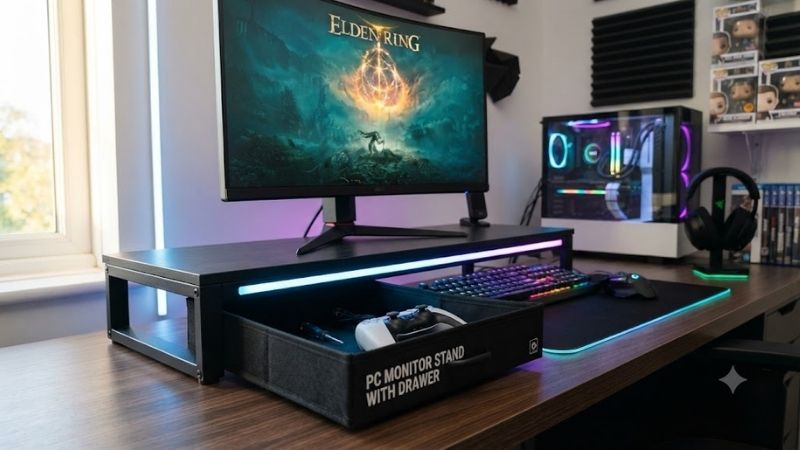
Kensington SmartFit Monitor Stand With Drawer – Best Overall
Best For: Single-monitor home offices and gaming desks that need adjustable height
The Kensington SmartFit Monitor Stand with Drawer is one of the more practical choices because it does not force you to use a single fixed monitor height. Kensington specifies three height settings of 71mm, 98mm, and 130mm, allowing the display position to be adjusted according to your desk and chair.
Its platform measures 551 × 239mm, or approximately 21.7 × 9.4 inches. Kensington rates it for one monitor up to 30 inches and up to 15kg, roughly 33 pounds, which comfortably covers many conventional office and gaming displays.
Key Features
- Three height positions
- 71mm, 98mm, and 130mm elevation
- Supports one monitor up to 30 inches
- Maximum load of 15kg
- 551 × 239mm platform
- Integrated storage drawer
- SmartFit ergonomic system
- Suitable for office or home use
What Makes It Different
Height adjustability separates Kensington from many inexpensive stands. Fixed risers commonly add four or five inches regardless of the user’s seating position. If your monitor already sits high on its factory stand, that additional height can force you to tilt your head upward.
SmartFit provides enough range to experiment with a more comfortable position. The lowest setting adds storage while making a relatively modest change to screen height, whereas the highest setting is useful when the original monitor base sits unusually low.
The drawer keeps common accessories close at hand without permanently occupying desk space. It is useful for flash drives, charging cables, portable SSDs, adapters, notebooks, pens, memory cards, and cleaning accessories.
Pros
- Adjustable height
- Useful integrated drawer
- Clearly documented load capacity
- Supports displays up to 30 inches
- Compact compared with dual-monitor shelves
- Strong ergonomic focus
- Fits many home-office desks
Cons
- Designed for one monitor
- Lower capacity than large wooden risers
- Limited room for oversized gaming-monitor feet
- More expensive than basic mesh risers
Use Case
The Kensington is particularly effective on a standard desk using a 24-inch or 27-inch monitor. It adds organization without taking over the entire back edge of the desk and allows the display height to be fine-tuned after installation.
Who It’s For
Choose Kensington if you want a drawer but care equally about monitor height. It is the strongest all-around recommendation for users with one display who do not need a 40-inch-wide shelf.
FENGE Frida F310 – Best Dual-Monitor Stand
Best For: Dual-monitor workstations, gaming setups, and wide desks
FENGE Frida F310 is designed specifically for larger setups. The manufacturer lists dimensions of approximately 42.5 × 9.2 × 5.4 inches and a total weight capacity of 99 pounds. It supports two monitors up to 27 inches each.
The storage design is more elaborate than a basic single drawer. FENGE combines two sliding drawers with a multi-zone, dual-tier layout. The company lists storage clearances of approximately 2.2 and 1.9 inches for the two levels.
Key Features
- 42.5-inch width
- Approximately 9.2-inch depth
- 5.4-inch overall height
- 99-pound load capacity
- Fits two monitors up to 27 inches
- Two integrated sliding drawers
- Two-level storage system
- Silicone anti-slip feet
- Multiple finish options
What Makes It Different
The Frida F310 turns almost the full width of a dual-monitor setup into usable storage. Instead of placing one small organizer beneath each display, the continuous platform provides a cleaner visual line and keeps both monitors at the same height.
Each drawer measures roughly 10.3 inches wide by 9.6 inches deep according to FENGE’s product information. These dimensions are useful for accessories such as tablets, power banks, small notebooks, cables, wireless earbuds, and gaming peripherals.
The open lower areas can also accommodate a keyboard or closed laptop, depending on thickness. That makes the stand useful when you want to clear the main desktop after work without moving equipment to another shelf.
Pros
- Excellent dual-monitor support
- 99-pound capacity
- Two real storage drawers
- Wide platform
- Several finish choices
- Good keyboard storage potential
- Stable anti-slip feet
- Clean desk appearance
Cons
- Requires a wide desk
- Fixed 5.4-inch height
- Heavy compared with metal mesh stands
- Overkill for a single 24-inch monitor
Use Case
Frida is particularly suited to gaming and productivity workstations using two displays. One monitor can handle the primary application or game while the second displays communication software, monitoring tools, reference material, or streaming controls.
Who It’s For
Choose Frida if your desk is at least wide enough to accommodate a 42.5-inch shelf comfortably and you want storage to span the entire monitor area.
HUANUO Dual Monitor Stand With Drawers – Best Heavy-Duty Value
Best For: Heavy monitors, large gaming displays, and users prioritizing load capacity
HUANUO’s current dual-monitor stand with drawers is rated for an impressive 132-pound load. The manufacturer lists product dimensions of 46.06 × 9.84 × 4.72 inches and a weight of approximately 13.59 pounds.
HUANUO combines a raised monitor platform with drawer storage, an open lower section for a keyboard or accessories, and cable-management space. The design is made from MDF rather than thin sheet metal, helping it support heavier equipment.
Key Features
- 46.06-inch overall width
- 9.84-inch depth
- 4.72-inch height
- 132-pound load rating
- Dual-monitor design
- Storage drawers
- Keyboard storage area
- Cable-management compartment
- MDF construction
What Makes It Different
The 132-pound rating gives the HUANUO considerably more capacity than most computer equipment will require. That additional margin is useful if you own a heavy ultrawide display, two monitors with metal bases, large speakers, or several accessories that share the platform.
Its large width also makes it flexible. Users do not have to install two monitors; a single ultrawide monitor can occupy the middle while speakers, a laptop dock, or small peripherals sit on either side.
HUANUO currently lists the model at $39.99 on its U.S. storefront, which is aggressive relative to its physical dimensions and load rating, although retail pricing can change.
Pros
- Exceptional 132-pound capacity
- Large 46-inch platform
- Suitable for dual monitors
- Open keyboard storage
- Hidden cable-management area
- Strong value
- Useful for ultrawide displays
Cons
- Very wide footprint
- Fixed height
- MDF is heavier than mesh construction
- Not ideal for small desks
- Appearance is more functional than premium
Use Case
This stand works especially well with heavy gaming equipment. It can support a large display and speakers while the keyboard slides underneath when the desk needs to be cleared.
Who It’s For
Choose HUANUO if you need maximum platform width and weight capacity for the money. Users with compact desks should consider Kensington or another smaller single-monitor riser instead.
FENGE Yugen Y310 – Best Premium Design
Best For: Minimalist desks where design quality matters alongside storage
FENGE Yugen Y310 takes a more furniture-focused approach. The stand measures 42.5 × 9.1 × 5.1 inches and supports up to 77 pounds. FENGE states that it accommodates two monitors up to 27 inches and uses beech wood, acrylic, and metal in its construction.
The storage layout uses two levels with approximately 2.2 inches and 2.1 inches of clearance. This creates usable organizer space while preserving the visual simplicity expected from a premium desk shelf.
Key Features
- 42.5-inch width
- 9.1-inch depth
- 5.1-inch height
- 77-pound maximum load
- Fits two monitors up to 27 inches
- Two-level storage
- Beech wood construction
- Acrylic details
- Metal structural components
- Approximately ten-minute assembly
What Makes It Different
Many monitor risers are clearly office accessories. The Yugen is designed to look more like part of the furniture, making it better suited to carefully designed gaming rooms, minimalist home offices, or wooden desk setups.
The 20mm board thickness also gives it a substantial appearance. It does not match HUANUO’s 132-pound rating, but 77 pounds is still more than enough for most pairs of modern monitors.
Pros
- Premium appearance
- Dual-monitor support
- 77-pound capacity
- Real wood elements
- Useful multi-level organization
- Strong fit for minimalist setups
Cons
- More expensive than basic risers
- Fixed height
- Large desk required
- Lower capacity than HUANUO
Use Case
Yugen works well when a monitor riser will remain permanently visible in a polished home-office or gaming setup. It gives peripherals a defined storage zone without introducing an industrial metal organizer into the design.
Who It’s For
Choose Yugen when aesthetic quality and desk organization are more important than obtaining the cheapest possible stand.
Kantek MS200B – Best Compact Multi-Drawer Organizer
Best For: Small office desks and users with many small accessories
The Kantek MS200B takes a more compact approach than wide FENGE and HUANUO risers. Its main attraction is multiple drawer storage, allowing small accessories to be separated rather than dropped into a single large compartment.
Current shopping results show the MS200B available through multiple retailers, with user ratings around 3.9 out of 5 across the retrieved listing. Pricing varies substantially by retailer and region. Kantek LCD Monitor Stand with Drawers MS200B
Key Features
- Compact monitor platform
- Multiple drawers
- Separate accessory compartments
- Suitable for single-monitor setups
- Desk-organizer design
- Small footprint
- Easy access to frequently used items
What Makes It Different
The Kantek is better at separating small objects than storing large equipment. One drawer can hold cables and flash drives, while another can handle pens, sticky notes, adapters, or memory cards.
This works particularly well in offices where the monitor stand doubles as the main stationery organizer. It also avoids occupying more than 40 inches of desktop width like a dual-monitor shelf.
Pros
- Multiple compartments
- Compact size
- Useful for small desks
- Keeps accessories hidden
- No separate organizer needed
Cons
- Limited space for large items
- Not appropriate for dual monitors
- Less open keyboard storage
- Weight capacity should be checked carefully for heavy displays
Use Case
Kantek is best under a standard office monitor where organization matters more than platform width. It can reduce clutter significantly without dominating the desktop.
Who It’s For
Choose this design if your desk is small and your storage needs involve many small accessories rather than keyboards, laptops, or controllers.
How to Choose a PC Monitor Stand With Drawer
Measure the Monitor Base First
Do not rely only on screen size. Two 27-inch monitors can use completely different stand designs. One may have a compact rectangular foot while another uses wide V-shaped legs that extend nearly the full width of the display.
Measure the width and depth of the physical base before ordering. The entire contact surface should rest securely on the riser.
Check Total Weight
Monitor stands should provide a comfortable safety margin above the actual equipment weight. Kensington supports approximately 33 pounds, FENGE F310 supports 99 pounds, Yugen supports 77 pounds, and the HUANUO stand is rated for 132 pounds.
Remember to include speakers, webcams, lamps, docks, and other equipment placed on the platform when calculating the total.
Choose the Right Height
A monitor riser should improve posture rather than simply lift the screen as high as possible. If your monitor already has an adjustable factory stand, a five-inch riser could place it unnecessarily high.
Kensington’s three-height system is useful in uncertain situations. Fixed-height FENGE and HUANUO stands are more appropriate when you already know approximately how much elevation you need.
Consider Drawer Size
A shallow drawer may look useful in marketing images but fail to hold the equipment you actually own. Before purchasing, decide whether you want to store pens and cables or larger devices such as tablets and power banks.
FENGE’s F310 drawers are approximately 10.3 by 9.6 inches, giving them considerably more usable area than typical pen trays.
Think About Keyboard Storage
Open space below the platform can be more valuable than another drawer. Sliding the keyboard underneath at the end of the day can instantly free enough room for writing, studying, or other tasks.
Mechanical keyboard users should measure the keyboard’s height carefully. FENGE lists only 1.9 inches of clearance in part of the F310 storage area, so very tall keyboards may not fit every section.
Single vs Dual Monitor Stand
A single-monitor riser is usually the smarter choice on desks below approximately 48 inches wide. It leaves free space for speakers, microphone arms, lights, or other equipment.
Dual-monitor platforms around 42–46 inches are better on larger desks. Their advantage is a continuous surface that keeps two displays aligned while creating a long storage area underneath.
Monitor Stand vs Monitor Arm
A monitor arm provides superior adjustment because it lets you change height, tilt, swivel, rotation, and viewing distance independently. It also removes the factory monitor stand from the desktop.
A riser wins on simplicity and storage. There is no VESA installation or clamp, and the drawer becomes useful immediately.
Users primarily concerned about ergonomics should favor an arm or an adjustable riser. Users primarily concerned about clutter may get more practical value from a drawer-equipped shelf.
Best Choice for Gaming
For one gaming monitor, Kensington offers enough adjustment for a comfortable screen position without occupying an entire desk.
For a two-monitor gaming setup, FENGE Frida provides the best blend of storage and presentation. HUANUO becomes more attractive for heavy ultrawides or equipment-intensive streaming setups because of its 132-pound rating.
Controllers, capture accessories, external SSDs, charging cables, and audio devices can then be stored beneath the screens instead of competing with the mouse pad.
FAQ
Is a PC Monitor Stand With Drawer Worth It?
Yes, particularly when desk space is limited. It raises the monitor while creating storage inside an area already occupied by the display, making it more space-efficient than adding another organizer beside the computer.
How High Should a Monitor Stand Be?
There is no universal height. Your display should sit comfortably relative to your natural seated eye position. Adjustable models are safer if you are uncertain because they allow the final screen position to be changed after installation.
Can a Monitor Stand Hold Two Screens?
Yes, but only if its width and weight capacity are appropriate. FENGE Frida supports two monitors up to 27 inches each, while HUANUO provides an even wider 46.06-inch platform.
Can I Put an Ultrawide Monitor on a Riser?
Yes, if the monitor base fits completely on the platform and the total weight remains below the rating. Wide HUANUO and FENGE models are particularly suitable for large monitor bases.
Are Wooden or Metal Monitor Stands Better?
Neither material is automatically better. Metal stands are generally lighter and easier to move, while wooden or MDF platforms can provide more width and furniture-style aesthetics. Weight ratings and construction quality matter more than material alone.
What Can I Store in the Drawer?
Useful items include charging cables, USB drives, portable SSDs, memory cards, controllers, adapters, pens, headphones accessories, cleaning cloths, and small notebooks.
Conclusion
The best PC monitor stand with drawer depends on desk width, monitor weight, and storage needs. Kensington SmartFit leads for adjustable single-monitor setups, FENGE Frida F310 is ideal for two displays, HUANUO offers exceptional heavy-duty value, while FENGE Yugen and Kantek suit premium or compact workspaces.
Ready to decide? Our #1 pick for 2026 is the Monitor Stand.
Live price & availability on Amazon.