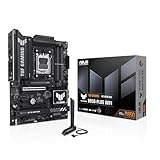
🛒 Best Price Today on Amazon
Prime members get fast, free shipping on everything above, plus member-only deals. New members get a 30-day free trial — cancel anytime.
- Best Micro ATX Motherboards for Gaming Compared
- MSI MAG B850M Mortar WiFi
- ASUS TUF Gaming B850M-Plus WiFi
- Gigabyte B850M Aorus Elite WiFi6E ICE
- MSI MAG B860M Mortar WiFi
- ASUS TUF Gaming B860M-Plus WiFi
- AMD B850 vs Intel B860 for Micro ATX Gaming
- How to Choose the Best Micro ATX Motherboard for Gaming
- FAQ
- Conclusion
Finding the best micro ATX motherboard for gaming means balancing CPU compatibility, PCIe support, storage, networking, and expansion in a compact platform. This guide compares strong AMD AM5 and Intel LGA1851 options to help you choose the right board for performance, upgrades, connectivity, and overall gaming needs.
Quick answer: For most people in 2026, the best micro atx motherboard for gaming is the Motherboard — our #1 rated choice. See the full ranked comparison, alternatives and buying advice below.
Best Micro ATX Motherboards for Gaming Compared
| Motherboard | Platform | Best For | Networking | M.2 Slots |
|---|---|---|---|---|
| MSI MAG B850M Mortar WiFi | AMD AM5 | Feature-rich Ryzen builds | 5GbE, Wi-Fi 7 | 3 |
| ASUS TUF Gaming B850M-Plus WiFi | AMD AM5 | Balanced connectivity | 2.5GbE, Wi-Fi 6E | 3 |
| Gigabyte B850M Aorus Elite WiFi6E ICE | AMD AM5 | White gaming builds | 2.5GbE, Wi-Fi 6E | 2 |
| MSI MAG B860M Mortar WiFi | Intel LGA1851 | Premium Intel builds | 5GbE, Wi-Fi 7 | 3 |
| ASUS TUF Gaming B860M-Plus WiFi | Intel LGA1851 | Balanced Intel builds | 2.5GbE, Wi-Fi 7 | 3 |
MSI MAG B850M Mortar WiFi
Best For: Feature-heavy AM5 gaming builds
Key Features: PCIe 5.0 x16, three M.2 slots, 5GbE, Wi-Fi 7
What Makes It Different: Two PCIe 5.0 x4 M.2 slots with supported Ryzen CPUs
Pros: Fast LAN; strong storage; extensive I/O
Cons: More hardware than basic builds need
Use Case: High-end compact Ryzen gaming PC
Who It’s For: Multi-SSD and multi-gig networking users
The MSI MAG B850M Mortar WiFi is the most feature-dense AMD option here for gamers building around Ryzen 7000, 8000, or 9000 processors. It combines a PCIe 5.0 x16 graphics slot, three M.2 sockets, 5Gb Ethernet, Wi-Fi 7, and a strong rear I/O layout in a square micro ATX format that suits compact high-end gaming systems.
Its storage layout is especially useful for a high-end compact system. Two M.2 slots can run at PCIe 5.0 x4 with supported Ryzen 7000 or 9000 CPUs, while the third runs from the chipset. That gives builders room for a fast OS drive, a dedicated game library, and another SSD without relying on SATA cabling.
The networking setup also separates it from many mainstream micro ATX boards. Realtek 5Gb Ethernet gives wired users more headroom than common 2.5Gb ports, while Wi-Fi 7 supports modern wireless networks. The limitation is simple: you only benefit from those faster standards if your router, switch, and internet setup can use them.
This board fits gamers who want an AM5 platform with fewer compromises in connectivity and storage. It makes the most sense in a powerful Ryzen build where several NVMe drives, fast LAN, and rear USB matter more than minimizing motherboard cost. For a basic single-SSD gaming PC, much of that capability may remain unused.
ASUS TUF Gaming B850M-Plus WiFi
Best For: Balanced AM5 gaming systems
Key Features: PCIe 5.0 x16, three M.2 slots, 2.5GbE, Wi-Fi 6E, 12 rear USB ports
What Makes It Different: Exceptionally broad rear USB connectivity
Pros: Many USB ports; flexible storage
Cons: No 5GbE or Wi-Fi 7
Use Case: Peripheral-heavy Ryzen setup
Who It’s For: Gamers wanting useful features without excess
The ASUS TUF Gaming B850M-Plus WiFi takes a more balanced approach for AM5 gaming. It supports Ryzen 7000, 8000, and 9000 processors, four DDR5 DIMM slots, a PCIe 5.0 x16 slot with Ryzen 7000 or 9000 CPUs, three M.2 sockets, 2.5Gb Ethernet, and Wi-Fi 6E without pushing every interface to the newest tier.
Its biggest practical strength is I/O flexibility. ASUS lists twelve rear USB ports, including a 20Gbps USB-C connection, plus internal headers for front USB-C and additional Type-A ports. That matters for gamers using controllers, wireless dongles, headsets, capture gear, external storage, and charging cables at the same desk.
Compared with the MSI B850M Mortar, this model gives up 5Gb LAN and Wi-Fi 7, but those differences may not affect gaming performance at all. If your network is already 1Gb or 2.5Gb and you use a Wi-Fi 6E router, the TUF board still covers the connections most gaming systems need while keeping the feature mix focused.
Choose it for a Ryzen gaming build where broad USB support and straightforward expansion are more important than premium networking. It is also easy to justify in a system that may add more storage later because three M.2 slots and four SATA ports provide several upgrade paths without turning a compact case into a cable-management problem.
Gigabyte B850M Aorus Elite WiFi6E ICE
Best For: White AM5 gaming builds
Key Features: PCIe 5.0 x16 with supported CPUs, two M.2 slots, 2.5GbE, Wi-Fi 6E
What Makes It Different: White and silver ICE styling
Pros: Distinct appearance; modern AM5 support
Cons: Only two M.2 sockets
Use Case: Showcase micro ATX gaming PC
Who It’s For: Gamers prioritizing a coordinated white build
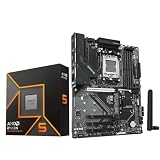
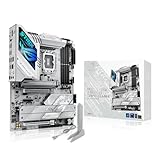
The Gigabyte B850M Aorus Elite WiFi6E ICE is the style-focused AMD pick in this group. Its white and silver ICE design is made for bright cases and light-colored components, while the core platform remains serious: AM5 support, four DDR5 slots, B850 features, PCIe expansion, integrated wireless networking, and multiple storage options.
For gaming, the main advantage is that you can build a visually consistent white micro ATX system without moving to a larger ATX board. That sounds cosmetic, but case size and component color often drive real purchasing decisions in showcase builds. The trade-off is that appearance should never override CPU, storage, and I/O requirements.
Gigabyte supports Ryzen 7000, 8000, and 9000 series processors on this board and lists DDR5 support with both AMD EXPO and Intel XMP memory profiles. That gives buyers broad memory-kit flexibility, although achievable memory speed still depends on the processor, DIMM layout, BIOS, and specific memory kit used in the final system.
This model is best for gamers who want AM5 in a white or silver build and still expect modern connectivity. It is less compelling if the case has no side window or if color is irrelevant, because the visual premium becomes harder to justify. In that situation, compare its exact ports and storage layout against the Mortar and TUF first.
MSI MAG B860M Mortar WiFi
Best For: Premium Intel LGA1851 gaming
Key Features: Three M.2 slots, PCIe 5.0 x4 SSD support, 5GbE, Wi-Fi 7, Thunderbolt 4
What Makes It Different: 5Gb networking plus Thunderbolt 4
Pros: Rich connectivity; fast wired networking
Cons: LGA1851 only
Use Case: High-spec Core Ultra gaming build
Who It’s For: Intel users with demanding peripherals
The MSI MAG B860M Mortar WiFi is the Intel counterpart for builders choosing Core Ultra Series 2 processors on LGA1851. It uses DDR5 memory, supports high memory overclocking profiles, and targets compact gaming systems that still need strong wired networking, modern wireless connectivity, and several high-speed storage connections.
Its appeal is not that B860 makes games faster by itself; the value comes from platform features around the CPU and GPU. A well-equipped micro ATX board can reduce the need for add-in cards, which matters because compact systems have fewer expansion slots. Integrated networking and storage therefore carry more weight than on full ATX.
For Intel buyers, the most important limitation is platform compatibility. This board supports LGA1851 Core Ultra Series 2 processors, not older LGA1700 chips such as 12th, 13th, or 14th Gen Core desktop CPUs. Reusing an existing Intel processor is therefore not an option, so budget for the CPU and possibly new cooling hardware together.
Pick the B860M Mortar WiFi when you are starting a new Intel compact gaming build and want a motherboard with premium connectivity rather than the cheapest route into LGA1851. It suits users with several fast peripherals or network storage especially well. Buyers with simpler needs can save money by choosing a less feature-heavy B860 board.
ASUS TUF Gaming B860M-Plus WiFi
Best For: Balanced Intel gaming builds
Key Features: PCIe 5.0 x16, three M.2 slots, 2.5GbE, Wi-Fi 7, 20Gbps rear USB-C
What Makes It Different: Balanced storage and I/O
Pros: Three M.2 slots; Wi-Fi 7
Cons: LGA1851 platform only
Use Case: Compact Core Ultra gaming system
Who It’s For: Intel gamers wanting sensible expansion
The ASUS TUF Gaming B860M-Plus WiFi is the more balanced Intel option in this list. It supports Core Ultra Series 2 processors, provides a PCIe 5.0 x16 graphics slot, three M.2 sockets including one PCIe 5.0 x4 slot, four SATA ports, 2.5Gb Ethernet, Wi-Fi 7, and a practical mix of rear and internal USB connections.
The storage configuration is useful for gamers who expect a library to grow over time. A PCIe 5.0 M.2 slot can host a current high-end SSD, while two PCIe 4.0 M.2 slots can hold additional game drives. In real gaming use, capacity and sustained reliability often matter more than chasing the highest sequential SSD specification.
Wi-Fi 7 is another future-facing feature, but it should not drive the purchase alone. ASUS notes that full Wi-Fi 7 functionality depends on Windows 11 24H2 or later and local wireless regulations. If you game over Ethernet, the integrated 2.5Gb port may matter more because it offers a simple, stable wired connection without an add-in card.
This board makes sense for Intel gamers who want a clean feature set without stepping up to a larger ATX platform. It is particularly well matched to a compact case with one graphics card, several NVMe drives, and multiple USB peripherals. The main constraint is the same as every B860 option here: LGA1851 CPU compatibility only.
AMD B850 vs Intel B860 for Micro ATX Gaming
The AMD boards have one major strategic advantage for upgraders: they all use socket AM5 and support several Ryzen generations, although exact CPU support can depend on BIOS version. The Intel B860 boards are tied to LGA1851 Core Ultra Series 2. That does not make one platform universally better, but it changes future CPU planning.
For raw motherboard features, the MSI B850M Mortar stands out with 5Gb Ethernet and two CPU-linked PCIe 5.0 M.2 slots on supported Ryzen processors. The ASUS TUF B850M-Plus counters with twelve rear USB ports. The Gigabyte ICE model emphasizes white-build aesthetics, while the B860 boards serve buyers committed to Intel LGA1851.
How to Choose the Best Micro ATX Motherboard for Gaming
Choose the Correct CPU Socket First
Start with socket compatibility before comparing anything else. Ryzen 7000, 8000, and 9000 desktop chips use AM5, so they belong with B850 boards in this roundup. Intel Core Ultra Series 2 desktop processors use LGA1851 and belong with B860. A motherboard with better ports is useless if it cannot accept the processor you plan to install.
Count the M.2 Slots You Actually Need
Next, count the storage devices you expect to use over the next few years. One M.2 slot is enough for a simple gaming build, but two or three slots give you room to expand without replacing the original SSD. PCIe 5.0 support can be attractive for premium drives, yet PCIe 4.0 SSDs are still highly capable for game libraries and general use.
Check GPU Lane Configuration
Check the graphics slot configuration with the exact CPU family, not only the chipset name. On some AM5 boards, Ryzen 8000 series processors can change the lane width or PCIe generation available to the main slot. The GPU still fits physically, but the electrical link may differ, so CPU-specific motherboard documentation matters before you buy.
Match Networking to Your Home Network
Networking should match your actual home setup. A 5Gb Ethernet port is useful when your switch, NAS, or internet service supports multi-gig speeds, while 2.5Gb Ethernet is already more than enough for many households. Wi-Fi 7 can improve wireless capability on compatible networks, but Wi-Fi 6E remains practical for gaming and everyday transfers.
Do Not Underestimate USB Connectivity
Rear USB count is easy to underestimate on a gaming PC. A keyboard, mouse, headset, controller, microphone, webcam, Bluetooth adapter, capture device, DAC, and external SSD can fill a rear panel quickly. If you use many accessories, a board with more native USB ports can be more valuable than an extra expansion slot you may never populate.
Choose DDR5 for Compatibility, Not Marketing Numbers
Memory support should be judged by compatibility, not the highest advertised overclocked number. Four DIMM slots offer capacity flexibility, but running four modules can reduce achievable memory speeds compared with two modules. For a new gaming build, choose a validated DDR5 kit first, then enable the appropriate EXPO or XMP profile in BIOS.
Consider Case and Cooler Clearance
Do not overlook case and cooler clearance simply because micro ATX is standardized. The board will fit a micro ATX-compatible case, but a thick graphics card can block lower expansion slots and make front-panel cables harder to route. Large tower coolers can also crowd memory or top-mounted radiators, so plan the entire component layout together.
Pay Only for Features You Will Use
Finally, buy motherboard features you will actually use. Premium LAN, extra M.2 slots, high-speed USB-C, optical audio, and diagnostic buttons are worthwhile when they solve a real need. If your gaming PC has one GPU, one SSD, Ethernet, and a few USB devices, a simpler board can deliver the same in-game frame rates with less unused hardware.
FAQ
Is Micro ATX Good for Gaming?
Micro ATX does not reduce gaming performance simply because the board is smaller. With the same compatible CPU, GPU, memory, and power settings, frame rates are determined mainly by those components. The format mostly changes expansion capacity, connector placement, and case options rather than the speed of the graphics card or processor.
Is Micro ATX Enough for a High-End Gaming PC?
For a single-GPU gaming PC, micro ATX is usually enough. Modern boards can provide four memory slots, several M.2 sockets, integrated Ethernet, Wi-Fi, and a full-length graphics slot. Full ATX becomes more useful when you need several add-in cards, more physical spacing, or a larger number of expansion slots for specialized hardware.
Is B850 Worth Choosing for an AM5 Gaming Build?
B850 is a strong match for current AM5 gaming builds because it supports modern Ryzen desktop processors and current storage and connectivity features. The exact value depends on the board, though. A capable B650 model can still work well, so compare ports, slots, BIOS support, and price rather than choosing by chipset name alone.
Is B860 Good for Gaming?
B860 is appropriate for gaming when you are using an Intel Core Ultra Series 2 desktop processor and do not need the higher-end feature set of a more expensive Intel chipset. It still supports discrete graphics, DDR5 memory, NVMe storage, and modern networking, but the exact expansion and overclocking options depend on the board and platform.
Do I Need Wi-Fi 7 on a Gaming Motherboard?
Wi-Fi 7 is not required for online gaming. Stable latency, signal quality, router placement, and internet service often matter more than the wireless standard printed on the box. If your router is Wi-Fi 6E or older, a Wi-Fi 7 motherboard still works with compatible earlier standards, but you will not receive every Wi-Fi 7 benefit.
Are Three M.2 Slots Enough for Gaming?
Three M.2 slots are enough for most gaming systems because they allow separate drives for Windows, games, and extra storage without SATA cables. Heavy creators or users with huge local libraries may want more, but many gamers will never fill all three. Check lane sharing and CPU-specific limits before assuming every slot runs at full speed.
Conclusion
The best micro ATX motherboard for gaming depends first on your CPU platform, then on storage, networking, USB needs, and case design. MSI’s B850M Mortar suits feature-heavy AM5 builds, ASUS offers balanced AMD and Intel options, Gigabyte serves white AM5 systems, and MSI’s B860M Mortar targets premium LGA1851 builds.
Ready to decide? Our #1 pick for 2026 is the Motherboard.
Live price & availability on Amazon.