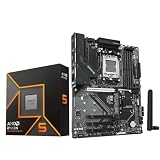
- Top Pick: ASUS TUF Gaming B850-PLUS WiFi AMD AM5 B850 ATX Motherboard, 14+2+1 80A Stages, AI Ready, DDR5, PCIe 5.0, 3X M.2, Wi-Fi 7, 2.5Gb LAN, DisplayPort, HDMI™, USB 10Gbps & 20Gbps Type-C®, BIOS Flashback™
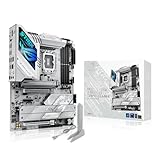
- Best Value: ASUS ROG Strix X870E-E Gaming WiFi AMD AM5 X870 ATX Motherboard 18+2+2 Power Stages, Dynamic OC Switcher, Core Flex, DDR5 AEMP, WiFi 7, 5X M.2, PCIe® 5.0, Q-Release Slim, USB4®, AI OCing & Networking
- Premium Choice: ASUS ROG Strix B650-A Gaming WiFi AMD B650 AM5 Ryzen™ Desktop 9000 8000 & 7000 ATX motherboard, 12 + 2 power stages, DDR5, 3x M.2 slot, PCIe® 4.0, 2.5G LAN, WiFi 6E, USB 3.2 Gen 2×2 Type-C®, Aura Sync
The motherboard is the foundation every other component plugs into, and for AMD’s latest Ryzen chips that foundation is the AM5 socket. Choosing the right AM5 board decides your memory speed, your storage expansion, your connectivity, and how much overclocking headroom you have. Get it right and your build is stable and upgradeable for years; get it wrong and you leave performance on the table.
- Watch: Best Am5 Motherboard For Gaming — Video Review
- How to Choose an AM5 Gaming Motherboard
- The Best AM5 Gaming Motherboards Reviewed
- What to Look For in an AM5 Board
- Which One Should You Buy?
- Common Mistakes When Buying an AM5 Motherboard
- A Quick Build Check Before You Order
- Related Guides
- Frequently Asked Questions
- Final Thoughts
- Related Articles
AM5 spans several chipsets, from budget-friendly B650 to feature-packed X870E, each with different power delivery, PCIe, and I/O. We compared the leading gaming boards on VRM quality, connectivity, and value so you can match a motherboard to your CPU and ambitions without overspending on features you will never use.



As an Amazon Associate we earn from qualifying purchases at no extra cost to you.


🎮 Get More From Your Setup — Free
Prime Gaming gives you free PC games every month, in-game loot, and a free Twitch channel sub — plus fast free shipping on all the gear above. New members get a 30-day free trial.
Watch: Best Am5 Motherboard For Gaming — Video Review
How to Choose an AM5 Gaming Motherboard
- Chipset tier: B650 covers most gamers affordably, B850 adds features, and X870/X870E bring the most connectivity and overclocking support.
- VRM and power stages: More and higher-amperage power stages keep high-end Ryzen chips stable and cool under load.
- Memory support: All AM5 boards use DDR5; look for high EXPO/AEMP speeds if you want to push memory performance.
- M.2 and PCIe: Count the M.2 slots and confirm PCIe 5.0 support if you plan on the fastest GPUs and SSDs.
- Connectivity: Wi-Fi 7, 2.5Gb LAN, and USB4 or 20Gbps Type-C future-proof your build for fast networking and peripherals.
The Best AM5 Gaming Motherboards Reviewed
ASUS ROG Strix X870E-E Gaming WiFi
A flagship with 18+2+2 power stages, five M.2 slots, Wi-Fi 7, USB4, and dynamic OC switching. The top pick for enthusiasts building a no-compromise Ryzen rig.
ASUS TUF Gaming X870-PLUS WiFi
A well-rounded X870 board with 16+2+1 power stages, four M.2 slots, Wi-Fi 7, and USB4 40Gbps. Excellent features and durability at a more sensible price.
ASUS TUF Gaming B850-PLUS WiFi
An AI-ready B850 board with 14+2+1 power stages, triple M.2, PCIe 5.0, and Wi-Fi 7. A strong mainstream choice that balances features and value.
ASUS ROG Strix B650-A Gaming WiFi
A capable B650 board with 12+2 power stages, three M.2 slots, and Wi-Fi 6E. A reliable, cost-effective foundation for mid-range and high-end gaming builds.
ASUS ROG Strix B850-F Gaming WiFi
A feature-rich B850 board with 16+2+2 power stages, four M.2 slots, Wi-Fi 7, and extensive USB support. A great blend of premium features and B-series pricing.
What to Look For in an AM5 Board
Chipset Tier Decides the Expansion Ceiling
AM5 boards share one socket and DDR5 memory, so the chipset letter and number mostly decide what else you get. X870E and X870 sit at the top: AMD’s platform requirements for these chipsets include USB4 and PCIe 5.0 for at least the primary NVMe storage connection, and the E tier adds PCIe 5.0 for the graphics slot as well. B850 and B650 sit below, trimming lane counts and mandatory features. If you run one graphics card and one or two SSDs, a B-series board gives up very little in everyday frame rates.
Memory: Aim for the DDR5-6000 Sweet Spot
Ryzen 7000 and 9000 chips officially list lower DDR5 speeds than most enthusiast kits advertise, and the extra speed comes through EXPO profiles. Owners and review writers commonly point to DDR5-6000 as the practical target because it lets the memory controller and fabric clocks stay in a one-to-one relationship. Faster kits often fall back to a slower ratio and can lose the benefit. Two DIMMs are usually easier to run at rated speed than four, so choose a board with a QVL that lists your kit, and expect a long first boot while memory training runs.
Power Delivery and Cooling
Spec sheets quote phase counts and amp ratings, such as the 16+2+1 layout and 80A power stages named in the ASUS TUF Gaming X870-PLUS WiFi listing. Treat these as capacity ceilings rather than performance numbers. A Ryzen 5 or Ryzen 7 at stock settings sits comfortably within a mid-range B650 board, while a 16-core chip held at its full power limit for hours benefits from heavier VRM heatsinks and a better-ventilated layout.
BIOS Support for Newer Ryzen Chips
Early B650 boards shipped before Ryzen 9000 existed. Some need a BIOS update before a newer processor will post, and a few lack a CPU-free update path. Look for a BIOS Flashback button, which updates the firmware from a USB stick with no processor installed, and confirm the BIOS version printed on the listing or box.
Which One Should You Buy?
| If you… | Choose… |
|---|---|
| Want the full feature set, with PCIe 5.0 for both graphics and storage plus USB4 | ASUS ROG Strix X870E-E Gaming WiFi |
| Want X870-class connectivity without the top-tier cost | ASUS ROG Strix X870-A Gaming WiFi or ASUS TUF Gaming X870-PLUS WiFi |
| Want a newer mid-range chipset for a Ryzen 9000 build | ASUS TUF Gaming B850-PLUS WiFi |
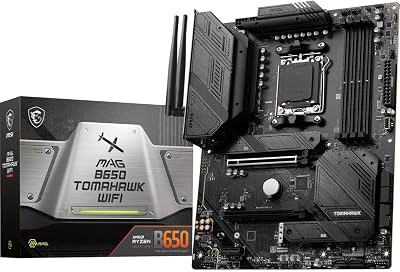
| Plan a high-core-count chip and want a board positioned around cooling and power delivery | MSI MAG B650 Tomahawk WiFi |
| Are building a sensible one-GPU, one-SSD gaming PC at the lowest outlay | MSI B650 Gaming Plus WiFi or ASUS TUF Gaming B650-PLUS WiFi |
| Prefer a styled ROG board on the B650 chipset | ASUS ROG Strix B650-A Gaming WiFi |
Common Mistakes When Buying an AM5 Motherboard
- Paying for PCIe 5.0 you cannot use. Current graphics cards rarely saturate a PCIe 4.0 x16 link, and PCIe 5.0 SSDs run hotter, so confirm you will actually fill the slot before choosing the premium chipset.
- Ignoring BIOS version. A listing that says “supports Ryzen 9000” may still ship with older firmware, so plan for Flashback or an older processor to update it.
- Counting only the M.2 slot total. Some boards share bandwidth between an M.2 slot and SATA ports or a second PCIe slot. Read the manual’s lane-sharing notes.
- Skipping the form factor check. The boards above are ATX, which needs a matching case with enough standoffs and room for the rear-panel I/O.
- Forgetting wireless is part of the board. WiFi 6E or WiFi 7 depends on the module fitted, so verify the standard if you rely on wireless.
A Quick Build Check Before You Order
Write down three items before buying: the processor you plan to install, the memory kit and its rated speed, and the number of M.2 drives you will fit now. Then confirm that the board lists the processor in its support table, that the kit appears in the memory qualified vendor list or at least uses a common two-module layout, and that the M.2 slots do not disable SATA ports you need. Five minutes with the manual specification page prevents most return headaches.
Related Guides
Frequently Asked Questions
Do I need X870 or is B650 enough?
For most gamers B650 is plenty. Step up to B850 or X870 only if you want more M.2 slots, USB4, or heavier overclocking headroom.
Does the motherboard affect gaming FPS?
Directly, very little, as long as it delivers stable power. It matters more for memory speed, connectivity, and upgrade potential.
Is Wi-Fi 7 worth it?
If you have a compatible router, yes, for faster and more stable wireless. Otherwise Wi-Fi 6E boards remain perfectly capable.
Will an AM5 board support future Ryzen chips?
AMD has committed to AM5 longevity, so a quality board is a good long-term investment with BIOS updates for newer CPUs.
Final Thoughts
The ASUS ROG Strix X870E-E is the enthusiast’s top choice for its power delivery and connectivity, while the TUF Gaming B850-PLUS offers the best balance for mainstream gamers. Budget-focused builders should look hard at the ROG Strix B650-A for its solid value.
Top picks from this guide
 ASUSASUS ROG Strix B850-A Gaming WiFi AMD AM5 B850 ATX…$197 \xc2\xb7 99/100
 ASUSASUS TUF Gaming B850-PLUS WiFi AMD AM5 B850 ATX Motherboard,…$182 \xc2\xb7 98/100
 ASUSASUS TUF Gaming B650-PLUS WiFi Motherboard Socket AMD AM5 (Ryzen…$169 \xc2\xb7 98/100
 msiMSI MAG B650 Tomahawk WiFi Gaming Motherboard (AMD Ryzen 9000/8000/7000…$155 \xc2\xb7 97/100