GPU Benchmark Hierarchy charts clarify complex GPU specs when endless product variants confuse PC builders. Buyers struggle with inflated prices, misleading clock speeds, and mismatched power supplies. This clear guide solves your shopping dilemma by ranking genuine frame rates, cooler quality, and real value so you buy the right GPU.
How to Choose the Best Graphics Card
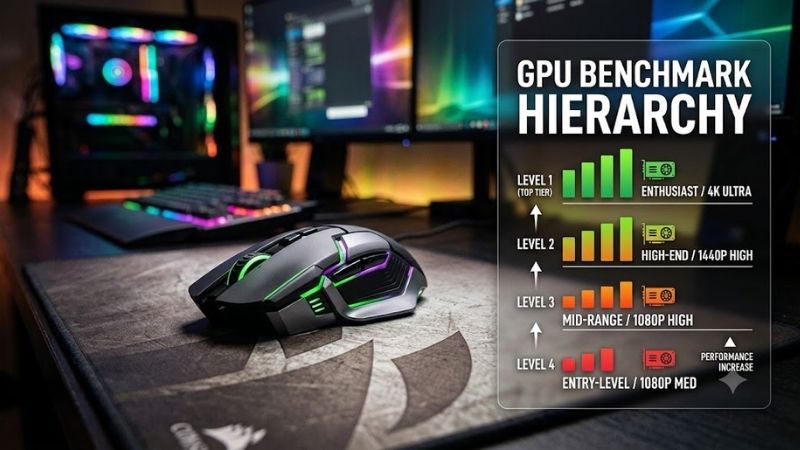
Selecting the right graphics hardware demands systematic evaluation rather than following marketing hype blindly. Our GPU benchmark hierarchy reveals that smart component pairing matters just as much as peak processing power. Understanding core technical criteria prevents buyer regret and ensures your next desktop upgrade runs smoothly.
Thermal Management and Heatsink Construction
Modern high performance graphics processors produce heavy thermal loads during sustained gaming marathons. Superior heatsink engineering employs thick copper vapor chambers, dense aluminum fin stacks, and triple axial fans that dissipate heat rapidly to keep core temperatures well below critical factory throttling thresholds.
Substandard thermal engineering triggers persistent frequency throttling that degrades overall visual smoothness. Enthusiast builders should inspect thermal pad coverage over volatile voltage regulator modules and video memory chips. Solid backplates with passive ventilation cutouts further reduce trapped hot air inside modern desktop chassis.
Power Supply Capacity and Connector Safety
Modern computational graphics architectures generate sudden transient power spikes during demanding gaming sequences. These brief electrical surges easily overwhelm budget power supplies, causing frustrating system reboots and potential hardware failures. Premium systems demand ATX 3.0 power supplies with dedicated high wattage wiring.
Investing in a native 12V-2×6 power connection eliminates risky split adapter cables inside cramped desktop cases. Ensuring a minimum headroom of two hundred watts above total system draw guarantees optimal operating efficiency and whisper quiet fan profiles. Quality Japanese capacitors safeguard expensive graphics silicon across many years.
Chassis Dimensions and Expansion Slot Clearance
Flagship graphic cards now feature massive physical proportions that consume three or four motherboard expansion slots. Builders must verify internal case clearances, front radiator thickness, and vertical support clearance before ordering parts. Inadequate space restricts essential intake airflow and produces elevated acoustic turbulence.
Our GPU benchmark hierarchy evaluations confirm that cramped cases degrade sustained boost clocks across extended rendering sessions. Providing at least two inches of space between card fans and glass side panels preserves healthy convection currents. Heavy cards also require rigid anti-sag brackets to shield delicate motherboard PCIe slots.
Memory Bandwidth and Dedicated Video Buffer
Visual resolution scaling places tremendous pressure on onboard video memory capacity and overall bus bandwidth. High refresh rate 4K gaming and generative rendering tools routinely consume more than sixteen gigabytes of video memory. Selecting insufficient memory capacity causes severe texture pop-in and abrupt stutter during gameplay.
A wide memory bus paired with modern GDDR6X modules ensures ultra fast asset streaming during open world gaming sessions. Enthusiasts who balance raw core frequency against memory throughput achieve balanced performance without wasting funds. Prioritizing ample buffer space extends operational life before future titles demand lower settings.
Top Picks for Every Gamer and Creator
Discovering the ideal graphics model requires balancing raw benchmark performance, thermal noise, and hardware pricing. We evaluated leading desktop partner cards across various gaming categories to identify outstanding market choices. Review the detailed comparative table below to find the perfect model tailored to your personal gaming budget.
| Model | Target Audience | Cooling Design | Slot Width | Key Advantage |
|---|---|---|---|---|
| ASUS ROG Strix RTX 4090 OC | Extreme Enthusiasts | Triple Axial Vapor | 3.5 Slots | Maximum Clock Speeds |
| MSI Gaming X Slim RTX 4070 Ti Super | Compact Mid-Tower Gamers | Tri Frozr 3 Air | 2.5 Slots | Slim Case Compatibility |
| Sapphire Nitro Plus RX 7900 XTX | High-Resolution Gamers | Vapor-X Triple Fan | 3.2 Slots | Massive 24GB VRAM Pool |
| XFX Speedster QICK 319 RX 7800 XT | Value 1440p Players | Triple Fan Airflow | 2.5 Slots | Exceptional Price-to-Performance |
ASUS ROG Strix GeForce RTX 4090 OC
The ASUS ROG Strix GeForce RTX 4090 OC is built for competitive enthusiasts and content professionals who accept no compromises. Utilizing a massive vapor chamber alongside reinforced aluminum shrouds, this flagship beast maintains ultra low operating temperatures even when running heavy 4K path tracing pipelines at unrestricted frame rates.
This premium card delivers class leading boost clocks right out of the box and features dual BIOS switching for silent operation. However, its immense physical weight demands an integrated anti-sag bracket, and the steep price tag limits its appeal to elite workstations. It stands as an unrivaled apex performer for dedicated showcase builds.
MSI Gaming X Slim GeForce RTX 4070 Ti Super
The MSI Gaming X Slim GeForce RTX 4070 Ti Super targets discerning gamers who want upper tier performance without sacrificing case compatibility. Its refined cooling layout shrinks overall card thickness without compromising heat dissipation, making it an excellent selection for standard mid-tower enclosures and tight multi-card layouts.
Our GPU benchmark hierarchy places this graphics card in the sweet spot for fluid 1440p and entry 4K gaming with full DLSS support. The refined fan curves provide whisper quiet operation under load, though aggressive manual overclocking headroom remains modest compared to heavier three slot designs. It represents fantastic everyday desktop value.
Sapphire Nitro Plus Radeon RX 7900 XTX
The Sapphire Nitro Plus Radeon RX 7900 XTX serves hardcore enthusiasts who prioritize raw rasterization horsepower and expansive memory buffers. Equipped with an innovative Vapor-X cooling chamber and striking ARGB lightbars, this flagship GPU tears through high resolution modern titles with exceptional visual fidelity and smooth framerates.
Featuring twenty four gigabytes of fast video memory, this card easily outlasts competitors when handling heavily modded gaming titles. Its primary drawback involves higher total board power draw and slower ray tracing throughput compared to rival architectures. It remains a premier choice for pure rasterization performance and open world longevity.
XFX Speedster QICK 319 Radeon RX 7800 XT
The XFX Speedster QICK 319 Radeon RX 7800 XT delivers outstanding high refresh 1440p gaming value without unnecessary aesthetic premiums. Its sleek industrial black shroud houses an efficient triple fan heatsink that expels thermal energy quickly while maintaining comfortable acoustic levels during extended weekend multiplayer gaming sessions.
Positioned prominently across our GPU benchmark hierarchy, this model offers generous memory capacity that easily outperforms entry alternatives. While the lengthy chassis requires careful measurement in smaller cases, the accessible price and robust construction make it an irresistible choice for mainstream PC builders seeking high frame rates.
Frequently Asked Questions About GPU Performance
Interpreting graphics rankings frequently raises practical compatibility and hardware scaling questions for desktop PC builders. Comparing our GPU benchmark hierarchy against individual system configurations helps eliminate performance bottlenecks before you purchase. Read our answers below to resolve common questions regarding GPU capability.
How Does Resolution Impact Overall Benchmark Positioning?
Target display resolution fundamentally dictates whether graphics rendering workloads become compute bound or processor bound. Rendering gameplay at standard 1080p relies heavily on central processor IPC speeds, often compressing score margins between high tier cards. At 4K resolution, the graphics silicon handles almost all rendering workloads.
Consulting a dedicated GPU benchmark hierarchy demonstrates that premium cards only showcase their full performance potential at ultra high resolutions. Investing in an elite tier graphics card for low resolution competitive gaming wastes considerable compute headroom. Matching screen pixel density with GPU strength provides maximum visual return.
Can an Older Processor Restrict High Tier GPU Scores?
Pairing a modern high tier graphics processor with an aging CPU creates severe processing bottlenecks during demanding gaming scenes. When older processing cores cannot feed render instructions quickly enough, the graphics card sits underutilized, producing perceptible micro stuttering and disappointing minimum frame rate performance across titles.
To achieve genuine benchmark parity, desktop builders should combine advanced GPUs with modern multi-threaded processors and DDR5 system memory. Balanced hardware prevents costly compute starvation and keeps frame times remarkably stable during intense online firefights. System synergy remains critical to unlocking true flagship GPU capabilities.
Is VRAM Capacity More Critical Than Raw Clock Speed?
Raw clock frequency determines instantaneous pixel shading speeds, but onboard memory capacity dictates asset handling longevity. Modern visual engines load high fidelity ray tracing textures and complex geometry meshes that quickly exceed modest video memory buffers. When memory runs out, system performance drops precipitously onto slow system RAM.
Scrutinizing our GPU benchmark hierarchy reveals that cards with higher memory capacity maintain smoother frame pacing across demanding titles. While fast boost clocks offer minor frame gains today, generous video buffer capacity ensures stable long-term fidelity for upcoming next-gen titles. Always balance raw frequency against total memory capacity.
Why Do Independent Benchmarks Diverge from Vendor Claims?
First party marketing materials often highlight cherry picked gaming scenarios using synthetic settings and extreme frame generation tools. Independent testing facilities utilize standardized hardware testbeds, realistic test loops, and strict ambient temperature controls to capture repeatable, unbiased frame delivery across various demanding modern games.
Reviewing verified third party benchmark runs protects consumers from misleading promotional statistics and artificial performance spikes. Objective testers expose critical thermal throttling issues, erratic acoustic spikes, and transient power spikes that vendor brochures omit. Independent data empowers you to invest your money with complete confidence.
View more products:
Final Thoughts on Choosing Your Next GPU
Navigating our comprehensive GPU benchmark hierarchy empowers you to choose a graphics card that balances raw speed, thermal efficiency, and pricing. Match your chassis dimensions and power supply capacity to your target gaming resolution, and you will secure an exceptional computing powerhouse that will elevate your gaming desktop for years ahead.