
Shopping for a 4K gaming monitor used to mean choosing between resolution and refresh rate — you could have sharp pixels or fast frames, but rarely both without spending well past a thousand dollars. In 2026 that trade-off has largely collapsed. Panel supply has caught up with demand, 160Hz 4K IPS displays have become the mid-range norm, and the sub-$500 bracket is now genuinely competitive rather than a compromise zone. The problem buyers face today isn’t scarcity, it’s noise: dozens of near-identical spec sheets, inflated “1ms” claims, and HDR badges that mean very little in practice.
This guide cuts through that. We’ve focused on displays that realistically land under $500 at typical street pricing, with an emphasis on panel quality, honest motion performance, and connectivity you’ll actually use. Below you’ll find our top picks, a short buying checklist, individual reviews, and answers to the questions we get asked most often about 4K gaming on a budget.
As an Amazon Associate we earn from qualifying purchases at no extra cost to you.






⚡ Save on Your Next PC — Amazon Prime
Prime members get fast free shipping on the systems above, plus early access to Prime Day & Black Friday PC deals. New members get a 30-day free trial.
Watch: Best 4K Monitor Under $500 — Video Review
How to Choose 4K Monitor Under $500
- Refresh rate vs. your GPU: A 160Hz 4K panel is only useful if your graphics card can push those frames. If you’re running mid-tier hardware, a 120Hz panel with strong upscaling support delivers better value than paying extra for headroom you won’t reach.
- Panel type: IPS remains the safest choice at this price for colour accuracy and viewing angles. VA panels offer deeper contrast and suit curved ultrawide-style setups, but watch for smearing in dark scenes.
- Real response time: Ignore marketing “1ms” figures, which are measured under best-case grey-to-grey conditions with aggressive overdrive. Look for reviews that measure overshoot, and check whether the monitor has usable overdrive settings rather than just an on/off toggle.
- Adaptive sync certification: FreeSync Premium or G-SYNC Compatible certification matters more than the logo on the box — it guarantees low framerate compensation, which keeps things smooth when frames dip below the panel’s minimum refresh.
- Ports and daily use: HDMI 2.1 is essential for consoles at 4K120. USB-C with power delivery is a genuine quality-of-life upgrade if you dock a laptop, and it’s increasingly available under $500.
The Best Picks Reviewed
Acer Nitro VG270K V4
The strongest all-rounder in this bracket: a 27-inch 4K IPS panel running at 160Hz natively, with a dual-mode function that drops to 1080p at 320Hz for competitive shooters. That flexibility is rare at this price, and the IPS colour reproduction holds up well for content work between sessions.
ASUS ROG XG27UCSR
ASUS’s ROG entry pairs a 162Hz 4K panel with USB-C connectivity and G-SYNC compatibility, making it the pick for anyone splitting time between a gaming rig and a work laptop. Build quality and the on-screen menu system are a clear step above the budget competition.
ASUS TUF Gaming VG27UQ1A
A slightly more affordable ROG alternative, the TUF hits 160Hz at 4K with 95% DCI-P3 coverage and ASUS’s Extreme Low Motion Blur Sync for reduced blur at high framerates. The three-year warranty is a meaningful reassurance at this price point.
Dell S2725QS
Dell’s 27-inch 4K IPS display tops out at 120Hz rather than 160Hz, but it’s typically the cheapest genuinely good 4K panel on this list and pairs well with consoles or mid-range GPUs. Colour accuracy out of the box is excellent, and the stand is far better than most rivals at this money.
Samsung Odyssey G7 (G75F)
The 37-inch curved 4K G7 is the immersion pick, offering considerably more screen real estate than the 27-inch competition with Samsung’s characteristically strong contrast. It sits at the very top of this budget and can drift above it, so buy on a sale.
Frequently Asked Questions
Is 4K worth it for gaming under $500?
Yes, provided your GPU can handle it. With DLSS, FSR and XeSS upscaling now mature, a mid-range card from the last two generations can hit high framerates at 4K in most titles. If you’re on older hardware, a high-refresh 1440p panel like the Samsung Odyssey G5 remains the smarter buy.
Do I need HDMI 2.1?
For PC use, DisplayPort 1.4 with DSC handles 4K at 160Hz without issue. HDMI 2.1 matters primarily for PlayStation 5 and Xbox Series X owners who want 4K at 120Hz — if you plan to connect a console, treat it as non-negotiable.
Is HDR usable on monitors this cheap?
Broadly, no. Most sub-$500 displays carry DisplayHDR 400 certification, which lacks the local dimming and peak brightness needed for real HDR impact. Treat it as a minor bonus rather than a buying reason, and expect SDR to look better in most games.
27 inches or larger?
At 4K, 27 inches gives roughly 163 pixels per inch — extremely sharp, though you may want display scaling for desktop work. Larger panels like the 37-inch Odyssey G7 trade some pixel density for immersion and are best suited to deeper desks where you can sit further back.
Final Thoughts
For most buyers, the Acer Nitro VG270K V4 is the easiest recommendation on this list — 4K at 160Hz with a dual-mode 320Hz option is remarkable value under $500. If you want USB-C docking and a more premium build, the ASUS ROG XG27UCSR justifies its slight premium, while the Dell S2725QS is the sensible budget choice for console players and anyone running mid-range hardware who doesn’t need refresh rates beyond 120Hz.
Top picks from this guide
 ASUSASUS ROG XG27UCSR 27 Inch 4K 162Hz USB-C G-SYNC Gaming…$399 \xc2\xb7 99/100
 SamsungSamsung 27" Odyssey G5 (G51F) Series QHD (1440P) Gaming Monitor…$150 \xc2\xb7 98/100
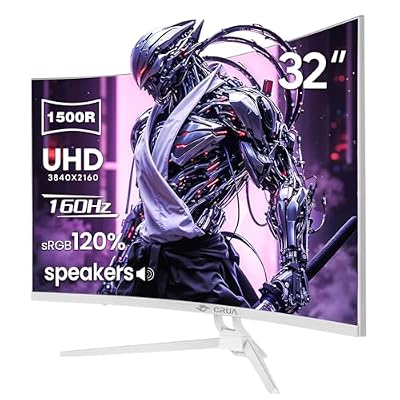 CRUACRUA 32" 4K UHD 160Hz Curved Gaming Monitor, 1500R, AMD…$260 \xc2\xb7 98/100
 CRUACRUA 32" 4K UHD 160Hz Curved Gaming Monitor, 1500R, AMD…$260 \xc2\xb7 97/100








