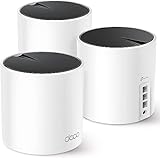
- Top Pick: NETGEAR Nighthawk Modem Router Combo (CAX30) DOCSIS 3.1 Cable Modem and WiFi 6 Router – AX2700 2.7 Gbps – Compatible with Xfinity, Spectrum, Cox, and More – Gigabit Wireless Internet
- Best Value: NETGEAR Nighthawk Cable Modem and WiFi 5 Router Combo (C7000) – Compatible with Major Cable Providers incl. Xfinity & Cox – Cable Plans up to 800Mbps – AC1900 (Up to 1.9Gbps) – DOCSIS 3.0 (Renewed)
- Premium Choice: Motorola MG7550 Modem Wi-Fi Router Combo with Power Boost , Approved by Comcast Xfinity, Cox, Charter Spectrum-AC1900 Wi-Fi Speed(16×4 DOCSIS 3.0)-Renewed
When setting up home internet, one of the first decisions you face is whether to buy a separate router and modem or a single modem-router combo unit. Both approaches get you online, but they differ in flexibility, cost, performance, and how easy they are to upgrade. For gamers and streamers in particular, understanding the trade-offs can mean the difference between a laggy connection and a rock-solid one.
This comparison breaks down the standalone router (paired with a separate modem) versus the all-in-one modem-router combo. We will cover the strengths and weaknesses of each, then help you decide which suits your household, your provider, and your priorities. The combo units featured here, like the NETGEAR Nighthawk and Motorola models, illustrate what modern all-in-one devices can do.
As an Amazon Associate we earn from qualifying purchases at no extra cost to you.



![ARRIS (SBG10-RB) - Modem Router Combo - DOCSIS 3.0 16 x 4 Gigabit & AC1600 WiFi, [Check with your provider for compatibility]400 Mbps Max Internet Speeds - Renewed](https://m.media-amazon.com/images/I/316QDCw6lkL._SL160_.jpg)




🛒 Best Price Today on Amazon
Prime members get fast, free shipping on everything above, plus member-only deals. New members get a 30-day free trial — cancel anytime.
Watch: Router Vs Modem Router: Full Comparison — Video Review
Quick Verdict
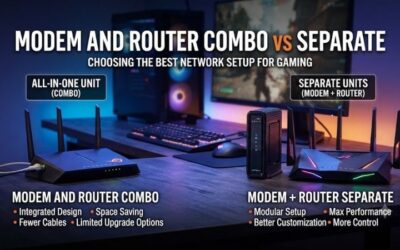
A separate router and modem offers the best performance, flexibility, and upgrade path, making it ideal for gamers, large homes, and enthusiasts. A modem-router combo like the NETGEAR Nighthawk CAX30 wins on simplicity, space savings, and cost, making it the better choice for smaller homes and anyone who values a clean, hassle-free setup.
Standalone Router (with Separate Modem)
Buying a dedicated router and a separate modem gives you maximum control. You can choose a high-end router with advanced features like Wi-Fi 6E or 7, QoS for prioritizing game traffic, and mesh support, while pairing it with whatever modem best matches your internet plan. When Wi-Fi standards advance, you upgrade only the router and keep the modem, saving money over time.
This approach also tends to deliver better performance and range, since dedicated routers pack stronger antennas and processors than combo units. The downsides are higher upfront cost, two devices to place and power, and a slightly more involved setup. For gamers chasing low latency and households with many devices, though, the extra effort usually pays off.
Modem-Router Combo
A modem-router combo bundles both functions into one box, dramatically simplifying setup and reducing clutter. Units like the NETGEAR Nighthawk CAX30, a DOCSIS 3.1 cable modem with Wi-Fi 6, or the Motorola MG7550 with Power Boost deliver capable speeds and broad provider compatibility with Xfinity, Cox, Spectrum, and more, all from a single device.
Combos save space, cost less than buying two separate devices, and mean only one unit to power and manage. The trade-off is less flexibility: when you want to upgrade your Wi-Fi, you must replace the whole unit, including the modem. Options like the NETGEAR C7000 (Wi-Fi 5) and ARRIS SBG10 show the range available, from budget to feature-rich.
Head-to-Head: Which Should You Buy?
- For competitive gamers: A separate router wins, offering advanced QoS, lower latency features, and the strongest performance for a stable connection.
- For small apartments: A modem-router combo like the Nighthawk CAX30 is ideal, saving space and simplifying your setup with one tidy box.
- For future-proofing: Separate devices let you upgrade the router alone as Wi-Fi standards evolve, protecting your investment over time.
- For budget and simplicity: A combo unit costs less upfront and is easier to install, perfect for those who want plug-and-play internet.
- For large homes: A dedicated router, especially one supporting mesh, provides better coverage than most all-in-one combos.
Frequently Asked Questions
Is a modem-router combo slower than separate devices?
Not necessarily for typical plans, but high-end separate routers usually offer better range, features, and performance for demanding households and gamers.
Can I use my own modem-router with any provider?
You must check compatibility. Combos like the Nighthawk CAX30 list supported providers such as Xfinity, Spectrum, and Cox. Always verify before buying.
Which is better for gaming?
A separate router generally wins thanks to advanced QoS and stronger hardware, though a quality combo like the Wi-Fi 6 Nighthawk can serve casual gamers well.
Do combos save money?
Yes, upfront. A single combo costs less than two devices and one unit to power, though separate gear can save money long-term via router-only upgrades.
Final Verdict
Choose a separate router and modem if you want top performance, flexibility, and an easy upgrade path, especially for gaming or a busy, device-heavy home. Choose a modem-router combo like the NETGEAR Nighthawk CAX30 if you prize simplicity, space savings, and lower cost. Both get you online reliably, so weigh flexibility against convenience and pick the setup that fits your home.