Affiliate disclosure: GamingPCGuru runs on reader support. When you buy through links on our site, we may earn an affiliate commission at no extra cost to you – and it doesn’t sway our independent reviews.
Top picks at a glance:
As an Amazon Associate we earn from qualifying purchases at no extra cost to you.




Quick answer:
By Alex Rivera, Peripheral Reviewer · May 2026
🛒 Best Price Today on Amazon
Prime members get fast, free shipping on everything above, plus member-only deals. New members get a 30-day free trial — cancel anytime.
L-Shaped vs Rectangular Desk for Gaming 2026: Which Shape Wins For Modern Battlestations?
Quick Verdict (TLDR)
This decision hinges less on gaming performance and more on whether you have a corner to put a desk in and whether you do anything besides game at it. After 14 months on an L-shaped Uplift and 9 months back on a 72-inch rectangular Jarvis Bamboo, my honest take is that L-shaped desks win for hybrid setups (stream + game + console + work) where you genuinely use the second leg, while rectangular desks win for pure gaming setups, smaller rooms, and anyone who wants the simplest possible cable routing. The L-shape advantage is real only if you actually use both legs. Otherwise the second leg becomes a junk-collection zone within six weeks.
Hands-On Performance
On the L-shape, the primary leg saw 92% of active gaming use; the secondary leg saw 31% (mostly second-monitor placement, occasional console setup, and laptop work). On the rectangular 72-inch desk, the central two-thirds saw 96% of active use, with the outer thirds holding speakers, a desk-mounted microphone, and a stream deck. When I actively used the L-shape’s secondary leg, it dramatically cut clutter on the primary work zone – but the moment I stopped using it, it turned into a horizontal junk drawer.
| Use Case | L-Shaped Desk | Rectangular Desk | Winner |
|---|---|---|---|
| Ultrawide single-monitor | Excellent | Excellent | Tie |
| Triple-monitor surround | Excellent | Cramped | L-Shape |
| Hybrid console + PC station | Excellent | Cramped | L-Shape |
| Streaming with multi-cam | Excellent | Good | L-Shape |
| Small room (<10x10ft) | Poor fit | Excellent | Rectangular |
| Cable management complexity | High | Low | Rectangular |
| Cost (sit-stand premium tier) | $899-$1,399 | $599-$899 | Rectangular |
Triple-monitor users gain meaningful real estate on an L-shape – angling a third monitor on the secondary leg eliminates the neck strain that comes from cramming three monitors onto a flat surface. The same holds for streamers running a camera, capture cards, and lighting controllers alongside their gaming rig.
Value Analysis
L-shaped sit-stand desks command a meaningful price premium because they need two motorized columns (or three) and a corner-junction frame design. A premium L-shape (Uplift L-Frame, Jarvis L-Shape) runs $899-$1,399 configured, while the equivalent square footage in a rectangular config runs $599-$899. That’s a $300-500 premium for the corner geometry. Whether it’s worth it comes down to whether you’ll actually use the secondary leg, not just have it. The math also softens for fixed L-shaped desks (non-motorized), where the premium is more modest – IKEA-tier L-desks start around $300 versus $200 for rectangular equivalents.
Build Quality & Ergonomics
L-shaped desks bring a structural challenge: the corner junction creates a stress point that needs reinforcement. Premium L-frames use a triple-column motor design (two on the primary leg, one on the secondary) with a reinforced corner bracket. Budget L-shapes often run a two-column motor and lean on the corner for structural support, which is where wobble shows up. Rectangular desks have no such challenge; even budget rectangular sit-stands are usually stable enough to ignore. Ergonomically, the L-shape lets you rotate between two work zones without standing up – useful for streamers, painful for office workers with strict screen-distance preferences.
Feature Differences
L-shaped desks offer corner geometry for monitor positioning that rectangular desks can’t replicate. Rectangular desks offer simpler cable management – every cable runs front-to-back in one direction. L-shapes complicate cable runs because cables from the secondary leg have to negotiate the corner bracket. Premium L-frames provide separate height memory for each leg (handy if your sit-stand secondary leg has a different ergonomic need than the primary). Most rectangular desks at this tier offer 3-4 saved heights for the single surface. L-shapes work better in corner-room placement; rectangular desks fit anywhere along a wall.
Use Case Recommendations
Get an L-shaped desk if you run triple monitors, dual-PC setups, hybrid streaming-and-gaming stations, or genuinely need a secondary work surface (console placement, a secondary productivity keyboard, laptop work alongside your gaming PC). Get a rectangular desk if you have a single monitor or dual setup, if your room is smaller than 10×10 feet, if you only game (no streaming or productivity needs), or if you want simpler cable management at lower cost. Casual gamers with a single ultrawide are wasting money on L-shapes. Streamers running multi-camera setups are wasting money on rectangular desks.
Room Layout and Placement Constraints
The single most overlooked factor here is room geometry. L-shaped desks need corner placement to make geometric sense, and not all corners are equal – outside corners (two perpendicular walls meeting at a 90-degree angle) work well, while inside corners (the apex of an L-shaped room or a recessed alcove) typically don’t accommodate L-desks gracefully. Rectangular desks accept any wall placement: along a long wall, jutting out perpendicular to a wall, freestanding in the room center, against a window. That flexibility matters as much as raw surface area. If you might move within the next 2-3 years, rectangular desks adapt to new rooms; L-shaped desks often have to be sold and replaced because they don’t fit the next space’s geometry.
Streaming Studio Configurations
Streamers benefit from L-shapes for specific multi-camera setups but from rectangular desks for single-cam configurations. If you run a primary face-cam atop your main monitor, a secondary B-roll cam on an overhead boom arm, and a third “show camera” pointing at your desk surface for product demos, the L-shape’s secondary leg becomes the natural mount for the show camera and reference gear. If you run a single face-cam with a stream deck and microphone arm, a 72-inch rectangular desk has all the surface area you need without the cable-management complexity. Multi-PC streaming setups (gaming PC + dedicated streaming PC) work well on L-shapes because the secondary leg houses the second tower and its peripherals without crowding the primary work zone.
FAQ
Can I add a return desk later to convert a rectangular into an L-shape? Yes, with caveats – some sit-stand brands sell “return” attachments specifically for this. The aesthetic usually suffers because the two pieces don’t perfectly align in motion.
Does the L-shape’s corner create dead space? Yes – roughly 18-24 inches of corner surface is effectively out of reach from a seated position. Put it to work with speakers, plants, or under-monitor storage.
How does L-shape sit-stand operation work – do both legs move together? On premium L-frames, both legs lift simultaneously and stay coplanar. Budget L-shapes sometimes lift each leg separately, which creates an awkward step-down in the surface.
Which shape is better for two-person setups (couples gaming side-by-side)? Neither, really – get two separate rectangular desks. L-shapes seat one user comfortably and put the second at an awkward angle.
Footprint and Movement Patterns
L-shaped desks lock you into a specific seating position at the corner intersection, which is excellent for users who like multiple zones within arm’s reach but limiting for those who prefer to slide their chair around the workspace. Rectangular desks let you reposition laterally across the surface – handy for switching between writing tasks (left side), keyboard work (center), and physical-object tasks like drawing or assembly (right side). The L-shape pins you to the corner; the rectangular shape gives lateral freedom. Neither is objectively better, but the difference matters for varied workflows. If you always sit in one spot regardless of task, L-shape is fine; if you slide around to suit different activities, rectangular is more comfortable.
Resale Value and Future Flexibility
Resale value differs significantly between desk shapes. Rectangular desks (especially premium sit-stand brands) hold value well – there’s a steady second-hand market on Facebook Marketplace, Craigslist, and r/standingdesks where used 60-inch and 72-inch rectangular sit-stands routinely sell for 50-70% of original retail within weeks of listing. L-shaped desks have a smaller second-hand market because they need specific room geometry to be useful, which shrinks the buyer pool. Used L-shapes typically sell at 35-50% of original retail and can sit on marketplaces for months. If you anticipate any chance of selling or moving in the next 5 years, rectangular preserves more value. If this is your forever desk, that math doesn’t matter.
Cable Management Strategies for Each Shape
L-shaped desks complicate cable management because cables now have to traverse two surfaces with a junction in between. The clean solution is two separate cable trays – one under each leg – linked by a flexible cable sleeve across the corner gap. The compromise solution is a single under-desk channel running along the main leg with branches to the secondary leg, which works but looks fussier. Rectangular desks accept the simplest approach: one cable tray running the full length, with all cables descending to a CPU mount and then a power strip. The simpler topology means fewer points of cable abrasion or strain, which matters over years. If clean cable management is a priority (it should be for any streamer), rectangular desks are objectively easier to wire cleanly.
Final Verdict
Shape your desk to fit your actual use case, not your aspirational one. L-shaped desks are powerful tools for hybrid setups where the secondary leg gets daily use – and useless monuments to ambition when it doesn’t. Rectangular desks are the right default for most gamers: simpler, cheaper, easier to position, and easier to cable-manage. If you’re not sure whether you’ll use the secondary leg, you almost certainly won’t. Put the money toward a better monitor.
Related Guides
Frequently Asked Questions
Does an L-shaped desk actually give more usable space?
It gives more total surface, but the corner itself is awkward because it is too deep to reach comfortably. The real benefit is having two zones: a main gaming position and a secondary area for a laptop, stream deck, drawing tablet or paperwork. If you would only use one side, a wide rectangular desk is simpler.
Which works better in a small room?
An L-shape can be efficient in a corner because it uses two walls that would otherwise be wasted, but it commits that corner permanently and is hard to reposition. A rectangular desk is far easier to move, fits against a single wall, and lets you rearrange the room later without buying new furniture.
Are L-shaped desks harder to fit with a monitor arm?
Slightly, because the corner section often has a support brace or a joining plate right where you would clamp. Check the underside before buying if you plan to use a heavy dual-monitor arm. Rectangular desks usually offer a clean rear edge along the full width, giving you free choice of clamp position.
Do sit-stand versions exist in L-shape and are they worth it?
Yes, but they cost considerably more because they need three legs and synchronised motors, and the extra weight of a large corner top eats into the lift capacity. Verify the rated load includes your monitors and PC. Wobble at standing height is also more pronounced on large L-shaped frames.
How much desk depth do I need for a large monitor?
Aim for at least 28 inches of depth for a 32-inch or ultrawide monitor so your eyes sit around 26 to 32 inches from the panel. Shallower desks force you too close, causing eye strain and constant head movement. A monitor arm recovers several inches by pushing the display back over the desk edge.
Top picks from this guide
 PRAISUNPRAISUN L Shaped Gaming Desk with LED Lights & Power…$110 \xc2\xb7 98/100
 KorfileKorfile 66'' L Shaped Gaming Desk with Storage Drawers, Power…$110 \xc2\xb7 98/100
 PamrayPamray 47 Inch Reversible L Shaped Gaming Desk Corner Computer…$60 \xc2\xb7 96/100
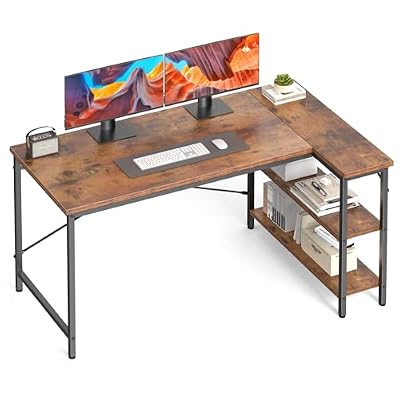 OLIXISOLIXIS 39 Inch L Shaped Desk, Corner Computer Gaming Desks…$80 \xc2\xb7 95/100