- Top Pick: CORSAIR Vengeance RGB DDR5 RAM 32GB (2x16GB) Up to 6000MHz CL36-44-44-96 1.35V Intel XMP 3.0 Desktop Computer Memory – White (CMH32GX5M2E6000C36W)
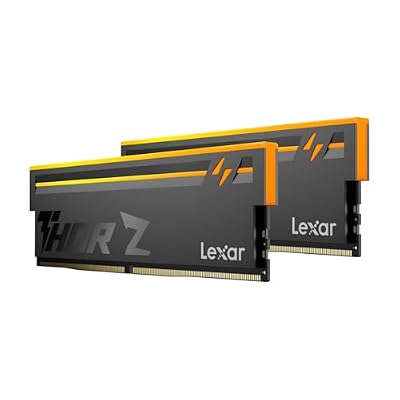
- Best Value: Lexar Thor Z RGB DDR5 RAM 32GB Kit (2x16GB) 6000MHz CL38 DRAM 288-Pin UDIMM
- Premium Choice: Crucial 32GB DDR5 RAM Kit (2x16GB), 5600MHz (or 5200MHz or 4800MHz) Laptop Memory 262-Pin SODIMM, Compatible with Intel Core and AMD Ryzen 7000, Black – CT2K16G56C46S5
For most of the last decade, choosing memory for a gaming build was simple: buy DDR4, buy 16GB, move on. That era is over. In 2026, DDR5 is the default across AMD’s AM5 platform and Intel’s LGA1851 socket, while DDR4 survives only on older motherboards, budget rebuilds, and the used market. The question is no longer “which is faster” — DDR5 wins that on paper — but whether the platform you’re buying into justifies the cost of the whole upgrade chain.
That distinction matters more than ever because memory is no longer the cheap afterthought it used to be. DRAM pricing has been volatile, DDR4 production has been winding down, and the old assumption that last-gen memory is automatically the bargain option no longer reliably holds. Below, we break down where each standard actually earns its place in a gaming rig, and which kits are worth your money if you’re building or upgrading this year.
As an Amazon Associate we earn from qualifying purchases at no extra cost to you.




⚡ Save on Your Next PC — Amazon Prime
Prime members get fast free shipping on the systems above, plus early access to Prime Day & Black Friday PC deals. New members get a 30-day free trial.
Watch: DDR5 vs DDR4 RAM: Does It Matter in 2026? — Video Review
Quick Verdict
DDR5 is the right choice for anyone building a new gaming PC in 2026 — it’s the only option on current AMD and Intel sockets, and kits like the CORSAIR Vengeance DDR5 32GB 6000MHz or the TEAMGROUP T-Force Vulcan DDR5 6000MHz CL38 deliver excellent performance without exotic pricing. DDR4 remains sensible only if you already own a compatible motherboard and CPU and simply want more capacity or a modest speed bump without replacing your entire platform.
Key Differences
- Bandwidth: DDR5 starts around 4800 MT/s and commonly runs 6000–6400 MT/s, roughly double the throughput of a typical 3200 MT/s DDR4 kit.
- Latency: DDR4 still wins on raw CAS latency (CL16 vs CL30–CL38), but DDR5’s higher clocks mean real-world nanosecond latency is now comparable or better.
- Channel architecture: Each DDR5 module contains two independent 32-bit sub-channels, improving efficiency under the scattered access patterns games generate.
- Power and regulation: DDR5 runs at 1.1V standard (1.35V for XMP kits) and moves voltage regulation onto the module itself, giving cleaner, more stable delivery.
- Capacity headroom: DDR5 scales to far larger single-module densities, making 64GB and 96GB configurations practical on two-slot boards.
- Platform lock-in: The standards are physically and electrically incompatible — 288-pin DDR5 DIMMs will not fit DDR4 slots, and no motherboard supports both.
DDR5 RAM
DDR5 has matured past its rocky launch. Early kits were expensive and barely faster than good DDR4; today’s 6000 MT/s CL30–CL38 modules are the sweet spot, particularly on AMD’s Ryzen 7000, 8000, and 9000 series where 6000 MT/s keeps the memory controller running in its optimal 1:1 mode. The CORSAIR Vengeance RGB DDR5 32GB (2x16GB) 6000MHz CL36 kit is a reliable pick with Intel XMP 3.0 profiles and clean white heatsinks, while the Lexar Thor Z RGB DDR5 6000MHz CL38 covers the same ground for builders who want lighting without a premium badge.
Where DDR5 pays off most is in CPU-limited scenarios: 1080p and 1440p high-refresh gaming, simulation titles, open-world games with heavy streaming, and anything running alongside a stream encoder or browser stack. Gains over DDR4 typically land in the 5–15% range for average framerates, but the improvement in 1% lows is often larger and more noticeable in play. For laptops and small-form-factor builds, the Crucial 32GB DDR5 SODIMM kit covers 262-pin systems on Intel Core and Ryzen 7000 mobile platforms.
DDR4 RAM
DDR4 is not obsolete — it’s simply finished evolving. A well-tuned 3600 MT/s CL16 kit on an AM4 board with a Ryzen 5000 CPU, or a 3200 MT/s kit on Intel’s 10th through 12th generation, still drives a modern GPU perfectly well at 1440p and above, where the graphics card is the bottleneck anyway. If you own that hardware, moving from 16GB to 32GB of DDR4 delivers a bigger practical benefit than any switch to DDR5 would, at a fraction of the total cost.
The problem is the upgrade path. Adopting DDR5 means a new motherboard and CPU as well, so the memory is rarely the expensive part of the decision. Conversely, sinking money into DDR4 today buys into a dead-end platform with shrinking retail availability and no future compatibility. Treat DDR4 as a way to extend the life of a machine you already have, not as the foundation of a build you expect to keep upgrading through the rest of the decade.
Which Should You Buy?
- For a new 2026 gaming build: pick DDR5 — the CORSAIR Vengeance DDR5 32GB 6000MHz kit is the safe default on AM5 and Intel alike.
- For maximum Intel headroom: pick the CORSAIR Vengeance DDR5 32GB up to 6400MHz, which leaves room to push beyond the 6000 baseline.
- For a value-focused DDR5 build: pick the TEAMGROUP T-Force Vulcan 6000MHz CL38 or Lexar Thor Z RGB for near-identical performance.
- For a laptop or mini-PC: pick the Crucial 32GB DDR5 SODIMM kit — desktop DIMMs won’t physically fit.
- For an existing AM4 or LGA1200 system: stay on DDR4 and spend the savings on your GPU instead.
Frequently Asked Questions
Can I put DDR5 in a DDR4 motherboard?
No. The modules use different pin layouts, notch positions, and voltage regulation, and no consumer motherboard accepts both. Moving to DDR5 always requires a compatible board and CPU.
Is 32GB enough for gaming in 2026?
Yes, 32GB remains the practical sweet spot. A handful of titles benefit from more, but 64GB is mainly worthwhile for heavy multitasking, large mod loads, video work, or running local AI models.
Does DDR5 speed actually matter for framerates?
It does, within limits. Moving from 4800 to 6000 MT/s produces a measurable gain; going beyond 6400 offers diminishing returns and can force AMD systems out of their optimal 1:1 memory controller ratio.
Should I enable XMP or EXPO?
Absolutely. Without it, kits default to a slow JEDEC baseline. Enable the XMP 3.0 or EXPO profile in BIOS to get the advertised speed and timings you paid for.
Final Verdict
If you’re buying a new platform, DDR5 is the only sensible answer — it’s faster, scales further, and is the standard every future CPU will use. A 32GB 6000MHz CL36–CL38 kit hits the ideal balance of price and performance, and any of the CORSAIR Vengeance, Lexar Thor Z, or TEAMGROUP T-Force Vulcan options will serve a high-refresh gaming rig well. Stick with DDR4 only if you already own the hardware and want the cheapest meaningful upgrade available.