🛒 Best Price Today on Amazon
Prime members get fast, free shipping on everything above, plus member-only deals. New members get a 30-day free trial — cancel anytime.
- The S340 Elite’s Cooling Limits, Stated Plainly
- Quick Comparison
- 1. Thermalright Assassin X120 Refined SE — The Air Cooler With Room to Spare
- 2. CORSAIR iCUE Link Titan 240 RX RGB — The Front-Radiator Option With a System Hub
- 3. ARCTIC Liquid Freezer III Pro 240 — The Thick-Radiator Front Option With a VRM Fan
- What Was Left Out, and Why
- Frequently Asked Questions
- Conclusion
As an Amazon Associate we earn from qualifying purchases.
Disclosure: This article contains affiliate links. If you buy through these links, we may earn a commission at no additional cost to you.
The NZXT S340 Elite rewards careful measuring and punishes guessing. It is a mid-tower with a tempered glass side panel, a power supply shroud, and an interior laid out before today’s very tall dual-tower air coolers and very long graphics cards became common. A cooler that is excellent in a wider modern case can fail to fit here, because the tower touches the glass, because the radiator has nowhere sensible to go, or because a front radiator eats into the space your graphics card needs. This guide therefore starts with the case, not the coolers. Every pick below was chosen because its listed dimensions fit inside the S340 Elite’s stated limits.
The S340 Elite’s Cooling Limits, Stated Plainly
Three numbers govern every choice in this article, and they all come from the case’s own published specifications and launch material.
First, CPU cooler clearance is 161mm. Any tower taller than that does not fit, full stop. Several flagship dual towers stand 165mm or taller, so a large share of the coolers recommended for gaming PCs in general are ruled out here before performance is even discussed. A pick that clears the limit by a comfortable margin is also safer than one that clears it by a single millimetre.
Second, radiator support is front and rear only. The front accepts radiators up to 280mm, so 240mm and 280mm radiators both have a home there. The rear accepts a radiator up to 120mm. The top has a fan mount, for one 120mm or 140mm fan, but it is not a radiator position, so do not plan a build around a top-mounted radiator. That single fact eliminates every 360mm liquid cooler.
Third, graphics card clearance changes when a front radiator is fitted. Without one, the case lists GPU clearance of 364mm. With a radiator at the front, that figure falls to 334mm, and a thick radiator plus its fans takes further depth out of the main chamber. If your card is unusually long, an air tower may be the simpler answer.
Keep those limits as a filter: air coolers no taller than 161mm, liquid coolers with a 240mm or 280mm front radiator or a 120mm rear radiator. Everything below passes that filter on its listed specifications.
Quick Comparison
| Cooler | Type | Fit evidence | Sockets listed | Fans listed |
|---|---|---|---|---|
| Thermalright Assassin X120 Refined SE | Single-tower air | 148mm tall, under the 161mm limit | Intel LGA 1150, 1151, 1155, 1200, 1700, 1851; AMD AM4, AM5 | One 120mm PWM |
| CORSAIR iCUE Link Titan 240 RX RGB | Liquid AIO | 240mm radiator, inside the 280mm front limit | Intel LGA 1851, 1700; AMD AM5, AM4 | Two RX120 RGB |
| ARCTIC Liquid Freezer III Pro 240 | Liquid AIO | 240mm radiator, inside the 280mm front limit | Intel LGA 1851, 1700; AMD AM5, AM4 | Two 120mm |
1. Thermalright Assassin X120 Refined SE — The Air Cooler With Room to Spare

ASIN: B09LHBFPJ6 — View on Amazon
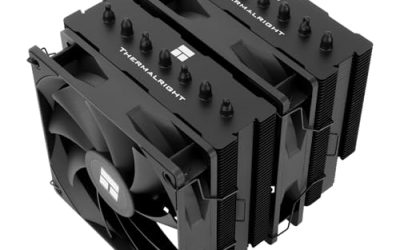
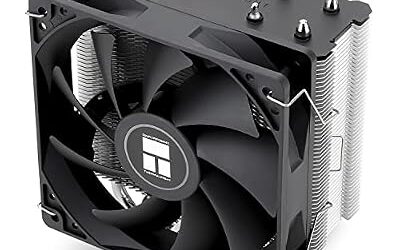
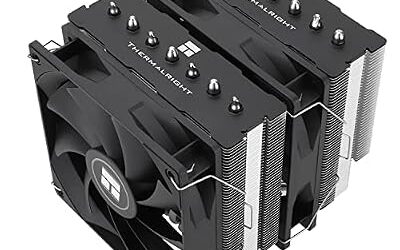
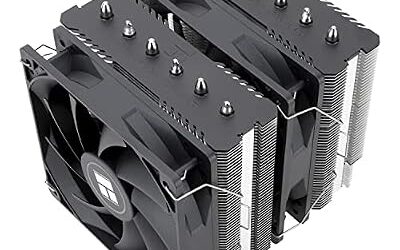
The Assassin X120 Refined SE is the easiest fit in this guide, and for an older case that is a genuine virtue rather than a compromise. Its listed cooler dimensions are 125mm long by 71mm wide by 148mm tall. Against the S340 Elite’s 161mm CPU cooler clearance, that height leaves 13mm of headroom, which is enough space that ordinary mounting variation and the curve of a fan clip are not going to put the top cover against the tempered glass. In a case where many popular towers either fail outright or fit with nothing to spare, a cooler that fits decisively is the one worth recommending first.
The narrow 71mm width matters too. A slim single tower is less likely to crowd the memory slots or the top edge of the board than a wide dual tower. Thermalright lists the heatsink as aluminium, with metal fasteners for both Intel and AMD platforms, and the design uses four 6mm heat pipes with the company’s AGHP technique, intended to counter the change in heat-pipe behaviour that can occur depending on mounting orientation.
The included fan is the TL-C12C, a standard 120mm by 120mm by 25mm PWM fan. Its listed speed is 1550rpm, within a tolerance of ten percent either way, it connects through a 4-pin power port at 12 volts, its listed airflow is 66.17 cubic feet per minute at maximum, and its listed noise level is no more than 25.6 decibels. Those are the manufacturer’s figures as listed on the product page, and they describe a single, modest fan: this is a straightforward tower for mainstream processors, not an attempt to cool the highest-power chips ever sold.
Socket support is where this cooler earns a second look from S340 Elite owners specifically. The listed compatibility covers Intel LGA 1150, 1151, 1155, 1200, 1700 and 1851, along with AMD AM4 and AM5. The S340 Elite dates from an era when LGA 1151 and AM4 boards were the normal contents of a build like this, and many current coolers have quietly dropped the older Intel mounts. This one still lists them, so it can go onto an original-era board, and it also lists mounts for newer platforms if the case is later rebuilt. Check the bracket parts in the box against your socket before you begin, as the product page notes that corresponding mounting plates or fasteners are supplied for different platforms.
Choose this cooler if you want the simplest installation in the case, no radiator placement decisions, no tubing to route past the graphics card, and a tower height that is comfortably inside the limit rather than exactly at it. It is also the natural pick if your graphics card is long, because it leaves the front of the case completely free for intake fans and preserves the full 364mm of listed GPU clearance.
2. CORSAIR iCUE Link Titan 240 RX RGB — The Front-Radiator Option With a System Hub
ASIN: B0D6BF3RXL — View on Amazon
If you would rather move the cooling hardware out of the centre of the case entirely, a 240mm liquid cooler mounted at the front is the S340 Elite’s supported route, and the CORSAIR iCUE Link Titan 240 RX RGB is built around exactly that radiator size. A 240mm radiator sits inside the case’s front support, which runs up to 280mm, so the radiator itself is not at the edge of what the chassis accepts. Mount it at the front, as the case intends, and not at the top, where this case provides a fan position rather than a radiator position.
Corsair describes the cooler’s FlowDrive cooling engine as using a three-phase pump, and lists a precision-engineered cold plate surface with XTM70 thermal paste pre-applied. Pre-applied paste removes one small but real source of installation error, particularly in a case where you may be working through a glass-sided interior with limited room to correct a messy application. The listed warranty period for this cooler family is six years, as stated in the manufacturer’s description on the product page.
The fans are two RX120 RGB fans, using AirGuide technology and magnetic dome bearings according to the listed description, and the package includes an iCUE Link system hub. The iCUE Link approach daisy-chains compatible devices back to the hub, rather than running separate power and lighting cables from every fan to the motherboard. That matters more in the S340 Elite than in a larger case, because cable space behind the motherboard tray is finite, even with the case’s cable management bar and clamps. The listed figures include a maximum rotational speed of 2100rpm and a noise level figure of 36 decibels, with a 12-volt DC supply.
Now the cautions, because this is where S340 Elite builds go wrong. The first is graphics card length. A front radiator moves the case to its with-radiator GPU clearance figure of 334mm, and the radiator and fan thickness sits in front of the card. If your card is close to that limit, favour the air cooler instead. The second caution is socket support: the listed compatibility is Intel LGA 1851 and LGA 1700, and AMD AM5 and AM4, with no older Intel LGA 1151 mount. An S340 Elite still containing an LGA 1151 motherboard is therefore not a match for this cooler, however well the radiator fits. Case fit and socket fit are separate questions, and both have to be answered yes.
Choose this cooler if your platform is one of the listed sockets, your graphics card leaves room behind a front radiator, and you want the fans and lighting handled through the included hub rather than through a collection of separate headers.
3. ARCTIC Liquid Freezer III Pro 240 — The Thick-Radiator Front Option With a VRM Fan
ASIN: B0DLWFBHSL — View on Amazon
The second liquid option is also a 240mm radiator design, so it uses the same supported front position in the S340 Elite, but it makes a different trade. The ARCTIC Liquid Freezer III Pro 240 lists a radiator that is 38mm thick, rather than the slimmer profile used by many all-in-one coolers, and its listed radiator dimensions are 277mm by 119mm by 38mm. The 240mm class keeps it inside the case’s front radiator support, which runs to 280mm, but that extra radiator thickness is exactly the figure to carry into your graphics card calculation. With a front radiator fitted, the case’s listed GPU clearance is 334mm, and a thicker radiator and fan stack reaches further toward the card than a thin one does. Short and mid-length cards will not notice. A very long card might, so measure before you commit to this specific model rather than to liquid cooling in general.
The pump design includes a small fan intended to move air around the motherboard’s voltage regulation area, a thoughtful addition in this case. The S340 Elite’s front intake path is partly covered by its front panel, and the area around the socket does not always receive strong direct airflow once a large graphics card divides the interior. The listed design also uses a PWM-controlled pump.
For Intel installations, the listed package uses a contact frame approach for LGA 1851 and LGA 1700, and the listed AMD support covers AM5 and AM4. As with the Corsair cooler, there is no older Intel mount in the listed support, so an original-era LGA 1151 board should be paired with the air cooler in this guide. The cooler is finished in black, which matches the most common S340 Elite colourways.
Installation order is worth planning. Fit the radiator and fans at the front before the graphics card goes in, route the tubing with a gentle path toward the socket, and confirm the tubing does not press against the card or the side panel once the glass is refitted. Because there is no top radiator position to fall back on, the measurement check decides whether this cooler is right for your specific build.
Choose this cooler if your socket is listed, your graphics card is not at the long extreme, and you value the thicker radiator and the extra airflow around the board’s power delivery area over the slimmest possible front stack.
What Was Left Out, and Why
The exclusions explain the shortlist as much as the inclusions do. Tall flagship air towers were left out because their listed heights exceed the case’s 161mm clearance, and a cooler that contacts the side panel is not a close fit, it is a failed fit. Liquid coolers with 360mm radiators were left out because the S340 Elite has no supported position for one: the front stops at 280mm, the rear at 120mm, and the top is a fan mount rather than a radiator mount. Coolers whose listed socket support could not be confirmed were not used to fill space, and no cooler was included on the strength of a marketplace listing alone without a verifiable product page behind it. A shorter list of coolers that demonstrably fit is more useful for this case than a longer list that transfers the measuring risk to you.
One further point applies to all three picks. The S340 Elite is an older case, and the boards inside surviving examples vary widely, from period LGA 1151 and early AM4 systems to much newer platforms transplanted into the chassis. Always confirm two independent things before ordering: that the cooler’s physical size fits the case, using the figures in this guide, and that its listed mounting support includes your exact socket. Neither check substitutes for the other.
Frequently Asked Questions
What is the maximum CPU cooler height in the NZXT S340 Elite?
The case’s listed CPU cooler clearance is 161mm. The air cooler in this guide stands 148mm tall on its listed dimensions, which leaves 13mm of headroom under that limit.
Can the S340 Elite take a 360mm radiator?
No supported position takes one. Front radiator support runs up to 280mm and rear support up to 120mm, so the liquid coolers that fit this case are 240mm and 280mm front designs, or 120mm rear designs.
Can a radiator go in the top of the S340 Elite?
The top provides a fan mount for one 120mm or 140mm fan. Plan liquid cooling around the front position instead, and use the top mount for an exhaust fan.
Does a front radiator affect graphics card length?
Yes. The case lists GPU clearance of 364mm without a radiator and 334mm with a front radiator fitted. Thicker radiators take more of that space, so check your card’s length against the radiator and fan stack you intend to fit.
My S340 Elite still has an LGA 1151 motherboard. Which pick lists that socket?
The Thermalright Assassin X120 Refined SE lists Intel LGA 1151 among its supported sockets. The two liquid coolers in this guide list LGA 1700 and LGA 1851 for Intel, plus AM5 and AM4 for AMD, so they do not cover that older Intel platform.
Is air or liquid cooling better for this case?
Neither is automatically better here. Air cooling is simpler, preserves the full graphics card clearance, and the listed tower fits with room to spare. Liquid cooling moves the radiator to the front, which suits the case’s supported layout, but it costs graphics card room and requires a listed socket match. Decide from your card length and your motherboard socket, in that order.
Conclusion
For most S340 Elite builds, start with the Thermalright Assassin X120 Refined SE. It is the only pick here that still lists the older Intel sockets many of these cases still contain, its 148mm height clears the case limit by a comfortable margin, and it leaves the front of the case and the full graphics card clearance untouched. If your board is an AM4, AM5, LGA 1700 or LGA 1851 platform and your graphics card leaves room behind a front radiator, the two 240mm liquid coolers become genuine alternatives: the CORSAIR iCUE Link Titan 240 RX RGB if you want its hub-based fan and lighting connections, and the ARCTIC Liquid Freezer III Pro 240 if you want its thicker radiator and the additional airflow around the board’s power delivery area. Whichever route you take, measure the card, check the socket list, and let the case’s three numbers — 161mm of cooler clearance, front radiators up to 280mm, and 334mm of graphics card room with a radiator fitted — make the decision with you.