🛒 Best Price Today on Amazon
Prime members get fast, free shipping on everything above, plus member-only deals. New members get a 30-day free trial — cancel anytime.
Polling rate is how many times per second a mouse reports its position, and the headline number alone can mislead a buyer. A mouse that lists 8,000 Hz but only reaches it with a dongle sold separately is not the same purchase as one that includes the dongle. A wireless mouse that hits 8,000 Hz for hours and then needs charging behaves differently from a wired mouse that holds 8,000 Hz forever. The real decision is which rate your monitor, CPU and playstyle can use, and which mouse delivers it without a hidden extra.
This guide is for competitive players on fast monitors who want the smoothest cursor updates, for players who own a fast CPU and want to remove input delay, for wired players who want 8,000 Hz without batteries, and for anyone deciding whether high polling is worth it. Every product below was chosen from its Amazon product title and listed specifications, so polling rates, sensors and battery figures come from the listing.
Quick Picks
As an Amazon Associate we earn from qualifying purchases.
| Product | Best for | Key spec from title |
|---|---|---|
| Razer Viper V3 Pro | Wireless 8,000 Hz with the dongle in the box | 55g lightweight, 35K DPI optical sensor, 8K polling |
| Logitech G PRO X Superlight 2 DEX | Ergonomic 8,000 Hz wireless for palm players | 60g, right-handed ergo shape, 44k DPI sensor |
| ENDGAME GEAR OP1 8k v2 | Wired 8,000 Hz with no battery to manage | 30K DPI optical sensor, 8000Hz polling |
| Razer DeathAdder V3 Pro + HyperPolling Dongle | Ergonomic 8,000 Hz with the dongle included | 63g ultra lightweight, Focus Pro 30K optical sensor |
How to Choose
Understand What Polling Rate Actually Changes
Polling rate sets the interval between position reports: 1,000 Hz reports every millisecond, 4,000 Hz every quarter of a millisecond, and 8,000 Hz every eighth of a millisecond. Higher polling gives the game fresher data, which can make the cursor feel smoother and reduce the delay between a hand movement and the screen updating. The effect is most visible on monitors running 240 Hz or higher with a fast CPU, and far less visible on a 60 Hz display. A mouse that reports at 8,000 Hz does not make a slow sensor faster; it only reports what the sensor already sees more often.
Check Whether 8,000 Hz Is Included or Extra
Several mice in this guide reach their highest polling rate only with a special dongle, and the dongle is sometimes in the box and sometimes sold separately. The Viper V3 Pro and the OP1 8k v2 include their high polling hardware, while the standard DeathAdder V3 Pro needs a dongle bought on its own. The bundle version of the DeathAdder V3 Pro in this guide includes the HyperPolling dongle, which is why it appears here rather than the standard version. Always read the listing title and the box contents before ordering, because the polling number on the front of the box may assume an accessory you do not own.
Match Polling Rate to Your Monitor and CPU
An 8,000 Hz mouse asks the CPU to process eight times as many reports as a 1,000 Hz mouse, and a weaker CPU can stutter under that load in CPU-heavy games. Players on 144 Hz monitors often cannot feel the step from 1,000 Hz to 8,000 Hz, while players on 360 Hz monitors with a modern CPU can. If your monitor runs at 240 Hz or below, 1,000 or 2,000 Hz is usually enough, and the money is better spent on shape and weight. High polling is a real advantage only when the rest of the system can keep up with it.
Weigh Battery Life Against Polling Rate
Wireless mice pay for high polling with battery life. A mouse rated for 95 hours at 1,000 Hz may last only a fraction of that at 8,000 Hz, so the headline battery figure rarely describes the battery life you will actually get. Wired mice avoid the trade-off entirely, which is why the OP1 8k v2 earns a place in this guide despite having no wireless mode. Decide whether you would rather charge a wireless mouse every day or live with a cable, and check the listing for battery figures at the polling rate you plan to use.
The 4 Best Options
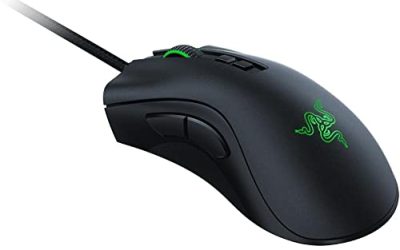
Razer Viper V3 Pro

The Viper V3 Pro is the simplest way to get true 8,000 Hz wireless polling, because the HyperPolling Wireless Dongle comes in the box and the mouse reaches its highest rate without an extra purchase. Its Focus Pro 35K sensor tracks cleanly at any speed, the 55 gram shell moves with almost no resistance, and the symmetrical shape suits claw and fingertip grips. Battery life is the trade-off: the mouse lasts up to 95 hours at 1,000 Hz but far less at 8,000 Hz, so players who run the highest rate should expect to charge it often. For pure wireless speed, nothing else here is as straightforward.
Specs
- Focus Pro 35K Optical Sensor Gen-2
- Up to 35,000 DPI
- Up to 8,000 Hz polling with included HyperPolling Wireless Dongle
- 54 g black, 55 g white
- Up to 95 hours of battery life at 1,000 Hz
- Gen-3 optical switches rated for 90 million clicks
- 8 programmable controls
- HyperSpeed wireless and wired connection
Best for: Competitive players who want 8,000 Hz wireless polling with everything included in the box.
Watch out for: Battery life drops sharply at 8,000 Hz, so plan on charging far more often than the headline 95-hour figure suggests.
Logitech G PRO X Superlight 2 DEX

The Superlight 2 DEX brings 8,000 Hz polling to players who want an ergonomic shell. Its right-handed shape supports the palm and thumb through long sessions, the HERO 2 sensor tracks precisely at low DPI, and LIGHTSPEED wireless keeps the connection stable at the highest report rate. At 60 grams it stays light enough for fast repositioning, and the battery lasts up to 95 hours at the standard rate. Players who found the symmetrical Superlight too flat finally get high polling in a shape that fills the hand, which makes it the best ergonomic option in this guide.
Specs
- HERO 2 sensor with up to 44,000 DPI
- Up to 8 kHz polling
- LIGHTSPEED wireless connection
- 60 g weight
- Right-handed asymmetrical ergonomic shape
- 5 programmable buttons
- Up to 95 hours of battery life
- USB-C charging
Best for: Palm and claw players who want 8,000 Hz wireless polling in an ergonomic right-handed shell.
Watch out for: The right-handed shape rules it out for left-handed players, and reaching the highest polling rate needs the software to enable it.
ENDGAME GEAR OP1 8k v2

The OP1 8k v2 is the wired answer to high polling, and it removes the battery question entirely. Its 30K DPI optical sensor and 8,000 Hz polling run at full speed for as long as the mouse is plugged in, with no charging breaks and no wireless interference to worry about. The compact claw-grip shape weighs very little and the hot-swappable switches let players change the click feel without soldering. It is the pick for players who sit at one desk, play on a high refresh rate monitor, and want the lowest possible input delay without thinking about battery life at all.
Specs
- 30K DPI optical sensor
- 8,000 Hz polling
- Wired esports gaming mouse with cable
- Hot-swappable switches
- Claw-grip design
Best for: Wired players who want 8,000 Hz polling with no battery trade-offs and no wireless setup.
Watch out for: It is wired only, so players who want a cable-free desk or who move between computers should choose a wireless pick instead.
Razer DeathAdder V3 Pro + HyperPolling Wireless Dongle

This bundle version of the DeathAdder V3 Pro solves the one weakness of the standard model: the HyperPolling Wireless Dongle is included, so the mouse reaches 8,000 Hz wireless polling without a separate purchase. The ergonomic right-handed shell supports the palm through long sessions, the Focus Pro 30K sensor tracks smoothly on cloth and glass, and the 63 gram weight keeps the mouse light for an ergonomic design. It is the right choice for palm-grip players who want high polling and a full shell, rather than the low symmetrical shape of the ultralight picks.
Specs
- Focus Pro 30K optical sensor
- 63 g ultra lightweight design
- HyperPolling Wireless Dongle included
- Up to 8,000 Hz wireless polling
- Gen-3 optical switches
- 5 programmable buttons
- Up to 90 hours of battery life
- HyperSpeed wireless connection
Best for: Palm-grip players who want ergonomic comfort and true 8,000 Hz wireless polling in one box.
Watch out for: The dongle needs current firmware and software setup before the highest polling rate works, so allow time to update it after unboxing.
Which One Fits Your Situation
You Play on a 240 Hz or Faster Monitor
Choose the Razer Viper V3 Pro or the Logitech G PRO X Superlight 2 DEX. Both deliver 8,000 Hz wireless polling that pairs with a fast monitor to make cursor movement feel smoother, and both include the hardware needed to reach the highest rate. Pick the Viper for a light symmetrical shell or the DEX for ergonomic palm support.
You Want 8,000 Hz Without Charging
Choose the ENDGAME GEAR OP1 8k v2. A wired mouse holds its highest polling rate indefinitely with no battery to manage, which suits players who sit at one desk and play long sessions. The claw-grip shape and hot-swappable switches are bonuses for players who like to tune the click feel.
Your Palm Needs an Ergonomic Shell
Choose the Logitech G PRO X Superlight 2 DEX or the Razer DeathAdder V3 Pro bundle. Both offer a right-handed shape with a thumb rest and palm support, and both reach 8,000 Hz wireless polling. The DEX is lighter and simpler, while the DeathAdder bundle suits players who already know the DeathAdder shape.
You Are Not Sure High Polling Matters for You
Choose the Razer Viper V3 Pro and run it at 1,000 Hz first. It is an excellent mouse at the standard rate, and you can raise the polling rate later if your monitor and CPU benefit from it. Buying a mouse that supports 8,000 Hz keeps the option open without forcing you to use it from day one.
Common Mistakes
- Buying a mouse for its 8,000 Hz headline, then discovering the dongle that enables it is sold separately.
- Running 8,000 Hz on a 60 Hz monitor, where the extra reports cannot show up on screen and only drain the battery.
- Ignoring CPU load, so a weaker processor stutters in CPU-heavy games under the extra report traffic.
- Judging battery life by the headline figure, which usually assumes 1,000 Hz rather than the 8,000 Hz rate in use.
- Choosing a high polling mouse with the wrong shape, when grip fit affects aim far more than the report rate ever will.
Frequently Asked Questions
What is a good polling rate for gaming?
A polling rate of 1,000 Hz is good for most gaming, because it reports the mouse position every millisecond and feels responsive on monitors up to 144 Hz. Players on 240 Hz or faster monitors with a modern CPU may notice smoother movement at 4,000 or 8,000 Hz, but the difference is subtle. Shape, weight and sensor quality matter more than the polling number for most players.
Does 8,000 Hz polling make a real difference?
It can make a real difference on a high refresh rate monitor with a fast CPU, where the cursor updates more smoothly during fast movement. On a 60 or 144 Hz monitor the difference is hard to feel, and the higher rate drains a wireless battery much faster. The benefit is genuine but narrow, which is why the mice in this guide are also strong on sensor, weight and shape.
Is a wired mouse better for high polling?
A wired mouse holds its highest polling rate without battery concerns, so it is the simplest route to 8,000 Hz. A wireless mouse can match it when the dongle is included and the link is stable, but battery life drops sharply at the highest rate. Players who sit at one desk often prefer wired for this reason, while players who value a cable-free desk accept the charging trade-off.
Do I need special software for 8,000 Hz polling?
Most mice need their companion software to enable the highest polling rate and update the dongle firmware, even when the hardware is included in the box. The setting is usually a single toggle, and the mouse keeps it after setup. Check the listing and the manual for the exact steps, because an unconfigured dongle may run at the standard 1,000 Hz rate by default.